
Bind Your Own Domain to Studio
Has the system-assigned URL been opened? If it can be opened, you can change it to your own address, such as studio.example.com. First bind in Studio, then add resolution at the domain service provider, and finally check HTTPS.
Domain resolution (DNS) can be understood as "telling the internet where this URL should go." You need to be able to log in to the platform where you purchased the domain to modify its resolution records.
¶ Fill in the Complete Domain in the Subsite
Enter from the official Studio's My Subsite → Management → Custom Domain.
Input the complete domain, such as studio.example.com, without https://, without a path, and without a trailing slash. After clicking bind, copy the CNAME target provided on the page.
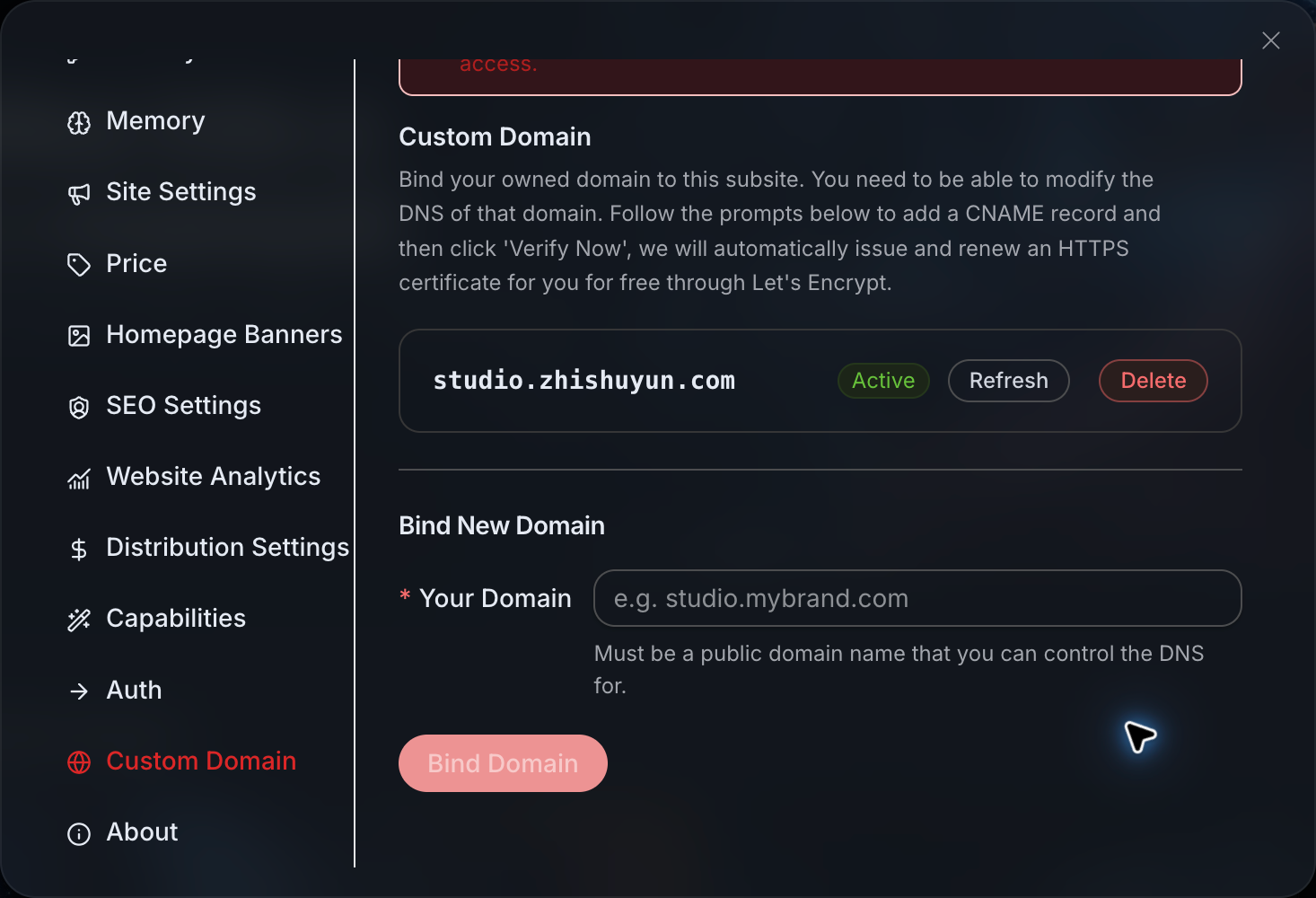
The status shown in the image is for an existing site. Please use the CNAME provided on your current page, do not copy the address in the screenshot.
¶ Go to the Domain Service Provider to Add a Record
Open the DNS control panel where you manage example.com, and find the option to add a resolution record. The interfaces vary by provider, but usually require these items:
| Field | Fill in when binding studio.example.com |
|---|---|
| Record Type | CNAME |
| Host Record | studio |
| Record Value / Target | CNAME copied from the Studio control panel |
| TTL (Cache Time) | Use the provider's default value |
The host record usually only requires the prefix studio; if the provider requires the full name, fill it in according to their prompt. Do not mistakenly fill the CNAME target into the host record.
If the same name already has A, AAAA, or other CNAME records, first confirm whether it is being used by another site. Do not delete records that are in use just to bind a new site; if unsure, choose an unused subdomain.
¶ Return to Check Status, Then Open the URL
After saving the DNS, return to the custom domain page in Studio and use the verification or refresh operation provided on the page.
DNS updates and HTTPS certificate issuance need to be completed separately, and it cannot be guaranteed to take a fixed number of minutes. Once the status is online, enter https://studio.example.com in the browser, confirm there are no certificate warnings, then log in and return.
¶ Before Going Live, Check as a Customer
| Check Action | What It Looks Like When Successful |
|---|---|
| Open the official domain on both computer and mobile | Homepage is accessible, title and icon are correct |
| Open an internal page and refresh | Page remains normal, no 404 appears |
| Log in, log out, and log in again | After completion, return to your official domain |
| Open main tools and customer service | Tool entry is normal, customer service can be accessed |
| View the billing page | Price meets expectations, then decide whether to test payment |
Real generation will incur costs, confirm before trying a small task; do not use long videos or bulk tasks for acceptance.
¶ If Stuck, First Identify Which Layer It Is
- System domain cannot be opened: First check the site itself, do not rush to change DNS.
- Only your own domain cannot be opened: Check the complete domain, resolution conflicts, and whether the public DNS has updated.
- Prompt indicates connection is not secure: First confirm DNS, then check the certificate status; do not let customers ignore browser warnings.
- Page is normal, but sharing preview still shows old branding: The sharing tool may not have executed the webpage script, and this is not the same issue as binding the domain failing.
When contacting support, provide the domain, time, page status, and screenshots, do not send domain account passwords.
¶ Supplement for Technical Colleagues
"Online" does not prove that the hostname necessarily points to the expected proxy; public access, refreshing deep routes, and completing login redirects are still required. The Studio brand mainly loads on the client side, and the original HTML/no JavaScript scraper may still display a unified product shell, and generated results may continue to use public CDN.
After completing this article: Customers can open the site through your HTTPS domain, log in, and find tools.
Only doing Studio? Continue to see Customers and Revenue. Also doing developer business? Continue to Create API Site. Return to Route Table