
Understanding Customer Attribution and Revenue
When a customer registers through your site, when do they count as your customer? Is the markup you set entirely yours? First, let's separate these two matters: The invitation relationship determines customer attribution, while the order and distribution rules determine revenue.

Conceptual illustration, not proof of revenue. Registration or usage does not equate to commission generation.
¶ First, find your site's attribution settings
| Your Product | Entry Point |
|---|---|
| Studio | Official main site “My Subsite” → Management → Distribution Settings |
| API Platform | Site Management → Management → Distribution Settings |
“Default” and “Mandatory” are not the same:
- Default Relationship: Used as the default inviter, but also considers the promotional links or existing invitation information brought by the customer.
- Mandatory Relationship: Will override promotional links, invitation cookies, and default relationships. Only enable this when you clearly need such business rules.
Understand the priority instructions on the page before saving. Do not repeatedly change the attribution of the official site for testing, and do not display customer names, emails, or user IDs in public screenshots.
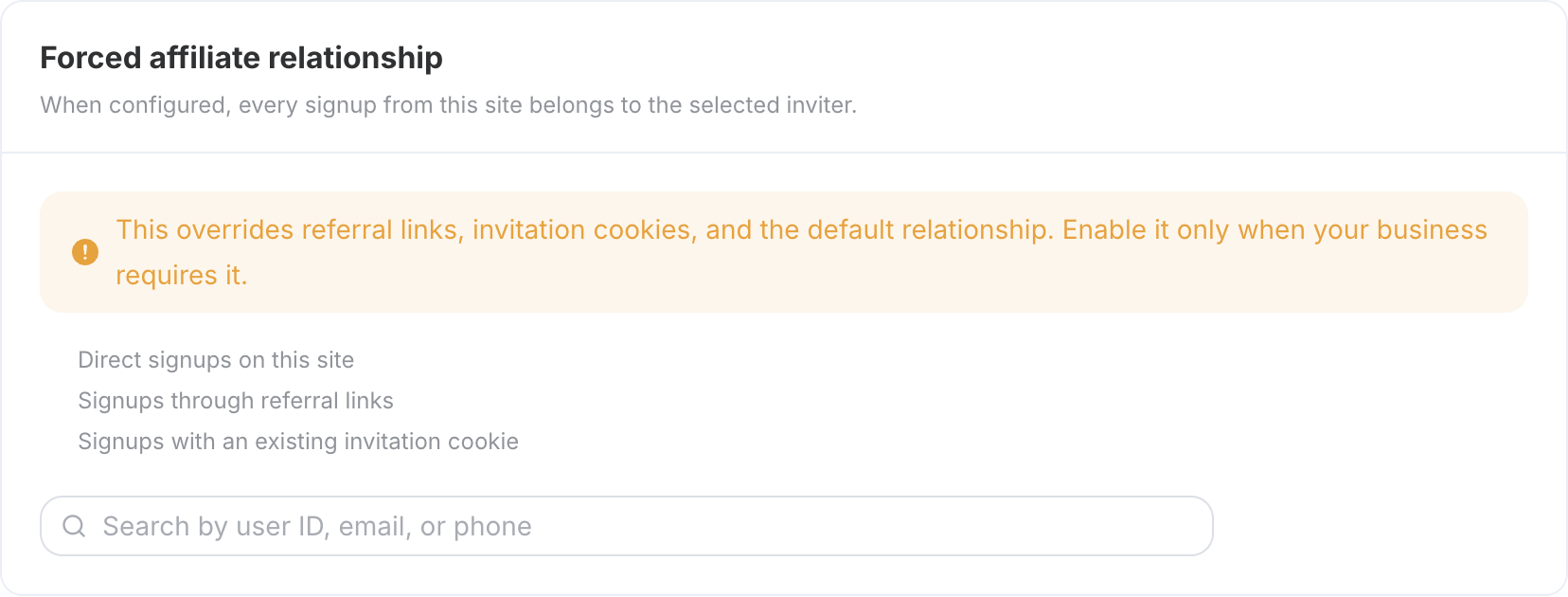
Live shot on September 6, 2026, only showing configuration instructions; account information of existing inviters is not included in the image.
¶ Use a real new account to check attribution
Have a test customer who has never registered before open your official site in a new incognito window and register. After completion, check in the authorized customer/distribution backend to confirm that the attribution meets expectations.
Recording three items is sufficient: Which domain they entered from, when they registered, and who the actual attribution is in the backend.
An existing account logging into your new site will not become a new customer, nor can it be re-bound by clicking the link again. The white label uses a shared identity system, not an independent user database for each site.
¶ Markup affects the selling price, but does not equal your total income
When entering through the white label purchase portal, the channel price is calculated based on the entire site or individual service ratio; individual service settings take precedence.
| Example Situation | What it Calculates |
|---|---|
| Assume platform price 100, whole site markup 10% | Channel price 110 |
| Same service set separately at 5% | Channel price 105, no longer adding whole site 10% |
| Customer actually pays 110 | Does not mean the site owner must receive the 10 difference |
These numbers are just to illustrate the algorithm, not the current quote or revenue promise. The settlement page and order snapshot are the basis for verifying actual prices.
Revenue should consider the effective order amount that meets the rules, the current distribution ratio, and adjustments; if there is a higher-level share, it should also be handled according to the corresponding rules. Refunds, risk control, order status, and settlement time will all affect the final record.
Do not use “selling price minus platform price” directly as site owner revenue, and do not promise fixed income or arrival time.
¶ Verify the payment link, then make a small order
Real purchases require payment; first clarify the testing budget, then let the test customer operate independently. Not every change in copy or logo requires a new payment.
| Records to Check | What to Look For |
|---|---|
| Customer Order | Whether completed, actual payment amount, and channel information |
| Customer Quota and Usage | Whether the quota is correct after purchase; whether small requests have corresponding records |
| Site Owner Distribution Records | Whether attributed to the expected relationship, and whether the amount and status meet the rules |
Usage and commission are two separate records: usage is used to check product delivery, and commission comes from purchases that meet the rules, not from every API call separately returning commission.
¶ If the numbers do not match, check these three areas
Did not find new customers: First confirm whether it is indeed the first registration, then check the entry domain, default/mandatory configuration, promotional links, and invitation information.
Incorrect selling price: Check individual service coverage, whole site ratio, and settlement currency. The displayed currency and the actual settlement currency may not be the same.
Order exists, but no revenue: Verify whether the order is completed, the invitation relationship, refunds, or risk control, then check effective distribution records; do not estimate based on front-end prices.
Channel markup only applies to the corresponding white label purchase process, not a mandatory price that cannot be bypassed at all entry points with a shared account. Hidden recharges will not change historical relationships and shared balances.
After completing this article: You can find new customers, explain the difference between selling price and revenue, and reconcile through order and distribution records.
Next article: Launch Check and Daily Troubleshooting · Return to Route Table