
Promotion Studio: Understand the product, get the link, and share by copying the text
If you want to recommend AI tools to friends, fans, or clients, you can start with Ace Data Cloud Studio. It combines chat, images, music, video, and other AI capabilities on one platform, allowing ordinary users to access it through a web page.
What you need to do is simple: Understand the highlights of Studio, get your own promotion link, choose a paragraph from the text below, replace the link, and send it out. When new users register through your link and generate valid purchase orders that meet the criteria, you can earn a referral commission.
¶ 1. What is the Studio you want to promote?
Studio is a multimodal AI creation platform aimed at ordinary users and content creators. Writing copy, asking questions, generating images, composing songs, and making videos can all be done here without needing to write code.
| Capability | What users can do with it | Representative products to introduce |
|---|---|---|
| AI Chat and Writing | Daily Q&A, writing, translation, organizing information, assisting programming | ChatGPT, Claude, Gemini, DeepSeek, etc. |
| AI Images | Product images, article covers, posters, illustrations, image editing | GPT Image, Nano Banana, Midjourney, etc. |
| AI Music | Composing songs based on descriptions or lyrics, creating music materials | Suno, etc. |
| AI Video | Generating videos from text or images, exploring short films and content creation | Seedance, Veo, Kling, Sora, etc. |
Specific available models and functions are subject to the current page of Studio.
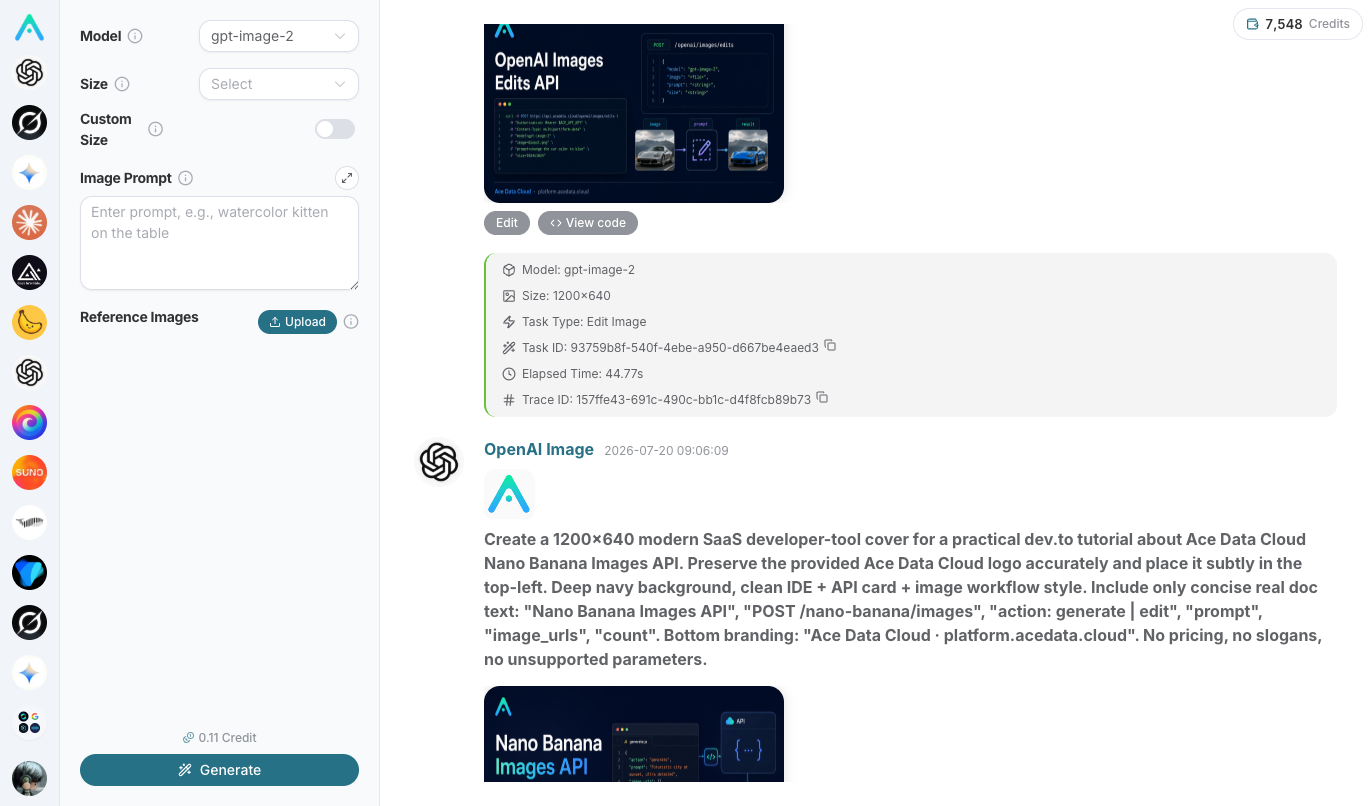
Product interface example: Users can operate directly through the page; the historical models, costs, and account values in the image are based on their current page.
¶ When recommending, focus on these highlights
- One platform, multiple AI capabilities. From writing copy to creating images, music, and videos, tools can be selected based on tasks, reducing the hassle of searching for different products.
- No coding required. Input requirements, select models, and view results through a visual interface, making it suitable for ordinary users to get started directly.
- Same account and balance. Multiple AI services can be used and managed within one account, eliminating the need to register repeatedly for different capabilities.
- Can handle daily work and content creation. Office, learning, self-media, e-commerce, and design users can all find easily understandable use cases.
When introducing to those unfamiliar with AI, you can start by saying, "It can help you write copy and create images"; when introducing to those already using AI, you can add the names of models they are familiar with.
¶ 2. How to get your own promotion link?
¶ Step 1: Log in and open the distribution page
Log in to Studio and open the Studio distribution page.
¶ Step 2: Copy the share link or save the QR code
Find the "Referral Link" area on the page and click the copy button next to the link. If you need to send a poster, social media image, or video screen, you can use the QR code generated here.
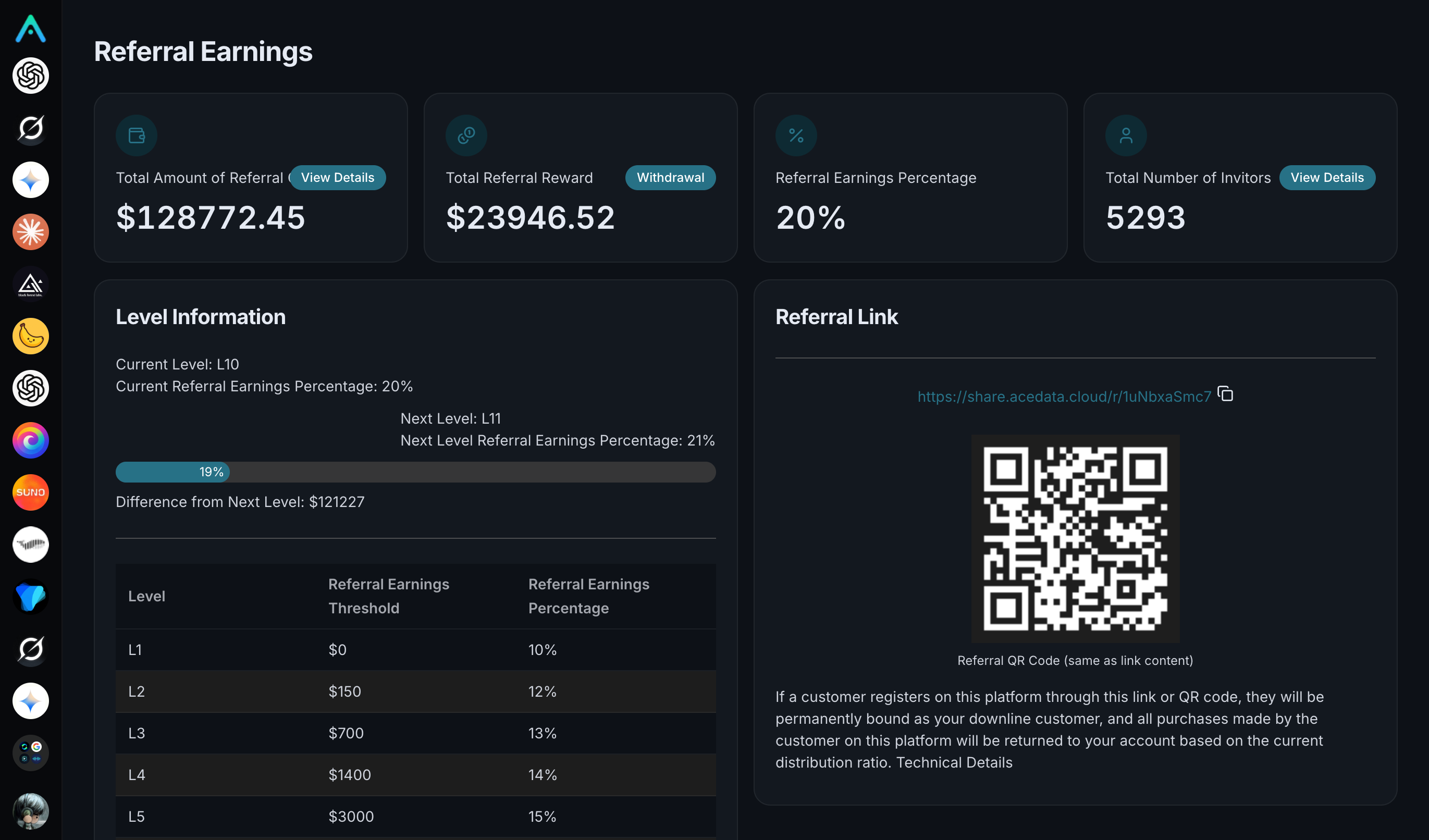
This is a screenshot of a historical account to help you identify the page; please copy the link and QR code from your own account, and the earnings shown do not represent expected income.
The backend may generate a short link; the long link reverts to a format similar to:
https://studio.acedata.cloud/?inviter_id=<your_user_ID>
Just copy the link provided by the backend; there is no need to splice the address or modify the user ID.
¶ Step 3: Open it once to confirm access
Paste the copied link into an incognito window to confirm access to Studio. If using the QR code, scan it with your phone first.
Next, replace "【your Studio promotion link】" in the text below with this link. Do not use the regular homepage address directly, as it may not contain your invitation information.
¶ 3. Not sure how to start? You can directly use these paragraphs
Choose a paragraph that you find smooth, replace the link with your own, and you can send it to friends, post it on social media, or add it to the end of articles and videos. If you have suitable product screenshots or official works, you can also include them to help friends understand what they can do with it at a glance.
¶ First, let me share an AI tool with everyone
Let me share an AI creation platform: Ace Data Cloud Studio.

If you want AI to help write something, create an image, or try writing a song or making a video,
you can find the corresponding tools here.
ChatGPT, Claude, Gemini, and other chat tools are also available,
and you can operate it directly through the web without writing code.

Friends who are interested in AI but don't know where to start can take a look:
【your Studio promotion link】 (invitation link)
¶ When you're stuck writing, you can give it a try
If you're stuck writing copy and want to refine a paragraph,
or if you have information that needs translation or organization, you can try letting AI lend a hand.

Ace Data Cloud Studio has various chat models to choose from,
just clearly state what you want to do, and you can start chatting with it.
Need an image to go with your article? It also has image generation tools.

If you need it, take a look (invitation link): 【your Studio promotion link】
¶ For friends making covers and images, check this out
Want to try out several ideas for article covers or product images?
Let me share Ace Data Cloud Studio with you.

It has image tools like GPT Image, Nano Banana, Midjourney, etc.,
where you can write down the scene you want or upload reference images to try different effects.
No coding required; just select the right tools on the web to get started.

If you want to give it a try, the link is here:
【your Studio promotion link】 (invitation link)
¶ Have lyrics and visuals, want to bring them to life?
If you have a melody in your mind and have written a few lines of lyrics, or if you want to animate an image, you can check out Ace Data Cloud Studio.

If you want to write songs, you can try Suno; if you want to make videos, you can look at Seedance, Veo, or Kling. First, choose the tool that interests you, write down your ideas, and try to create a small work. You need to prepare a script and images, and you can also find tools to help on the same platform.

If you're interested, you can take a look (invitation link): 【Your Studio promotion link】
¶ Just a simple recommendation
If you're looking for AI tools, you can check out Ace Data Cloud Studio. Chatting, writing, creating images, as well as music and video tools, are all gathered together. No need to write code, just pick a feature you can use right now and give it a try.

Here's the link for you (invitation link): 【Your Studio promotion link】
How to choose? If a friend is working on product images, just send the image section; if they like writing songs or making videos, send the creative section. If you're unsure what they need, use the first section. Keep the explanation for the "invitation link" and pay attention to whether the group allows promotional content.
¶ IV. Want to post a long article? You can directly use official materials
In addition to the short copy above, you can also introduce the functions of Studio, organize a list of AI tools, or rewrite official cases into articles suitable for your own readers.
Enter “Customer Acquisition and Growth → Promotion Material Library” on the left side of Revenue Alliance to find “Promotion Short Copy” and “Marketing Long Articles.” If you don't know where to start, you can first look at the platform's image application cases and choose parts that your readers are interested in, such as product images, posters, covers, etc.
Using materials only requires three steps:
- Select content. Choose an article relevant to your audience, taking the product introduction, function description, and images; when targeting general users, delete unnecessary parts like API code.
- Change the guiding link. Replace guiding entries like “Enter Studio,” “Experience Now,” “Register to Use,” etc., with your own Studio promotion link. Reference material links can be retained; do not use others' QR codes from example images as your own entry.
- Organize and publish. Change to a title suitable for your readers, add a brief introduction and closing guidance, and then post it to your public account, Zhihu, blog, or community.
You can start with these titles:
- “A platform that handles chatting, images, music, and videos: What can Studio do?”
- “AI tool recommendations for self-media creators: From copywriting to image creation”
- “No coding required, yet able to use various AI tools: An introduction to Studio”
At the end of the article, you can directly add:
The chatting, image, music, and video tools mentioned in the article can all be found in Ace Data Cloud Studio. If you want to try it yourself, you can register through the entry below and then choose the features that interest you.

Experience entry (invitation link): 【Your Studio promotion link】
Official cases can be introduced as they are, without needing to change them into your personal experiences. When the materials involve models, prices, or activities, check against the current page updates before publishing.
If you want AI to help organize the article, you can copy this request to Studio:
Please write an introduction to Studio aimed at general users based on the official materials I provided. First, introduce what the platform is, then explain the uses of chatting, images, music, and videos. Retain useful images and do not fabricate my usage experiences. Add at the end: Experience entry (invitation link): 【Your Studio promotion link】 Below is the reference material:
Attach the materials afterward, replace the links, and check the final draft. If you need to connect your content account, assist in drafting or publishing, refer to the Connector Content Marketing Guide.
¶ V. After posting, where to see the earnings?
Return to the Studio Distribution Page to check invited users, valid orders, accumulated commissions, and the current ratio.
New users establish an invitation relationship after registering through your link; existing accounts will not be re-bound by clicking the link again. Registration itself does not generate commissions; only completed recharge or purchase orders that meet the criteria will generate distribution records. For detailed ratios and settlement rules, see Promotion Methods and Commission Rules.
You can start now: copy your link → choose the above paragraph of text → replace the link → send it to those who might need Studio.