
Promote API Platform: Understand the product, get the link, and share by copying the text
If your friends, readers, or clients are developing AI applications, you can recommend the Ace Data Cloud API Platform to them. It consolidates various AI APIs, development documentation, and call management into one platform, helping developers integrate AI capabilities into their products and tools.
You are responsible for introducing the platform and sharing your promotional link. When new users register through the link and generate valid purchase orders that meet the criteria, you can earn a referral commission. First, let's introduce the features worth recommending, then provide the method to obtain the link and the text that can be copied directly.
¶ 1. What is the API Platform you want to promote?
The API Platform is an AI API service platform for developers, technical teams, and enterprises. Studio allows users to use AI directly on the page, while the API Platform enables developers to integrate AI capabilities into their apps, websites, business systems, and workflows.
| Capability | What customers can do | Representative services to introduce |
|---|---|---|
| Large model chat | AI assistant, intelligent Q&A, text processing, programming assistance | OpenAI, Claude, Gemini, DeepSeek, etc. |
| Image generation and editing | Product images, cover generation, design tools, batch material processing | GPT Image, Nano Banana, Midjourney, etc. |
| Music and video | Music creation tools, video applications, automated content processes | Suno, Seedance, Veo, Kling, etc. |
| Search and tool integration | Information retrieval, Agent tool calls, integration with existing applications | Search API, MCP, development documentation and examples |
Specific services and models are subject to the current catalog of the platform.
¶ When recommending, focus on these highlights
- One platform to access multiple AI capabilities. Developers can choose services like chat, image, music, and video around the same business on the platform.
- Documentation and debugging entry available. The interface page provides parameter descriptions and call examples, making it easy for customers to understand the integration and try requests.
- Easy integration with existing tools. The platform provides OpenAI-compatible chat interfaces and MCP integration methods, suitable for users with existing AI tools, Agents, or workflows.
- Centralized management of calls and usage. API credentials, quotas, and usage records can be managed on the platform, facilitating usage and verification after project integration.
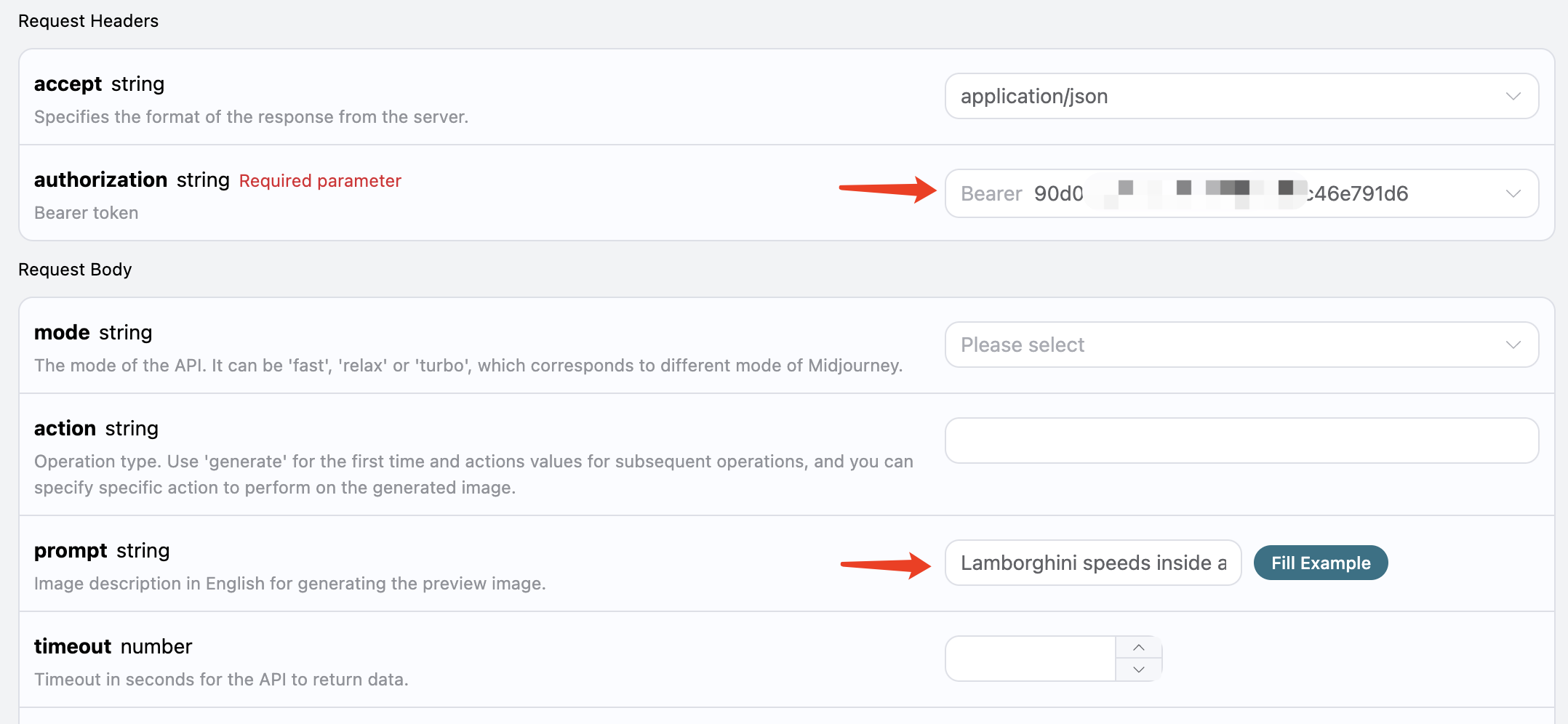
Product interface example: Customers can learn about parameters and try calls on the documentation page, with the specific interface subject to the current platform.
Suitable for recommending to independent developers, technical bloggers, AI application teams, and enterprises looking for AI interfaces for their business. When introducing them, you can first ask, "Do you need chat, image, or video capabilities?" and then share the corresponding text.
¶ 2. How to get your own promotional link?
¶ Step 1: Log in and open the distribution backend
Log in to API Platform and open the distribution backend.
¶ Step 2: Copy the share link or save the QR code
Find the "Referral Link" card, click the copy button next to the link, and you will have your share link. On a computer, this card is located to the right of the level information; on a mobile device, you can find it by scrolling down. The QR code is also in this card and can be saved for use in posters or articles.
The backend may generate a short link; the long link reverts to a format similar to:
https://platform.acedata.cloud/?inviter_id=<your_user_ID>
¶ Step 3: Verify the link and replace the text
Open the copied link in an incognito window to confirm it leads to the API Platform; also scan the QR code yourself first. Then replace “【your API promotional link】” in the text below with this link.
The share link is not an API Key. The share link can be publicly sent to readers, while the API Key is a program call credential and should not be included in promotional text. You only need to share the invitation entry, and the clients who need to integrate will obtain the Key in their accounts.
¶ 3. Not sure how to introduce it? You can directly use these paragraphs
You can send them to friends working on AI projects, post them in developer groups, social circles, or at the end of articles. Choose a paragraph you find smooth, just replace the link with your own; adding a few words of your own introduction is also fine.
¶ Share with friends working on AI applications
Share the platform with friends working on AI applications: Ace Data Cloud API Platform.

If you want to add a chat assistant to your website or add live images, music, and video features to your app,
you can find the corresponding APIs here.
Documentation, call examples, and usage records are all available on the platform,
so check if there are features you need for your project.

Friends in need can take a look (invitation link): 【your API promotional link】
¶ Looking for large model APIs recently?
Friends who are working on chat assistants or configuring interfaces for AI tools,
can check out Ace Data Cloud API Platform.

Here you can find model services like OpenAI, Claude, Gemini, DeepSeek, etc.,
and there are also OpenAI-compatible chat interfaces.
Don’t just listen to the introduction; open the platform to see which models are supported, how to integrate, and the costs,
then choose what fits your project.

Here’s the link for more information (invitation link): 【your API promotional link】
¶ Want to add AI image generation features to your product?
Want to add AI image generation, image editing, or cover generation features to your product?

Check out Ace Data Cloud's image API.
You can find services like GPT Image, Nano Banana, Midjourney, etc.,
which can be useful for product images, content covers, or adding new features to design tools.
Each interface has parameter descriptions and call examples, so you can check the integration methods first.

If needed, you can view it here (invitation link): 【your API promotional link】
¶ Friends making music and video tools, look here
Want to create a small tool that can write songs, or add AI video generation to your product?
Let me share with you Ace Data Cloud's music and video APIs.

For music, you can check out Suno, and for video, you can look at Seedance, Veo, Kling, etc.
You don’t need to research all the models first,
just find the corresponding documentation and examples based on the features you want to create.

Documentation and pricing are here (invitation link): 【your API promotional link】
¶ Want your Agent to learn a few more tricks?
For friends who are tinkering with AI Agents or automated workflows,
you can take a look at Ace Data Cloud.

In addition to chat, there are also services like live images, music, videos, and search,
as well as tools integration like MCP.
If you want the Agent to not only answer questions but also call more tools,
you can check if there are services suitable for your current workflow.

The link is here (invitation link): 【Your API promotion link】
How to choose? If you don't know what the other party is doing, use the first paragraph; if you know they are looking for live images or video interfaces, send the corresponding paragraph. If they ask about parameters and prices, then send the relevant documents. Keep the explanation for the "invitation link" and pay attention to whether the group allows promotional content.
¶ Four, use official articles as material, no need to start from scratch
Enter “Customer Acquisition and Growth → Promotion Material Library” on the left side of Revenue Alliance to find “promotional short copy” and “marketing long articles”.
There are two common methods:
| How you plan to send | What material to use | How to process |
|---|---|---|
| Send group messages, moments, or at the end of articles | Promotional short copy | Select the corresponding service, update necessary information, replace the invitation link |
| Send technical blogs, public accounts, or project introductions | Marketing long articles, official access documents | Select product introductions, feature examples, and images, and modify them into articles suitable for readers |
You can start from these ready-made materials:
- Suno API promotional copy: suitable for music tools and content creation audiences.
- Nano Banana image API introduction and examples: suitable for image applications, e-commerce, and design tool audiences.
- Seedance video API introduction: suitable for video applications and automated content audiences.
¶ How to change the links in the article?
Replace links that guide users to the platform, such as “Register Platform,” “Experience Now,” “Get Services,” with your own API promotion link. API interface addresses, request addresses in the code, and reference document links should remain unchanged, do not replace them with the invitation link.
The article's conclusion can directly use:
If you are also ready to integrate these AI capabilities into your products,
you can visit the Ace Data Cloud API Platform
to view the service catalog, development documents, and current prices.

Registration link (invitation link): 【Your API promotion link】
After registration, obtain the API Key in your own console,
and then complete the integration according to the corresponding interface document.
When the material involves models, prices, and effects, verify against the current page; if citing official examples, indicate that they are official examples. You can also add your own project experience and write it into an original article, but you do not need to complete a project first to start sharing the platform.
If you want AI to help you organize a long article, you can copy:
Please write a product introduction aimed at developers based on the official materials I provided.
Explain what this AI service can do, which projects it is suitable for, and where to view the access documents.
Keep necessary examples and images, do not fabricate my project experience or test data.
Only replace the registration link at the end with:
【Your API promotion link】 (invitation link)
Do not modify the API addresses and reference document links in the code.
Here is the reference material:
Replace the links and add the material, check the final draft before publishing it to your blog, public account, developer community, or include it in related project descriptions. When you need AI assistance in drafting and publishing, refer to the Connector Content Marketing Guide.
¶ Five, after sending out, where to see the earnings?
Return to the Distribution Backend to view invited users, valid orders, accumulated commissions, and current ratios.
New users establish an invitation relationship after registering through your link; existing accounts will not change bindings by clicking the link again. Registration and API calls themselves do not directly generate promotional commissions; only completed recharge or purchase orders that meet the rules will generate distribution records. Detailed ratios and settlement rules can be found in Promotion Methods and Commission Rules.
You can start now: copy your link → choose a paragraph corresponding to customer needs → replace the link → share it out.