
Post on X (Twitter): Content Marketing for Going Global with AI
X (formerly Twitter) is the core battlefield for content marketing aimed at global developers and creators. Discussions, product launches, and technical sharing in the AI circle often happen first on X. If you are promoting an API Platform, managing a white-label site for overseas users, or integrating APIs into your own products, X is a must-occupy space for you.
This article teaches you how to connect to X, allowing AI to post tweets, threads, and images in your name, and then observe the feedback.
¶ What This Connector Can Do (Truthfully)
- Authorization Method: Use the ACE extension to authorize your logged-in X session as prompted on the connection page. The scope of authorization, account limitations, and validity period are subject to the target platform.
- Can Post: Single tweets, tweet threads, replies, quotes, can include images or videos.
- Can Read/Interact: Search tweets and users, read your home timeline or a specific user's tweets, view individual tweet details, like/retweet/follow/delete, view trends.
- This is your real account, and every write operation (like posting tweets) will require your confirmation.
¶ Step-by-Step: Connect → Let AI Post → See Feedback
¶ 1. Connect Your X Account
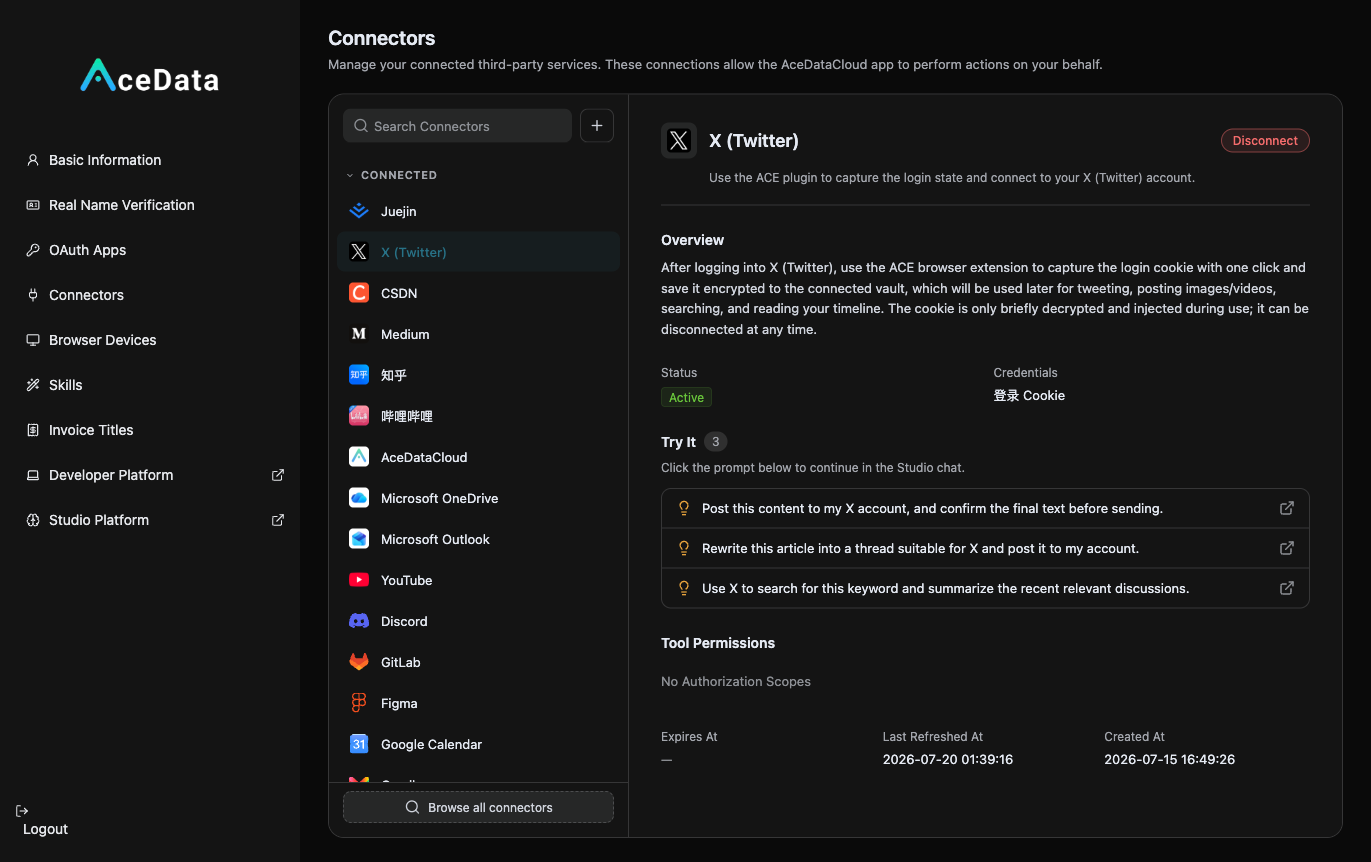
Open https://studio.acedata.cloud/console/connectors, find x, and use the ACE extension to capture a Cookie while logged in at x.com / twitter.com, changing the status to Active.
¶ 2. Let AI Write Threads + Images + Publish
In the Studio, say:
"Write an X thread: 'I built an AI image tool in an afternoon with one API 🧵', the first tweet is a hook, the middle explains how to do it, the last naturally includes my link, with a generated result image, then post to X (confirm with me first)."
For images/demonstration images, let AI generate using gpt-image-2: POST https://api.acedata.cloud/openai/images/generations, body {"model":"gpt-image-2","prompt":"...","size":"1024x1024"}, using the platform API Key for authentication; the connector will include it when posting.
¶ 3. See Feedback, Ride the Trends
Let AI search for related topics, check the interactions on your timeline, and follow up on any tweets that are performing well; keep up with new model releases immediately, bringing your own testing perspective.
¶ Don't Forget to Embed Your Affiliate Link (This is the Source of Income)
Naturally place your exclusive invitation link copied from the distribution backend within the content. For invitation attribution, levels, ratios, confirmation periods, and withdrawal conditions, refer to the Promotion Methods and Commission Rules; only valid orders that meet current rules may generate commissions.
¶ Content Suggestions (What Works on X)
- The first tweet is a hook. X is a platform where "if the first tweet doesn't grab attention, it's gone," so the first sentence should be informative or create a sense of conflict, without buildup.
- Threads should provide substance. Break down something real into "background → how to do it → results → you can try too (link)."
- Images/Demonstrations. Screenshots, GIFs, generated results; visual content has far higher interaction than plain text.
- Ride the AI topics. Keep up with new model releases and hot discussions immediately, bringing your own testing perspective.
- Primarily in English, targeting a global audience to reach the largest pool of developers/creators.
¶ Honest Reminders
- Posting is affected by X's account permissions, throttling, review, and authorization validity; if it fails, return to the connection management page to check and reauthorize.
- X heavily throttles pure link tweets—don't just post a link in every tweet; provide value first (a thread, a real share), and place the link naturally.
- Avoid mechanical spamming; repeatedly posting the same content will lead to reduced visibility. Confirm this step before posting to protect yourself.
¶ Automate It
After manually running through the process, you can refer to the Scheduled Task Content Workflow to try generating drafts or calling the publishing Skill as planned. Execution is affected by account status, authorization, balance, review, and target platform policies, requiring continuous checks on the operation history.
The traffic on X is global and precise (the AI circle is highly concentrated). Use authentic build-in-public content to guide interested developers and creators to your services, and then evaluate the effectiveness based on backend data.