
Posting on LinkedIn: Content Marketing for Professionals and B2B
LinkedIn is a common professional social platform. Its user profile is completely different from Xiaohongshu and Bilibili—this is a place where decision-makers, professionals, and B2B buyers gather. If you are working on white-label solutions for enterprises, promoting API platforms for teams, or customer delivery, LinkedIn can be used to test content aimed at professionals and corporate audiences.
This article teaches you how to connect to LinkedIn and let AI post professional updates on your behalf.
¶ What This Connector Can Do (Truthfully)
- Authorization Method: Official OAuth (Share on LinkedIn), authorizing the
w_member_socialscope. The token is valid for about 60 days, after which re-authorization is required. - Can Post: Post text/link updates (Posts) to your personal homepage. Links can be placed directly in the body, and LinkedIn will automatically expand the card.
- Only Posts to Personal Homepage:
w_member_socialonly allows posting to your own feed; company Pages require additional permissions and admin roles, which are not included in this connector. - Truthful Boundaries: This connector is for pure text/link sharing and does not support images (rich media images must go through LinkedIn's assets/images API, which is not included); it also does not read the statistics of the posts. For visual impact, rely on a good copy + a link card that will automatically expand.
¶ Step-by-Step: Connect → Let AI Post → Review
¶ 1. Connect Your LinkedIn Account
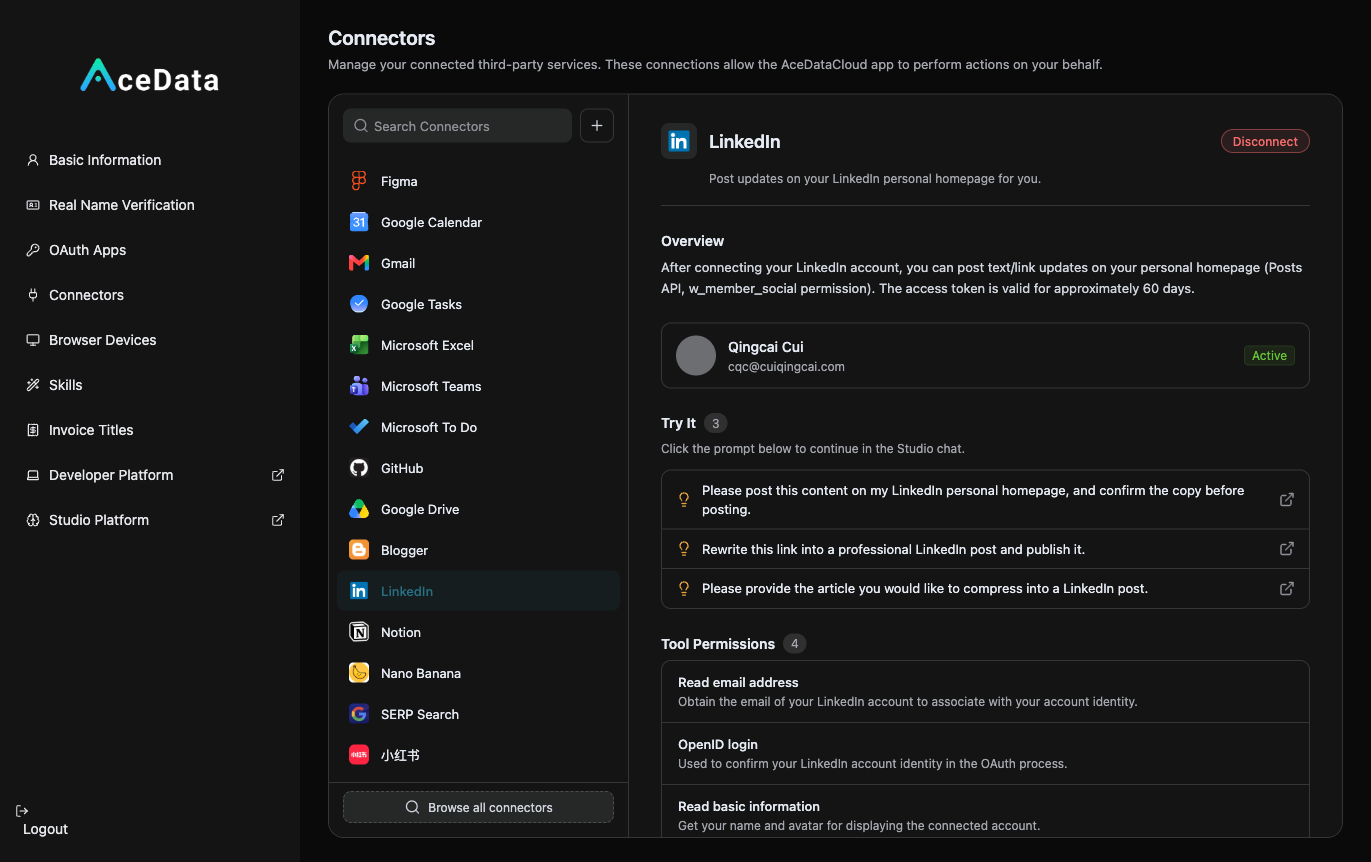
Open https://studio.acedata.cloud/console/connectors, find linkedin, click to authorize and redirect to LinkedIn, agree to w_member_social, and return to see the status change to Active.
¶ 2. Let AI Write Professional Updates + Publish
In the Studio, say:
"Help me write a LinkedIn update: discuss how AI is changing the way X industry works, in the first person, insightful, not pretentious, and naturally include my link at the end, then post it to my LinkedIn (confirm with me first)."
Use your exclusive invitation link: https://platform.acedata.cloud/?inviter_id=<your_userID>—LinkedIn will automatically expand it into a card, making it visually appealing.
¶ 3. Review the Rhythm
LinkedIn is a slow-building trust platform; don’t expect immediate conversions. Check which posts have good interactions on LinkedIn, and solidify your professional image.
¶ How to Calculate Distribution
Naturally place your exclusive invitation link copied from the distribution backend in the content. For invitation attribution, levels, ratios, confirmation periods, and withdrawal conditions, refer to the promotion methods and commission rules; only valid orders that meet current rules may generate commissions.
¶ Content Suggestions (What Works on LinkedIn)
- Professional and Insightful: Avoid memes and clickbait; focus on substantial content like "industry observations," "trend analysis," and "our practices."
- Talk Value and Results, Not Parameters: When addressing B2B decision-makers, saying "helped companies save this much, improve efficiency by this much" is more compelling than "supports this many models."
- First Person + Real Cases: Sharing what you/your clients have genuinely solved with AI is more likely to build credibility.
- English Reaches the Widest Audience (for global B2B), but Chinese can also be used for local markets.
¶ Honest Reminders
- Token Expires in About 60 Days (
401means expired)—if unable to post, go to connections to re-authorize. - No Image Support, rely on copy and automatically expanded link cards for visuals; LinkedIn limits low-quality spamming, so it’s better to post one high-quality piece per week.
- It is suitable for slow-building brands/trust; do not expect immediate conversions. B2B is inherently a long-term game.
¶ Automate It
After manually running through the process, you can refer to the scheduled task content workflow to try generating drafts or calling the publishing Skill as planned. Execution is affected by account status, authorization, balance, review, and target platform policies, requiring continuous checks on the operation history.
If your business is B2B—selling to companies, selling to teams—LinkedIn is the place you should focus on. Use professional, insightful content to establish your brand in front of decision-makers.