

Kelp sways with the current, and light falls from the sea surface. Swim forward for a while, and you can see a shipwreck, schools of fish, and manta rays passing overhead.
This is not a pre-rendered video, but a three-dimensional scene where you can freely move the viewpoint in a browser. What makes you want to open the source code even more is that its delivered file is under 100 KB.
The project is called Abyssal Garden. Its creator shared it on Reddit under the title “I built a swimmable underwater world in one 97 KB HTML file with Fable 5.2,” and XDA also reported on it. This article’s description of Fable 5.2’s involvement in the creation is based on these public shares; its technical details are primarily based on the project repository, README, and original prompt, and it is not presented as model results we independently reproduced.
First, let’s clarify the point most likely to cause misunderstandings: what is small is the saved HTML file, not all the memory used while the scene is running, nor does it mean it will run smoothly on every device.
¶ What fits in 97 KB is not photos of the seafloor, but the method for generating a world
Usually, creating a three-dimensional scene requires loading models, textures, and sometimes audio files. Abyssal Garden takes another route: it constructs these contents with code at runtime.
According to the repository description, it renders directly with WebGPU and does not use Three.js, Babylon.js, or other 3D engines. The terrain is generated by the GPU when the page opens; objects such as the shipwreck, whale tail, fish, and coral are built from combinations of mathematical shapes; ambient sound is synthesized in real time through the Web Audio API, without needing to load pre-recorded sound files.
Therefore, this HTML is more like a set of production instructions for the scene than a package containing ready-made assets. After the browser reads the code, it calculates the geometry, lighting, motion, and sound.
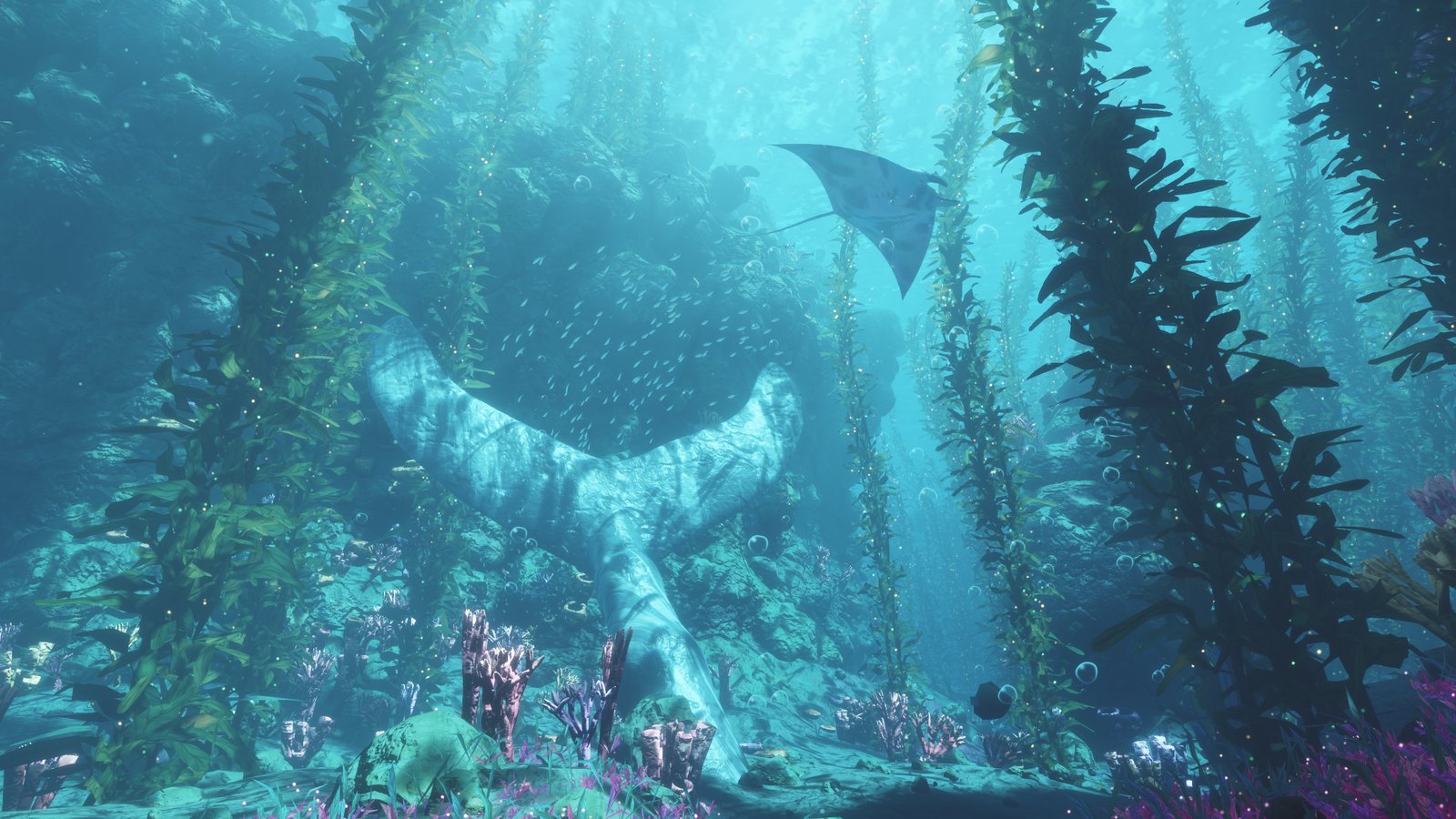
Project in-game screenshot, from the Noniv / Abyssal Garden repository. This article’s cover image is a separately produced concept poster, not a project runtime screenshot.
There is also a small detail worth explaining here: the public share and repository description use “97 KB,” while the current README says “96 KB.” When reading the repository this time, the file size field of index.html was 99,514 bytes, approximately 97.2 KiB, or approximately 99.5 KB in decimal units. The project is continuously updated, and the numbers in the documentation may also be out of sync.
So, rather than treating “97” as a fixed and precise metric, it is better to remember the more reliable conclusion: the current deliverable is a self-contained HTML file under 100 KB. This size does not include the browser, graphics drivers, or runtime-generated buffers and other data.
¶ Whether a scene looks good does not depend only on whether it contains enough things
The repository lists quite a few scene elements: kelp forests, rock arches, canyons, floating stones, shipwrecks, stone whale tails, and coral and sponges in purple caves. Schools of fish, bubbles, particles, and manta rays keep the space in constant motion.
But for creators, what is more worth studying is how it organizes these elements.
The original prompt has clear requirements for the layers of water: near the surface it should lean cyan, becoming deep blue in the distance, with fog and light absorption strengthening the sense of depth; from underwater, the undulating water surface should be visible, along with beams of light and dynamic caustics. Here, caustics can be understood as the patterns of light and dark formed when light is refracted through the water surface.
These requirements are not simply about “adding effects” to the scene, but about telling the model how viewers need to understand this space.
The shipwreck and whale tail provide memorable locations, while kelp and rock walls create foreground and background occlusion, and distant objects gradually blend into the water color. The creative insight we draw from this project is that visual richness does not mean filling every area with detail evenly; a scene that makes people stop and look needs clear layers and recognizable places.
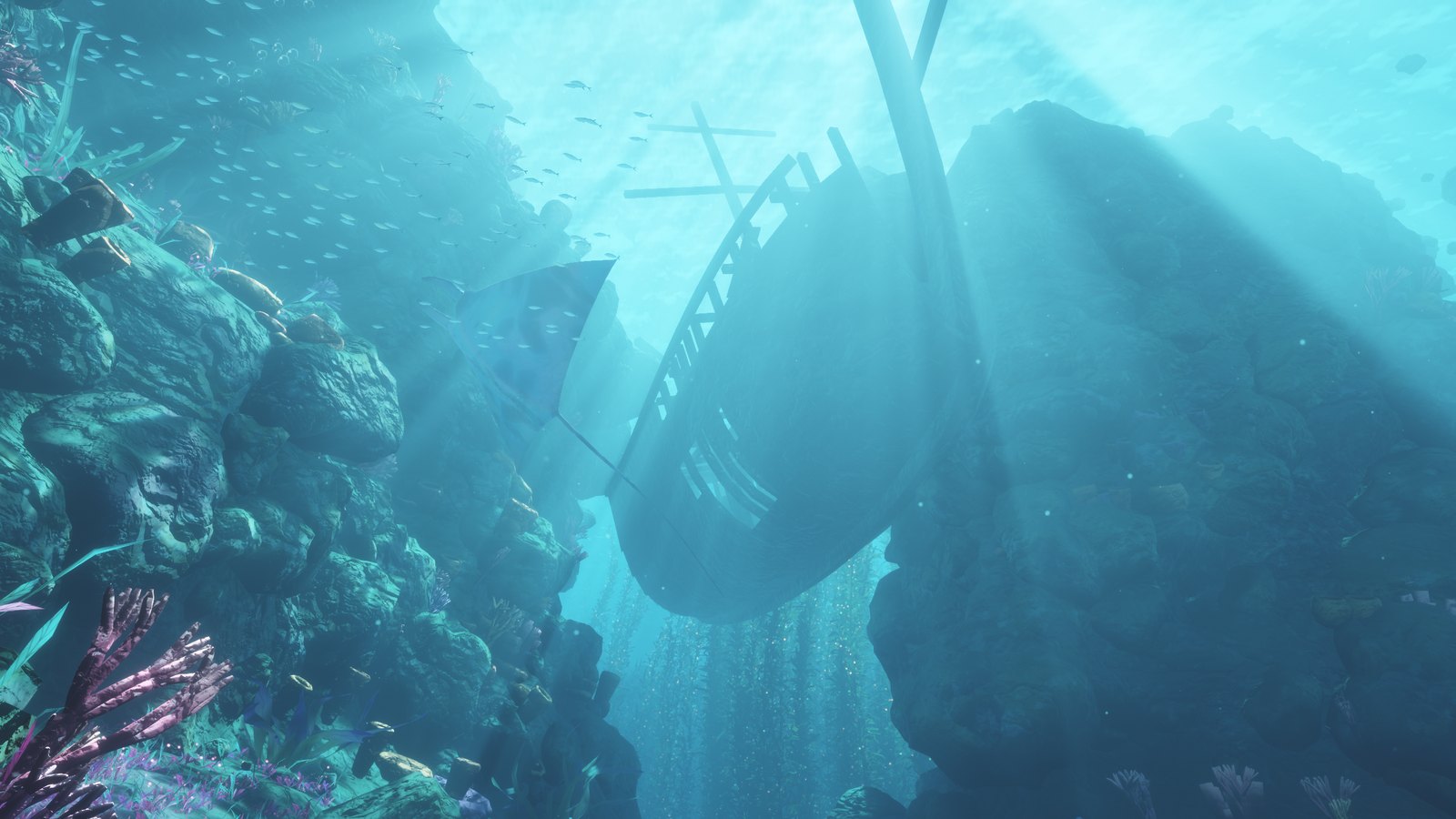
Shipwreck scene, image from the project repository.
Its interaction boundaries are also quite specific. The README explains that the seabed, cliffs, and arches have collision handling, and the player will slide along the surface when touching rocks; but objects such as kelp, plants, shipwrecks, and whale tails can be passed through.
This makes it more suitable to be called an explorable visual scene, rather than an underwater game with complete physics interactions. Clearly defining the scope of the experience has more reference value than giving it an oversized label.
¶ The most useful thing to learn from the prompt is “how to know when it is finished”
The project has made prompt.txt public. The opening goal is simple: create a fantasy underwater scene that runs in real time in a browser, only needs to look beautiful, and allows free camera movement.
But the requirements that follow are very specific.
First is priority: visual quality comes first, followed by stable frame time on the target device, and file size comes last.
This is different from understanding it as “the smaller, the better.” A small file is one of the constraints, but you cannot sacrifice the scene’s visual quality or make motion unstable just to reduce a few KB.
Second are the environment and delivery boundaries. The prompt explicitly requires WebGPU, a self-contained index.html, no texture or model files, no 3D engine, and preallocated buffers to avoid garbage-collection stutters caused by JavaScript memory allocation every frame.
The most interesting part is that it splits acceptance into two parts.
Visual inspection does not read code and only looks at the result. The prompt requires another sub-agent to receive only rendered images, without receiving implementation code or explanations of the production process. It checks screenshots from six fixed camera positions, then watches a traversal video, looking for issues such as flickering, aliasing, objects suddenly appearing, and color banding, and provides specific defects in order of priority. Performance checks do not rely on “it feels pretty smooth.” The prompt requires recording frame times along a fixed one-minute route, using GPU timestamp queries, and reporting the average, 99th percentile, and maximum values.
These are acceptance requirements publicly proposed by the author, not results we have already verified as passed. Based on this prompt alone, it cannot be asserted that every check was fully performed, nor can it be inferred that the entire project was generated only once.
However, this approach itself is highly valuable as a reference. When asking a model to “make it look nicer,” it is difficult to know whether the next modification is an improvement; after fixing the viewpoint and route, there is at least something that can be compared repeatedly.
If you are creating educational animations or interactive demonstrations, you can also rewrite tasks following this approach: do not only ask for “natural effects,” but specify which scenes need to be checked, which movements must not jitter, which information must be clearly visible, and what problems require rework.
¶ The files are small, but the GPU still has plenty of work to do
Procedural generation saves asset files; it does not make rendering costs disappear.
The README describes a complete scene containing approximately two million kelp blades and plants, as well as large quantities of rocks, sponges, corals, and fish. The author reports that it can run at approximately 180 fps on an RTX 5070 Ti at a resolution of 2560×1440; another low-end mobile example runs at approximately 20 fps on the Low setting at a resolution of 670×372.
These are device results self-reported by the author, not measurements from this article, and should not be used to promise performance on other computers or phones.
The project therefore provides Low, Medium, and High levels of detail, and reduces the rendering distance of resolution, plants, and rocks according to runtime conditions. Different levels also reduce the number of blades, simplify geometry or lighting. Mobile touch controls are still labeled as experimental support in the README.
From an engineering perspective, this part is well worth paying attention to: a demonstration being able to run on the author's device, and being able to adapt to devices in readers' hands, are two different stages. Automatically adjusting image quality, preserving settings, and handling loading failures are all problems that only become clearly exposed when the work is handed to someone else.
Therefore, we do not recommend summarizing this case as “AI replaced a game engine with 97 KB.” What it demonstrates is that, within a clearly scoped visual experience, direct rendering and procedural generation can produce a very compact deliverable; it does not prove that general-purpose engines, asset pipelines, or cross-device testing are no longer needed.
¶ If you want to modify it yourself, you do not need to start with the compressed HTML
The project does not only publish one compressed file. The repository's source directory retains readable source code, and the README also lists the purpose of each part.
To adjust the layout, you can start with source/src/world.js, which is responsible for content such as rock walls, arches, kelp forests, schools of fish, shipwrecks, and whale tails. To modify water color, fog, lighting, and materials, you can look at shaders.js, which contains WGSL shaders. Camera, controls, and rendering logic are mainly in main.js; sound is in audio.js; quality levels are in quality.js.
According to the repository instructions, use Node.js 18 or later, and run the following in the project's source directory:
npm install
npm run build
The build will regenerate the index.html in the repository root directory. If debugging is needed, you can use npm run build:readable to output an uncompressed version. The above are the project's publicly available build instructions; this article did not actually execute the build, nor did it complete browser and GPU performance testing.
For the first attempt, it is recommended to change only one thing: make the seawater clearer, reduce the swimming speed, or move one scene subject. Keep the original version, compare the changes before and after from the same viewpoint, confirm that operation has not been broken, and then continue with the next change.
For content that requires long-term maintenance, this is easier to accumulate controllable results than directly asking the model to “make another more grand world.”
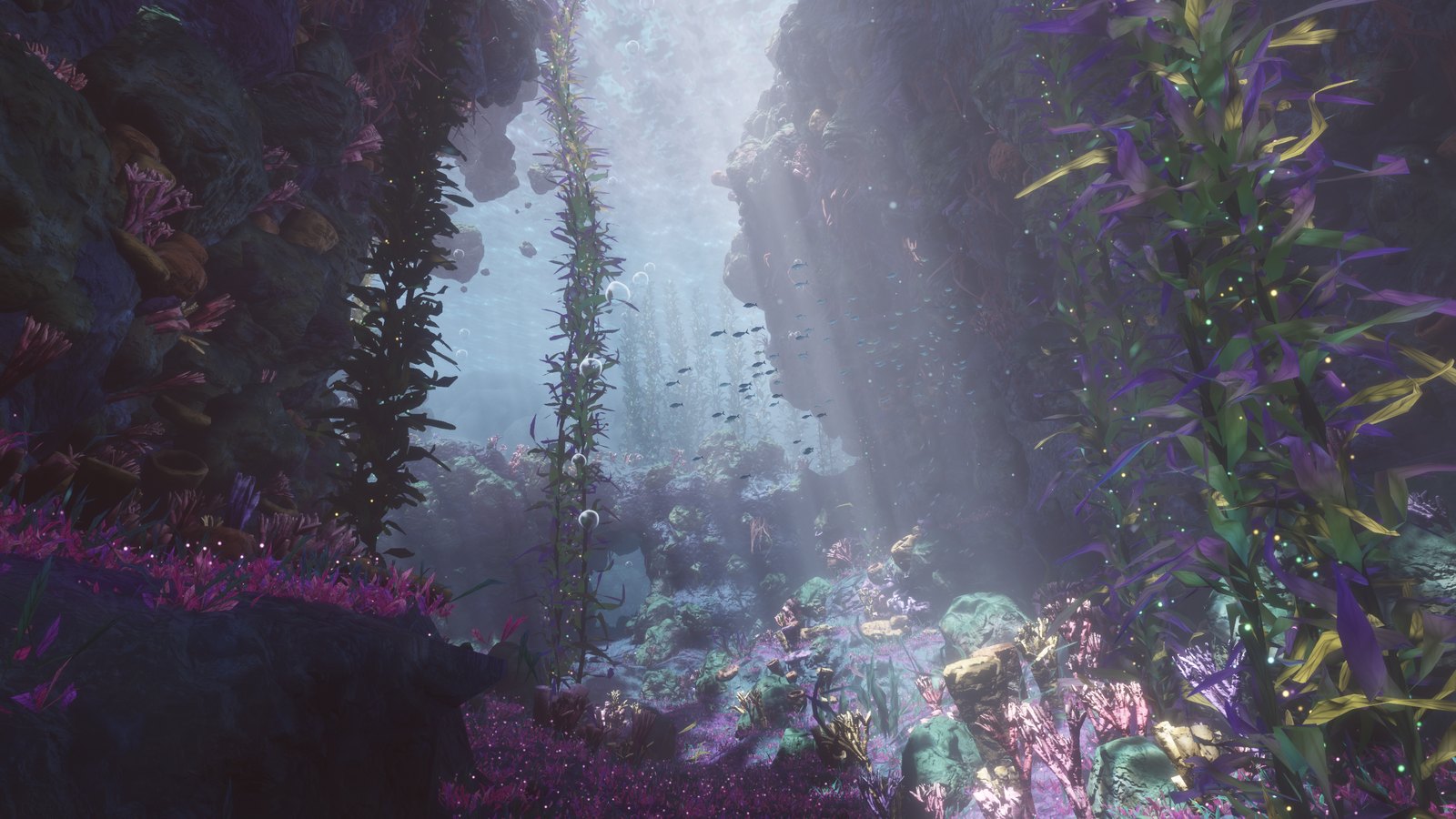
Purple cave scene, image from the project repository.
¶ What is truly worth keeping is not a file-size record
What makes Abyssal Garden appealing, of course, includes the contrast of being “under 100 KB.”
But after looking through the source code structure and the original prompt, another thing may be more worth remembering: code can handle business logic, but it can also construct spaces, arrange movement, generate sound, and turn a visual idea into an experience that can be entered.
After models participate in creation, human work has not automatically disappeared. What kind of space is wanted, which one should be prioritized when visuals and performance conflict, how to inspect the results, and when to stop expanding—these decisions still need to be expressed clearly.
If you also want to try procedural scenes, you might as well start with a small space with a clear theme. A room, a forest, or a short underwater route is easier to make runnable, observable, and continuously modifiable than “making a complete world.”
First make one small place worth lingering in, then consider making the world larger.
¶ Project Links and Resources
- Experience Abyssal Garden online
- GitHub repository and README
- The author's publicly available original prompt
- Readable source code directory
- The author's project post on Reddit
- Related XDA coverage
Source and usage notes: This article is compiled based on the public repository, README, prompt, and public posts. It did not independently reproduce the generation process, test frame rates, or use this as a basis for judging the model's general performance, invocation costs, or platform availability. Reddit and XDA are used to explain the background of the project's public sharing; the technical details in the main text are primarily based on repository materials. The project will continue to be updated, and file size, interface, and performance descriptions are subject to the corresponding version.
Images and License: The three images in the main text come from the .github/screenshots directory of the Noniv / Abyssal Garden repository, and the copyright belongs to the respective rights holders; the cover is a concept poster created separately for this article and does not represent actual project footage. The repository provides an MIT License, attributed as Copyright (c) 2026 Maksymilian Dendura. When reusing code or substantial portions of the software, please retain the copyright and license notice in accordance with the original license text.
¶ Want to keep trying, and set aside a budget for creation
After seeing a project like this, it is easy to want to try it yourself. But if you also feel that the cost of using Fable 5.2 is relatively high, you may first take a look at Ace Data Cloud's Coding Plan, choose a plan and top-up amount based on your own usage frequency, and then start creating continuously.
Coding Plan provides integration guides for programming tools such as Claude Code, Codex, and OpenCode, allowing you to continue writing code, debugging, and modifying your work in familiar development environments. Rather than trying it only once and stopping, it is more worthwhile to set aside a budget for “generate—run—inspect—modify” and gradually refine your ideas into something usable.
For specific pricing, quotas, supported models, and usage restrictions, please refer to the page description at the time of purchase; do not infer solely from the examples in this article that the plan already supports Fable 5.2, or that you will get the same results after topping up.