
Iris Dataset:
A Classic Starting Point for Machine Learning
A classic classification dataset published by statistician R.A. Fisher in 1936. 150 samples, 3 species, 4 features—concise, clean, and perfect, making it an ideal first step for learning machine learning and data analysis.
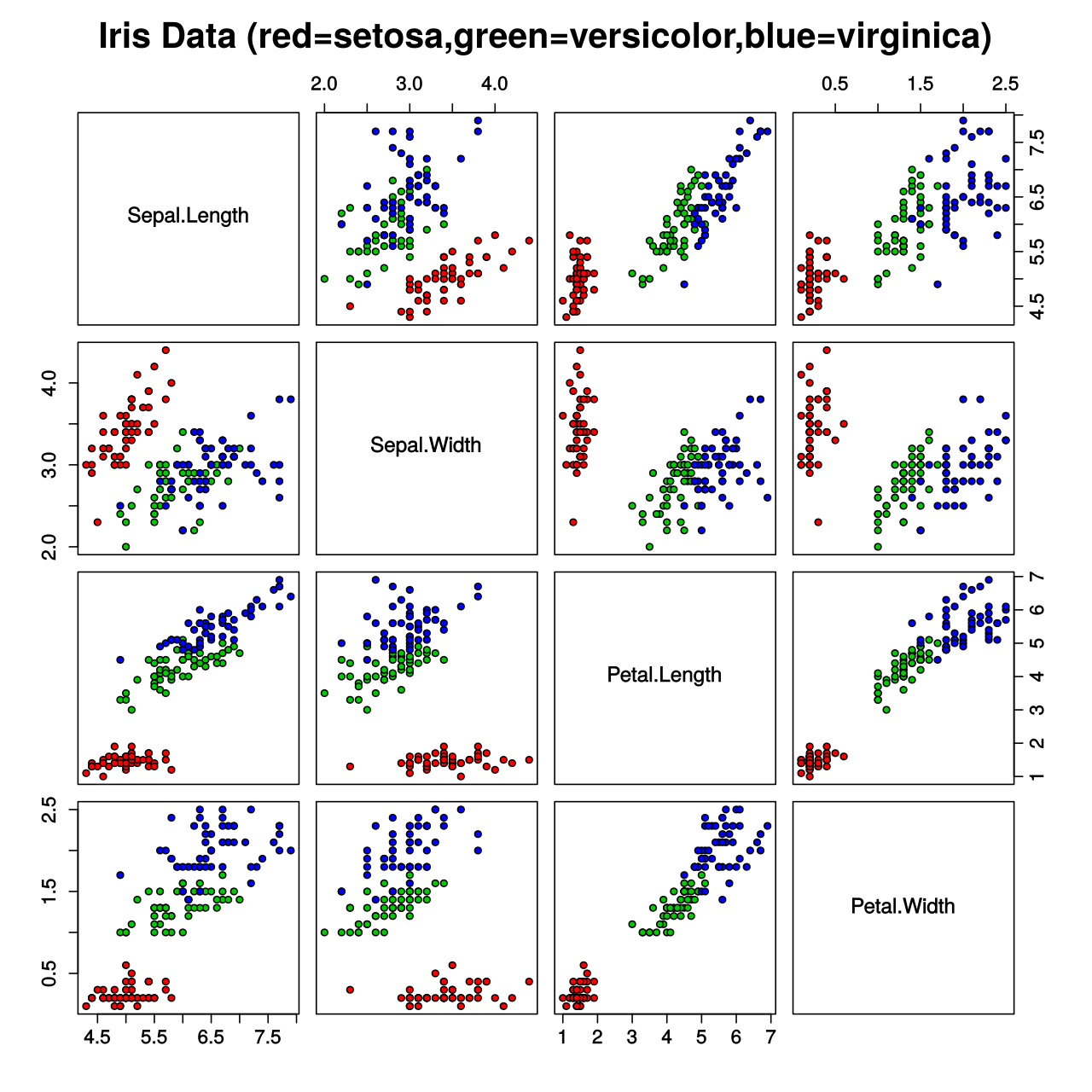
Dataset Highlights
The Iris dataset has ample reasons to be the "Hello World" of machine learning
Class Balance
Each of the three species (Setosa, Versicolor, Virginica) has 50 samples, perfectly balanced, with no need for oversampling or undersampling.
Simple and Clean
No missing values, no outliers, no complex data cleaning required. A 4.4 KB CSV file contains all the data, ready to use.
Beginner Friendly
The standard teaching dataset for global machine learning courses. Almost all classification algorithms can use it for demonstration, from KNN to neural networks.
Visualization Friendly
The 4 numerical features are very suitable for creating scatter plots, box plots, heatmaps, and pair plots, intuitively showing the distribution differences between categories.
Extensive Literature
As one of the most cited datasets in statistics and machine learning, it has a wealth of tutorials, papers, and reference implementations.
CC BY 4.0 License
Utilizes a permissive Creative Commons license, freely usable for learning, teaching, research, and commercial projects, with proper attribution required.
Applicable Scenarios
From classroom exercises to algorithm benchmarking—common uses of the Iris dataset
Classification Algorithms
KNN, SVM, decision trees, random forests, logistic regression—preferred dataset for validating any classifier
Data Visualization
Create scatter plots, pair plots, parallel coordinate plots to intuitively understand the category structure of multidimensional data
Statistics Teaching
Used to explain core statistical concepts such as discriminant analysis, principal component analysis (PCA), and hypothesis testing
Algorithm Benchmarking
Quickly compare the accuracy, recall, and F1 scores of different models on standard data
Data Preview
Sample examples of the Iris dataset (CSV format)
sepal_length,sepal_width,petal_length,petal_width,species
5.1,3.5,1.4,0.2,setosa
4.9,3.0,1.4,0.2,setosa
7.0,3.2,4.7,1.4,versicolor
6.4,3.2,4.5,1.5,versicolor
6.3,3.3,6.0,2.5,virginica
5.8,2.7,5.1,1.9,virginica
3 Steps to Get Started Quickly
From browsing to using, just a few minutes
Browse the Dataset
View detailed descriptions, field definitions, and data previews of the Iris dataset on the Ace Data Cloud platform.
Download the CSV File
One-click download of the 4.4 KB CSV file to your local machine, no registration, no payment, get it immediately.
Load and Use
Load the data using Python, R, or any data analysis tool, and start training models or creating visualizations.
import pandas as pd
from sklearn.model_selection import train_test_split
from sklearn.ensemble import RandomForestClassifier
from sklearn.metrics import accuracy_score
# Load data
df = pd.read_csv("iris.csv")
# Split into training and testing sets
X = df[["sepal_length", "sepal_width", "petal_length", "petal_width"]]
y = df["species"]
X_train, X_test, y_train, y_test = train_test_split(
    X, y, test_size=0.3, random_state=42
)
# Train the random forest classifier
clf = RandomForestClassifier(n_estimators=100, random_state=42)
clf.fit(X_train, y_train)
# Evaluate accuracy
y_pred = clf.predict(X_test)
print(f"Accuracy: {accuracy_score(y_test, y_pred):.2%}")  # Output: Accuracy: 100.00%
Start Your Machine Learning Journey
The Iris dataset is the first step for millions of developers worldwide to learn machine learning. Download for free and start exploring immediately.