
WebExtrator 智能抽取 API 集成指南
POST https://api.acedata.cloud/webextrator/extract
WebExtrator 智能抽取 API 把一个 URL 转换成类型化的结构化结果 —— 文章、商品、 食谱、视频、讨论、招聘等,同时附带清洗后的 Markdown 与纯文本。当你想要"干净的结 构化数据"而不是原始 HTML 时,这是该用的接口。
¶ 申请流程
要使用 WebExtrator 服务页,首先到 Ace Data Cloud 控制台 获取您的 API Token,留作备用。
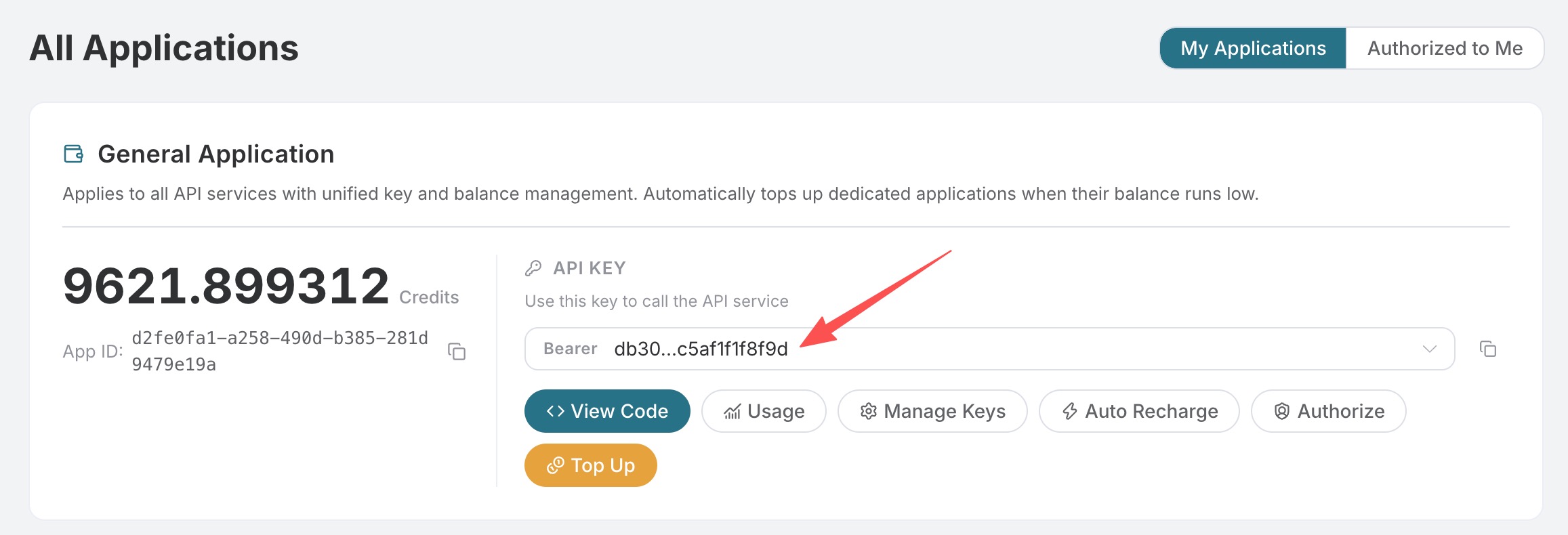
如果你尚未登录或注册,会自动跳转到登录页面邀请你注册和登录,完成后会自动返回当前页面。
通用应用的 API Key 可用于账号已开放的服务;专用应用的 Key 按该应用的服务范围使用。请检查 Key 的权限、有效期和限额,并确认应用余额足以支付本次请求。可用试用额度以账号显示为准,余额不足时可在 控制台 充值。
📘 完整文档:WebExtrator 服务页 →
¶ 鉴权
Authorization: Bearer YOUR_API_KEY
Content-Type:  application/json
¶ 请求参数
Extract 接受所有Render API 的参数
(url、user_agent、timeout、wait_until、delay、wait_for_selector、
block_resources、headers、cookies、callback_url、bypass_cache、
cache_ttl_seconds、async),外加两个 Extract 专属字段:
| 字段 | 类型 | 必填 | 默认 | 说明 |
|---|---|---|---|---|
expected_type |
enum | ❌ | 自动判断 | 页面类型提示:product / article / general。指定期望的结果类型。 |
enable_llm |
boolean | ❌ | false |
当 schema.org 未命中时允许调用 LLM 抽取。在 Amazon / HN / Greenhouse 这类无 JSON-LD 的页面上,需要打开才能拿到类型化结果。 |
¶ 同步响应
{
  "success": true,
  "task_id": "550e8400-e29b-41d4-a716-446655440000",
  "trace_id": "550e8400-e29b-41d4-a716-446655440001",
  "started_at": 1777717800.123,
  "finished_at": 1777717802.535,
  "elapsed": 2.412,
  "data": {
    "kind": "extract",
    "url": "https://en.wikipedia.org/wiki/Diffbot",
    "finalUrl": "https://en.wikipedia.org/wiki/Diffbot",
    "contentType": "article",
    "title": "Diffbot",
    "description": "American machine learning and knowledge management company",
    "byline": "Contributors to Wikimedia projects",
    "language": "en",
    "siteName": "Wikipedia",
    "publishedAt": "2007-08-08T05:47:27Z",
    "images": ["https://en.wikipedia.org/static/images/icons/enwiki-25.svg"],
    "links": ["https://en.wikipedia.org/wiki/Machine_learning"],
    "markdown": "# Diffbot\n\nDiffbot is a developer of machine learning ...",
    "text": "Diffbot is a developer of machine learning algorithms ...",
    "structured": {
      "schemaOrg": { "primary": { /* 类型化实体 */ }, "breadcrumbs": [], "all": [] },
      "openGraph": { "title": "...", "description": "...", "image": "...", "type": "..." },
      "jsonLd": [ /* 原始 JSON-LD */ ]
    },
    "rawSignals": {
      "hasJsonLd": true,
      "title": "Diffbot - Wikipedia",
      "metaDescription": null,
      "pageStatus": 200,
      "textLength": 11473
    },
    "elapsedMs": 2412
  }
}
¶ 顶层字段
| 字段 | 类型 | 说明 |
|---|---|---|
kind |
string | 固定 "extract"。 |
url |
string | 你提交的 URL。 |
finalUrl |
string | 重定向后的最终 URL。 |
contentType |
enum | 页面类型:product / article / general。 |
title |
string | 页面标题。 |
description |
string? | 页面描述或摘要。 |
byline |
string? | 作者、频道或公司。 |
language |
string? | <html lang>。 |
siteName |
string? | og:site_name。 |
publishedAt |
string? | 发布时间,使用 ISO 8601 格式。 |
images |
string[] | 最多 50 个 <img src>,已解析为绝对 URL、去重、丢弃 data: URI。 |
links |
string[] | 最多 100 个外链,已过滤片段 / javascript: / mailto: / tel:。 |
markdown |
string | 页面的 Markdown 内容。 |
text |
string | 页面纯文本。 |
structured |
object | 完整结构化结果,见下。 |
rawSignals |
object | 调试用的诊断信息。 |
cached |
boolean? | 命中缓存时为 true。 |
cacheStoredAt |
number? | 缓存条目首次写入的 Unix 毫秒时间戳。 |
¶ data.structured 子字段
| 子字段 | 何时出现 | 说明 |
|---|---|---|
schemaOrg |
始终 | { primary, breadcrumbs, all }。primary 是最高优先级的类型化实体;找不到时为 null。 |
openGraph |
始终 | { title, description, image, type },源自 <meta property="og:*">。 |
jsonLd |
始终 | 所有 <script type="application/ld+json"> 块的原始 JSON 数组。 |
llm |
LLM 跑了且成功时 | { kind, data, model, promptCharCount },类型化结果。 |
llmError |
LLM 跑了但失败时 | { kind, error, model },请求仍可返回其他已提取字段。 |
amazon |
URL 是 amazon.* 时 |
旧版 Amazon 扩展结果;新集成请使用类型化结果。 |
¶ schema.org 结果类型
structured.schemaOrg.primary 支持以下结果类型:
| schema.org 类型 | kind | 输出字段 |
|---|---|---|
Product |
product | name, sku, gtin, model, color, brand, url, images, offer.{price,currency,availability,condition,seller}, rating.{value,count}, reviews[], properties[] |
Recipe |
recipe | name, description, image, datePublished, author, cookTime, prepTime, totalTime, recipeYield, ingredients[], instructions[], nutrition, rating, keywords, recipeCategory, recipeCuisine |
VideoObject |
video | name, description, thumbnailUrl, uploadDate, duration, embedUrl, contentUrl, channel, interactionCount |
JobPosting |
job | title, description, datePosted, validThrough, hiringOrganization, jobLocation, baseSalary, employmentType |
Event(含 *Event) |
event | name, description, startDate, endDate, location.{name,address}, organizer, offer.{url,price,currency} |
Article / NewsArticle / BlogPosting / ScholarlyArticle / TechArticle / Report / *NewsArticle |
article | subtype, headline, description, datePublished, dateModified, author, publisher, image[], url, sameAs[] |
FAQPage |
faq | questions[{question, answer}] |
BreadcrumbList |
(挂在 sibling) | 始终输出到 structured.schemaOrg.breadcrumbs[],不会作为 primary。 |
¶ LLM 结果类型
当 enable_llm: true 且页面没有可用的 schema.org 结构化数据时,可返回以下类型的抽取结果:
| Kind | 必填字段 | 可选字段 |
|---|---|---|
article |
headline |
description, byline, publishedAt, language, topics[], sections[{heading,summary}] |
product |
name |
description, brand, sku, price, currency, availability, rating.{value,count}, bullets[], specifications[{name,value}] |
discussion |
title |
author, postedAt, points, commentCount, body, url |
recipe |
name |
description, author, cookTime, prepTime, totalTime, recipeYield, ingredients[], instructions[], nutrition, rating, keywords[] |
video |
name |
description, channel, uploadDate, duration, viewCount, likeCount, thumbnailUrl, transcript |
job |
title |
description, company, location, remote, employmentType, datePosted, validThrough, salaryMin, salaryMax, salaryCurrency, salaryPeriod, responsibilities[], qualifications[] |
¶ 缓存
相同 URL、请求参数、cookies 和 headers 可以复用缓存结果;async、bypass_cache、cache_ttl_seconds 用于控制执行方式和缓存行为。
| 字段 | 效果 |
|---|---|
bypass_cache: true |
跳过读取;本次结果仍会写回缓存,下次相同请求能命中。 |
cache_ttl_seconds: 0 |
本次响应不缓存。 |
cache_ttl_seconds: N |
自定义本条目的 TTL(默认 3600 秒)。 |
命中缓存的响应会带上 data.cached: true 与 data.cacheStoredAt: <unix-ms>。
¶ 异步模式与回调
设置 async: true 进入异步模式(提供 callback_url 也会自动进入)。平台立即返回(HTTP 200):
{
  "success": true,
  "task_id": "550e8400-...",
  "trace_id": "6ba7b810-...",
  "started_at": 1777717800.123
}
任务完成时把完整 envelope POST 到你的 callback_url(如果配置了)。也可以事
后通过 /webextrator/tasks 主动查询。
¶ 示例
¶ 1. Wikipedia 文章(schema.org 命中,不需要 LLM)
curl -X POST https://api.acedata.cloud/webextrator/extract \
  -H "Authorization: Bearer $API_KEY" \
  -H "Content-Type: application/json" \
  -d '{
    "url": "https://en.wikipedia.org/wiki/Diffbot",
    "expected_type": "article"
  }'
data.structured.schemaOrg.primary 关键字段:
{
  "kind": "article",
  "subtype": "Article",
  "headline": "American machine learning and knowledge management company",
  "datePublished": "2007-08-08T05:47:27Z",
  "dateModified": "2025-07-10T20:42:45Z",
  "author": { "name": "Contributors to Wikimedia projects", "type": "Organization" },
  "publisher": { "name": "Wikimedia Foundation, Inc." }
}
¶ 2. BestBuy 商品页(schema.org 命中)
curl -X POST https://api.acedata.cloud/webextrator/extract \
  -H "Authorization: Bearer $API_KEY" \
  -H "Content-Type: application/json" \
  -d '{
    "url": "https://www.bestbuy.com/product/apple-airpods-pro-2nd-generation-white/JJ8ZH6TPSW",
    "expected_type": "product"
  }'
schema.org 抽出:
{
  "kind": "product",
  "name": "Apple - Refurbished Excellent - AirPods Pro (2nd generation) - White",
  "sku": "10845412",
  "model": "MQD83AM/A",
  "color": "White",
  "brand": "Apple",
  "offer": { "price": 159.99, "currency": "USD", "availability": "https://schema.org/InStock", "seller": "Best Buy" },
  "rating": { "value": 4.4, "count": 8 }
}
¶ 3. AllRecipes 食谱页(含营养与步骤)
curl -X POST https://api.acedata.cloud/webextrator/extract \
  -H "Authorization: Bearer $API_KEY" \
  -H "Content-Type: application/json" \
  -d '{
    "url": "https://www.allrecipes.com/recipe/16354/easy-meatloaf/"
  }'
schema.org 抽出:
{
  "kind": "recipe",
  "name": "Easy Meatloaf",
  "cookTime": "PT60M",
  "totalTime": "PT75M",
  "recipeYield": "8 / 1 (9x5-inch) meatloaf",
  "ingredients": ["1 1/2 pounds ground beef", "..."],
  "instructions": [{ "text": "Preheat oven to 350°F ..." }, "..."],
  "rating": { "value": 4.7, "count": 9348 }
}
¶ 4. HN 讨论页(无 JSON-LD —— 需要启用 LLM)
curl -X POST https://api.acedata.cloud/webextrator/extract \
  -H "Authorization: Bearer $API_KEY" \
  -H "Content-Type: application/json" \
  -d '{
    "url": "https://news.ycombinator.com/item?id=37000000",
    "enable_llm": true
  }'
data.structured.llm.data:
{
  "kind": "discussion",
  "title": "Show HN: A new way to extract web pages",
  "author": "alice",
  "points": 173,
  "commentCount": 42,
  "body": "Hi HN, we built a self-hosted alternative to Diffbot's Analyze API ..."
}
顶层字段也被回填:byline = "alice"、publishedAt = "..."。
¶ 5. Amazon 商品页(Amazon 无 JSON-LD —— 需要启用 LLM)
curl -X POST https://api.acedata.cloud/webextrator/extract \
  -H "Authorization: Bearer $API_KEY" \
  -H "Content-Type: application/json" \
  -d '{
    "url": "https://www.amazon.com/dp/B0BSHF7WHW",
    "expected_type": "product",
    "enable_llm": true
  }'
data.structured.llm.data(类型化 product):
{
  "kind": "product",
  "name": "Apple 2023 MacBook Pro M2 Pro 14-inch",
  "brand": "Apple",
  "price": 1799,
  "currency": "USD",
  "bullets": ["Apple M2 Pro chip with 10-core CPU", "..."],
  "specifications": [{ "name": "Display size", "value": "14.2 inches" }, "..."]
}
¶ Python (requests)
import os, requests

API_KEY = os.environ["ACEDATA_API_KEY"]

resp = requests.post(
    "https://api.acedata.cloud/webextrator/extract",
    headers={
        "Authorization": f"Bearer {API_KEY}",
        "Content-Type": "application/json",
    },
    json={
        "url": "https://en.wikipedia.org/wiki/Diffbot",
        "expected_type": "article",
    },
    timeout=120,
)
resp.raise_for_status()
data = resp.json()["data"]

primary = (data.get("structured") or {}).get("schemaOrg", {}).get("primary")
print("contentType:", data["contentType"])
print("title:      ", data["title"])
print("byline:     ", data.get("byline"))
print("publishedAt:", data.get("publishedAt"))
if primary and primary["kind"] == "article":
    print("headline:    ", primary["headline"])
    print("dateModified:", primary.get("dateModified"))
¶ Node.js (fetch)
const apiKey = process.env.ACEDATA_API_KEY;

const res = await fetch('https://api.acedata.cloud/webextrator/extract', {
  method: 'POST',
  headers: {
    Authorization: `Bearer ${apiKey}`,
    'Content-Type': 'application/json',
  },
  body: JSON.stringify({
    url: 'https://www.allrecipes.com/recipe/16354/easy-meatloaf/',
  }),
});
const { data } = await res.json();
const recipe = data?.structured?.schemaOrg?.primary;
console.log(recipe.name, recipe.cookTime, recipe.ingredients.length, '种配料');
¶ 提示与坑
- 需要指定页面类型时传入
expected_type。 例如文章页使用article,商品页使用product。 enable_llm: true在 schema.org 命中的页面上是免费的。 LLM 只在 schema.org 没有 primary 时才被调用,所以默认开着也很安全。- 调试时先看
rawSignals.hasJsonLd。 如果是true但structured.schemaOrg.primary为null,说明页面的@type暂不受支持,可向我们反馈。 structured.llmError是信息性的。 请求仍可成功返回其他已提取字段。看llmError.error来定位原因(超时、JSON 解析失败、结构校验失败)。- 非文章页的
links[]不会做相关性排序。 仅按"上限 100 条 + 过滤无效协议" 尽力清洗。 - 缓存命中也计费。