
Suno 歌曲生成 API 对接说明
随着 AI 的应用变广,各类 AI 程序已逐渐普及。AI 已逐渐深入到人们的工作生活方方面面。而 AI 涉及的行业也越来越多,从最初的写作,到医疗教育,再到现在的音乐。
Suno 是一个专业高质量的 AI 歌曲和音乐创作平台,用户只需输入简单的文本提示词,即可根据流派风格和歌词生成带有人声的歌曲。该 AI 音乐生成器由来自 Meta、TikTok、Kensho 等知名科技公司的团队成员开发,目标是不需要任何乐器工具,让所有人都可以创造美妙的音乐。
¶ 失败结果与重试
错误对象可能包含可选的布尔字段 error.retryable。只有当它为 true 时,才表示此次失败允许使用相同参数稍后重新请求,例如明确未受理的临时限流或服务容量不足。建议使用退避间隔并限制重试次数。重试成功的请求按正常规则计费。
retryable: false 表示不应原样重试。字段缺失时,不要仅根据 HTTP 500、busy 或错误文字自动重发。缺参数、素材格式或时长不符、内容审核及失效资源应先修正。提交超时、连接中断、已受理任务的轮询或媒体交付失败,应优先使用原 task_id 查询任务;重新提交可能创建新的歌曲。该标记描述的是原公共操作,不是某个内部处理步骤。
以下是模型更新的进度:
| 版本 | model | 上线时间 | lyric 限制 | style 限制 | 歌曲最长时长 |
|---|---|---|---|---|---|
| v6 | chirp-v6 | 2026.09.09 | — | — | — |
| v6 Wild | chirp-v6-wild | 2026.09.09 | — | — | — |
| v6 Mini | chirp-v6-mini | 2026.09.09 | — | — | — |
| v5.5 | chirp-v5-5 | 2026.03.27 | 5000 | 1000 | 8 分钟 |
| v5 | chirp-v5 | 2025.09.23 | 5000 | 1000 | 8 分钟 |
| v4.5+ | chirp-v4-5-plus | 2025.07.17 | 5000 | 1000 | 8 分钟 |
| v4.5 | chirp-v4-5 | 2025.05.03 | 5000 | 1000 | 4 分钟 |
| v4 | chirp-v4 | 2024.12.17 | 3000 | 200 | 150 秒 |
| v3.5 | chirp-v3-5 | --- | 3000 | 200 | 120 秒 |
上表的
lyric与style限制为自定义模式(custom为true)下的上限。非自定义的灵感模式(custom为false)只填prompt,其长度上限为 500 字符(各模型一致)。
Suno 现已支持 chirp-v6、chirp-v6-wild 和 chirp-v6-mini。推荐使用 chirp-v6;旧模型名称继续兼容。
然而 Suno 官方是并没有提供 API 的,AceDataCloud 提供了一套 Suno 的 API,模拟对接了 Suno 官方,可以方便快捷地生成想要的音乐。
¶ 申请和使用
要使用 Suno Audios Generation API,首先到 Ace Data Cloud 控制台 获取您的 API Token,留作备用。
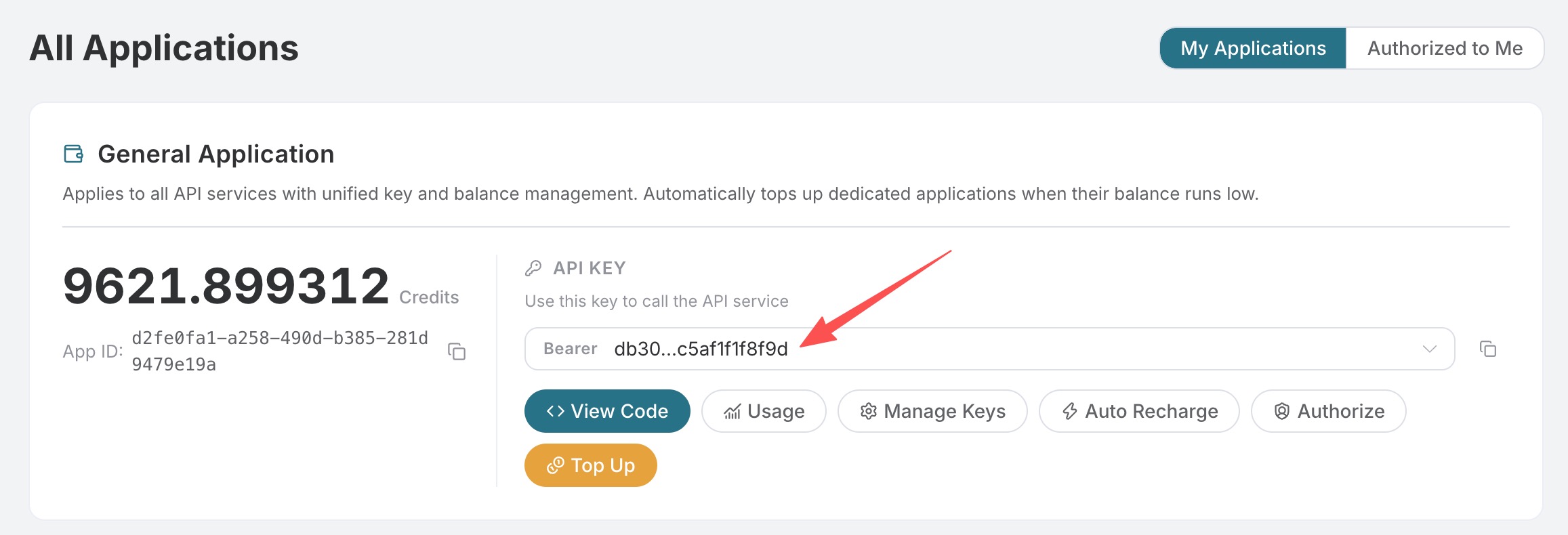
如果你尚未登录或注册,会自动跳转到登录页面邀请你注册和登录,完成后会自动返回当前页面。
通用应用的 API Key 用于账号已开放的服务。请检查权限、有效期、限额与余额;试用额度以账号显示为准。
📘 完整文档:Suno Audios Generation API →
¶ 基本使用
想些什么歌曲,可以任意输入一段文字,比如我想生成一个关于圣诞的歌曲,就可以输入 a song for Christmas,如图所示:
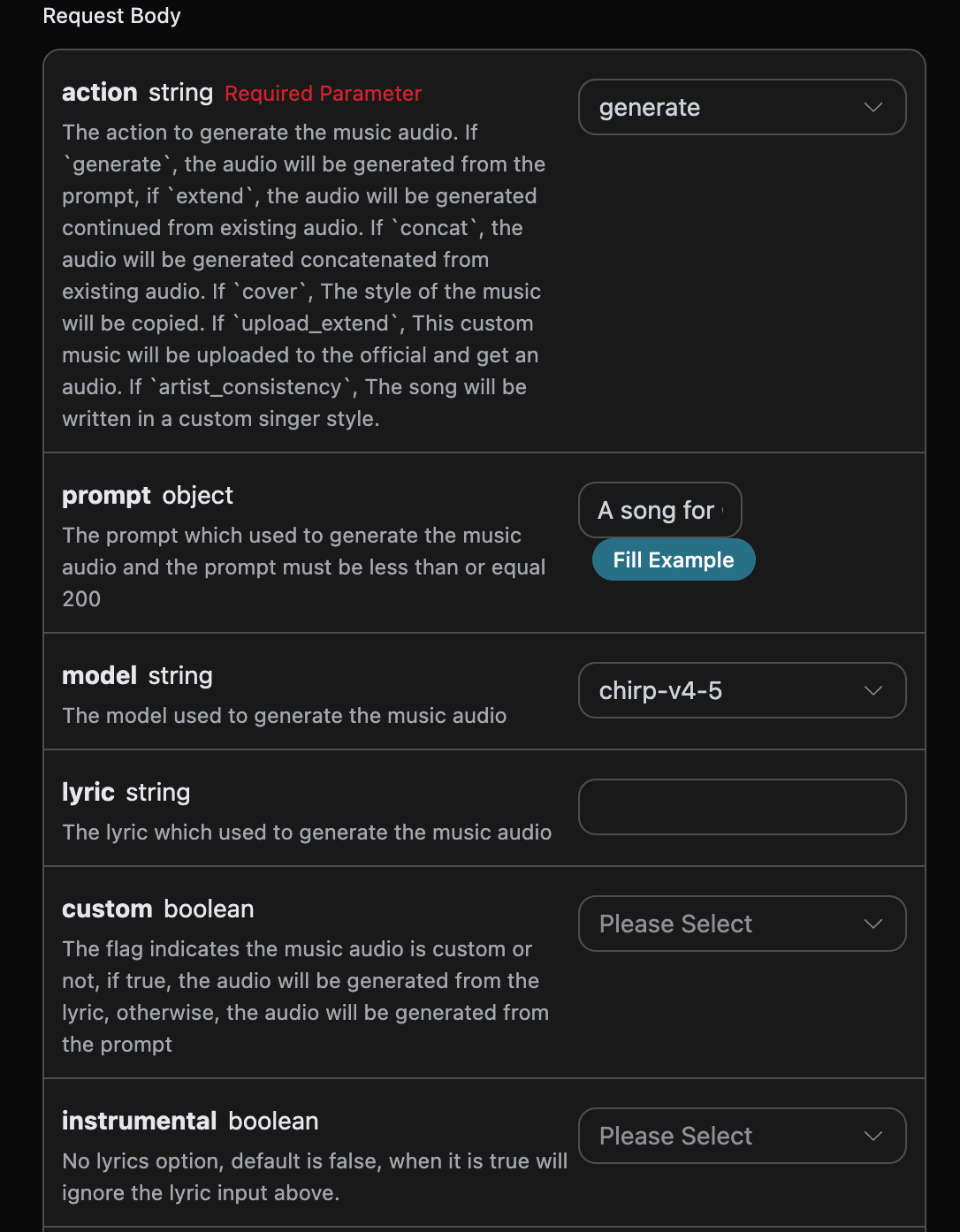
可以看到这里我们设置了 Request Headers,包括:
accept:想要接收怎样格式的响应结果,这里填写为application/json,即 JSON 格式。authorization:调用 API 的密钥,申请之后可以直接下拉选择。
另外设置了 Request Body,包括:
action:音频任务类型,默认是generate。支持生成、续写、翻唱、拼接、分轨、添加音轨、提取指定音轨、生成音效和调整速度等操作,统一通过POST /suno/audios调用。prompt:Suno 官方的灵感模式提示词(custom为false时生效),最大 500 字符。model:此次音乐生成任务的模型。v6 系列包含chirp-v6、chirp-v6-wild和chirp-v6-mini;旧模型名称继续兼容。max_mode:增强生成模式。generate仅在custom与max_mode均为true时启用,费用为 1.12 Credits;add_stem可直接启用,费用为 1.344 Credits。关闭或省略时分别为 0.56 和 0.672 Credits。variety:生成结果的多样性强度,可选off、normal、high、extra、max。仅用于generate和add_stem,其他 action 传入会返回 400。lyric:Suno 官方的自定义模式的歌词内容。chirp-v3-5与chirp-v4最大 3000 字符;chirp-v4-5及以上(含chirp-v5、chirp-v5-5)最大 5000 字符。custom:是否采用自定义模式,默认是:false。instrumental:Suno 官方的灵感模式的纯音乐选项。title:Suno 官方的自定义模式的音乐标题。chirp-v3-5、chirp-v4最大 80 字符;chirp-v4-5及以上最大 100 字符。style:Suno 官方的自定义模式音乐风格。chirp-v3-5与chirp-v4最大 200 字符;chirp-v4-5及以上(含chirp-v5、chirp-v5-5)最大 1000 字符。negative_tags:自定义生成时希望排除的音乐风格或流派,也可用于replace_section。本接口目前未对该字段设置固定字符数上限;过长内容仍可能无法处理,建议保持描述精简。audio_weight:音频或声音特征的影响权重,范围 0-1,0也是有效值。可用于生成、续写、翻唱、添加音轨和声音一致性等操作;没有参考音频或声音特征时,模型可能弱化或忽略该值。audio_id:参考音乐的 ID,用于翻唱、续写、分轨等后续操作。音频文件仍可下载,不代表该 ID 的后续处理始终可用;若返回suno_processing_unavailable,请保留task_id和trace_id联系支持。overpainting_start/overpainting_end:为已有纯音乐补充人声的起止时间,单位秒。underpainting_start/underpainting_end:为清唱加伴奏的起止时间,单位秒。persona_id:通过 Persona 或声音创建接口获得的声音 ID,不是歌曲的audio_id。continue_at:续写边界,单位为秒。例如,213.5 表示从第 3 分 33.5 秒处开始生成后续片段。lyric和style只引导边界之后的新内容,不会替换源音频中边界之前的歌词或演唱。style_influence:自定义模式下的风格影响力,范围 0-1,越大通常越贴合所选风格;0会作为有效值传递。replace_section_end:替换片段的最终时间。replace_section_start:替换片段的起始时间。vocal_gender:控制男女声偏好,女声f,男声m,4.5 及以上模型有效;为偏好项,不保证严格遵循。weirdness:自定义模式下的怪异度,范围 0-1,越大通常越具创意和实验性;0会作为有效值传递。duration:期望的歌曲时长,单位秒,需为整数,取值范围 10 到 360。当前仅generate使用该参数,具体效果取决于模式和模型。它是一个倾向性提示而非硬性约束:模型会参考它,但不保证达到,实际成品时长以响应中的duration字段为准,通常短于期望值。
¶ 声音 ID 的适用范围
generate、cover、upload_cover、artist_consistency、artist_consistency_vox 可以使用 persona_id。后两个 action 必须提供 persona_id;也可以同时提供创建该 Persona 时所用歌曲的 audio_id。
extend、upload_extend 不使用额外的 persona_id。mashup、inspo 是否支持声音 ID 取决于所选服务通道;其他 action 不保证应用该字段,请按各操作说明使用。vocal_gender 是可选的性别偏好,不能代替声音 ID。
后续创作操作需要有效的源 audio_id;mashup 需要至少两个 mashup_audio_ids。缺少必要来源或时间参数时会返回 HTTP 400。
¶ 高级参数适用范围
| 参数 | 取值 | 支持的 action | 说明 |
|---|---|---|---|
weirdness |
0-1 | 可选 | 调节实验性,0 是有效值;效果取决于操作、模式和模型 |
style_influence |
0-1 | 可选 | 调节风格遵循倾向,0 是有效值;效果取决于操作、模式和模型 |
audio_weight |
0-1 | 可选 | 调节音频或声音特征的影响;无参考信息时可能被模型忽略 |
variety |
off / normal / high / extra / max |
generate、add_stem |
调节结果间的风格多样性 |
max_mode |
boolean | generate(要求 custom=true)、add_stem |
增强一致性并按增强模式计费 |
vocal_gender |
f / m |
支持人声控制的生成操作 | 偏好项,不保证严格遵循 |
duration |
整数 10-360 | generate |
期望时长;其他 action 当前不使用该字段,实际长度以结果为准 |
平台会校验参数类型和数值范围,但不会仅因 action 不同拒绝这些可选调节项;具体效果由操作、模式和模型决定。
lyric_prompt:生成歌词的 prompt,当且仅当custom为true并且lyric没有传的时候生效。callback_url:需要回调结果的 URL。async:可选,设为true时接口立即返回task_id,无需提供callback_url,随后通过对应的任务查询接口轮询获取结果。
生成的代码如下:
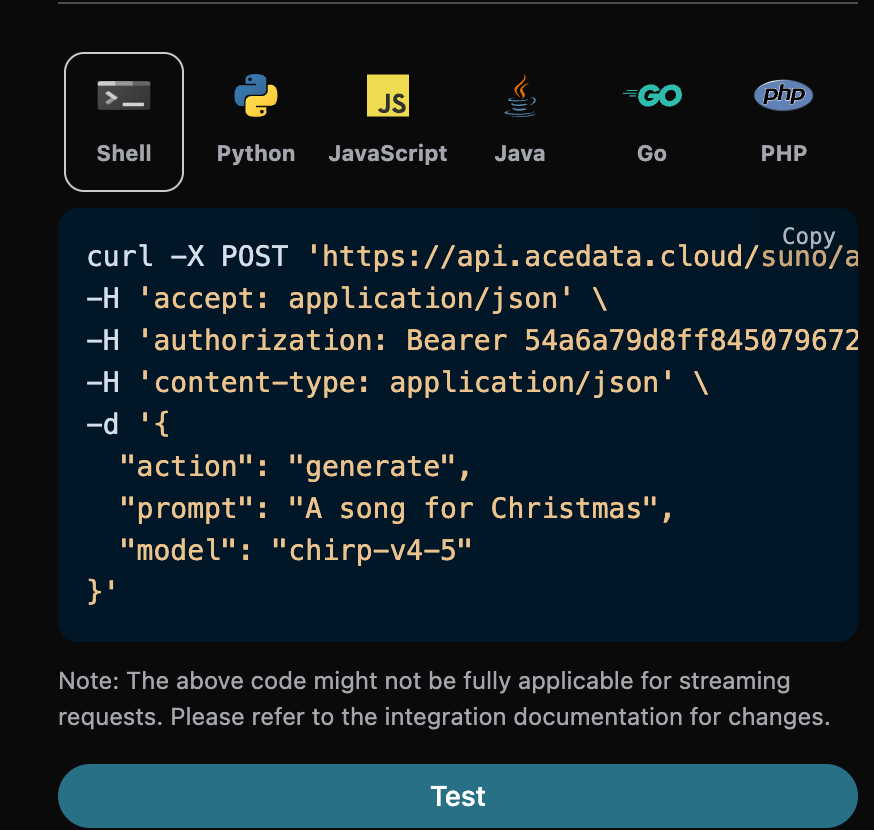
可以点击「Try」按钮直接测试 API,稍等 1-2 分钟,结果如下:
{
  "success": true,
  "task_id": "e72fb249-bd5b-4e2a-b20c-8a06fea5ac14",
  "trace_id": "7dbc5b6a-b2c0-4d85-9d39-fa8a8a785ccf",
  "data": [
    {
      "id": "b481b17a-bf50-4e10-8adc-4d5635050893",
      "title": "Under the Mistletoe",
      "image_url": "https://cdn.acedata.cloud/e724d7f13d.png?example=image-001",
      "lyric": "[Verse]\nSnowflakes falling on the ground\nTwinkling lights all around\nThe scent of pine fills the air\nChristmas magic everywhere\n[Chorus]\nUnder the mistletoe tonight\nHearts aglow in the soft moonlight\nLaughter echoes\nSpirits bright\nIt’s Christmas time\nIt feels so right\n[Verse 2]\nStockings hung by the fire’s glow\nWarmth inside while the cold winds blow\nCookies baking\nSweet delight\nA season of joy shining bright\n[Chorus]\nUnder the mistletoe tonight\nHearts aglow in the soft moonlight\nLaughter echoes\nSpirits bright\nIt’s Christmas time\nIt feels so right\n[Bridge]\nCarols sung by candlelight\nStars above make the world feel tight\nPeace and love\nA season’s creed\nFilling hearts with all we need\n[Chorus]\nUnder the mistletoe tonight\nHearts aglow in the soft moonlight\nLaughter echoes\nSpirits bright\nIt’s Christmas time\nIt feels so right",
      "audio_url": "https://cdn.acedata.cloud/assets/examples/fish/5ade0339-5f11-487e-aacc-06a908271706-8e3fcb0e5547.mp3",
      "video_url": "",
      "created_at": "2025-06-17T15:59:32.468Z",
      "model": "chirp-auk",
      "state": "succeeded",
      "prompt": "A song for Christmas",
      "style": "holiday, cheerful, male vocals",
      "duration": 154.92
    },
    {
      "id": "fbf22dab-5e2b-4e02-84c0-6d7605f14c3d",
      "title": "Under the Mistletoe",
      "image_url": "https://cdn.acedata.cloud/e724d7f13d.png?example=image-002",
      "lyric": "[Verse]\nSnowflakes falling on the ground\nTwinkling lights all around\nThe scent of pine fills the air\nChristmas magic everywhere\n[Chorus]\nUnder the mistletoe tonight\nHearts aglow in the soft moonlight\nLaughter echoes\nSpirits bright\nIt’s Christmas time\nIt feels so right\n[Verse 2]\nStockings hung by the fire’s glow\nWarmth inside while the cold winds blow\nCookies baking\nSweet delight\nA season of joy shining bright\n[Chorus]\nUnder the mistletoe tonight\nHearts aglow in the soft moonlight\nLaughter echoes\nSpirits bright\nIt’s Christmas time\nIt feels so right\n[Bridge]\nCarols sung by candlelight\nStars above make the world feel tight\nPeace and love\nA season’s creed\nFilling hearts with all we need\n[Chorus]\nUnder the mistletoe tonight\nHearts aglow in the soft moonlight\nLaughter echoes\nSpirits bright\nIt’s Christmas time\nIt feels so right",
      "audio_url": "https://cdn.acedata.cloud/assets/examples/fish/5ade0339-5f11-487e-aacc-06a908271706-8e3fcb0e5547.mp3",
      "video_url": "",
      "created_at": "2025-06-17T15:59:32.468Z",
      "model": "chirp-auk",
      "state": "succeeded",
      "prompt": "A song for Christmas",
      "style": "holiday, cheerful, male vocals",
      "duration": 158.48
    }
  ]
}
可以看到这时候我们就得到了两首歌的内容,包括标题、预览图、歌词、音频、视频等内容。
字段说明如下:
- success:生成是否成功,如果成功则为
true,否则为false - data:是一个列表,包含了生成的歌曲的详细信息。
- state: 歌曲生成状态,主要包含四种,具体的如下:
- succeeded:生成成功
- pending:队列中
- running:执行中
- error:失败
- id:歌曲 ID
- title:歌曲的标题
- image_url:歌曲的原始封面图片 URL,可直接用于展示。
- image_large_url:歌曲的高清原始封面 URL,有高清图时返回。需要长期保留封面时,请自行下载保存。
- lyric:歌曲的歌词
- audio_url:歌曲的终态音频地址。平台会优先返回 Ace Data Cloud CDN 地址;若持久化失败,可能返回原始媒体地址,请及时下载。
- video_url:歌曲的视频文件,打开就是一个 mp4 视频。
- created_at:创建的时间
- model:使用的模型,一般是最新的 v3 模型
- style:风格
- state: 歌曲生成状态,主要包含四种,具体的如下:
¶ 自定义生成
如果想自定义生成歌词,可以输入歌词:
这时候 lyric 字段可以传入类似如下内容:
[Verse]\nSnowflakes falling all around\nGlistening white\nCovering the ground\nChildren laughing\nFull of delight\nIn this winter wonderland tonight\nSanta's sleigh\nUp in the sky\nRudolph's nose shining bright\nOh my\nHear the jingle bells\nRinging so clear\nBringing joy and holiday cheer\n[Verse 2]\nRoasting chestnuts by the fire's glow\nChristmas lights\nThey twinkle and show\nFamilies gathering with love and cheer\nSpreading warmth to everyone near
注意,这里的歌词中
\n是换行符,如果你不知道如何生成歌词,可以使用 AceDataCloud 提供的歌词生成 API 来通过 prompt 生成歌词,API 是 Suno Lyrics Generation API。
接下来我们要根据歌词、标题、风格自定义生成歌曲,就可以指定如下内容:
- lyric:歌词文本
- custom:填写为
true,代表自定义生成,该参数默认为 false,代表使用prompt生成。 - title:歌曲的标题。
- style:歌曲的风格,选填。
填写样例如下:
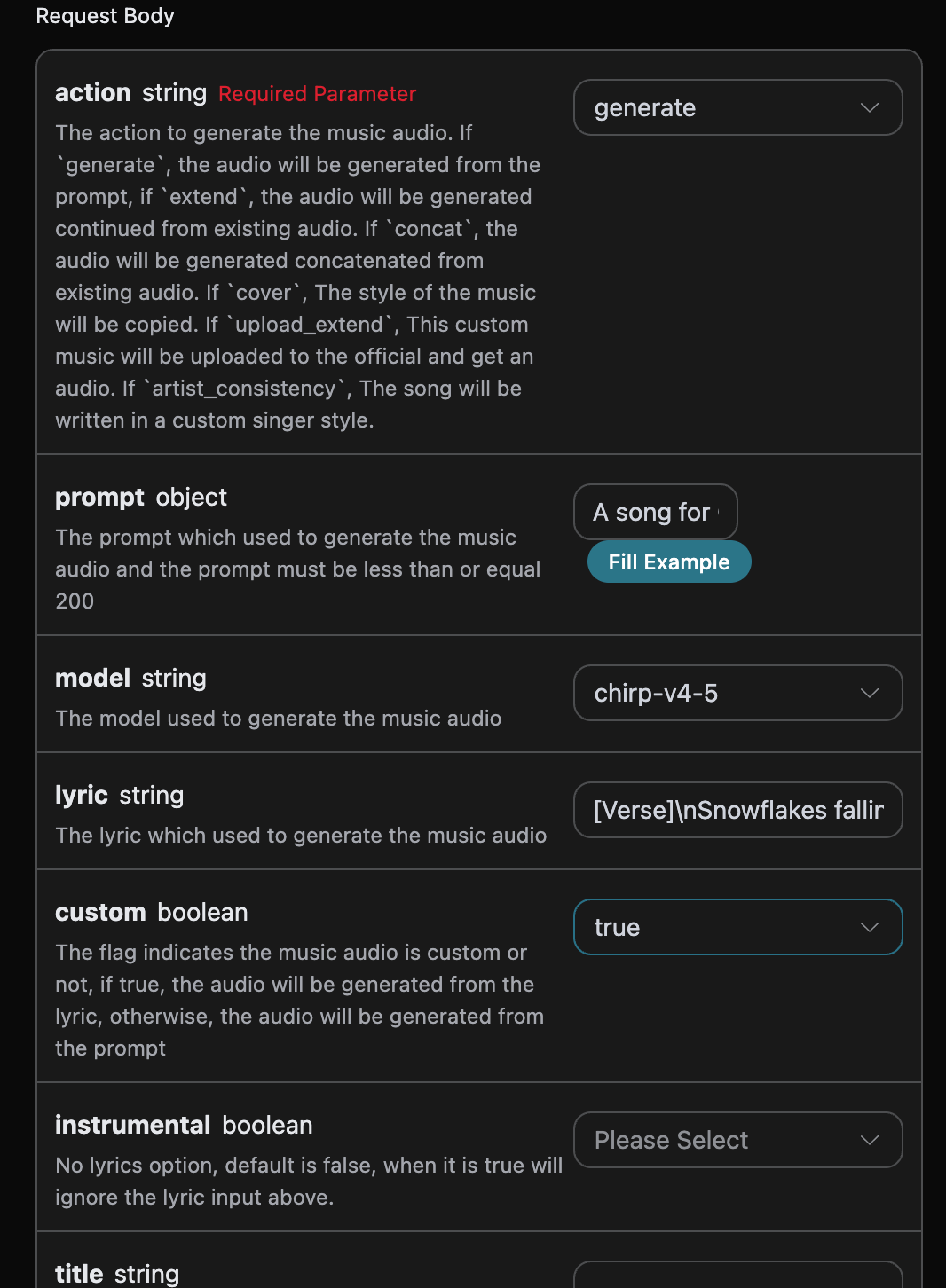
填写完毕之后自动生成了代码如下:
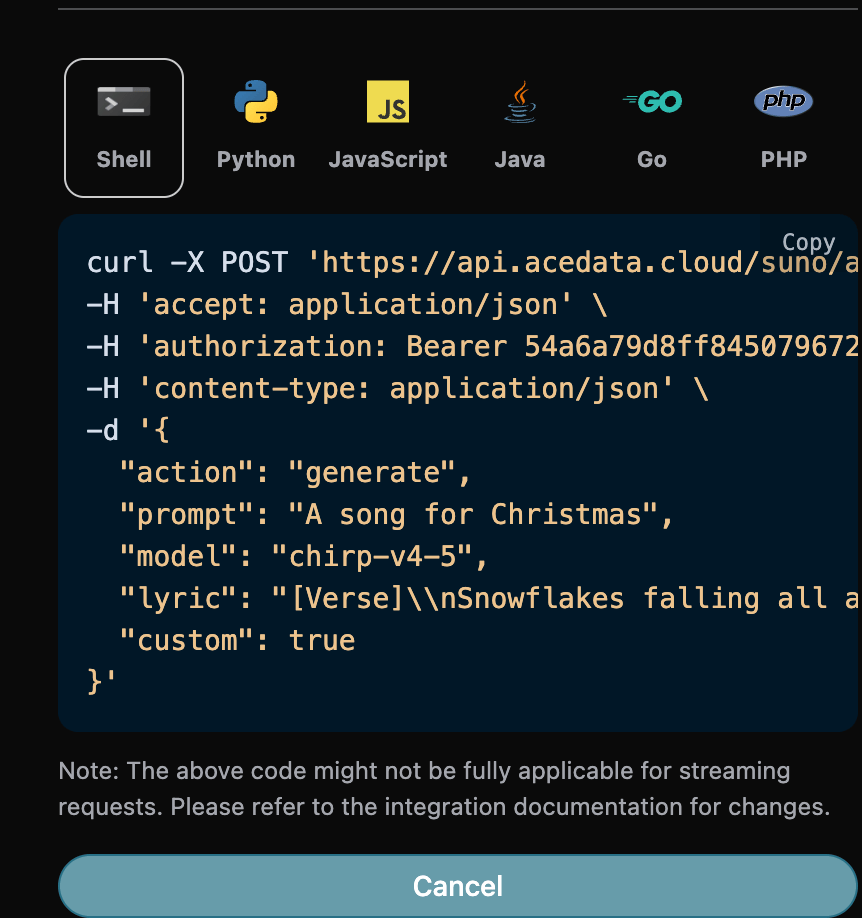
对应的代码:
curl -X POST 'https://api.acedata.cloud/suno/audios' \
-H 'accept: application/json' \
-H 'authorization: Bearer {token}' \
-H 'content-type: application/json' \
-d '{
  "action": "generate",
  "prompt": "A song for Christmas",
  "model": "chirp-v4-5",
  "lyric": "[Verse]\\nSnowflakes falling all around\\nGlistening white\\nCovering the ground\\nChildren laughing\\nFull of delight\\nIn this winter wonderland tonight\\nSanta's sleigh\\nUp in the sky\\nRudolph's nose shining bright\\nOh my\\nHear the jingle bells\\nRinging so clear\\nBringing joy and holiday cheer\\n[Verse 2]\\nRoasting chestnuts by the fire's glow\\nChristmas lights\\nThey twinkle and show\\nFamilies gathering with love and cheer\\nSpreading warmth to everyone near",
  "custom": true
}'
测试允许,生成的效果是类似的。
¶ 自定义歌手风格生成功能
如果想使用歌手风格来生成歌曲的话,首先通过上文的基本使用生成一首歌曲,
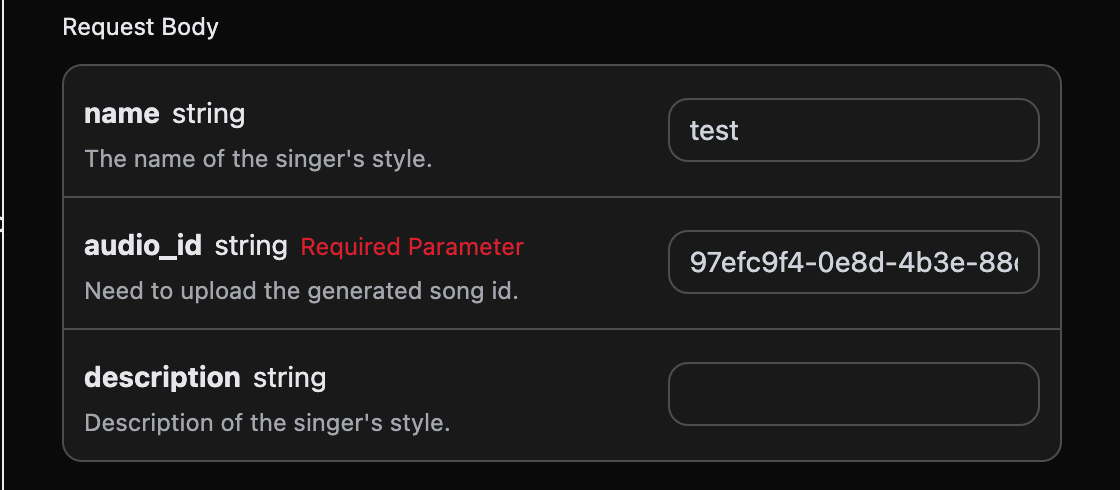
最后得到了需要设置这个歌曲为歌手风格,然后需要进入Suno Persona API根据官方生成的音乐 ID audio_id 来生成一个歌手风格的 id 参数 persona_id,具体的参数如下图所示:
填写完毕之后自动生成了代码如下:
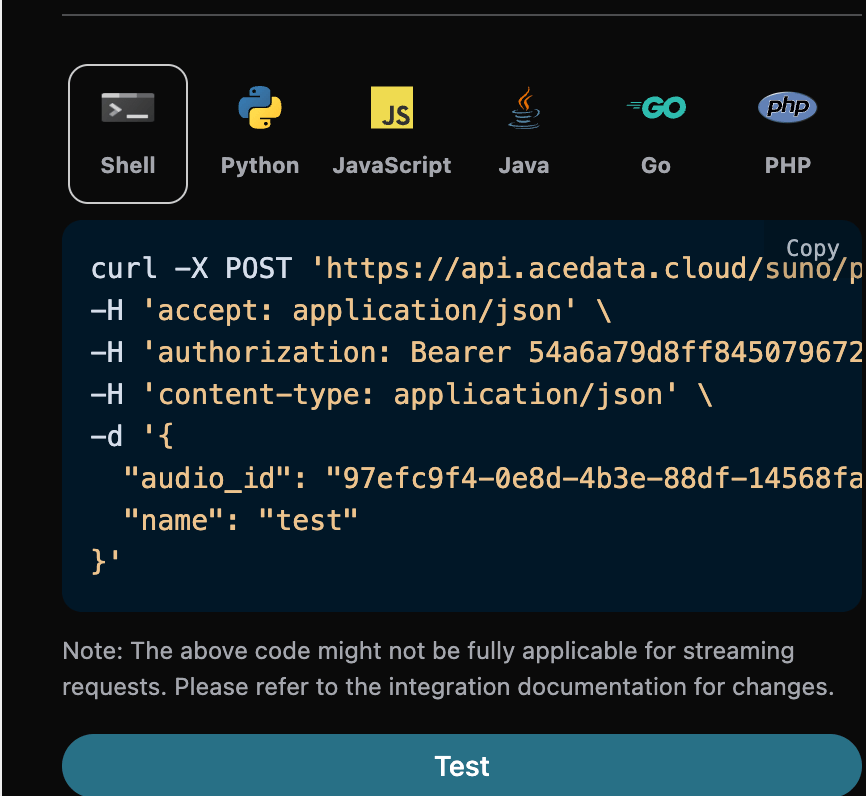
对应的 Python 代码:
import requests

url = "https://api.acedata.cloud/suno/persona"

headers = {
    "accept": "application/json",
    "authorization": "Bearer {token}",
    "content-type": "application/json"
}

payload = {
    "audio_id": "97efc9f4-0e8d-4b3e-88df-14568fa1b11f",
    "name": "test"
}

response = requests.post(url, json=payload, headers=headers)
print(response.text)
点击运行,可以发现会得到一个结果,如下:
{
  "success": true,
  "task_id": "7628b754-4fe7-4e79-bda4-806d0dd8bf6e",
  "data": {
    "persona_id": "e0d7319e-aa2a-44cb-b00a-916218d7cb0b"
  }
}
我们以上面的 audio_id 和 persona_id 分别为 97efc9f4-0e8d-4b3e-88df-14568fa1b11f、e0d7319e-aa2a-44cb-b00a-916218d7cb0b 为此次的示例数据。 然后可以将参数 action 设置为 artist_consistency (如果是新版的歌手风格Persona-v2-vox,action 必须设置为 artist_consistency_vox),并且输入需要继续生成歌曲的 ID 、 歌手风格 ID,填写样例如下:
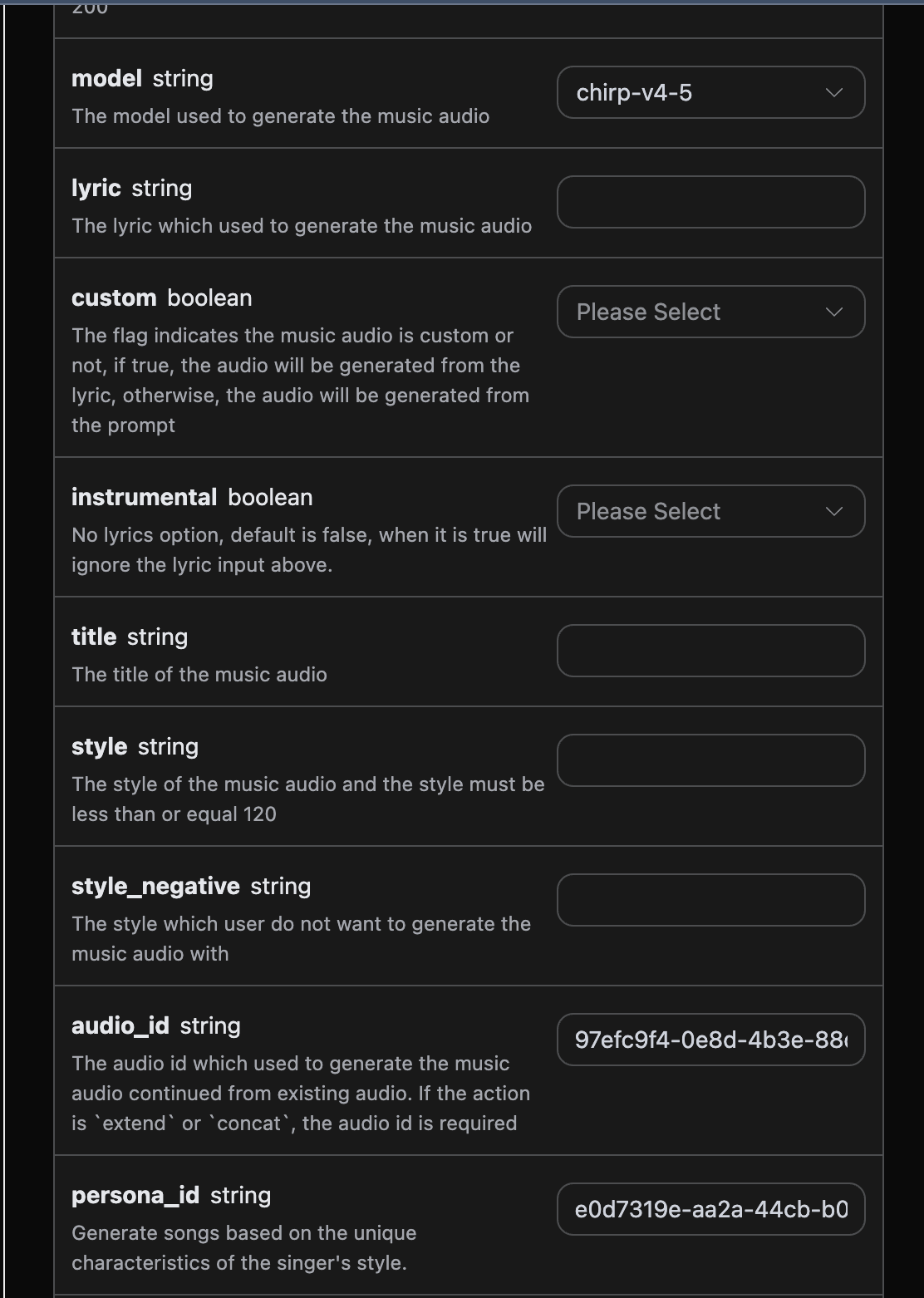
填写完毕之后自动生成了代码如下:
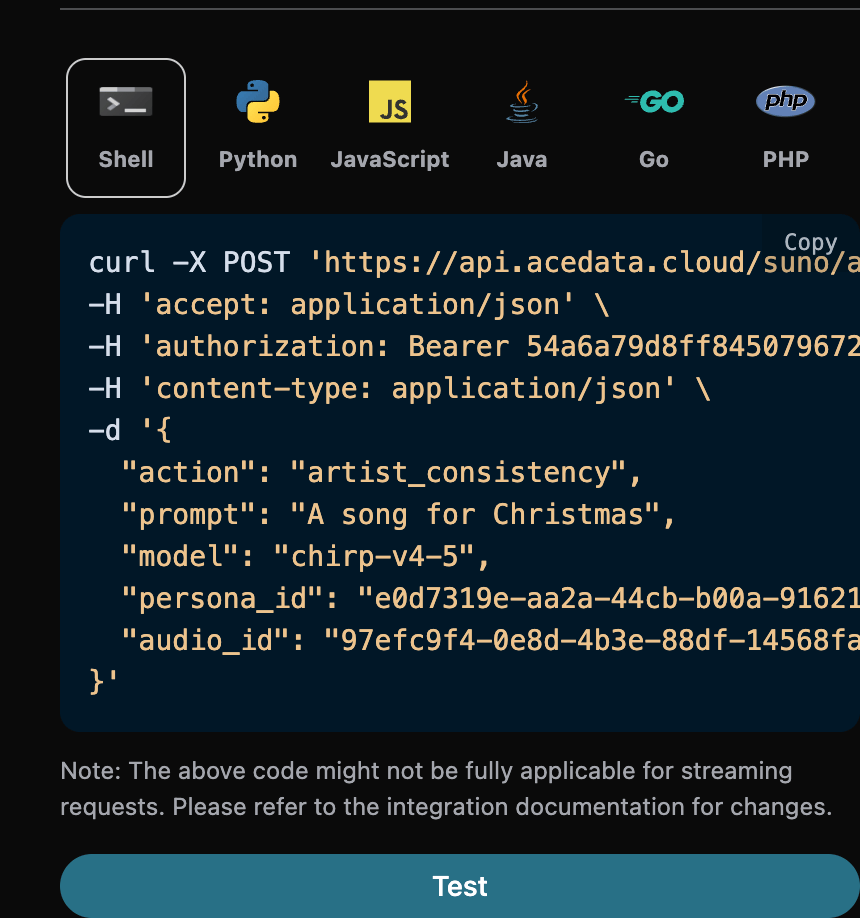
对应的 Python 代码:
import requests

url = "https://api.acedata.cloud/suno/audios"

headers = {
    "accept": "application/json",
    "authorization": "Bearer {token}",
    "content-type": "application/json"
}

payload = {
    "action": "artist_consistency",
    "prompt": "A song for Christmas",
    "model": "chirp-v4-5",
    "persona_id": "e0d7319e-aa2a-44cb-b00a-916218d7cb0b",
    "audio_id": "97efc9f4-0e8d-4b3e-88df-14568fa1b11f"
}

response = requests.post(url, json=payload, headers=headers)
print(response.text)
点击运行,可以发现会得到一个结果,如下:
{
  "success": true,
  "task_id": "9b732b1a-bd67-48bc-95e4-90140e06836f",
  "trace_id": "30fcd88e-7687-4137-92d7-913b58115204",
  "data": [
    {
      "id": "727a36e2-8dce-4df7-99e5-14e44635c80f",
      "title": "",
      "image_url": "https://cdn.acedata.cloud/e724d7f13d.png?example=image-003",
      "lyric": "",
      "audio_url": "https://cdn.acedata.cloud/assets/examples/fish/5ade0339-5f11-487e-aacc-06a908271706-8e3fcb0e5547.mp3",
      "video_url": "",
      "created_at": "2025-06-17T16:27:33.979Z",
      "model": "chirp-auk",
      "state": "succeeded",
      "style": "",
      "duration": 244.4
    },
    {
      "id": "3b33301a-b17e-4b25-8842-09b46dab1a36",
      "title": "",
      "image_url": "https://cdn.acedata.cloud/e724d7f13d.png?example=image-004",
      "lyric": "",
      "audio_url": "https://cdn.acedata.cloud/assets/examples/fish/5ade0339-5f11-487e-aacc-06a908271706-8e3fcb0e5547.mp3",
      "video_url": "",
      "created_at": "2025-06-17T16:27:33.979Z",
      "model": "chirp-auk",
      "state": "succeeded",
      "style": "",
      "duration": 229.88
    }
  ]
}
可以看出,结果内容与上文的是一致的,这也就实现使用歌手风格来生成歌曲的功能。
¶ 继续生成功能
如果想对已经生成的 Suno 歌曲进行继续生成的话,可以将参数 action 设置为 extend ,并且输入需要继续生成歌曲的 ID,歌曲 ID 的获取是根据基本使用来获取,通过上文可知,这时候可以看到歌曲的 ID 为:
"id": "97efc9f4-0e8d-4b3e-88df-14568fa1b11f"
注意,这里的歌词中
id是生成后歌曲的 ID,如果你不知道如何生成歌曲,可以参考上文的基本使用来生成歌曲。
如果想对自己上传的歌曲进行继续生成的话,可以将参数 action 设置为 upload_extend ,并且输入需要继续生成自定义上传的歌曲 ID,歌曲 ID 的获取是使用 Suno Upload Generation API来获取,如下图所示:
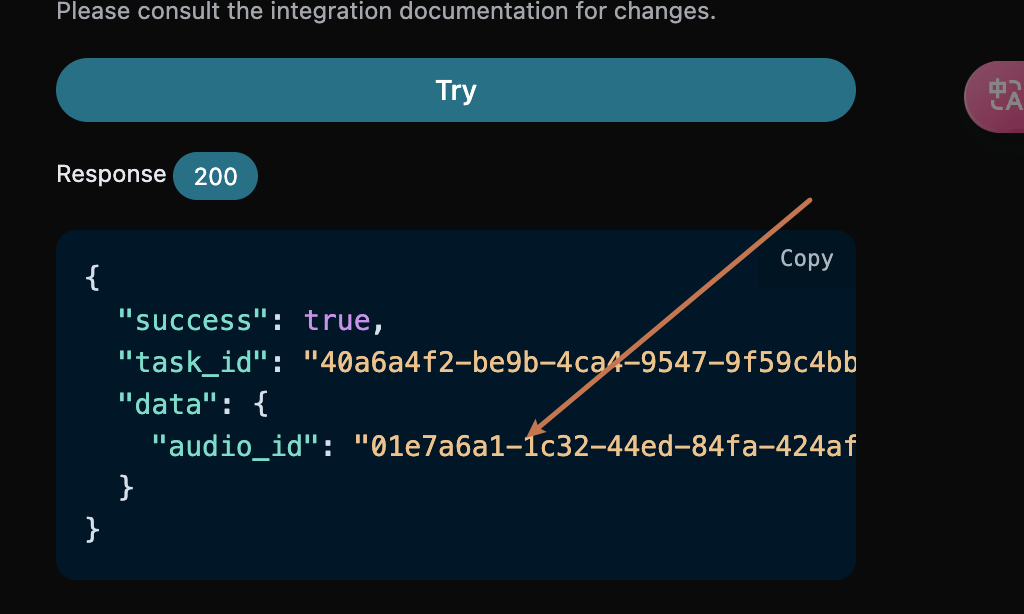
接下来必须填写续写片段的歌词,并可以指定风格:
- lyric:只用于引导
continue_at之后新生成片段的歌词,不会替换源音频中该时间点之前的歌词。 - custom:填写为
true,代表自定义生成,该参数默认为 false,代表使用prompt生成。 - style:续写片段的歌曲风格,选填。
- continue_at:续写边界,单位为秒。例如,213.5 表示从第 3 分 33.5 秒处开始生成后续片段。
extend 和 upload_extend 的 continue_at 必须大于 0,支持小数秒,例如 30.792;提交时不会取整。
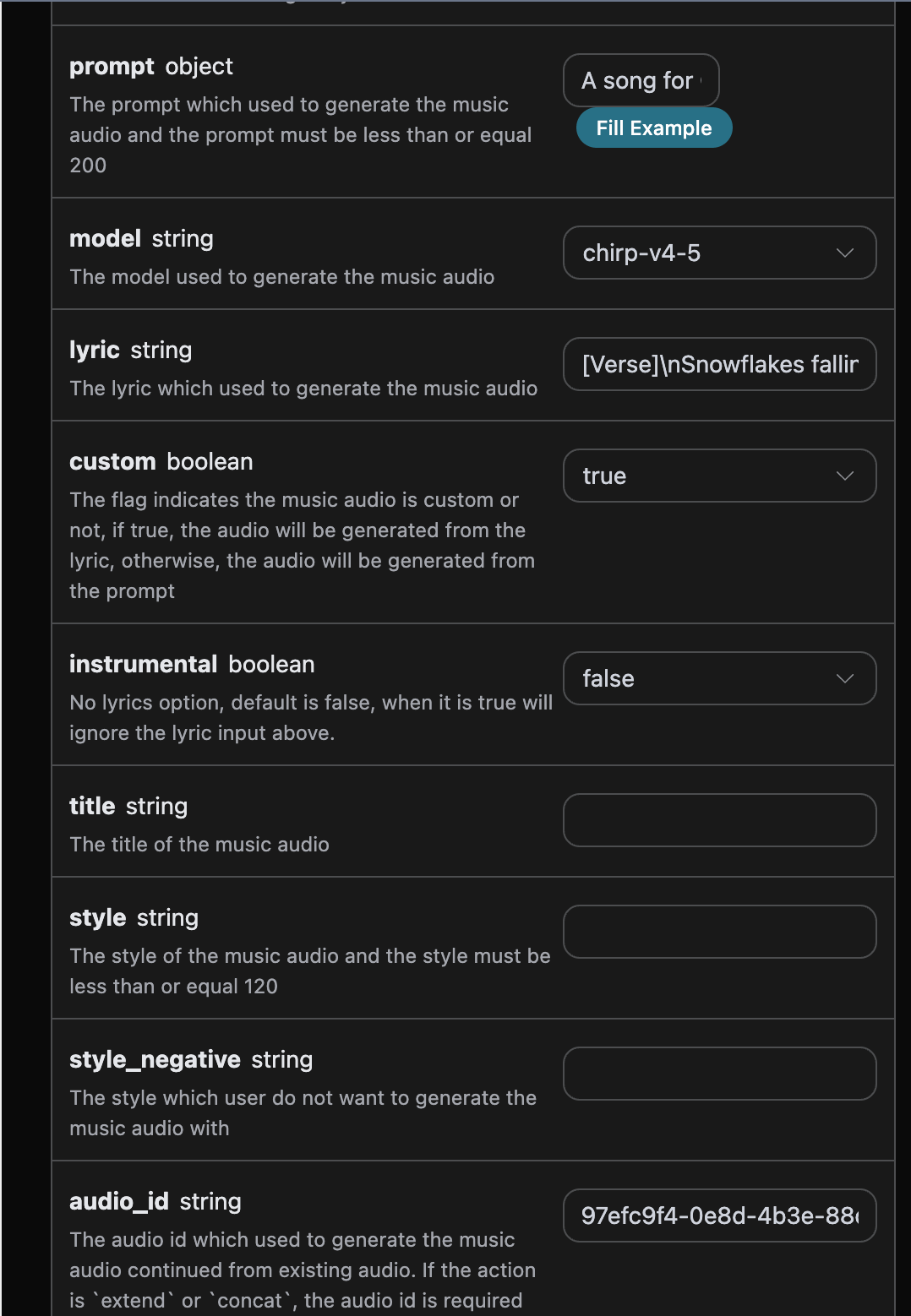
extend用于接着已有歌曲往后创作,不是给整首歌曲换词。若希望整首歌曲从头使用新歌词,请使用generate重新生成;若希望参考已有歌曲重新演绎,可使用cover。传入一整首新歌词时,continue_at之前的原歌词仍不会被替换。
填写样例如下:
填写完毕之后自动生成了代码如下:
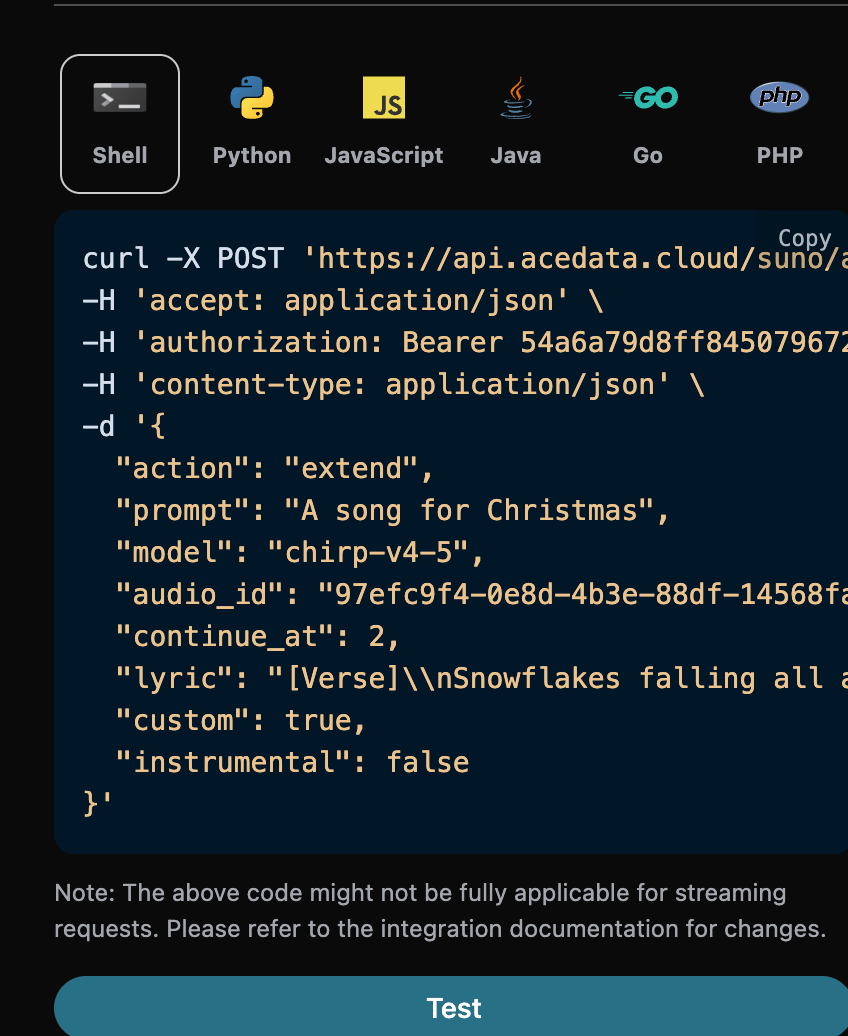
下面保留的是一次真实历史调用快照,其中 continue_at 为 2 秒,因此只有前 2 秒属于续写边界之前的原内容。实际接近歌曲结尾续写时,应将该值设为期望开始续写的秒数,并仅在 lyric 中提供边界之后要唱的新段落。
对应的 Python 代码:
import requests

url = "https://api.acedata.cloud/suno/audios"

headers = {
    "accept": "application/json",
    "authorization": "Bearer {token}",
    "content-type": "application/json"
}

payload = {
    "action": "extend",
    "prompt": "A song for Christmas",
    "model": "chirp-v4-5",
    "audio_id": "97efc9f4-0e8d-4b3e-88df-14568fa1b11f",
    "continue_at": 2,
    "lyric": "[Verse]\\nSnowflakes falling all around\\nGlistening white\\nCovering the ground\\nChildren laughing\\nFull of delight\\nIn this winter wonderland tonight\\nSanta's sleigh\\nUp in the sky\\nRudolph's nose shining bright\\nOh my\\nHear the jingle bells\\nRinging so clear\\nBringing joy and holiday cheer\\n[Verse 2]\\nRoasting chestnuts by the fire's glow\\nChristmas lights\\nThey twinkle and show\\nFamilies gathering with love and cheer\\nSpreading warmth to everyone near",
    "custom": True,
    "instrumental": False
}

response = requests.post(url, json=payload, headers=headers)
print(response.text)
点击运行,可以发现会得到一个结果,如下:
{
  "success": true,
  "task_id": "75b835d9-30d1-4641-8524-0aeedbdc9e1a",
  "trace_id": "44c41045-a2e1-4d19-aafc-7abd239d0d5c",
  "data": [
    {
      "id": "0a1e1b10-c36a-41c9-9bfb-b26d9d25db98",
      "title": "",
      "image_url": "https://cdn.acedata.cloud/e724d7f13d.png?example=image-005",
      "lyric": "[Verse]\\nSnowflakes falling all around\\nGlistening white\\nCovering the ground\\nChildren laughing\\nFull of delight\\nIn this winter wonderland tonight\\nSanta's sleigh\\nUp in the sky\\nRudolph's nose shining bright\\nOh my\\nHear the jingle bells\\nRinging so clear\\nBringing joy and holiday cheer\\n[Verse 2]\\nRoasting chestnuts by the fire's glow\\nChristmas lights\\nThey twinkle and show\\nFamilies gathering with love and cheer\\nSpreading warmth to everyone near",
      "audio_url": "https://cdn.acedata.cloud/assets/examples/fish/5ade0339-5f11-487e-aacc-06a908271706-8e3fcb0e5547.mp3",
      "video_url": "",
      "created_at": "2025-06-17T16:38:35.509Z",
      "model": "chirp-auk",
      "state": "succeeded",
      "style": "",
      "duration": 165.92
    },
    {
      "id": "4334c5b4-0a44-4b26-a8f6-66cc4dbb8fc3",
      "title": "",
      "image_url": "https://cdn.acedata.cloud/e724d7f13d.png?example=image-006",
      "lyric": "[Verse]\\nSnowflakes falling all around\\nGlistening white\\nCovering the ground\\nChildren laughing\\nFull of delight\\nIn this winter wonderland tonight\\nSanta's sleigh\\nUp in the sky\\nRudolph's nose shining bright\\nOh my\\nHear the jingle bells\\nRinging so clear\\nBringing joy and holiday cheer\\n[Verse 2]\\nRoasting chestnuts by the fire's glow\\nChristmas lights\\nThey twinkle and show\\nFamilies gathering with love and cheer\\nSpreading warmth to everyone near",
      "audio_url": "https://cdn.acedata.cloud/assets/examples/fish/5ade0339-5f11-487e-aacc-06a908271706-8e3fcb0e5547.mp3",
      "video_url": "",
      "created_at": "2025-06-17T16:38:35.509Z",
      "model": "chirp-auk",
      "state": "succeeded",
      "style": "",
      "duration": 158.84
    }
  ]
}
可以看出,结果中 lyric 会返回此次续写任务使用的歌词文本。该字段不是完整成品音频的逐字转写;对于 extend,continue_at 之前的源音频仍使用原歌词,新歌词只用于引导续写片段。
¶ 获取完整歌曲
当前模型的 extend 结果通常已包含 continue_at 之前的源音频和边界之后的新内容,请先根据返回音频的实际时长与内容判断是否已经是完整歌曲。若返回的是独立续写片段,或者需要将多次续写历史显式合并为一首歌,再使用拼接功能:
- action:内容为
concat。 - audio_id:最后一个续写片段的 ID。
比如扩展后的歌曲 ID 是:0a1e1b10-c36a-41c9-9bfb-b26d9d25db98,那么可以设置参数如下:
{
  "action": "concat",
  "audio_id": "0a1e1b10-c36a-41c9-9bfb-b26d9d25db98"
}
其他参数不变,返回的就是一首完整的歌曲,就是所有歌曲片段的拼接结果,但结果只有一首歌,样例如下:
{
  "success": true,
  "task_id": "0f794915-8418-4124-93f5-b7eb3a417167",
  "trace_id": "62afcce0-e7e5-44b8-8c2e-4bba12a4f414",
  "data": [
    {
      "id": "0efec7e0-11bf-4313-9981-2c0e7218d7dd",
      "title": "",
      "image_url": "https://cdn.acedata.cloud/e724d7f13d.png?example=image-007",
      "lyric": "[Verse]\\nSnowflakes falling all around\\nGlistening white\\nCovering the ground\\nChildren laughing\\nFull of delight\\nIn this winter wonderland tonight\\nSanta's sleigh\\nUp in the sky\\nRudolph's nose shining bright\\nOh my\\nHear the jingle bells\\nRinging so clear\\nBringing joy and holiday cheer\\n[Verse 2]\\nRoasting chestnuts by the fire's glow\\nChristmas lights\\nThey twinkle and show\\nFamilies gathering with love and cheer\\nSpreading warmth to everyone near\n[Verse]\\nSnowflakes falling all around\\nGlistening white\\nCovering the ground\\nChildren laughing\\nFull of delight\\nIn this winter wonderland tonight\\nSanta's sleigh\\nUp in the sky\\nRudolph's nose shining bright\\nOh my\\nHear the jingle bells\\nRinging so clear\\nBringing joy and holiday cheer\\n[Verse 2]\\nRoasting chestnuts by the fire's glow\\nChristmas lights\\nThey twinkle and show\\nFamilies gathering with love and cheer\\nSpreading warmth to everyone near",
      "audio_url": "https://cdn.acedata.cloud/assets/examples/fish/5ade0339-5f11-487e-aacc-06a908271706-8e3fcb0e5547.mp3",
      "video_url": "",
      "created_at": "2025-06-17T16:43:06.718Z",
      "model": "chirp-auk",
      "state": "succeeded",
      "style": "",
      "duration": 167.91997916666668,
      "concat_history": [
        {
          "continue_at": 2,
          "id": "97efc9f4-0e8d-4b3e-88df-14568fa1b11f",
          "infill": false,
          "source": "web",
          "type": "gen"
        },
        {
          "id": "0a1e1b10-c36a-41c9-9bfb-b26d9d25db98"
        }
      ]
    }
  ]
}
¶ 音乐翻版
当基于原有的歌曲继续生成歌曲之后,返回的歌曲的风格可能不太合适。如果要对原先生成的歌曲(若是自定义上传的音乐也支持)进行翻版,需要使用音乐翻版方法,就可以指定如下内容:
- action:内容为
cover,当是对自定义上传的音乐进行翻版操作的时候必须指定内容为:upload_cover。 - audio_id:之前生成歌曲的 ID。
如需使用指定声音翻唱,可同时传入 persona_id。通过 /suno/voices 创建的私有声音需要先在 /suno/upload 中携带相同的 persona_id 上传原曲,再使用返回的 audio_id 进行 upload_cover。各步骤须使用相同的服务通道。无需额外指定 vocal_gender,性别偏好不能代替声音 ID。
比如原先生成后的歌曲 ID 是:0a1e1b10-c36a-41c9-9bfb-b26d9d25db98,那么可以设置参数如下:
{
  "action": "cover",
  "audio_id": "0a1e1b10-c36a-41c9-9bfb-b26d9d25db98",
  "prompt": "A song for Christmas",
  "model": "chirp-v4-5"
}
其他参数不变,返回的就是一首翻版后的歌曲,就是对原先生成的歌曲进行翻版后的结果,样例如下:
{
  "success": true,
  "task_id": "b9d43d06-2e0a-4b5e-9e0d-7dfab32e00ab",
  "trace_id": "6c5e567d-0fdc-4c44-9b36-4090d9a75ff5",
  "data": [
    {
      "id": "6988fa57-f810-41cf-afab-7838db2c77dc",
      "title": "",
      "image_url": "https://cdn.acedata.cloud/e724d7f13d.png?example=image-008",
      "lyric": "",
      "audio_url": "https://cdn.acedata.cloud/assets/examples/fish/5ade0339-5f11-487e-aacc-06a908271706-8e3fcb0e5547.mp3",
      "video_url": "",
      "created_at": "2025-06-17T16:44:13.007Z",
      "model": "chirp-auk",
      "state": "succeeded",
      "style": "",
      "duration": 182.4
    },
    {
      "id": "ce98b991-0258-4f05-8245-e43d4efa8fb8",
      "title": "",
      "image_url": "https://cdn.acedata.cloud/e724d7f13d.png?example=image-009",
      "lyric": "",
      "audio_url": "https://cdn.acedata.cloud/assets/examples/fish/5ade0339-5f11-487e-aacc-06a908271706-8e3fcb0e5547.mp3",
      "video_url": "",
      "created_at": "2025-06-17T16:44:13.007Z",
      "model": "chirp-auk",
      "state": "succeeded",
      "style": "",
      "duration": 179.72
    }
  ]
}
生成的结果与上文类似,这就完成了对原先生成的歌曲进行翻版生成的过程。
¶ 替换片段
replace_section 根据源歌曲的时间区间重新生成选中的片段,并将结果拼回原曲。replace_section_result_mode 默认为 full_song,返回 2 首完整歌曲,可直接播放,无需再调用 concat。
¶ 输入怎么填
action:replace_section。audio_id:要编辑的完整歌曲 ID。再次编辑时,使用上一次选中的完整歌曲的data[].id,不是task_id。model:歌曲生成模型,例如chirp-v6。lyric:选中区间要唱的局部新歌词。不需要为了获得完整歌曲而传入整首歌词。prompt:明确指定这次替换的局部新歌词。改词时建议与lyric填入同一段内容,避免两个字段表达不同的歌词。已有只传局部lyric、省略prompt的请求仍可使用,但补上prompt本身并不保证改词成功。style、negative_tags:可选的风格描述和排除项;prompt在此操作中不是普通做歌时的灵感描述。replace_section_start、replace_section_end:选区在本次源歌曲中的起止时间,单位为秒,支持小数。起点不得小于 0,终点必须大于起点且不得超过源歌曲时长。replace_section_result_mode:full_song(默认)返回 2 首完整歌曲;candidates返回 2 个尚未拼接的替换候选。
不要将“lyric 必须是替换后的完整歌词,prompt 必须是局部歌词”作为通用用法。完整歌词输入在部分任务中会产生过长的替换内容,拼接后使整曲显著变长。局部输入也不保证固定时长或逐字遵循歌词;这是生成式编辑,需要检查实际音频。
¶ 发起任务并取得完整歌曲
下面是请求格式示例。请将 YOUR_COMPLETED_AUDIO_ID 和时间区间替换为自己的源歌曲 ID 和实际选区;示例假设第 30–50 秒对应下列四句。
{
  "action": "replace_section",
  "audio_id": "YOUR_COMPLETED_AUDIO_ID",
  "model": "chirp-v6",
  "custom": false,
  "instrumental": false,
  "lyric": "晚风吹过安静的街巷\n绿色风筝停在我身旁\n我们沿着河岸轻轻唱\n把今天的故事放心上",
  "prompt": "晚风吹过安静的街巷\n绿色风筝停在我身旁\n我们沿着河岸轻轻唱\n把今天的故事放心上",
  "replace_section_start": 30.0,
  "replace_section_end": 50.0,
  "replace_section_result_mode": "full_song",
  "async": true
}
提交后使用返回的 task_id 查询 /suno/tasks,请求体为 {"action":"retrieve","id":"YOUR_TASK_ID"}。任务完成后,在任务响应的 response.data 中取得两首完整歌曲的 id、audio_url 和 duration,试听后选择其中一首。success: true 表示任务执行成功,不等于新歌词已逐字唱出或时长符合预期。
¶ 选区、结果检查与再次编辑
- 先试听源歌曲,再结合
/suno/timing的时间信息确定选区,尽量覆盖完整乐句。不要按歌词数组的固定下标选区,也不要用几句歌词替换包含更多乐句的区间而预期节奏完全不变。 - 新歌词的句数、字数和节奏尽量接近选区原有内容。只改几个字也需要试听验证,不能据此保证成功。
- 检查目标区间是否唱出新词、前后衔接是否自然,以及整曲时长是否合理。
full_song表示返回完整歌曲,不表示与原曲等长;替换片段变长时,后半段会相应后移。duration请求参数只用于普通生成,不能锁定替换片段的时长。 - 返回的
lyric是歌词元数据,完整歌曲模式会在可取得源歌词时间信息时组合完整歌词;无法取得时可能为空。它不是音频转写,出现新词不能证明音频已唱出新词。时间对齐信息也应结合试听核对,尤其是已经编辑过的产物。 - 再次编辑时,以所选完整成品 ID 为新的
audio_id,重新核对该成品的时长和选区。不要照搬编辑前的时间坐标,也不要直接将上次返回的整首lyric当作本次局部输入。
如果任务已完成但仍唱旧词、漏词或显著变长,先检查源歌曲 ID、选区和局部歌词,再检查另一首结果。增加任务查询频率不会改变已生成的内容。若仍异常,请保留 task_id、源歌曲 ID、请求字段、选区及结果音频,便于核查。
¶ 可选:先取候选,再手动拼接
仅当需要自行挑选替换候选时,设置 replace_section_result_mode: "candidates"。候选可能包含上下文,不能仅凭候选时长把它当作完整歌曲。选定后,以候选的 data[].id 调用 concat,再取得完整成品。
默认 full_song 已完成拼接,不需要执行这一步。
¶ 声曲分离
计费:action=stems 成功后,每次请求的标准费用为 0.56 Credits;同一请求返回的人声与伴奏合并计为一次。适用的消费优惠以实际账单为准,失败请求不收费。all_stems 和 extract_stem 按各自价格计费。
当生成歌曲之后需要进行伴奏和人声单独操作的二次创作时,可以分离纯音乐伴奏和清唱人声。就可以指定如下内容:
- action:内容为
stems。 - audio_id:之前生成歌曲的 ID。
比如原先生成后的歌曲 ID 是:ec13e502-d043-4eb2-92ee-e900c6da69d1,那么可以设置参数如下:
{
  "action": "stems",
  "audio_id": "ec13e502-d043-4eb2-92ee-e900c6da69d1"
}
通过以上参数即可得到声曲分离的结果,结果如下:
{
  "success": true,
  "task_id": "4050affc-f8a6-4cba-a86c-bf201eed053d",
  "trace_id": "5107ee58-687d-422f-9195-fa0e82e1fcc8",
  "data": [
    {
      "id": "e3de0928-085a-42c4-b982-3b24738d1989",
      "title": "Deck the Sky - Vocals",
      "image_url": "https://cdn.acedata.cloud/e724d7f13d.png?example=image-013",
      "lyric": "[Verse]\nSnowflakes dance on rooftops high\nChildren's laughter fills the sky\nCarols ring from church bells loud\nHolidays a joyful crowd\n[Verse 2]\nCandy canes and cocoa warm\nWrapped up tight in our own storm\nStockings hung with dreams and cheer\nMagic growing every year\n[Chorus]\nDeck the sky with twinkling stars\nHoliday joy feels ours and ours\nSing the songs of love and light\nChristmas glows so pure and bright\n[Verse 3]\nFireside tales of long ago\nReindeer prance in icy glow\nEvergreen and tinsel’s gleam\nChristmas time a lovely dream\n[Bridge]\nHearts are full with friends and kin\nMistletoe for love to win\nGifts of love and hope we share\nChristmas spirit everywhere\n[Chorus]\nDeck the sky with twinkling stars\nHoliday joy feels ours and ours\nSing the songs of love and light\nChristmas glows so pure and bright",
      "audio_url": "https://cdn.acedata.cloud/assets/examples/fish/5ade0339-5f11-487e-aacc-06a908271706-8e3fcb0e5547.mp3",
      "video_url": "https://cdn.acedata.cloud/assets/examples/gemini/04a043bd-6b23-4b4e-945c-ce48158c3eee-3a89912507c7.mp4?example=video-001",
      "created_at": "2025-01-05T07:49:16.881Z",
      "model": "",
      "state": "succeeded",
      "style": "holiday, jolly",
      "duration": 174.16
    },
    {
      "id": "ad5d7c89-709c-4eb4-a5a6-72f9f5e57fdb",
      "title": "Deck the Sky - Instrumental",
      "image_url": "https://cdn.acedata.cloud/e724d7f13d.png?example=image-014",
      "lyric": "",
      "audio_url": "https://cdn.acedata.cloud/assets/examples/fish/5ade0339-5f11-487e-aacc-06a908271706-8e3fcb0e5547.mp3",
      "video_url": "https://cdn.acedata.cloud/assets/examples/gemini/04a043bd-6b23-4b4e-945c-ce48158c3eee-3a89912507c7.mp4?example=video-002",
      "created_at": "2025-01-05T07:49:16.892Z",
      "model": "",
      "state": "succeeded",
      "style": "holiday, jolly",
      "duration": 174.16
    }
  ]
}
生成的结果与上文类似,这就完成了对原先生成的歌曲进行声曲分离的过程。
¶ 全轨道声曲分离
任务会等待全部音轨生成完成后才返回成功终态。处理中出现可播放地址不代表整组音轨已经完成。
当生成歌曲之后需要进行全轨道声曲分离操作时,就可以指定如下内容:
- action:内容为
all_stems。 - audio_id:之前生成歌曲的 ID。
比如原先生成后的歌曲 ID 是:bdf23a5a-59f5-4103-b452-054a824a7f9f,那么可以设置参数如下:
{
  "action": "all_stems",
  "audio_id": "bdf23a5a-59f5-4103-b452-054a824a7f9f"
}
通过以上参数即可得到全轨道声曲分离的结果,结果如下:
{
  "success": true,
  "task_id": "f4b16fb9-8478-4857-88c7-b9a1f0bb9518",
  "trace_id": "9c560ebd-4fc6-4bdb-988a-8890160a92fb",
  "data": [
    {
      "id": "f86ca64a-9519-4ea7-a592-52438e001412",
      "title": "安全之弦 (Vocals)",
      "image_url": "https://cdn.acedata.cloud/e724d7f13d.png?example=image-015",
      "lyric": "",
      "audio_url": "https://cdn.acedata.cloud/assets/examples/fish/5ade0339-5f11-487e-aacc-06a908271706-8e3fcb0e5547.mp3",
      "video_url": "",
      "created_at": "2025-06-11T02:40:30.770Z",
      "model": "chirp-ahi-stem-12-t1",
      "state": "succeeded",
      "duration": 154.92
    },
    {
      "id": "99e649a7-a394-47b9-a915-d7f847285a36",
      "title": "安全之弦 (Backing Vocals)",
      "image_url": "https://cdn.acedata.cloud/e724d7f13d.png?example=image-016",
      "lyric": "",
      "audio_url": "https://cdn.acedata.cloud/assets/examples/fish/5ade0339-5f11-487e-aacc-06a908271706-8e3fcb0e5547.mp3",
      "video_url": "",
      "created_at": "2025-06-11T02:40:30.770Z",
      "model": "chirp-ahi-stem-12-t1",
      "state": "succeeded",
      "duration": 154.92
    },
    {
      "id": "6d710bf7-809f-4fdc-bb63-b8cb3a456d42",
      "title": "安全之弦 (Drums)",
      "image_url": "https://cdn.acedata.cloud/e724d7f13d.png?example=image-017",
      "lyric": "",
      "audio_url": "https://cdn.acedata.cloud/assets/examples/fish/5ade0339-5f11-487e-aacc-06a908271706-8e3fcb0e5547.mp3",
      "video_url": "",
      "created_at": "2025-06-11T02:40:30.770Z",
      "model": "chirp-ahi-stem-12-t1",
      "state": "succeeded",
      "duration": 154.92
    },
    {
      "id": "e05f07e3-7d80-4713-8e51-7f176c733543",
      "title": "安全之弦 (Bass)",
      "image_url": "https://cdn.acedata.cloud/e724d7f13d.png?example=image-018",
      "lyric": "",
      "audio_url": "https://cdn.acedata.cloud/assets/examples/fish/5ade0339-5f11-487e-aacc-06a908271706-8e3fcb0e5547.mp3",
      "video_url": "",
      "created_at": "2025-06-11T02:40:30.770Z",
      "model": "chirp-ahi-stem-12-t1",
      "state": "succeeded",
      "duration": 154.92
    },
    {
      "id": "93fe7cd8-62fd-4739-b78e-142c7e0b8562",
      "title": "安全之弦 (Guitar)",
      "image_url": "https://cdn.acedata.cloud/e724d7f13d.png?example=image-019",
      "lyric": "",
      "audio_url": "https://cdn.acedata.cloud/assets/examples/fish/5ade0339-5f11-487e-aacc-06a908271706-8e3fcb0e5547.mp3",
      "video_url": "",
      "created_at": "2025-06-11T02:40:30.770Z",
      "model": "chirp-ahi-stem-12-t1",
      "state": "succeeded",
      "duration": 154.92
    },
    {
      "id": "8367d71c-fdd3-441c-8ebe-70c33cca821b",
      "title": "安全之弦 (Keyboard)",
      "image_url": "https://cdn.acedata.cloud/e724d7f13d.png?example=image-020",
      "lyric": "",
      "audio_url": "https://cdn.acedata.cloud/assets/examples/fish/5ade0339-5f11-487e-aacc-06a908271706-8e3fcb0e5547.mp3",
      "video_url": "",
      "created_at": "2025-06-11T02:40:30.770Z",
      "model": "chirp-ahi-stem-12-t1",
      "state": "succeeded",
      "duration": 154.92
    },
    {
      "id": "28c03590-731c-416e-8fd3-95cdb3d75043",
      "title": "安全之弦 (Percussion)",
      "image_url": "https://cdn.acedata.cloud/e724d7f13d.png?example=image-021",
      "lyric": "",
      "audio_url": "https://cdn.acedata.cloud/assets/examples/fish/5ade0339-5f11-487e-aacc-06a908271706-8e3fcb0e5547.mp3",
      "video_url": "",
      "created_at": "2025-06-11T02:40:30.770Z",
      "model": "chirp-ahi-stem-12-t1",
      "state": "succeeded",
      "duration": 154.92
    },
    {
      "id": "3d4c1a28-4e1c-485a-8201-d21bb93aca2f",
      "title": "安全之弦 (Strings)",
      "image_url": "https://cdn.acedata.cloud/e724d7f13d.png?example=image-022",
      "lyric": "",
      "audio_url": "https://cdn.acedata.cloud/assets/examples/fish/5ade0339-5f11-487e-aacc-06a908271706-8e3fcb0e5547.mp3",
      "video_url": "",
      "created_at": "2025-06-11T02:40:30.770Z",
      "model": "chirp-ahi-stem-12-t1",
      "state": "succeeded",
      "duration": 154.92
    },
    {
      "id": "b9db8ded-01ec-4e37-b8a5-64aab3a814c2",
      "title": "安全之弦 (Synth)",
      "image_url": "https://cdn.acedata.cloud/e724d7f13d.png?example=image-023",
      "lyric": "",
      "audio_url": "https://cdn.acedata.cloud/assets/examples/fish/5ade0339-5f11-487e-aacc-06a908271706-8e3fcb0e5547.mp3",
      "video_url": "",
      "created_at": "2025-06-11T02:40:30.770Z",
      "model": "chirp-ahi-stem-12-t1",
      "state": "succeeded",
      "duration": 154.92
    },
    {
      "id": "10a5248e-32e6-42b9-8da1-678a8a392aef",
      "title": "安全之弦 (FX)",
      "image_url": "https://cdn.acedata.cloud/e724d7f13d.png?example=image-024",
      "lyric": "",
      "audio_url": "https://cdn.acedata.cloud/assets/examples/fish/5ade0339-5f11-487e-aacc-06a908271706-8e3fcb0e5547.mp3",
      "video_url": "",
      "created_at": "2025-06-11T02:40:30.770Z",
      "model": "chirp-ahi-stem-12-t1",
      "state": "succeeded",
      "duration": 154.92
    },
    {
      "id": "2d272128-111f-4901-8f62-5ae1eb43095a",
      "title": "安全之弦 (Brass)",
      "image_url": "https://cdn.acedata.cloud/e724d7f13d.png?example=image-025",
      "lyric": "",
      "audio_url": "https://cdn.acedata.cloud/assets/examples/fish/5ade0339-5f11-487e-aacc-06a908271706-8e3fcb0e5547.mp3",
      "video_url": "",
      "created_at": "2025-06-11T02:40:30.770Z",
      "model": "chirp-ahi-stem-12-t1",
      "state": "succeeded",
      "duration": 154.92
    },
    {
      "id": "4a7c19a5-f8d4-4e4a-add9-aa0bad9307cc",
      "title": "安全之弦 (Woodwinds)",
      "image_url": "https://cdn.acedata.cloud/e724d7f13d.png?example=image-026",
      "lyric": "",
      "audio_url": "https://cdn.acedata.cloud/assets/examples/fish/5ade0339-5f11-487e-aacc-06a908271706-8e3fcb0e5547.mp3",
      "video_url": "",
      "created_at": "2025-06-11T02:40:30.770Z",
      "model": "chirp-ahi-stem-12-t1",
      "state": "succeeded",
      "duration": 154.92
    },
    {
      "id": "1ca774f9-3e75-48a6-941b-808875eadcd2",
      "title": "安全之弦 (Vocals)",
      "image_url": "https://cdn.acedata.cloud/e724d7f13d.png?example=image-027",
      "lyric": "",
      "audio_url": "https://cdn.acedata.cloud/assets/examples/fish/5ade0339-5f11-487e-aacc-06a908271706-8e3fcb0e5547.mp3",
      "video_url": "",
      "created_at": "2025-06-11T02:40:30.770Z",
      "model": "chirp-ahi-stem-12-t1",
      "state": "succeeded",
      "duration": 154.92
    },
    {
      "id": "14c5ffc7-addf-4fee-afd2-4b8b3e7ee470",
      "title": "安全之弦 (Backing Vocals)",
      "image_url": "https://cdn.acedata.cloud/e724d7f13d.png?example=image-028",
      "lyric": "",
      "audio_url": "https://cdn.acedata.cloud/assets/examples/fish/5ade0339-5f11-487e-aacc-06a908271706-8e3fcb0e5547.mp3",
      "video_url": "",
      "created_at": "2025-06-11T02:40:30.771Z",
      "model": "chirp-ahi-stem-12-t1",
      "state": "succeeded",
      "duration": 154.92
    },
    {
      "id": "9d044557-450d-48ab-90dc-8eaf6f1cdb6c",
      "title": "安全之弦 (Drums)",
      "image_url": "https://cdn.acedata.cloud/e724d7f13d.png?example=image-029",
      "lyric": "",
      "audio_url": "https://cdn.acedata.cloud/assets/examples/fish/5ade0339-5f11-487e-aacc-06a908271706-8e3fcb0e5547.mp3",
      "video_url": "",
      "created_at": "2025-06-11T02:40:30.771Z",
      "model": "chirp-ahi-stem-12-t1",
      "state": "succeeded",
      "duration": 154.92
    },
    {
      "id": "efd052d0-c12f-47b3-8282-1f3ef7610e1f",
      "title": "安全之弦 (Bass)",
      "image_url": "https://cdn.acedata.cloud/e724d7f13d.png?example=image-030",
      "lyric": "",
      "audio_url": "https://cdn.acedata.cloud/assets/examples/fish/5ade0339-5f11-487e-aacc-06a908271706-8e3fcb0e5547.mp3",
      "video_url": "",
      "created_at": "2025-06-11T02:40:30.771Z",
      "model": "chirp-ahi-stem-12-t1",
      "state": "succeeded",
      "duration": 154.92
    },
    {
      "id": "5775372b-292e-4420-96ef-60e57a60cc1f",
      "title": "安全之弦 (Guitar)",
      "image_url": "https://cdn.acedata.cloud/e724d7f13d.png?example=image-031",
      "lyric": "",
      "audio_url": "https://cdn.acedata.cloud/assets/examples/fish/5ade0339-5f11-487e-aacc-06a908271706-8e3fcb0e5547.mp3",
      "video_url": "",
      "created_at": "2025-06-11T02:40:30.771Z",
      "model": "chirp-ahi-stem-12-t1",
      "state": "succeeded",
      "duration": 154.92
    },
    {
      "id": "dab3f220-19cd-408e-9b96-30ec18f5b049",
      "title": "安全之弦 (Keyboard)",
      "image_url": "https://cdn.acedata.cloud/e724d7f13d.png?example=image-032",
      "lyric": "",
      "audio_url": "https://cdn.acedata.cloud/assets/examples/fish/5ade0339-5f11-487e-aacc-06a908271706-8e3fcb0e5547.mp3",
      "video_url": "",
      "created_at": "2025-06-11T02:40:30.771Z",
      "model": "chirp-ahi-stem-12-t1",
      "state": "succeeded",
      "duration": 154.92
    },
    {
      "id": "2d0cd6d4-af82-4bb5-86fe-d92bdb367157",
      "title": "安全之弦 (Percussion)",
      "image_url": "https://cdn.acedata.cloud/e724d7f13d.png?example=image-033",
      "lyric": "",
      "audio_url": "https://cdn.acedata.cloud/assets/examples/fish/5ade0339-5f11-487e-aacc-06a908271706-8e3fcb0e5547.mp3",
      "video_url": "",
      "created_at": "2025-06-11T02:40:30.771Z",
      "model": "chirp-ahi-stem-12-t1",
      "state": "succeeded",
      "duration": 154.92
    },
    {
      "id": "f3191a1a-5e8d-4afe-b638-3add222d52cd",
      "title": "安全之弦 (Strings)",
      "image_url": "https://cdn.acedata.cloud/e724d7f13d.png?example=image-034",
      "lyric": "",
      "audio_url": "https://cdn.acedata.cloud/assets/examples/fish/5ade0339-5f11-487e-aacc-06a908271706-8e3fcb0e5547.mp3",
      "video_url": "",
      "created_at": "2025-06-11T02:40:30.771Z",
      "model": "chirp-ahi-stem-12-t1",
      "state": "succeeded",
      "duration": 154.92
    },
    {
      "id": "a8834ea5-200b-4206-a812-9780ef336660",
      "title": "安全之弦 (Synth)",
      "image_url": "https://cdn.acedata.cloud/e724d7f13d.png?example=image-035",
      "lyric": "",
      "audio_url": "https://cdn.acedata.cloud/assets/examples/fish/5ade0339-5f11-487e-aacc-06a908271706-8e3fcb0e5547.mp3",
      "video_url": "",
      "created_at": "2025-06-11T02:40:30.771Z",
      "model": "chirp-ahi-stem-12-t1",
      "state": "succeeded",
      "duration": 154.92
    },
    {
      "id": "f50d1a31-ef72-400a-b8ae-0367849d007d",
      "title": "安全之弦 (FX)",
      "image_url": "https://cdn.acedata.cloud/e724d7f13d.png?example=image-036",
      "lyric": "",
      "audio_url": "https://cdn.acedata.cloud/assets/examples/fish/5ade0339-5f11-487e-aacc-06a908271706-8e3fcb0e5547.mp3",
      "video_url": "",
      "created_at": "2025-06-11T02:40:30.771Z",
      "model": "chirp-ahi-stem-12-t1",
      "state": "succeeded",
      "duration": 154.92
    },
    {
      "id": "cb581673-23cc-40d6-9f9b-0f76720f0d18",
      "title": "安全之弦 (Brass)",
      "image_url": "https://cdn.acedata.cloud/e724d7f13d.png?example=image-037",
      "lyric": "",
      "audio_url": "https://cdn.acedata.cloud/assets/examples/fish/5ade0339-5f11-487e-aacc-06a908271706-8e3fcb0e5547.mp3",
      "video_url": "",
      "created_at": "2025-06-11T02:40:30.771Z",
      "model": "chirp-ahi-stem-12-t1",
      "state": "succeeded",
      "duration": 154.92
    },
    {
      "id": "d91cfb52-f0a3-4546-bf8a-2ad14c3775a5",
      "title": "安全之弦 (Woodwinds)",
      "image_url": "https://cdn.acedata.cloud/e724d7f13d.png?example=image-038",
      "lyric": "",
      "audio_url": "https://cdn.acedata.cloud/assets/examples/fish/5ade0339-5f11-487e-aacc-06a908271706-8e3fcb0e5547.mp3",
      "video_url": "",
      "created_at": "2025-06-11T02:40:30.771Z",
      "model": "chirp-ahi-stem-12-t1",
      "state": "succeeded",
      "duration": 154.92
    }
  ]
}
生成的结果与上文类似,这就完成了对原先生成的歌曲进行声曲分离的过程。
¶ 添加音轨
add_stem 为指定音频生成目标乐器或声音轨,通过 POST /suno/audios 调用。
- 必填:
action、audio_id、stem_type。 - 可选:
model、prompt、title、style、negative_tags、weirdness、style_influence、audio_weight、max_mode、variety。 - 计费:普通模式 0.672 Credits;
max_mode为true时 1.344 Credits。
{
  "action": "add_stem",
  "audio_id": "dead4ee5-df4d-417b-8f7e-717722fae51a",
  "stem_type": "bass",
  "model": "chirp-v6",
  "prompt": "Add warm bass guitar",
  "style": "minimal piano pulse with warm bass guitar",
  "negative_tags": "vocals",
  "variety": "normal",
  "max_mode": false,
  "async": true
}
终态响应:
{
  "success": true,
  "task_id": "82851953-9590-4334-8bb8-ae30ccadc815",
  "trace_id": "862bbcce-1678-44ff-982d-8b439c126a5e",
  "data": [
    {
      "id": "0adc26ca-2720-4c69-b237-457a986d70e3",
          "audio_url": "https://cdn.acedata2.cloud/suno/0adc26ca-2720-4c69-b237-457a986d70e3.mp3",
      "model": "chirp-v6",
      "state": "succeeded",
      "duration": 12.8
    },
    {
      "id": "e2d39a6c-1d20-4a40-adaf-b2551815d869",
          "audio_url": "https://cdn.acedata2.cloud/suno/e2d39a6c-1d20-4a40-adaf-b2551815d869.mp3",
      "model": "chirp-v6",
      "state": "succeeded",
      "duration": 12.36
    }
  ],
  "cost": {"amount": 0.6048, "currency": "credit", "list_amount": 0.672}
}
¶ 提取音轨
extract_stem 从指定音频中提取目标音轨,同时返回移除该音轨后的互补版本,通过 POST /suno/audios 调用。
- 必填:
action、audio_id、stem_type。 - 可选:
audio_format,当前公共双通道契约仅支持mp3。 - 计费:1.12 Credits。
{
  "action": "extract_stem",
  "audio_id": "dead4ee5-df4d-417b-8f7e-717722fae51a",
  "stem_type": "bass",
  "audio_format": "mp3",
  "async": true
}
终态响应中的 data 保留扁平音频列表,stem_sets 表示目标音轨与互补音轨的对应关系:
{
  "success": true,
  "task_id": "ae9557d0-4ff7-4a35-bcde-d881e78fbfe5",
  "trace_id": "82c51a55-7627-41a5-b72b-1b9775ca25f2",
  "data": [
    {"id":"3084d7e1-4278-4733-8b56-56f7ecf3f859","title":"(Bass)","audio_url":"https://cdn.acedata2.cloud/suno/3084d7e1-4278-4733-8b56-56f7ecf3f859.mp3","model":"chirp-v6","state":"succeeded","duration":12.8,"stem_set":1},
    {"id":"19b83ca9-a51d-494f-a41d-5b0957f3295e","title":"(Without Bass)","audio_url":"https://cdn.acedata2.cloud/suno/19b83ca9-a51d-494f-a41d-5b0957f3295e.mp3","model":"chirp-v6","state":"succeeded","duration":12.8,"stem_set":1},
    {"id":"7eb431e8-f4db-4915-902e-0e89d2b3185a","title":"(Bass)","audio_url":"https://cdn.acedata2.cloud/suno/7eb431e8-f4db-4915-902e-0e89d2b3185a.mp3","model":"chirp-v6","state":"succeeded","duration":12.8,"stem_set":2},
    {"id":"495d29cc-5790-4d0a-8b95-9551a6127b61","title":"(Without Bass)","audio_url":"https://cdn.acedata2.cloud/suno/495d29cc-5790-4d0a-8b95-9551a6127b61.mp3","model":"chirp-v6","state":"succeeded","duration":12.8,"stem_set":2}
  ],
  "stem_sets": [
    {"stem_type":"bass","isolated":{"id":"3084d7e1-4278-4733-8b56-56f7ecf3f859","state":"succeeded","stem_set":1},"remainder":{"id":"19b83ca9-a51d-494f-a41d-5b0957f3295e","state":"succeeded","stem_set":1}},
    {"stem_type":"bass","isolated":{"id":"7eb431e8-f4db-4915-902e-0e89d2b3185a","state":"succeeded","stem_set":2},"remainder":{"id":"495d29cc-5790-4d0a-8b95-9551a6127b61","state":"succeeded","stem_set":2}}
  ],
  "cost": {"amount": 1.008, "currency": "credit", "list_amount": 1.12}
}
¶ 生成音效
sounds 根据文字描述生成一次性或可循环音效,通过 POST /suno/audios 调用。
- 必填:
action、sound、sound_type。 - 可选:
model、bpm、key、audio_format;audio_format当前仅支持mp3。 sound_type:one-shot或loop。- 计费:0.112 Credits。
{
  "action": "sounds",
  "sound": "single soft analog synth pluck, no reverb",
  "sound_type": "one-shot",
  "model": "chirp-v6",
  "bpm": 120,
  "key": "C",
  "audio_format": "mp3",
  "async": true
}
{
  "success": true,
  "task_id": "f6716546-d118-40a0-ad15-09999f9f22ba",
  "trace_id": "da4c7895-e494-4bd8-83bd-132e006c94e3",
  "data": [
    {"id":"b3cd3e7d-96e4-48ef-abde-73c7ddee8b4a","title":"single soft analog synth pluck, no reverb","audio_url":"https://cdn.acedata2.cloud/suno/b3cd3e7d-96e4-48ef-abde-73c7ddee8b4a.mp3","model":"chirp-v6","state":"succeeded","duration":10},
    {"id":"f1517867-b76a-4cdf-b006-9ce6e653e0a5","title":"single soft analog synth pluck, no reverb","audio_url":"https://cdn.acedata2.cloud/suno/f1517867-b76a-4cdf-b006-9ce6e653e0a5.mp3","model":"chirp-v6","state":"succeeded","duration":10}
  ],
  "cost": {"amount": 0.1008, "currency": "credit", "list_amount": 0.112}
}
¶ 调整音频速度
adjust_speed 调整指定音频的播放速度,通过 POST /suno/audios 调用。
- 必填:
action、audio_id、speed_multiplier、title。 - 可选:
keep_pitch。 speed_multiplier:范围 0.25–4。- 计费:0.28 Credits。
{
  "action": "adjust_speed",
  "audio_id": "dead4ee5-df4d-417b-8f7e-717722fae51a",
  "speed_multiplier": 1.1,
  "keep_pitch": true,
  "title": "Suno contract verification speed 1.1x",
  "async": true
}
源音频时长为 9.8 秒,1.1 倍速结果为 8.909090909 秒:
{
  "success": true,
  "task_id": "c5860fdd-76b1-40a1-b5b5-ec047e471c8a",
  "trace_id": "292ed097-3631-441c-ac80-52f326b62726",
  "data": [
    {
      "id": "02534b52-45a7-4961-834a-f473a407e62c",
      "title": "Suno contract verification speed 1.1x",
      "audio_url": "https://cdn.acedata2.cloud/suno/02534b52-45a7-4961-834a-f473a407e62c.mp3",
      "model": "chirp-v6",
      "state": "succeeded",
      "duration": 8.909090909090908
    }
  ],
  "cost": {"amount": 0.252, "currency": "credit", "list_amount": 0.28}
}
生成模型具有随机性。接口保证参数语义、任务状态和响应结构一致,不保证不同请求生成完全相同的波形。
¶ 自定义生成的高级参数
官方允许在自定义模式下使用高级参数 weirdness==>Weirdness、style_influence==>Style Influence、audio_weight==>Audio Influence来进行生成,对应如下如的官方示例:
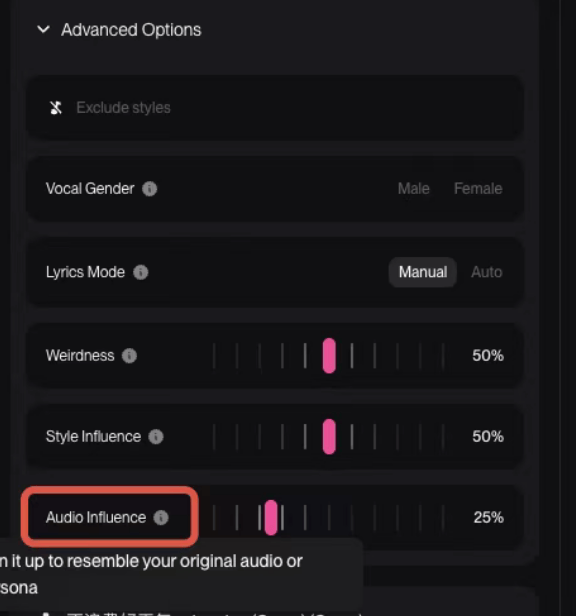
其中高级参数的范围都在 0-1 之间,具体的参数如下图所示:
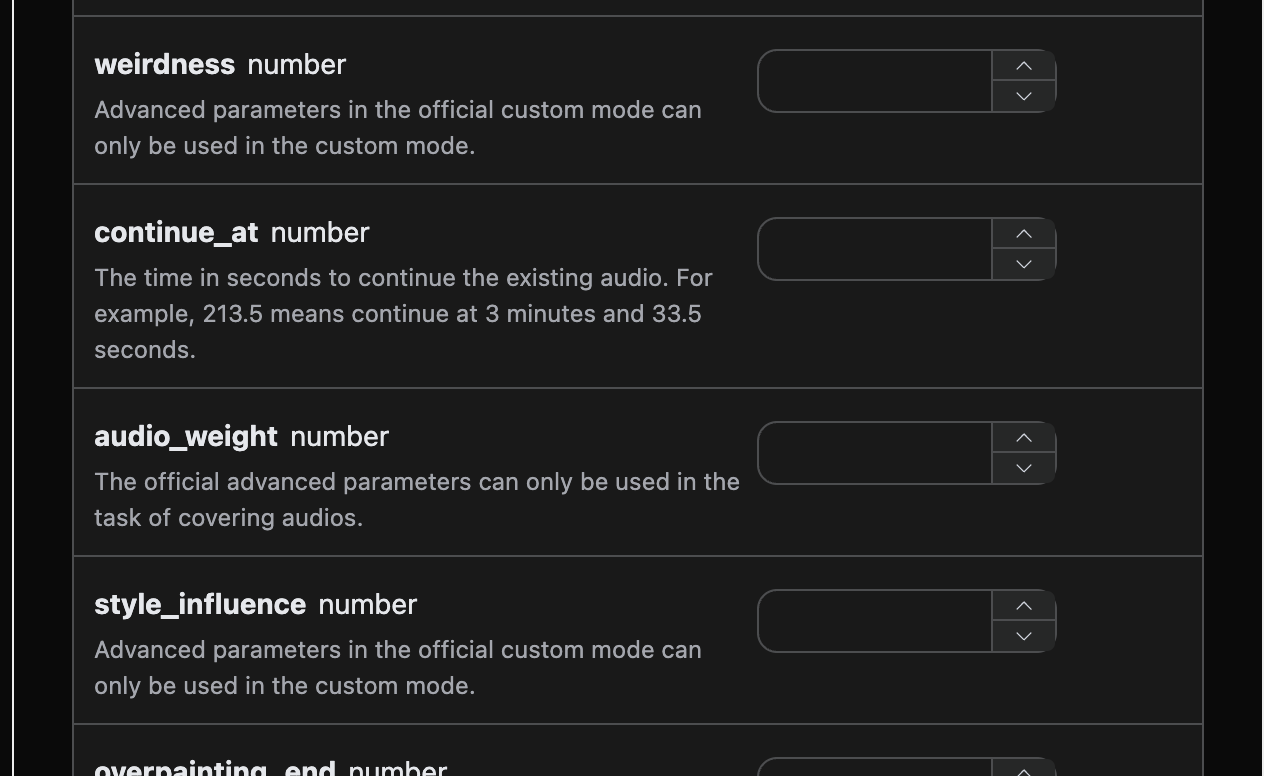
填写完毕之后自动生成了代码如下:
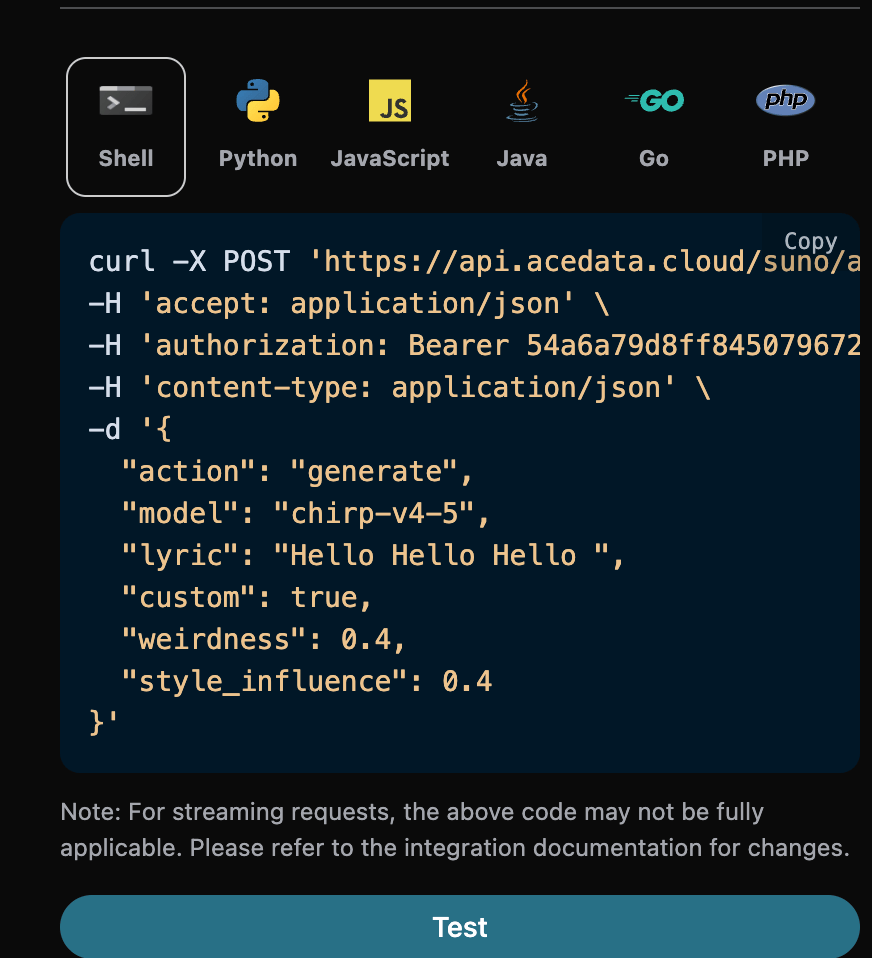
对应的 Python 代码:
import requests

url = "https://api.acedata.cloud/suno/audios"

headers = {
    "accept": "application/json",
    "authorization": "Bearer {token}",
    "content-type": "application/json"
}

payload = {
    "action": "generate",
    "model": "chirp-v4-5",
    "lyric": "Hello Hello Hello ",
    "custom": True,
    "weirdness": 0.4,
    "style_influence": 0.4,
    "audio_weight": 0.4
}

response = requests.post(url, json=payload, headers=headers)
print(response.text)
点击运行,可以发现会得到一个结果,如下:
{
  "success": true,
  "task_id": "2f3aa682-e1a7-43a9-9fbb-ed0ce8668a4b",
  "trace_id": "07408194-7deb-4a52-a36d-9a9a13143b5f",
  "data": [
    {
      "id": "c66e2077-7580-43f2-9937-c67a8afcd8bd",
      "title": "",
      "image_url": "https://cdn.acedata.cloud/e724d7f13d.png?example=image-039",
      "lyric": "Hello Hello Hello ",
      "audio_url": "https://cdn.acedata.cloud/assets/examples/fish/5ade0339-5f11-487e-aacc-06a908271706-8e3fcb0e5547.mp3",
      "video_url": "",
      "created_at": "2025-07-10T12:54:35.199Z",
      "model": "chirp-auk",
      "state": "succeeded",
      "style": "",
      "duration": 187.92
    },
    {
      "id": "a922f97b-307c-4c4d-aae3-a47ba8202a10",
      "title": "",
      "image_url": "https://cdn.acedata.cloud/e724d7f13d.png?example=image-040",
      "lyric": "Hello Hello Hello ",
      "audio_url": "https://cdn.acedata.cloud/assets/examples/fish/5ade0339-5f11-487e-aacc-06a908271706-8e3fcb0e5547.mp3",
      "video_url": "",
      "created_at": "2025-07-10T12:54:35.199Z",
      "model": "chirp-auk",
      "state": "succeeded",
      "style": "",
      "duration": 229.64
    }
  ]
}
这样就使用了高级参数进行生成自定义歌曲,结果与上文类似。
¶ 控制歌曲时长
默认情况下生成的歌曲时长由模型自行决定,通常在 30 秒到 4 分钟之间。如果需要更长或更短的成品,可以通过 duration 参数指定期望时长,单位是秒,取值为 10 到 360 之间的整数。
该参数用于自定义模式(custom 为 true)的歌曲生成。需要特别说明的是,duration 是一个倾向性提示,而不是硬性约束:模型在创作时会参考这个值,但不保证达到,实测中实际时长通常明显短于期望值,同一次请求返回的两首歌曲时长也可能相差数倍。即使是完全相同的请求,多次提交得到的时长也可能有较大差异。因此不要把它当作精确的时长控制来使用,如果业务上需要固定时长,请在拿到成品后自行裁剪或重试。
对应的 Python 代码:
import requests

url = "https://api.acedata.cloud/suno/audios"

headers = {
    "accept": "application/json",
    "authorization": "Bearer {token}",
    "content-type": "application/json"
}

payload = {
    "action": "generate",
    "model": "chirp-v5-5",
    "custom": True,
    "title": "Under the City Lights",
    "style": "lo-fi piano",
    "lyric": "[Verse]\nSunrise creepin\nGold on the floor\n[Chorus]\nUnder the city lights\n",
    "duration": 330
}

response = requests.post(url, json=payload, headers=headers)
print(response.text)
需要注意的是,请求中的 duration 是期望时长,而响应 data 中每首歌曲的 duration 字段是该首歌曲的实际时长。两者名称相同但含义不同,实际时长不保证等于期望值。歌词长度是影响成品时长的主要因素之一,若需要较长的成品,建议同时提供更完整的歌词。
接口会校验 duration 必须是 10 到 360 的整数;它仍然只是生成目标,不是成品长度保证。
¶ Add Insterumental 功能
2025 年 8 月份 suno 新出 Add Insterumental 功能,首先需要上传一首清唱无配音的歌曲, 让 suno 帮你配乐,首先可以先到 Suno Upload API上传一首清唱无配乐的歌曲,对应如下如的操作如下图所示:
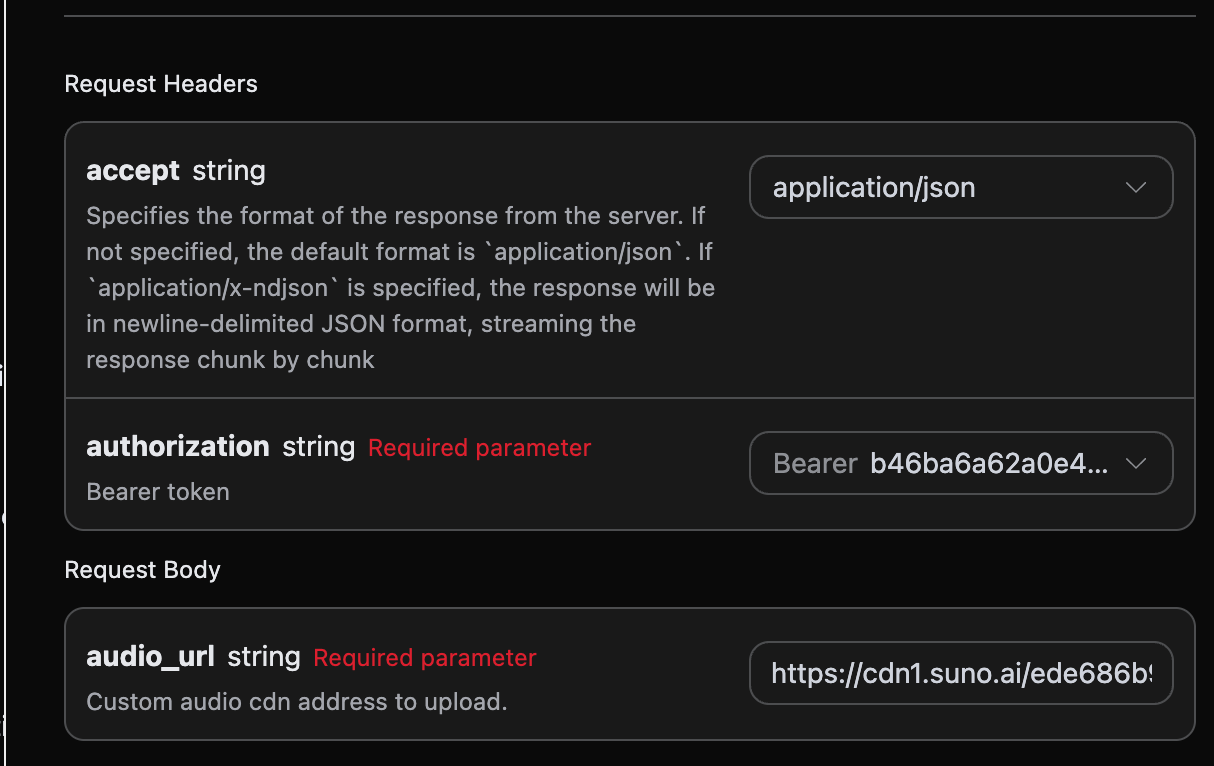
然后需要记录上传后的audio_id,具体的结果如下图所示:
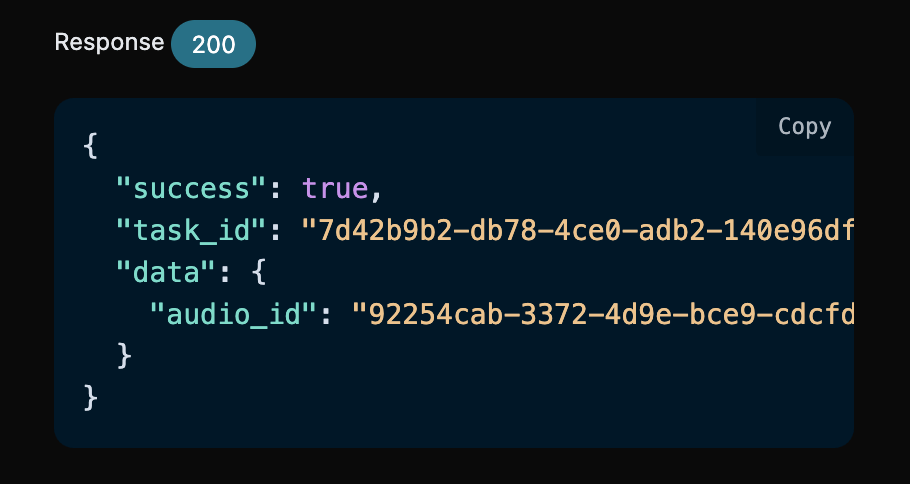
最后得到了一个audio_id:92254cab-3372-4d9e-bce9-cdcfdbc39070,然后我们还需要填写如下参数:
- action:内容为
underpainting。 - underpainting_start:对上传的歌曲进行添加伴奏的起始时间,默认值是 0。
- underpainting_end:对上传的歌曲进行添加伴奏的终点时间,必须小于歌曲的总时长。
- audio_id:上传的清唱无配音的歌曲 ID。
- style:伴奏的风格,最好是不用歌词 毕竟是配音。
填写完毕之后自动生成了代码如下:
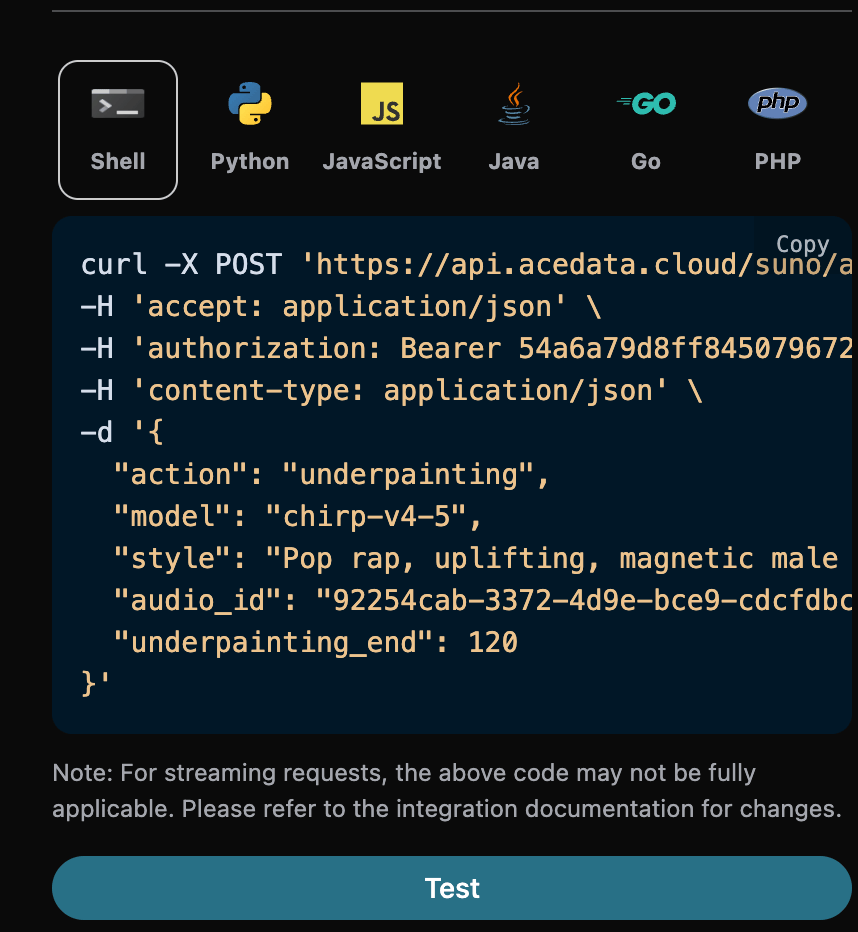
对应的 Python 代码:
import requests

url = "https://api.acedata.cloud/suno/audios"

headers = {
    "accept": "application/json",
    "authorization": "Bearer {token}",
    "content-type": "application/json"
}

payload = {
    "action": "underpainting",
    "model": "chirp-v4-5",
    "style": "Pop rap, uplifting, magnetic male vocals, piano, synth, electric guitar, driving bass, clear structure",
    "audio_id": "92254cab-3372-4d9e-bce9-cdcfdbc39070",
    "underpainting_end": 120
}

response = requests.post(url, json=payload, headers=headers)
print(response.text)
点击运行,可以发现会得到一个结果,如下:
{
  "success": true,
  "task_id": "822d2e14-c535-4d48-a4e5-1b6ab00b04a7",
  "trace_id": "257eac2c-8e4f-44d0-8454-5e215111eefa",
  "data": [
    {
      "id": "2788cd21-bd84-422d-beb5-859c60fbf5b6",
      "title": "",
      "image_url": "https://cdn.acedata.cloud/e724d7f13d.png?example=image-041",
      "lyric": "",
      "audio_url": "https://cdn.acedata.cloud/assets/examples/fish/5ade0339-5f11-487e-aacc-06a908271706-8e3fcb0e5547.mp3",
      "video_url": "",
      "created_at": "2025-08-27T15:25:42.548Z",
      "model": "chirp-v4",
      "state": "succeeded",
      "style": "Pop rap, uplifting, magnetic male vocals, piano, synth, electric guitar, driving bass, clear structure",
      "duration": 10.16
    },
    {
      "id": "a4bb7220-e971-4cbf-a626-b86c648bcf55",
      "title": "",
      "image_url": "https://cdn.acedata.cloud/e724d7f13d.png?example=image-042",
      "lyric": "",
      "audio_url": "https://cdn.acedata.cloud/assets/examples/fish/5ade0339-5f11-487e-aacc-06a908271706-8e3fcb0e5547.mp3",
      "video_url": "",
      "created_at": "2025-08-27T15:25:42.548Z",
      "model": "chirp-v4",
      "state": "succeeded",
      "style": "Pop rap, uplifting, magnetic male vocals, piano, synth, electric guitar, driving bass, clear structure",
      "duration": 2.52
    }
  ]
}
这样就完成了对上传的清唱无配音歌曲进行配乐的操作,结果与上文类似。
¶ Add Vocals 功能
2025 年 8 月份 suno 新出 Add Vocals 功能,首先需要上传一首纯音乐,让 suno 填词、出人声歌唱,首先可以先到 Suno Upload API上传一首清唱无配乐的歌曲,对应如下如的操作如下图所示:
然后需要记录上传后的audio_id,具体的结果如下图所示:
最后得到了一个audio_id:92254cab-3372-4d9e-bce9-cdcfdbc39070,然后我们还需要填写如下参数:
- action:内容为
overpainting。 - overpainting_start:对上传的歌曲进行添加人声的起始时间,默认值是 0。
- overpainting_end:对上传的歌曲进行添加人声的终点时间,必须小于歌曲的总时长。
- audio_id:上传的清唱无配音的歌曲 ID。
- custom:该模式下必须使用自定义模式填入歌词。
- lyric:自定义模式下填写的歌词。
- style:伴奏的风格。
填写完毕之后自动生成了代码如下:
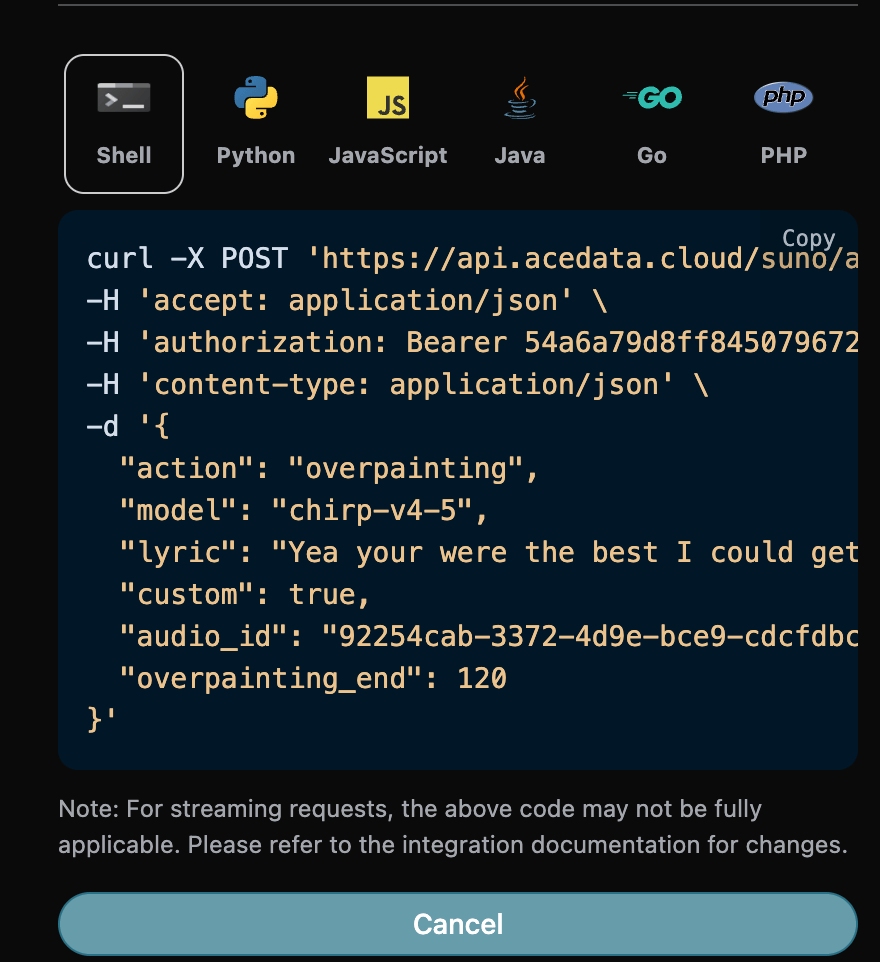
对应的 Python 代码:
import requests

url = "https://api.acedata.cloud/suno/audios"

headers = {
    "accept": "application/json",
    "authorization": "Bearer {token}",
    "content-type": "application/json"
}

payload = {
    "action": "overpainting",
    "model": "chirp-v4-5",
    "lyric": "Yea your were the best I could get \\nBut I knew that it couldn’t last \\nStayed down since we were friends \\nHad to leave those thoughts in the past \\nMade like 40k just last week \\nOn top of the 20 with my babe\\ndon’t care for what niggas say",
    "custom": True,
    "audio_id": "92254cab-3372-4d9e-bce9-cdcfdbc39070",
    "overpainting_end": 120
}

response = requests.post(url, json=payload, headers=headers)
print(response.text)
点击运行,可以发现会得到一个结果,如下:
{
  "success": true,
  "task_id": "31bb250e-6614-49ec-ac85-631f224daeba",
  "trace_id": "efe8e7f3-9a65-4f13-a9f8-51e8478899df",
  "data": [
    {
      "id": "a597f945-64df-4722-a631-d436450832bd",
      "title": "",
      "image_url": "https://cdn.acedata.cloud/e724d7f13d.png?example=image-043",
      "lyric": "Yea your were the best I could get \\nBut I knew that it couldn’t last \\nStayed down since we were friends \\nHad to leave those thoughts in the past \\nMade like 40k just last week \\nOn top of the 20 with my babe\\ndon’t care for what niggas say",
      "audio_url": "https://cdn.acedata.cloud/assets/examples/fish/5ade0339-5f11-487e-aacc-06a908271706-8e3fcb0e5547.mp3",
      "video_url": "",
      "created_at": "2025-08-27T15:33:51.550Z",
      "model": "chirp-v4",
      "state": "succeeded",
      "style": "",
      "duration": 105.32
    },
    {
      "id": "b41a8b91-3d88-4ebd-a6cf-732764b24954",
      "title": "",
      "image_url": "https://cdn.acedata.cloud/e724d7f13d.png?example=image-044",
      "lyric": "Yea your were the best I could get \\nBut I knew that it couldn’t last \\nStayed down since we were friends \\nHad to leave those thoughts in the past \\nMade like 40k just last week \\nOn top of the 20 with my babe\\ndon’t care for what niggas say",
      "audio_url": "https://cdn.acedata.cloud/assets/examples/fish/5ade0339-5f11-487e-aacc-06a908271706-8e3fcb0e5547.mp3",
      "video_url": "",
      "created_at": "2025-08-27T15:33:51.550Z",
      "model": "chirp-v4",
      "state": "succeeded",
      "style": "",
      "duration": 148.16
    }
  ]
}
这样就完成了对上传的清唱无配音歌曲进行配人声的操作,结果与上文类似。
¶ Remaster 功能
2025 年 12 月份 suno 新出 Remaster 功能,该功能可以重新生成歌曲,不可跨账号,然后我们还需要填写如下参数:
- action:内容为
remaster。 - audio_id:需要重新生成的歌曲 ID。
- model:仅支持 v4.5+、v5。
- variation_category:仅在 v5 以上版本支持,而且只有 3 个值 high normal subtle。
填写完毕之后自动生成了代码如下:
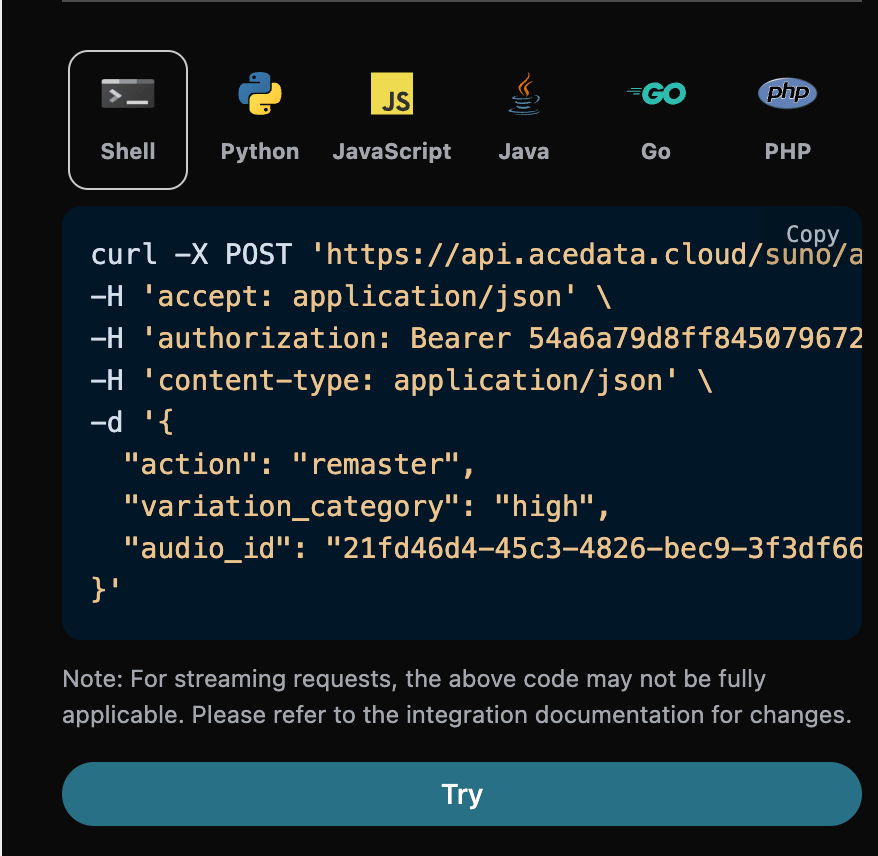
对应的 Python 代码:
import requests

url = "https://api.acedata.cloud/suno/audios"

headers = {
    "accept": "application/json",
    "authorization": "Bearer {token}",
    "content-type": "application/json"
}

payload = {
    "action": "remaster",
    "variation_category": "high",
    "audio_id": "21fd46d4-45c3-4826-bec9-3f3df667902e"
}

response = requests.post(url, json=payload, headers=headers)
print(response.text)
点击运行,可以发现会得到一个结果,如下:
{
  "success": true,
  "task_id": "791ee74c-9363-4352-afe7-babb19b89899",
  "trace_id": "77acda57-c3d4-4e11-a506-4f50e0609916",
  "data": [
    {
      "id": "b0515cdf-9cb5-46cd-b0fe-10a239dc9274",
      "title": "Navidad en costura  (Remastered)",
      "image_url": "https://cdn.acedata.cloud/e724d7f13d.png?example=image-045",
      "image_large_url": "https://cdn.acedata.cloud/e724d7f13d.png?example=image-046",
      "lyric": "En Teror las clases siguen,\nni en Navidad hay parón;\ncose el grupo entre villancicos\ny un buen trocito de turrón.\nLa Popular abre sus puertas,\ny el taller suena mejor;\nhilo, aguja y canto alegre\nlo pasaremos mejor\nSeguimos en las costuras,\ncon música y diversión;\nlos alumnos comeremos\nGolosinas un montón ",
      "audio_url": "https://cdn.acedata.cloud/assets/examples/fish/5ade0339-5f11-487e-aacc-06a908271706-8e3fcb0e5547.mp3",
      "video_url": "",
      "created_at": "2025-12-04T13:09:59.936Z",
      "model": "chirp-v4",
      "state": "succeeded",
      "style": "Villancico",
      "duration": 32.2
    },
    {
      "id": "06edab94-a4f9-4c0c-abac-a2e8a97c76a8",
      "title": "Navidad en costura  (Remastered)",
      "image_url": "https://cdn.acedata.cloud/e724d7f13d.png?example=image-047",
      "image_large_url": "https://cdn.acedata.cloud/e724d7f13d.png?example=image-048",
      "lyric": "En Teror las clases siguen,\nni en Navidad hay parón;\ncose el grupo entre villancicos\ny un buen trocito de turrón.\nLa Popular abre sus puertas,\ny el taller suena mejor;\nhilo, aguja y canto alegre\nlo pasaremos mejor\nSeguimos en las costuras,\ncon música y diversión;\nlos alumnos comeremos\nGolosinas un montón ",
      "audio_url": "https://cdn.acedata.cloud/assets/examples/fish/5ade0339-5f11-487e-aacc-06a908271706-8e3fcb0e5547.mp3",
      "video_url": "",
      "created_at": "2025-12-04T13:09:59.936Z",
      "model": "chirp-v4",
      "state": "succeeded",
      "style": "Villancico",
      "duration": 32.2
    }
  ]
}
这样就完成了对已生成歌曲重新生成的操作,结果与上文类似。
¶ Mashup 混曲生成功能
2025 年 12 月份 suno 新出 Mashup 功能,该功能可以根据俩首参考歌曲生成歌曲,然后我们还需要填写如下参数:
- action:内容为
mashup。 - mashup_audio_ids:俩首参考歌曲的 ID。
填写完毕之后自动生成了代码如下:
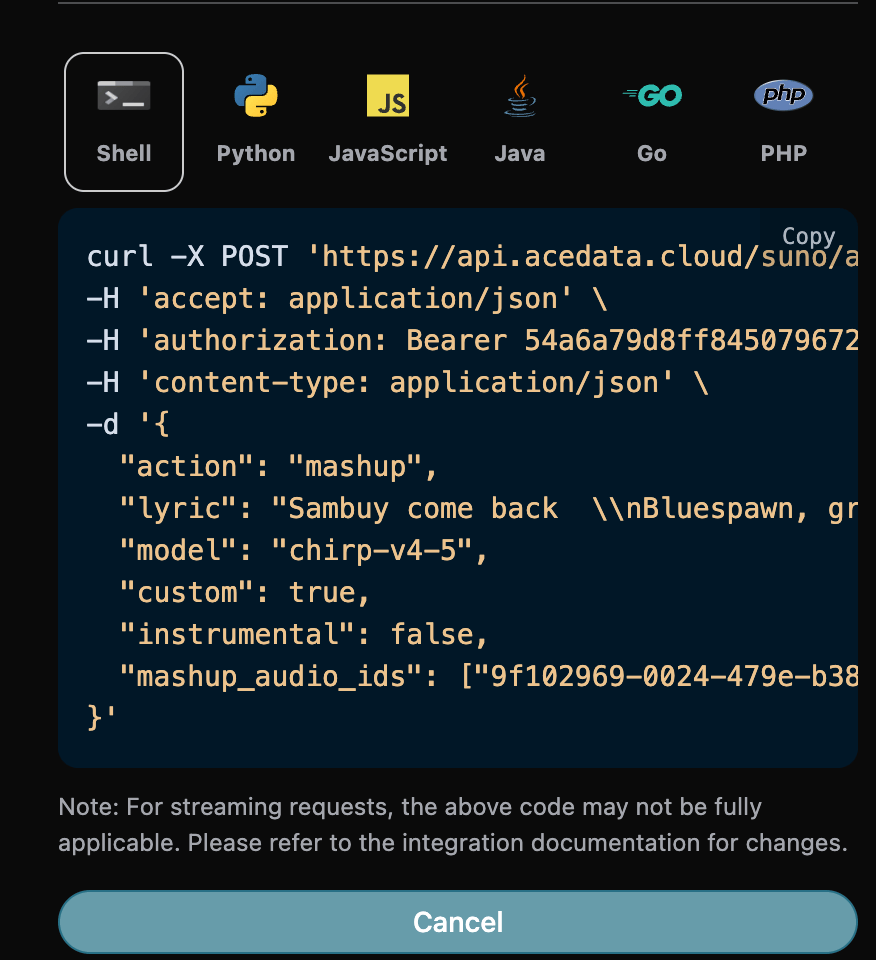
对应的 Python 代码:
import requests

url = "https://api.acedata.cloud/suno/audios"

headers = {
    "accept": "application/json",
    "authorization": "Bearer {token}",
    "content-type": "application/json"
}

payload = {
    "action": "mashup",
    "lyric": "Sambuy come back  \\nBluespawn, greenspawn are making you a spawn  \\n\\nSambuy come  \\nSambuy come back  \\nBluespawn, greenspawn are making you a spawn  \\n\\nSambuy come  \\nSambuy come back  \\nBluespawn, greenspawn are making you a spawn  \\n\\nSambuy come  \\nSambuy come back  \\nSambuy come, Sambuy come back  \\nBluespawn, greenspawn are making you a spawn  \\n\\nSambuy come  \\nSambuy come back  \\nBluespawn, greenspawn are making you a spawn  \\nSambuy come back",
    "model": "chirp-v4-5",
    "custom": True,
    "instrumental": False,
    "mashup_audio_ids": ["9f102969-0024-479e-b38f-c0c5db21383d","6aebb715-701c-433f-b976-a7ff5cf16255"]
}

response = requests.post(url, json=payload, headers=headers)
print(response.text)
点击运行,可以发现会得到一个结果,如下:
{
  "success": true,
  "task_id": "3fe070eb-2ab1-4424-909c-acfe3ca761af",
  "trace_id": "2b220382-7a84-4853-ae43-05cdcad233a9",
  "data": [
    {
      "id": "5ff751dc-0e72-4de9-a54b-2cad50984b47",
      "title": "",
      "image_url": "https://cdn.acedata.cloud/e724d7f13d.png?example=image-049",
      "image_large_url": "https://cdn.acedata.cloud/e724d7f13d.png?example=image-050",
      "lyric": "Sambuy come back  \\nBluespawn, greenspawn are making you a spawn  \\n\\nSambuy come  \\nSambuy come back  \\nBluespawn, greenspawn are making you a spawn  \\n\\nSambuy come  \\nSambuy come back  \\nBluespawn, greenspawn are making you a spawn  \\n\\nSambuy come  \\nSambuy come back  \\nSambuy come, Sambuy come back  \\nBluespawn, greenspawn are making you a spawn  \\n\\nSambuy come  \\nSambuy come back  \\nBluespawn, greenspawn are making you a spawn  \\nSambuy come back",
      "audio_url": "https://cdn.acedata.cloud/assets/examples/fish/5ade0339-5f11-487e-aacc-06a908271706-8e3fcb0e5547.mp3",
      "video_url": "",
      "created_at": "2026-01-25T15:13:30.181Z",
      "model": "chirp-v4-5",
      "state": "succeeded",
      "style": "",
      "duration": 219.08
    },
    {
      "id": "19c515c4-d7b3-4a17-8ab0-dd1ebd4861b8",
      "title": "",
      "image_url": "https://cdn.acedata.cloud/e724d7f13d.png?example=image-051",
      "image_large_url": "https://cdn.acedata.cloud/e724d7f13d.png?example=image-052",
      "lyric": "Sambuy come back  \\nBluespawn, greenspawn are making you a spawn  \\n\\nSambuy come  \\nSambuy come back  \\nBluespawn, greenspawn are making you a spawn  \\n\\nSambuy come  \\nSambuy come back  \\nBluespawn, greenspawn are making you a spawn  \\n\\nSambuy come  \\nSambuy come back  \\nSambuy come, Sambuy come back  \\nBluespawn, greenspawn are making you a spawn  \\n\\nSambuy come  \\nSambuy come back  \\nBluespawn, greenspawn are making you a spawn  \\nSambuy come back",
      "audio_url": "https://cdn.acedata.cloud/assets/examples/fish/5ade0339-5f11-487e-aacc-06a908271706-8e3fcb0e5547.mp3",
      "video_url": "",
      "created_at": "2026-01-25T15:13:30.181Z",
      "model": "chirp-v4-5",
      "state": "succeeded",
      "style": "",
      "duration": 163.12
    }
  ]
}
这样就完成了对参考歌曲混曲生成的操作,结果与上文类似。
¶ Samples 取样生成歌曲
这里的 samples 是单音频区间取样:从一首已有音频中选择起止时间,将该片段作为采样素材进行创作。它不同于下文使用 1 到 4 段完整参考音频的 Inspo 灵感创作功能。需要填写如下参数:
- action:内容为
samples。 - samples_start:取样开始时间(秒),默认为 0,不得小于 0。
- samples_end:取样结束时间(秒),必填且必须大于开始时间。
- audio_id:需要取样的参考歌曲的 ID。
填写完毕之后自动生成了代码如下:
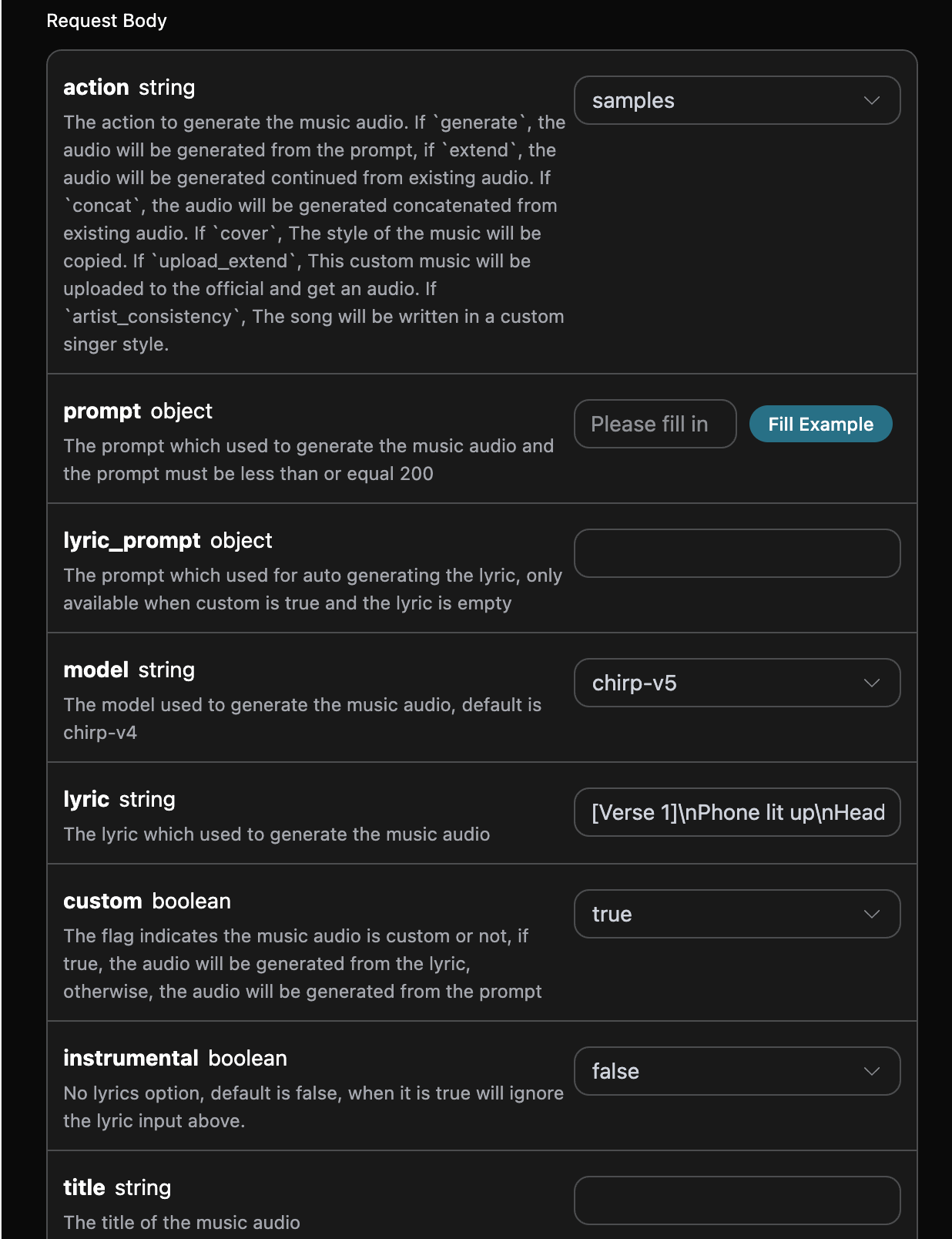
对应的 Python 代码:
import requests

url = "https://api.acedata.cloud/suno/audios"

headers = {
    "accept": "application/json",
    "authorization": "Bearer {token}",
    "content-type": "application/json"
}

payload = {
    "action": "samples",
    "model": "chirp-v5",
    "lyric": "[Verse 1]\\nPhone lit up\\nHeadline in my hand\\nFeels made up\\nStill says “you won’t understand”\\nYour name\\nMy name\\nSide by side in the scroll\\nCold black text\\nOn a story I used to hold\\n\\n[Chorus]\\nYou’re breaking news\\nAnd I’m just breaking\\nFront-page truth\\nHeart still shaking\\nEverybody reads\\nWhat we already knew\\nYou’re a story now\\nAnd I’m the one you broke it to\\n\\n[Verse 2]\\nNeighbors talk\\nThrough a half-closed door\\nCoffee cools\\nOn a cracked old floor\\nYour suitcase snaps\\nLike a camera flash\\nOne last quote\\nThen you cut to black\\n\\n[Chorus]\\nYou’re breaking news\\nAnd I’m just breaking\\nFront-page truth\\nHeart still shaking\\nEverybody reads\\nWhat we already knew\\nYou’re a story now\\nAnd I’m the one you broke it to\\n\\n[Bridge]\\nIs there a line\\nWhere we rewind\\nOr just a feed\\nThat leaves us behind\\nTell me\\nWho gets\\nThe final view\\nWhen I stop trending\\nWith you\\n\\n[Chorus]\\nYou’re breaking news\\nAnd I’m just breaking\\nFront-page truth\\nHeart still shaking\\nEverybody reads\\nWhat we already knew\\nYou’re a story now\\nAnd I’m the one you broke it to (yeah)",
    "custom": True,
    "instrumental": False,
    "audio_id": "0fa07665-6b8e-4a8b-8bd3-7e0cfcdada88",
    "samples_end": 102.16,
    "samples_start": 59.88
}

response = requests.post(url, json=payload, headers=headers)
print(response.text)
点击运行,可以发现会得到一个结果,如下:
{
    "success": true,
    "task_id": "12135a45-6384-4683-9bb1-64f19933915a",
    "trace_id": "683e559d-340e-4c72-8fae-e683442ac7e9",
    "data": [
        {
            "id": "9a0b680f-a9ea-4a36-8695-8ea777ab6ee7",
            "title": "Whistle in the Wind",
            "image_url": "https://cdn.acedata.cloud/e724d7f13d.png?example=image-053",
            "image_large_url": "https://cdn.acedata.cloud/e724d7f13d.png?example=image-054",
            "lyric": "[Verse 1]\nPhone lit up\nHeadline in my hand\nFeels made up\nStill says “you won’t understand”\nYour name\nMy name\nSide by side in the scroll\nCold black text\nOn a story I used to hold\n[Chorus]\nYou’re breaking news\nAnd I’m just breaking\nFront-page truth\nHeart still shaking\nEverybody reads\nWhat we already knew\nYou’re a story now\nAnd I’m the one you broke it to\n[Verse 2]\nNeighbors talk\nThrough a half-closed door\nCoffee cools\nOn a cracked old floor\nYour suitcase snaps\nLike a camera flash\nOne last quote\nThen you cut to black\n[Chorus]\nYou’re breaking news\nAnd I’m just breaking\nFront-page truth\nHeart still shaking\nEverybody reads\nWhat we already knew\nYou’re a story now\nAnd I’m the one you broke it to\n[Bridge]\nIs there a line\nWhere we rewind\nOr just a feed\nThat leaves us behind\nTell me\nWho gets\nThe final view\nWhen I stop trending\nWith you\n[Chorus]\nYou’re breaking news\nAnd I’m just breaking\nFront-page truth\nHeart still shaking\nEverybody reads\nWhat we already knew\nYou’re a story now\nAnd I’m the one you broke it to (yeah)",
            "audio_url": "https://cdn.acedata.cloud/assets/examples/fish/5ade0339-5f11-487e-aacc-06a908271706-8e3fcb0e5547.mp3",
            "video_url": "",
            "created_at": "2026-01-31T14:34:45.043Z",
            "model": "chirp-v5",
            "state": "succeeded",
            "style": "acoustic with a hint of optimism,folk-pop,female vocals",
            "duration": 176.92
        },
        {
            "id": "66473dee-3aaf-43b2-80fd-76568b3abbb1",
            "title": "Whistle in the Wind",
            "image_url": "https://cdn.acedata.cloud/e724d7f13d.png?example=image-055",
            "image_large_url": "https://cdn.acedata.cloud/e724d7f13d.png?example=image-056",
            "lyric": "[Verse 1]\nPhone lit up\nHeadline in my hand\nFeels made up\nStill says “you won’t understand”\nYour name\nMy name\nSide by side in the scroll\nCold black text\nOn a story I used to hold\n[Chorus]\nYou’re breaking news\nAnd I’m just breaking\nFront-page truth\nHeart still shaking\nEverybody reads\nWhat we already knew\nYou’re a story now\nAnd I’m the one you broke it to\n[Verse 2]\nNeighbors talk\nThrough a half-closed door\nCoffee cools\nOn a cracked old floor\nYour suitcase snaps\nLike a camera flash\nOne last quote\nThen you cut to black\n[Chorus]\nYou’re breaking news\nAnd I’m just breaking\nFront-page truth\nHeart still shaking\nEverybody reads\nWhat we already knew\nYou’re a story now\nAnd I’m the one you broke it to\n[Bridge]\nIs there a line\nWhere we rewind\nOr just a feed\nThat leaves us behind\nTell me\nWho gets\nThe final view\nWhen I stop trending\nWith you\n[Chorus]\nYou’re breaking news\nAnd I’m just breaking\nFront-page truth\nHeart still shaking\nEverybody reads\nWhat we already knew\nYou’re a story now\nAnd I’m the one you broke it to (yeah)",
            "audio_url": "https://cdn.acedata.cloud/assets/examples/fish/5ade0339-5f11-487e-aacc-06a908271706-8e3fcb0e5547.mp3",
            "video_url": "",
            "created_at": "2026-01-31T14:34:45.043Z",
            "model": "chirp-v5",
            "state": "succeeded",
            "style": "acoustic with a hint of optimism,folk-pop,female vocals",
            "duration": 177.48
        }
    ]
}
这样就完成了取样生成歌曲的操作,结果与上文类似。
¶ Inspo 灵感创作功能
Inspo 灵感创作功能可以根据 1 到 4 段完整参考音频生成新的音乐,支持拖拽或上传音频作为灵感来源。API 使用现有 inspo action:客户端提供公开可访问的音频 URL,服务会自动完成参考音频准备和创作,无需客户端分别读取歌词、风格或时长再组装请求。它不同于上文的区间取样,也不同于复刻原曲风格的 Cover。使用时需要填写如下参数:
- action:内容为
inspo。 - audio_urls:参考音频的 URL 列表,需提供 1 到 4 个公开可访问的音频地址。
- model:使用的模型,推荐
chirp-v6。 - prompt:歌词或创作提示词(可选)。
- instrumental:设为
true时按纯音乐请求生成,不使用歌词。 - persona_id:在支持该组合的服务通道上使用指定声音;参考音频会在准备阶段绑定到该声音所需的资源环境。
- lyric_prompt:当
custom=true且未提供lyric时,用于自动生成歌词。
说明:参考音频需为公开可访问的音频文件。若参考音频与平台曲库中的已知录音完全匹配,Suno 可能会因版权校验而拒绝生成,建议使用自有或由 Suno 生成的音频作为灵感来源。
对应的 Python 代码:
import requests

url = "https://api.acedata.cloud/suno/audios"

headers = {
    "accept": "application/json",
    "authorization": "Bearer {token}",
    "content-type": "application/json"
}

payload = {
    "action": "inspo",
    "model": "chirp-v6",
    "audio_urls": [
        "https://cdn.acedata.cloud/uploads/a0bc051f-42c2-4a46-aeb4-582dcc884ad2"
    ],
    "prompt": "Rework these references as warm acoustic folk with soft vocals"
}

response = requests.post(url, json=payload, headers=headers)
print(response.text)
下面保留一份已验证的历史响应快照;快照使用当时的 chirp-v5,当前请求示例推荐 chirp-v6,返回结构一致:
{
    "success": true,
    "task_id": "725e6b41-78d0-4adf-856c-05e81098c029",
    "trace_id": "8c2f0b3e-2f6a-4738-8b1d-c58068ca3dab",
    "data": [
        {
            "id": "20ca5628-86e0-4c32-8ae4-9f0c481e45f3",
            "title": "Inspo Demo",
            "image_url": "https://cdn.acedata.cloud/e724d7f13d.png?example=image-057",
            "lyric": "",
            "audio_url": "https://cdn.acedata.cloud/assets/examples/fish/5ade0339-5f11-487e-aacc-06a908271706-8e3fcb0e5547.mp3",
            "video_url": "",
            "created_at": "2026-06-18T13:01:53.910Z",
            "model": "chirp-v5",
            "state": "succeeded",
            "style": "acoustic, folk, warm",
            "duration": 36.92
        },
        {
            "id": "8744a796-9961-45af-868d-4f3bc1c44257",
            "title": "Inspo Demo",
            "image_url": "https://cdn.acedata.cloud/e724d7f13d.png?example=image-058",
            "lyric": "",
            "audio_url": "https://cdn.acedata.cloud/assets/examples/fish/5ade0339-5f11-487e-aacc-06a908271706-8e3fcb0e5547.mp3",
            "video_url": "",
            "created_at": "2026-06-18T13:01:53.910Z",
            "model": "chirp-v5",
            "state": "succeeded",
            "style": "acoustic, folk, warm",
            "duration": 84.16
        }
    ]
}
这样就完成了灵感创作的操作,返回结果与普通生成歌曲一致。
¶ 异步回调
由于 Suno 生成音乐的时间相对较长,大约需要 1-2 分钟,如果 API 长时间无响应,HTTP 请求会一直保持连接,导致额外的系统资源消耗,所以本 API 也提供了异步回调的支持。
整体流程是:客户端发起请求的时候,额外指定一个 callback_url 字段,客户端发起 API 请求之后,API 会立马返回一个结果,包含一个 task_id 的字段信息,代表当前的任务 ID。当任务完成之后,生成音乐的结果会通过 POST JSON 的形式发送到客户端指定的 callback_url,其中也包括了 task_id 字段,这样任务结果就可以通过 ID 关联起来了。
下面我们通过示例来了解下具体怎样操作。
首先,Webhook 回调是一个可以接收 HTTP 请求的服务,开发者应该替换为自己搭建的 HTTP 服务器的 URL。此处为了方便演示,使用一个公开的 Webhook 样例网站 https://webhook.site/,打开该网站即可得到一个 Webhook URL,如图所示:

将此 URL 复制下来,就可以作为 Webhook 来使用,此处的样例为 https://webhook.site/03e60575-3d96-4132-b681-b713d78116e2。
接下来,我们可以设置字段 callback_url 为上述 Webhook URL,同时填入 prompt,如图所示:
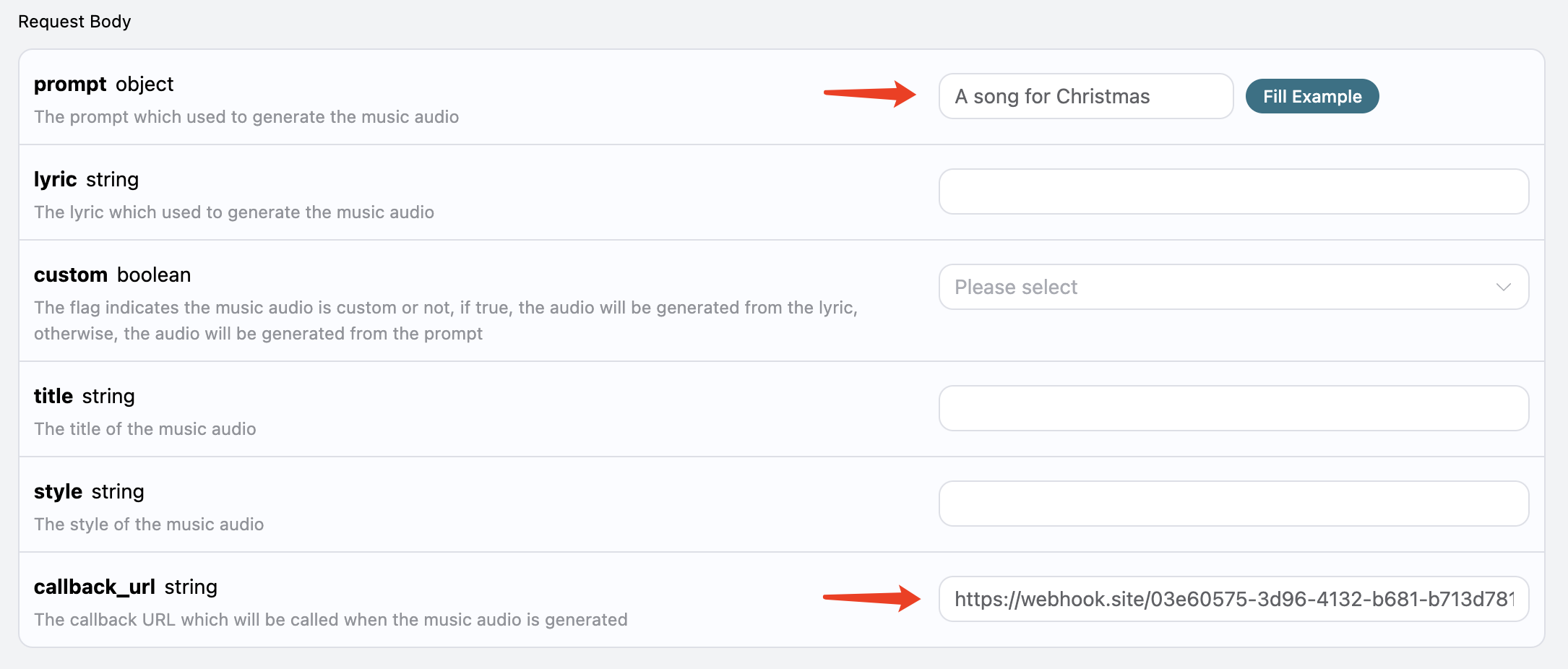
点击运行,可以发现会立即得到一个结果,如下:
{
  "task_id": "44472ab8-783b-4054-b861-5bf14e462f60"
}
稍等片刻,我们可以在 https://webhook.site/03e60575-3d96-4132-b681-b713d78116e2 上观察到生成歌曲的结果,如图所示:
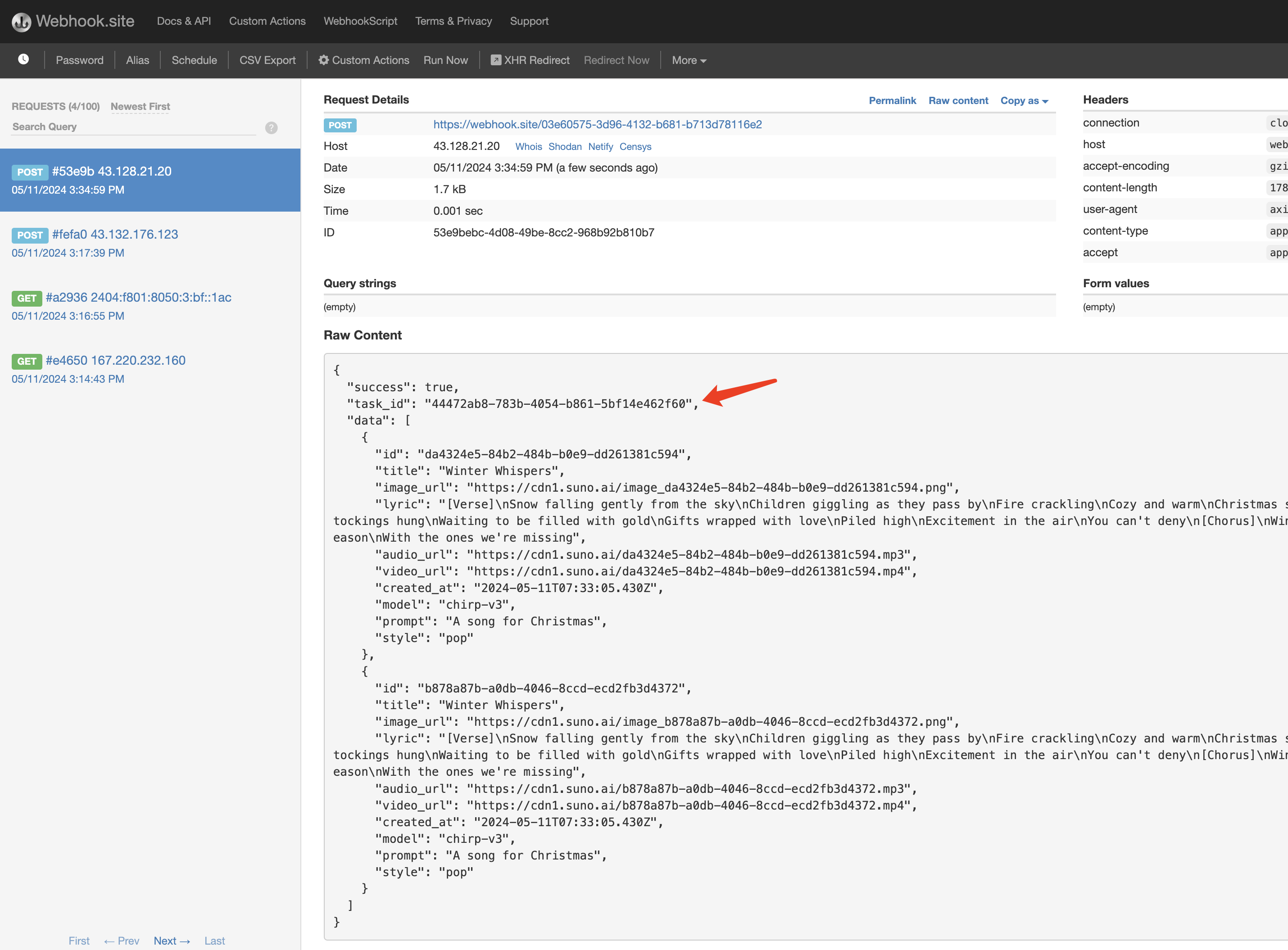
内容如下:
{
  "success": true,
  "task_id": "44472ab8-783b-4054-b861-5bf14e462f60",
  "data": [
    {
      "id": "da4324e5-84b2-484b-b0e9-dd261381c594",
      "title": "Winter Whispers",
      "image_url": "https://cdn.acedata.cloud/e724d7f13d.png?example=image-059",
      "lyric": "[Verse]\nSnow falling gently from the sky\nChildren giggling as they pass by\nFire crackling\nCozy and warm\nChristmas spirit begins to swarm\n[Verse 2]\nTwinkling lights\nA sight to behold\nStockings hung\nWaiting to be filled with gold\nGifts wrapped with love\nPiled high\nExcitement in the air\nYou can't deny\n[Chorus]\nWinter whispers in the wind\nJoy and love it brings\nLet's celebrate this season\nWith the ones we're missing",
      "audio_url": "https://cdn.acedata.cloud/assets/examples/fish/5ade0339-5f11-487e-aacc-06a908271706-8e3fcb0e5547.mp3",
      "video_url": "https://cdn.acedata.cloud/assets/examples/gemini/04a043bd-6b23-4b4e-945c-ce48158c3eee-3a89912507c7.mp4?example=video-003",
      "created_at": "2024-05-11T07:33:05.430Z",
      "model": "chirp-v3",
      "prompt": "A song for Christmas",
      "style": "pop"
    },
    {
      "id": "b878a87b-a0db-4046-8ccd-ecd2fb3d4372",
      "title": "Winter Whispers",
      "image_url": "https://cdn.acedata.cloud/e724d7f13d.png?example=image-060",
      "lyric": "[Verse]\nSnow falling gently from the sky\nChildren giggling as they pass by\nFire crackling\nCozy and warm\nChristmas spirit begins to swarm\n[Verse 2]\nTwinkling lights\nA sight to behold\nStockings hung\nWaiting to be filled with gold\nGifts wrapped with love\nPiled high\nExcitement in the air\nYou can't deny\n[Chorus]\nWinter whispers in the wind\nJoy and love it brings\nLet's celebrate this season\nWith the ones we're missing",
      "audio_url": "https://cdn.acedata.cloud/assets/examples/fish/5ade0339-5f11-487e-aacc-06a908271706-8e3fcb0e5547.mp3",
      "video_url": "https://cdn.acedata.cloud/assets/examples/gemini/04a043bd-6b23-4b4e-945c-ce48158c3eee-3a89912507c7.mp4?example=video-004",
      "created_at": "2024-05-11T07:33:05.430Z",
      "model": "chirp-v3",
      "prompt": "A song for Christmas",
      "style": "pop"
    }
  ]
}
可以看到结果中有一个 task_id 字段,其他的字段都和上文类似,通过该字段即可实现任务的关联。
当然我们也可以通过流式调用来获取结果,我们只需要将请求头里面的accept的值设置为application/x-ndjson即可,下面用一个示例输入作为示范:
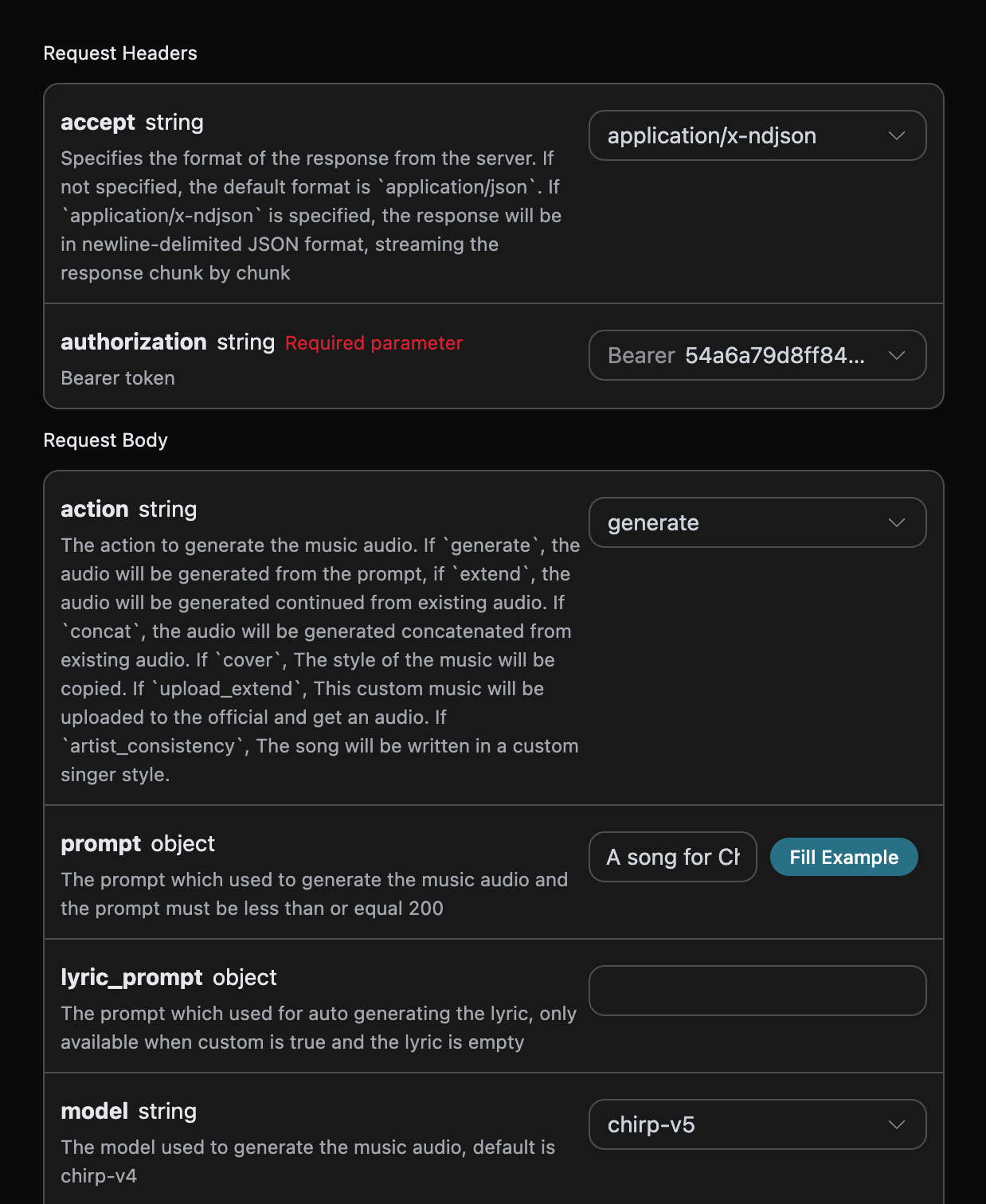
等待过程中我们可以得到以下输出:
{"success":true,"task_id":"1af4b454-ce84-4512-a0a2-de3f8574ecd8","data":[{"id":"1f610752-f426-4fd5-89a8-ba2ad0370881","title":"Snowflakes and Mistletoe","lyric":"[Verse]\nLights are tangled on the tree again\nThe cat’s knocked over the wreath\nCookies burning in the oven too\nBut I’m still grinning through my teeth\n[Prechorus]\nSnow is falling like glitter in the sky\nI’ve got a feeling this year’s gonna fly\n[Chorus]\nSnowflakes and mistletoe\nEverywhere I go\nI know\nLove is the gift\nThe glow\nSnowflakes and mistletoe\n[Verse 2]\nGrandma’s singing a little off-key\nThe kids are laughing too loud\nThe dog’s stolen a turkey leg\nChaos is a Christmas crowd\n[Prechorus]\nBut the fire’s crackling\nWarm and bright\nAnd my heart’s a candle tonight\n[Chorus]\nSnowflakes and mistletoe\nEverywhere I go\nI know\nLove is the gift\nThe glow\nSnowflakes and mistletoe","audio_url":"","video_url":"","created_at":"2025-12-13T11:29:25.101Z","model":"chirp-v5","state":"pending","prompt":"A song for Christmas","style":"uplifting, orchestral with bells and acoustic guitar"},{"id":"d1a3109d-799b-401e-b032-4b501bcf26f3","title":"Snowflakes and Mistletoe","lyric":"[Verse]\nLights are tangled on the tree again\nThe cat’s knocked over the wreath\nCookies burning in the oven too\nBut I’m still grinning through my teeth\n[Prechorus]\nSnow is falling like glitter in the sky\nI’ve got a feeling this year’s gonna fly\n[Chorus]\nSnowflakes and mistletoe\nEverywhere I go\nI know\nLove is the gift\nThe glow\nSnowflakes and mistletoe\n[Verse 2]\nGrandma’s singing a little off-key\nThe kids are laughing too loud\nThe dog’s stolen a turkey leg\nChaos is a Christmas crowd\n[Prechorus]\nBut the fire’s crackling\nWarm and bright\nAnd my heart’s a candle tonight\n[Chorus]\nSnowflakes and mistletoe\nEverywhere I go\nI know\nLove is the gift\nThe glow\nSnowflakes and mistletoe","audio_url":"","video_url":"","created_at":"2025-12-13T11:29:25.101Z","model":"chirp-v5","state":"pending","prompt":"A song for Christmas","style":"uplifting, orchestral with bells and acoustic guitar"}]}
{"success":true,"task_id":"1af4b454-ce84-4512-a0a2-de3f8574ecd8","trace_id":"4440342a-41c4-4140-8bb1-3537a598ca2e","data":[{"id":"1f610752-f426-4fd5-89a8-ba2ad0370881","title":"Snowflakes and Mistletoe","image_url": "https://cdn.acedata.cloud/e724d7f13d.png?example=image-073","image_large_url": "https://cdn.acedata.cloud/e724d7f13d.png?example=image-074","lyric":"[Verse]\nLights are tangled on the tree again\nThe cat’s knocked over the wreath\nCookies burning in the oven too\nBut I’m still grinning through my teeth\n[Prechorus]\nSnow is falling like glitter in the sky\nI’ve got a feeling this year’s gonna fly\n[Chorus]\nSnowflakes and mistletoe\nEverywhere I go\nI know\nLove is the gift\nThe glow\nSnowflakes and mistletoe\n[Verse 2]\nGrandma’s singing a little off-key\nThe kids are laughing too loud\nThe dog’s stolen a turkey leg\nChaos is a Christmas crowd\n[Prechorus]\nBut the fire’s crackling\nWarm and bright\nAnd my heart’s a candle tonight\n[Chorus]\nSnowflakes and mistletoe\nEverywhere I go\nI know\nLove is the gift\nThe glow\nSnowflakes and mistletoe","audio_url":"https://cdn.acedata.cloud/assets/examples/fish/5ade0339-5f11-487e-aacc-06a908271706-8e3fcb0e5547.mp3","video_url":"","created_at":"2025-12-13T11:29:25.101Z","model":"chirp-v5","state":"succeeded","prompt":"A song for Christmas","style":"uplifting, orchestral with bells and acoustic guitar","duration":129.92},{"id":"d1a3109d-799b-401e-b032-4b501bcf26f3","title":"Snowflakes and Mistletoe","image_url": "https://cdn.acedata.cloud/e724d7f13d.png?example=image-075","image_large_url": "https://cdn.acedata.cloud/e724d7f13d.png?example=image-076","lyric":"[Verse]\nLights are tangled on the tree again\nThe cat’s knocked over the wreath\nCookies burning in the oven too\nBut I’m still grinning through my teeth\n[Prechorus]\nSnow is falling like glitter in the sky\nI’ve got a feeling this year’s gonna fly\n[Chorus]\nSnowflakes and mistletoe\nEverywhere I go\nI know\nLove is the gift\nThe glow\nSnowflakes and mistletoe\n[Verse 2]\nGrandma’s singing a little off-key\nThe kids are laughing too loud\nThe dog’s stolen a turkey leg\nChaos is a Christmas crowd\n[Prechorus]\nBut the fire’s crackling\nWarm and bright\nAnd my heart’s a candle tonight\n[Chorus]\nSnowflakes and mistletoe\nEverywhere I go\nI know\nLove is the gift\nThe glow\nSnowflakes and mistletoe","audio_url":"https://cdn.acedata.cloud/assets/examples/fish/5ade0339-5f11-487e-aacc-06a908271706-8e3fcb0e5547.mp3","video_url":"","created_at":"2025-12-13T11:29:25.101Z","model":"chirp-v5","state":"succeeded","prompt":"A song for Christmas","style":"uplifting, orchestral with bells and acoustic guitar","duration":127.16}]}
流式响应会为同一个 task_id 依次推送处理中状态和最终结果;上面仅保留首次与终态两条真实响应,省略重复的中间更新。
¶ 错误处理
如果发生错误,您将得到类似如下的错误信息:
{
  "success": false,
  "error": {
    "code": "forbidden",
    "message": "Song Description contained artist name: eminem"
  },
  "trace_id": "9bb7c2f4-3b7b-4965-b50a-f663874b1b6f",
  "task_id": "9bb3a2a6-c438-436d-a9f3-fa466abc077c"
}
下面是 HTTP Status Code, error.code, error.message 的列表:
style长度限制随模型而异;若返回长度错误,请缩短内容,并以响应中的限制为准。
| Status Code | error.code |
error.message |
|---|---|---|
| 400 | bad_request |
The song id does not exist or has been taken offline. |
| 400 | bad_request |
Prompt too long. |
| 400 | bad_request |
Tags too long. |
| 400 | bad_request |
Uploaded audio matches existing work of art. |
| 400 | bad_request |
instrumental must be a boolean |
| 400 | bad_request |
Title too long. |
| 400 | bad_request |
Topic too long. |
| 400 | bad_request |
style must be less than or equal 120 |
| 400 | bad_request |
custom must be a boolean |
| 400 | bad_request |
audio_id is required when extend audio |
| 400 | bad_request |
continue_at is required when extend audio |
| 400 | bad_request |
continue_at must be a number greater than 0 |
| 400 | bad_request |
lyric is required when extend audio and instrumental is false |
| 400 | bad_request |
prompt is required when generate audio |
| 400 | bad_request |
lyric is required when generate custom audio |
| 403 | forbidden |
Prompt likely malformed |
| 403 | forbidden |
Prompt likely copyrighted |
| 403 | forbidden |
Prompt contained inappropriate material |
| 403 | forbidden |
Song Description flagged for moderation |
| 403 | forbidden |
Song Description contained artist name |
| 403 | forbidden |
Tags contained artist name |
| 403 | forbidden |
Lyrics contained copyrighted material |
| 403 | forbidden |
Song Description contained producer tag |
| 403 | forbidden |
Generic openAI error |
| 403 | forbidden |
Prompt flagged for moderation |
| 429 | too_many_requests |
Too many requests. Please try again later. |
| 500 | api_error |
Unable to generate lyrics from song description |
| 500 | api_error |
job failed with unknown error |
| 500 | api_error |
service under maintenance, generation paused |
| 500 | api_error |
the account may have been offline |
| 500 | suno_processing_unavailable |
Music processing is unavailable. Contact support with the trace ID. |
| 500 | suno_model_unavailable |
The selected model is unavailable for this operation. Contact support with the trace ID. |
| 500 | suno_processing_failed |
Music processing returned no audio. Contact support with the trace ID. |
| 504 | timeout |
timeout while waiting for audio generation |
对于明确尚未受理的临时限流,平台可能在本次请求的时间预算内等待后进行有限次数重试。若最终仍返回 429(too_many_requests),请稍后再试;失败请求不收费。
使用 async=true 或 callback_url 时,收到 task_id 仅表示任务已创建,不代表生成成功。请通过回调或 Suno Tasks API 确认原任务的最终结果;在终态明确前不要重复提交,以免创建重复任务。