
Suno Song Generation API Integration Guide
As AI applications become more widespread, various AI programs have gradually become commonplace. AI has gradually become integrated into every aspect of people’s work and lives. The industries involving AI are also growing in number, from writing at the outset, to healthcare and education, and now to music.
Suno is a professional, high-quality AI song and music creation platform. Users only need to enter a simple text prompt to generate songs with vocals based on genre, style, and lyrics. This AI music generator was developed by team members from well-known technology companies such as Meta, TikTok, and Kensho, with the goal of enabling everyone to create beautiful music without needing any instruments or tools.
¶ Failed Results and Retries
The error object may contain an optional Boolean field, error.retryable. Only when it is true does it mean that the failed request may be retried later with the same parameters, for example, in cases of temporary rate limiting or insufficient service capacity where the request was explicitly not accepted. Backoff intervals and a limited number of retries are recommended. Requests that succeed after a retry are billed according to the normal rules.
retryable: false means that the request should not be retried unchanged. When the field is absent, do not automatically resend the request based solely on HTTP 500, busy, or the error message. Missing parameters, incorrect media formats or durations, content moderation issues, and expired resources should be corrected first. For submission timeouts, connection interruptions, or polling or media delivery failures for accepted tasks, use the original task_id to query the task first; resubmission may create new songs. This flag describes the original public operation, not an internal processing step.
The progress of model updates is as follows:
| Version | model | Launch Date | lyric Limit | style Limit | Maximum Song Duration |
|---|---|---|---|---|---|
| v6 | chirp-v6 | 2026.09.09 | — | — | — |
| v6 Wild | chirp-v6-wild | 2026.09.09 | — | — | — |
| v6 Mini | chirp-v6-mini | 2026.09.09 | — | — | — |
| v5.5 | chirp-v5-5 | 2026.03.27 | 5000 | 1000 | 8 minutes |
| v5 | chirp-v5 | 2025.09.23 | 5000 | 1000 | 8 minutes |
| v4.5+ | chirp-v4-5-plus | 2025.07.17 | 5000 | 1000 | 8 minutes |
| v4.5 | chirp-v4-5 | 2025.05.03 | 5000 | 1000 | 4 minutes |
| v4 | chirp-v4 | 2024.12.17 | 3000 | 200 | 150 seconds |
| v3.5 | chirp-v3-5 | --- | 3000 | 200 | 120 seconds |
The
lyricandstylelimits in the table above are the maximums for custom mode (customistrue). In non-custom inspiration mode (customisfalse), onlypromptis provided, with a maximum length of 500 characters (the same for all models).
Suno now supports chirp-v6, chirp-v6-wild, and chirp-v6-mini. chirp-v6 is recommended; older model names remain compatible.
However, Suno does not officially provide an API. AceDataCloud provides a set of Suno APIs that simulate integration with the official Suno service, allowing you to generate the music you want conveniently and quickly.
¶ Application and Usage
To use the Suno Audios Generation API, first go to the Ace Data Cloud Console to obtain your API Token for later use.
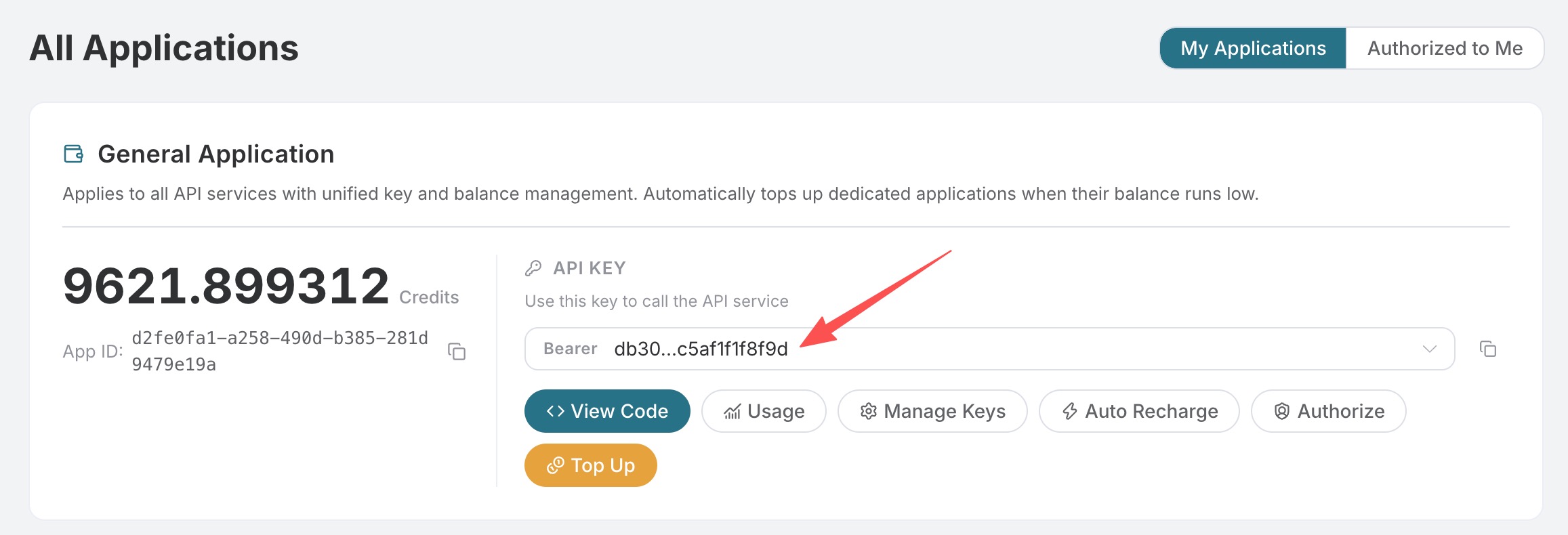
If you have not yet logged in or registered, you will be automatically redirected to the login page to register and log in, and you will be automatically returned to the current page once finished.
A single API Token can be used to call all services on the platform, with no need to apply separately for each service. Free credits are provided upon your first application, allowing you to try the services for free; when your credits are insufficient, you can top up your general balance in the Console.
📘 Full documentation: Suno Audios Generation API →
¶ Basic Usage
For the song you want, you can enter any text. For example, if I want to generate a song about Christmas, I can enter a song for Christmas, as shown:
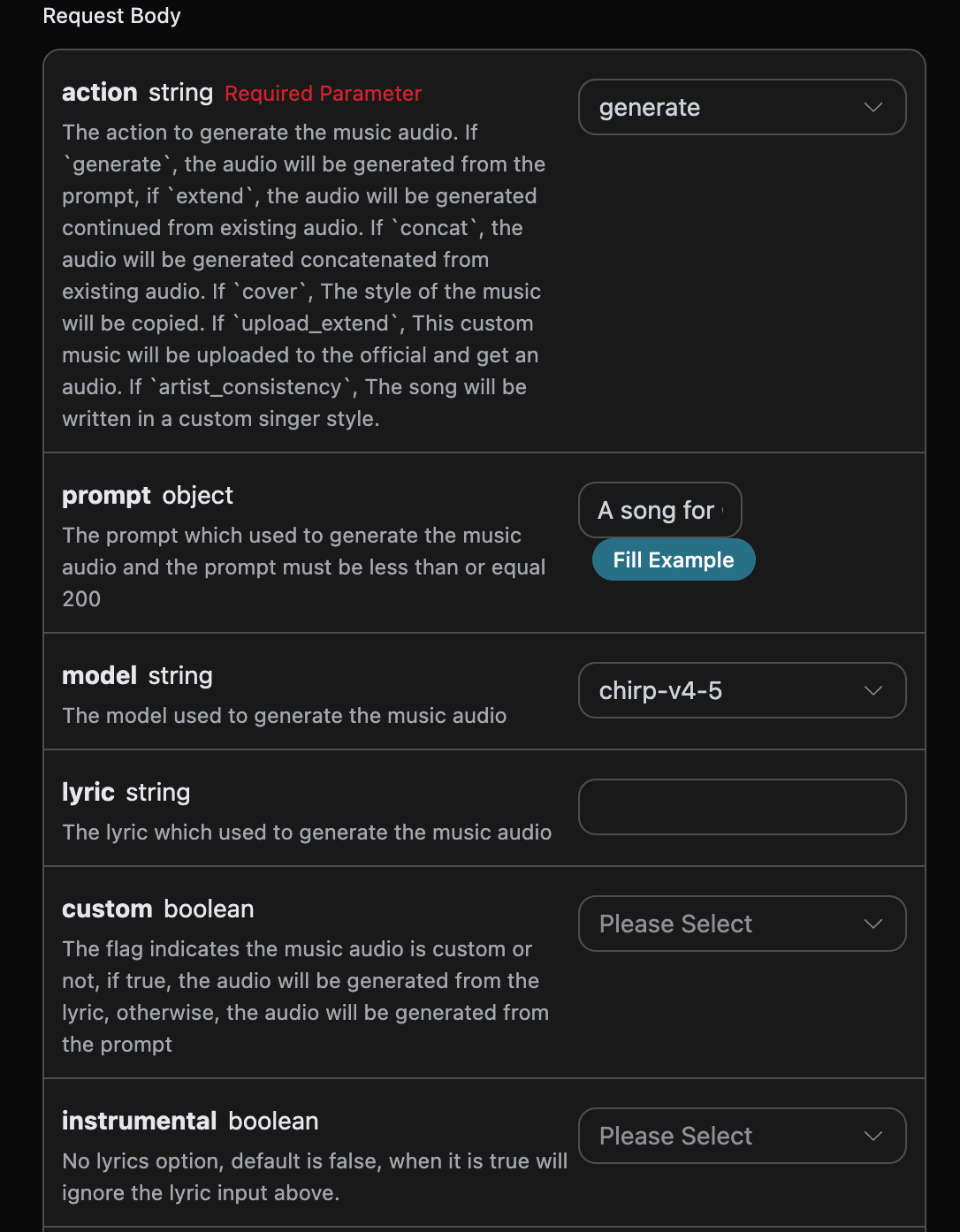
You can see that we have set the Request Headers here, including:
accept: The format in which you want to receive the response. Here it is set toapplication/json, meaning JSON format.authorization: The key used to call the API, which can be selected directly from the dropdown after you apply for it.
The Request Body is also set, including:
action: The audio task type, which defaults togenerate. Supports operations such as generation, extension, cover creation, concatenation, stem splitting, adding a stem, extracting a specified stem, sound effect generation, and speed adjustment, all called throughPOST /suno/audios.prompt: The prompt for Suno's official inspiration mode (effective whencustomisfalse), with a maximum of 500 characters.model: The model for this music generation task. The v6 series includeschirp-v6,chirp-v6-wild, andchirp-v6-mini; older model names remain compatible.max_mode: Enhanced generation mode. Forgenerate, it is enabled only when bothcustomandmax_modearetrue, and costs 1.12 Credits; foradd_stem, it can be enabled directly and costs 1.344 Credits. When disabled or omitted, the costs are 0.56 and 0.672 Credits, respectively.variety: The diversity intensity of generated results, with optionsoff,normal,high,extra, andmax. Used only forgenerateandadd_stem; passing it to other actions returns 400.lyric: The lyrics for Suno's official custom mode. Maximum 3,000 characters forchirp-v3-5andchirp-v4; maximum 5,000 characters forchirp-v4-5and above (includingchirp-v5andchirp-v5-5).custom: Whether to use custom mode, default:false.instrumental: The instrumental option for Suno's official inspiration mode.title: The music title for Suno's official custom mode. Maximum 80 characters forchirp-v3-5andchirp-v4; maximum 100 characters forchirp-v4-5and above.style: The music style for Suno's official custom mode. Maximum 200 characters forchirp-v3-5andchirp-v4; maximum 1,000 characters forchirp-v4-5and above (includingchirp-v5andchirp-v5-5).negative_tags: Music styles or genres to exclude during custom generation; can also be used forreplace_section. This interface currently does not set a fixed character limit for this field; excessively long content may still be unprocessable, so keeping the description concise is recommended.audio_weight: The influence weight of audio or voice characteristics, ranging from 0 to 1;0is also a valid value. Can be used for operations such as generation, extension, cover creation, adding a stem, and voice consistency; when there is no reference audio or voice characteristic, the model may reduce the influence of or ignore this value.audio_id: The ID of the reference music, used for subsequent operations such as cover creation, extension, and stem splitting. The fact that the audio file can still be downloaded does not mean that subsequent processing with this ID is always available; ifsuno_processing_unavailableis returned, retain thetask_idandtrace_idand contact support.overpainting_start/overpainting_end: The start and end times for adding vocals to existing instrumental music, in seconds.underpainting_start/underpainting_end: The start and end times for adding accompaniment to a cappella vocals, in seconds.persona_id: The voice ID obtained through the Persona or voice creation interface, not the song'saudio_id.continue_at: The extension boundary, in seconds. For example, 213.5 means generating the subsequent segment starting at 3 minutes and 33.5 seconds.lyricandstyleguide only the new content after the boundary and do not replace the lyrics or vocals before the boundary in the source audio.style_influence: The style influence in custom mode, ranging from 0 to 1; higher values usually result in closer adherence to the selected style.0is passed as a valid value.replace_section_end: The end time of the segment to replace.replace_section_start: The start time of the segment to replace.vocal_gender: Controls the preference for female or male vocals, withffor female andmfor male; effective for models 4.5 and above. This is a preference and is not guaranteed to be strictly followed.weirdness: The weirdness level in custom mode, ranging from 0 to 1; higher values usually produce more creative and experimental results.0is passed as a valid value.duration: The desired song duration, in seconds; must be an integer ranging from 10 to 360. Currently, onlygenerateuses this parameter, and its specific effect depends on the mode and model. It is a preference hint rather than a hard constraint: the model will take it into account but does not guarantee that it will be achieved. The actual duration of the finished audio is given by thedurationfield in the response and is usually shorter than the desired value.
¶ Scope of Voice ID Use
generate, cover, upload_cover, artist_consistency, and artist_consistency_vox can use persona_id. The latter two actions require persona_id; the audio_id of the song used to create the Persona can also be provided at the same time.
extend and upload_extend do not use an additional persona_id. Whether mashup and inspo support voice IDs depends on the selected service channel; other actions are not guaranteed to apply this field, so use it according to each operation's instructions. vocal_gender is an optional gender preference and cannot replace a voice ID.
Subsequent creation operations require a valid source audio_id; mashup requires at least two mashup_audio_ids. HTTP 400 is returned when required source or time parameters are missing.
¶ Scope of Advanced Parameter Use
| Parameter | Value | Supported actions | Description |
|---|---|---|---|
weirdness |
0-1 | Optional | Controls experimentation; 0 is a valid value. The effect depends on the operation, mode, and model |
style_influence |
0-1 | Optional | Controls the tendency to follow the style; 0 is a valid value. The effect depends on the operation, mode, and model |
audio_weight |
0-1 | Optional | Controls the influence of audio or sound characteristics; may be ignored by the model when no reference information is available |
variety |
off / normal / high / extra / max |
generate, add_stem |
Controls stylistic diversity among results |
max_mode |
boolean | generate (requires custom=true), add_stem |
Enhances consistency and is billed at the enhanced-mode rate |
vocal_gender |
f / m |
Generation operations that support vocal control | A preference, not guaranteed to be strictly followed |
duration |
Integer 10-360 | generate |
Desired duration; other actions do not currently use this field. The actual length depends on the result |
The platform validates parameter types and value ranges, but does not reject these optional adjustment parameters solely because of differences in actions; the specific effects depend on the operation, mode, and model.
lyric_prompt: The prompt for generating lyrics; takes effect if and only ifcustomistrueandlyricis not provided.callback_url: The URL to which the result should be sent via callback.async: Optional; when set totrue, the API immediately returns atask_idwithout requiring acallback_url, and the result can then be obtained by polling the corresponding task query API.
The generated code is as follows:
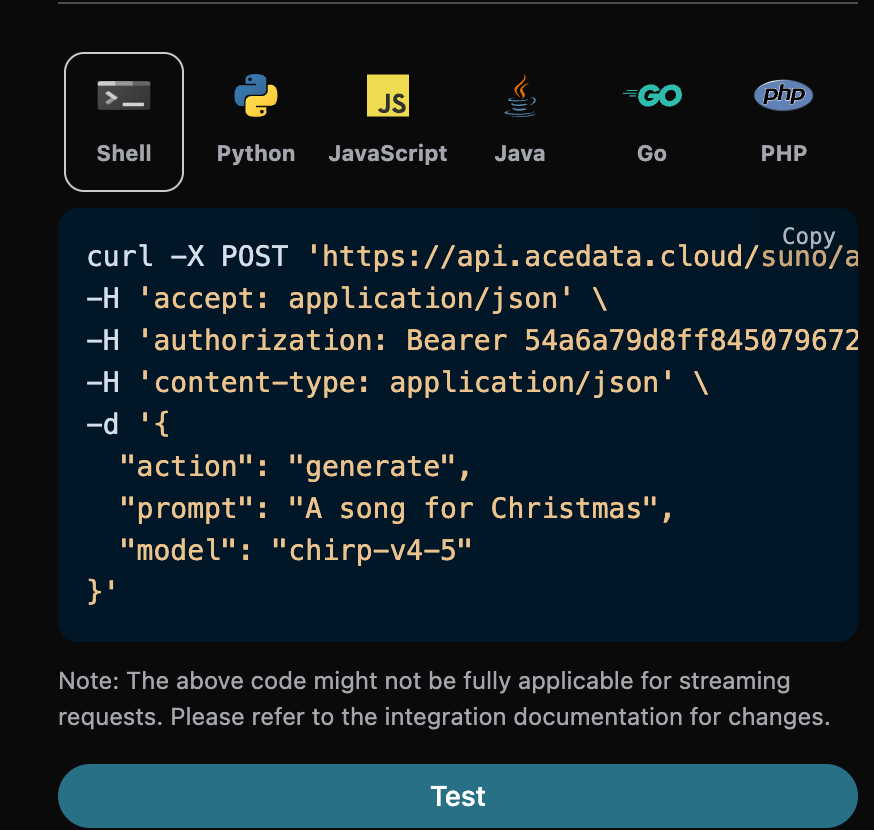
You can click the "Try" button to test the API directly. After waiting 1-2 minutes, the result is as follows:
{
  "success": true,
  "task_id": "e72fb249-bd5b-4e2a-b20c-8a06fea5ac14",
  "trace_id": "7dbc5b6a-b2c0-4d85-9d39-fa8a8a785ccf",
  "data": [
    {
      "id": "b481b17a-bf50-4e10-8adc-4d5635050893",
      "title": "Under the Mistletoe",
      "image_url": "https://cdn.acedata.cloud/e724d7f13d.png?example=image-001",
      "lyric": "[Verse]\nSnowflakes falling on the ground\nTwinkling lights all around\nThe scent of pine fills the air\nChristmas magic everywhere\n[Chorus]\nUnder the mistletoe tonight\nHearts aglow in the soft moonlight\nLaughter echoes\nSpirits bright\nIt’s Christmas time\nIt feels so right\n[Verse 2]\nStockings hung by the fire’s glow\nWarmth inside while the cold winds blow\nCookies baking\nSweet delight\nA season of joy shining bright\n[Chorus]\nUnder the mistletoe tonight\nHearts aglow in the soft moonlight\nLaughter echoes\nSpirits bright\nIt’s Christmas time\nIt feels so right\n[Bridge]\nCarols sung by candlelight\nStars above make the world feel tight\nPeace and love\nA season’s creed\nFilling hearts with all we need\n[Chorus]\nUnder the mistletoe tonight\nHearts aglow in the soft moonlight\nLaughter echoes\nSpirits bright\nIt’s Christmas time\nIt feels so right",
      "audio_url": "https://cdn.acedata.cloud/assets/examples/fish/5ade0339-5f11-487e-aacc-06a908271706-8e3fcb0e5547.mp3",
      "video_url": "",
      "created_at": "2025-06-17T15:59:32.468Z",
      "model": "chirp-auk",
      "state": "succeeded",
      "prompt": "A song for Christmas",
      "style": "holiday, cheerful, male vocals",
      "duration": 154.92
    },
    {
      "id": "fbf22dab-5e2b-4e02-84c0-6d7605f14c3d",
      "title": "Under the Mistletoe",
      "image_url": "https://cdn.acedata.cloud/e724d7f13d.png?example=image-002",
      "lyric": "[Verse]\nSnowflakes falling on the ground\nTwinkling lights all around\nThe scent of pine fills the air\nChristmas magic everywhere\n[Chorus]\nUnder the mistletoe tonight\nHearts aglow in the soft moonlight\nLaughter echoes\nSpirits bright\nIt’s Christmas time\nIt feels so right\n[Verse 2]\nStockings hung by the fire’s glow\nWarmth inside while the cold winds blow\nCookies baking\nSweet delight\nA season of joy shining bright\n[Chorus]\nUnder the mistletoe tonight\nHearts aglow in the soft moonlight\nLaughter echoes\nSpirits bright\nIt’s Christmas time\nIt feels so right\n[Bridge]\nCarols sung by candlelight\nStars above make the world feel tight\nPeace and love\nA season’s creed\nFilling hearts with all we need\n[Chorus]\nUnder the mistletoe tonight\nHearts aglow in the soft moonlight\nLaughter echoes\nSpirits bright\nIt’s Christmas time\nIt feels so right",
      "audio_url": "https://cdn.acedata.cloud/assets/examples/fish/5ade0339-5f11-487e-aacc-06a908271706-8e3fcb0e5547.mp3",
      "video_url": "",
      "created_at": "2025-06-17T15:59:32.468Z",
      "model": "chirp-auk",
      "state": "succeeded",
      "prompt": "A song for Christmas",
      "style": "holiday, cheerful, male vocals",
      "duration": 158.48
    }
  ]
}
As you can see, we have now obtained the content of two songs, including their titles, preview images, lyrics, audio, videos, and other content.
The fields are described as follows:
- success: Whether generation succeeded;
trueif successful, otherwisefalse - data: A list containing detailed information about the generated songs.
- state: The song generation status, which primarily has four possible values:
- succeeded: Generation succeeded
- pending: In the queue
- running: In progress
- error: Failed
- id: The song ID
- title: The song title
- image_url: The URL of the song's original cover image, which can be used directly for display.
- image_large_url: The URL of the song's original high-resolution cover image, returned when a high-resolution image is available. If you need to keep the cover long-term, please download and save it yourself.
- lyric: The song lyrics
- audio_url: The song's final audio URL. The platform prioritizes returning an Ace Data Cloud CDN URL; if persistence fails, the original media URL may be returned, so please download it promptly.
- video_url: The song's video file, which opens as an mp4 video.
- created_at: The creation time
- model: The model used, generally the latest v3 model
- style: The style
- state: The song generation status, which primarily has four possible values:
¶ Custom Generation
If you want to generate lyrics in a customized way, you can enter lyrics:
At this point, the lyric field can be passed content similar to the following:
[Verse]\nSnowflakes falling all around\nGlistening white\nCovering the ground\nChildren laughing\nFull of delight\nIn this winter wonderland tonight\nSanta's sleigh\nUp in the sky\nRudolph's nose shining bright\nOh my\nHear the jingle bells\nRinging so clear\nBringing joy and holiday cheer\n[Verse 2]\nRoasting chestnuts by the fire's glow\nChristmas lights\nThey twinkle and show\nFamilies gathering with love and cheer\nSpreading warmth to everyone near
Note that
\nin the lyrics here represents a newline character. If you do not know how to generate lyrics, you can use the lyrics generation API provided by AceDataCloud to generate lyrics from a prompt. The API is Suno Lyrics Generation API.
Next, to generate a custom song based on the lyrics, title, and style, you can specify the following:
- lyric: The lyrics text.
- custom: Set to
trueto indicate custom generation. This parameter defaults to false, indicating generation usingprompt. - title: The title of the song.
- style: The style of the song, optional.
An example is shown below:
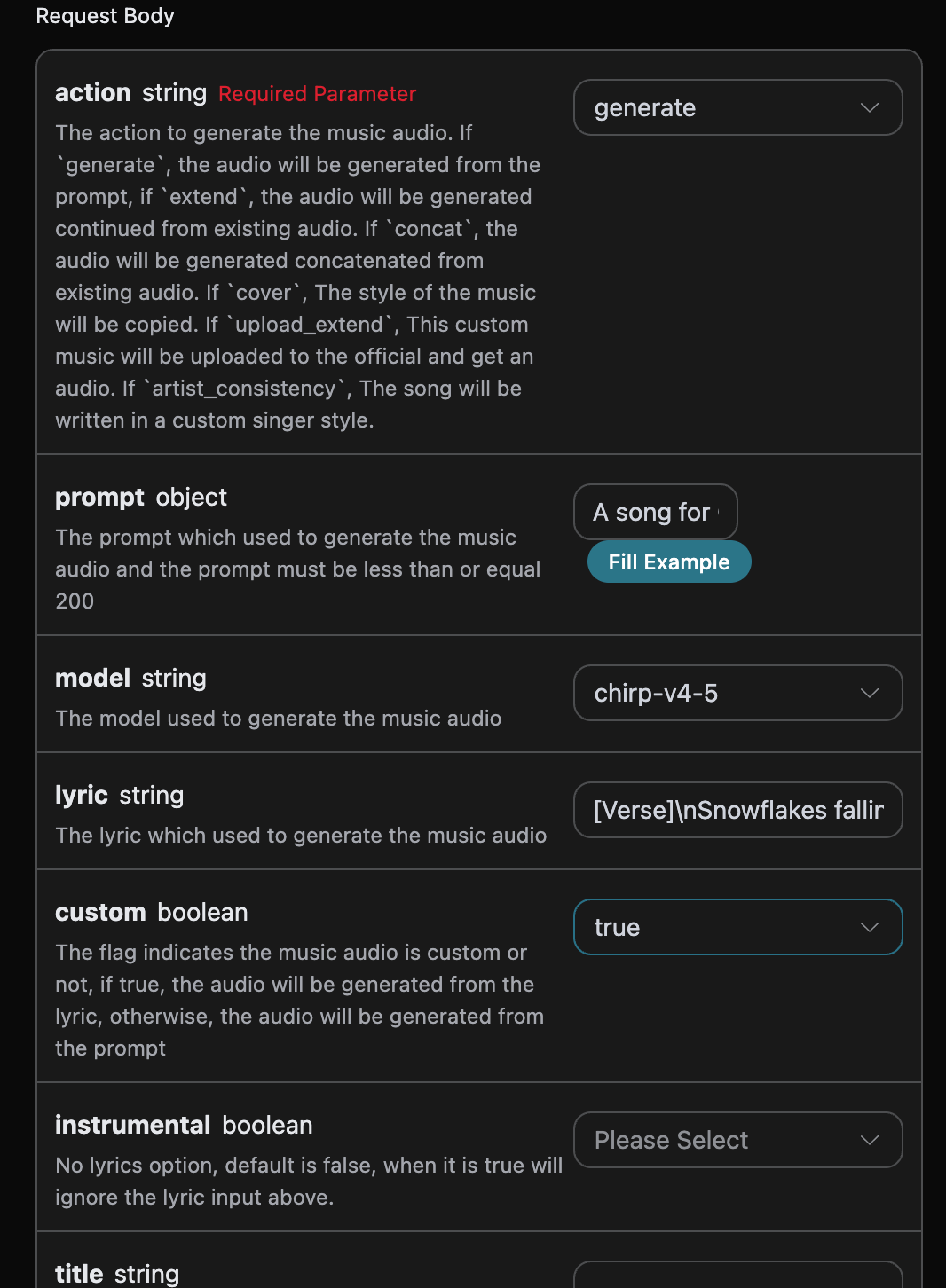
After filling in the fields, the following code is automatically generated:
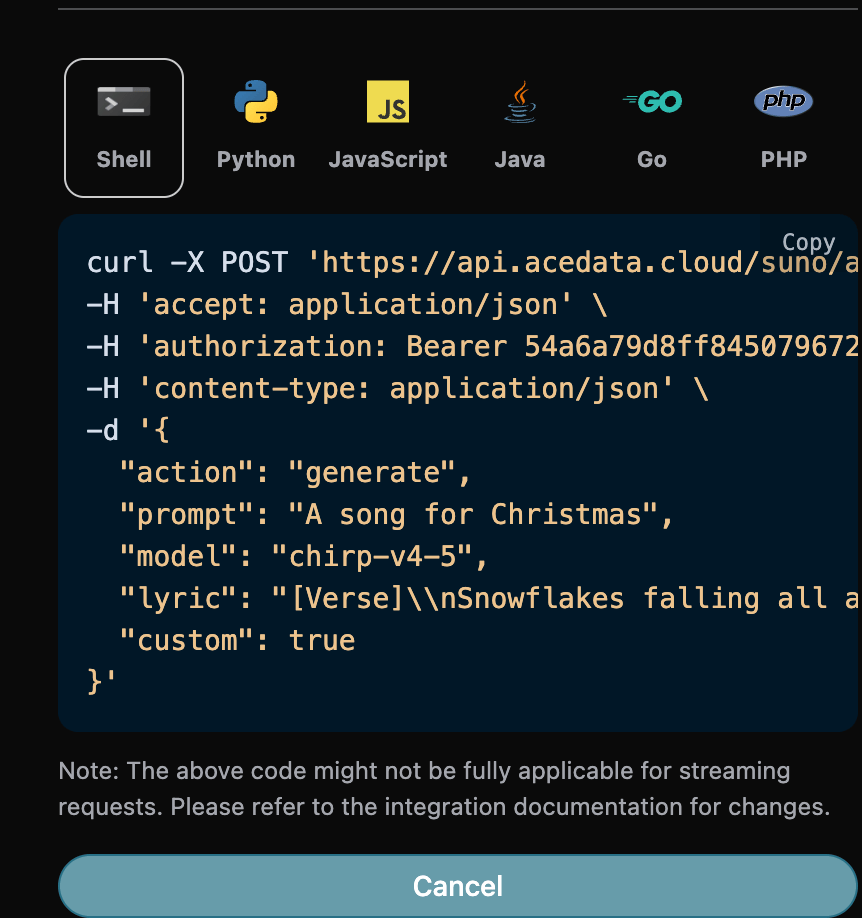
The corresponding code:
curl -X POST 'https://api.acedata.cloud/suno/audios' \
-H 'accept: application/json' \
-H 'authorization: Bearer {token}' \
-H 'content-type: application/json' \
-d '{
  "action": "generate",
  "prompt": "A song for Christmas",
  "model": "chirp-v4-5",
  "lyric": "[Verse]\\nSnowflakes falling all around\\nGlistening white\\nCovering the ground\\nChildren laughing\\nFull of delight\\nIn this winter wonderland tonight\\nSanta's sleigh\\nUp in the sky\\nRudolph's nose shining bright\\nOh my\\nHear the jingle bells\\nRinging so clear\\nBringing joy and holiday cheer\\n[Verse 2]\\nRoasting chestnuts by the fire's glow\\nChristmas lights\\nThey twinkle and show\\nFamilies gathering with love and cheer\\nSpreading warmth to everyone near",
  "custom": true
}'
Testing is allowed, and the generated result is similar.
¶ Custom Singer Style Generation Feature
If you want to generate a song using a singer style, first generate a song using the basic usage described above.
Once you have the song you want to set as the singer style, go to the Suno Persona API to generate a singer style ID parameter persona_id based on the officially generated music ID audio_id. The specific parameters are shown below:
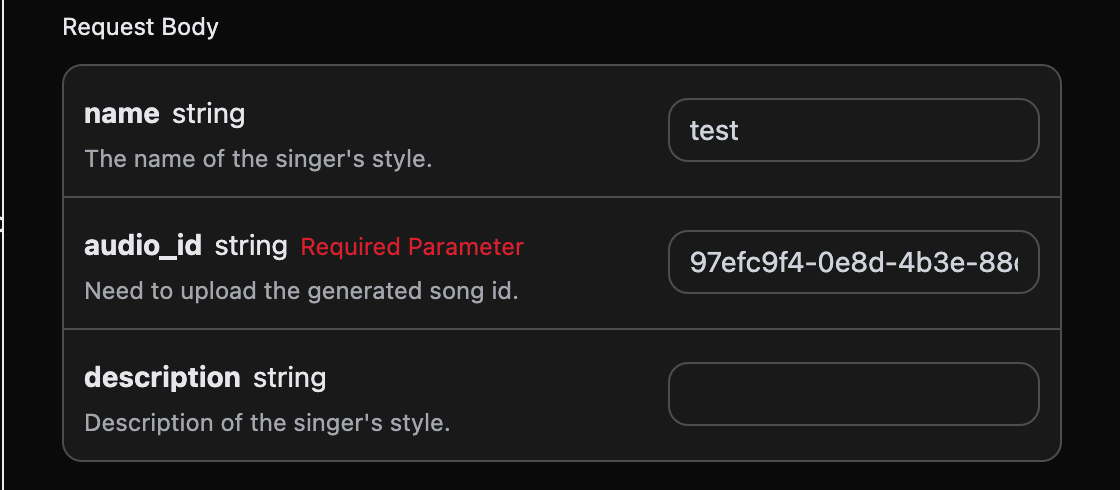
After filling in the fields, the following code is automatically generated:
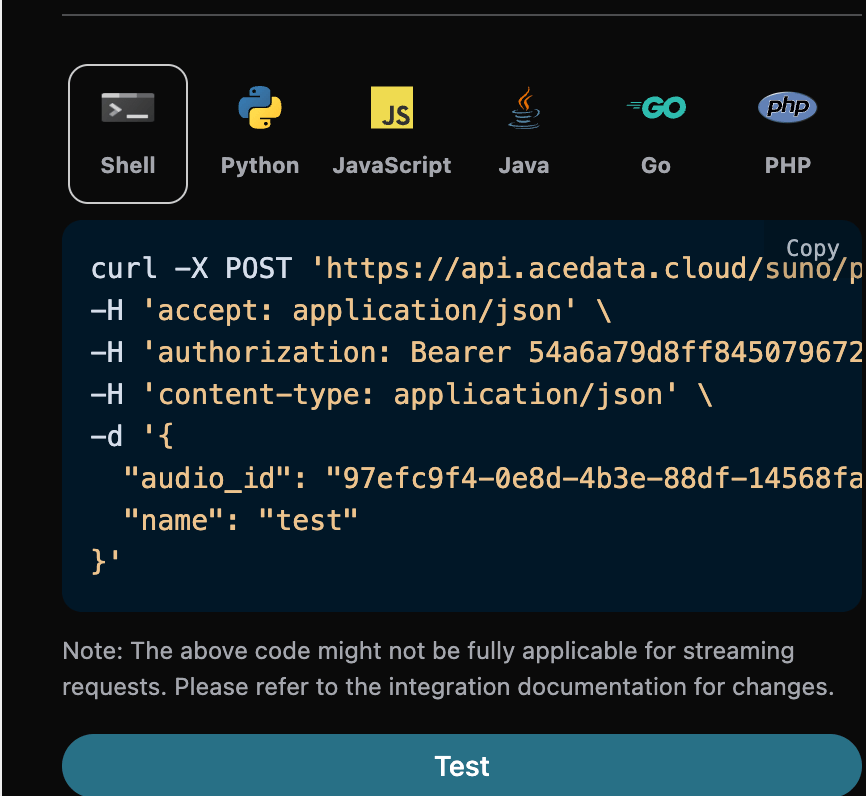
The corresponding Python code:
import requests

url = "https://api.acedata.cloud/suno/persona"

headers = {
    "accept": "application/json",
    "authorization": "Bearer {token}",
    "content-type": "application/json"
}

payload = {
    "audio_id": "97efc9f4-0e8d-4b3e-88df-14568fa1b11f",
    "name": "test"
}

response = requests.post(url, json=payload, headers=headers)
print(response.text)
Click Run, and you will get a result as follows:
{
  "success": true,
  "task_id": "7628b754-4fe7-4e79-bda4-806d0dd8bf6e",
  "data": {
    "persona_id": "e0d7319e-aa2a-44cb-b00a-916218d7cb0b"
  }
}
We use the audio_id and persona_id above, 97efc9f4-0e8d-4b3e-88df-14568fa1b11f and e0d7319e-aa2a-44cb-b00a-916218d7cb0b respectively, as the example data for this instance. Then you can set the action parameter to artist_consistency (if using the newer singer style Persona-v2-vox, action must be set to artist_consistency_vox), and enter the ID of the song to continue generating and the singer style ID. An example is shown below:
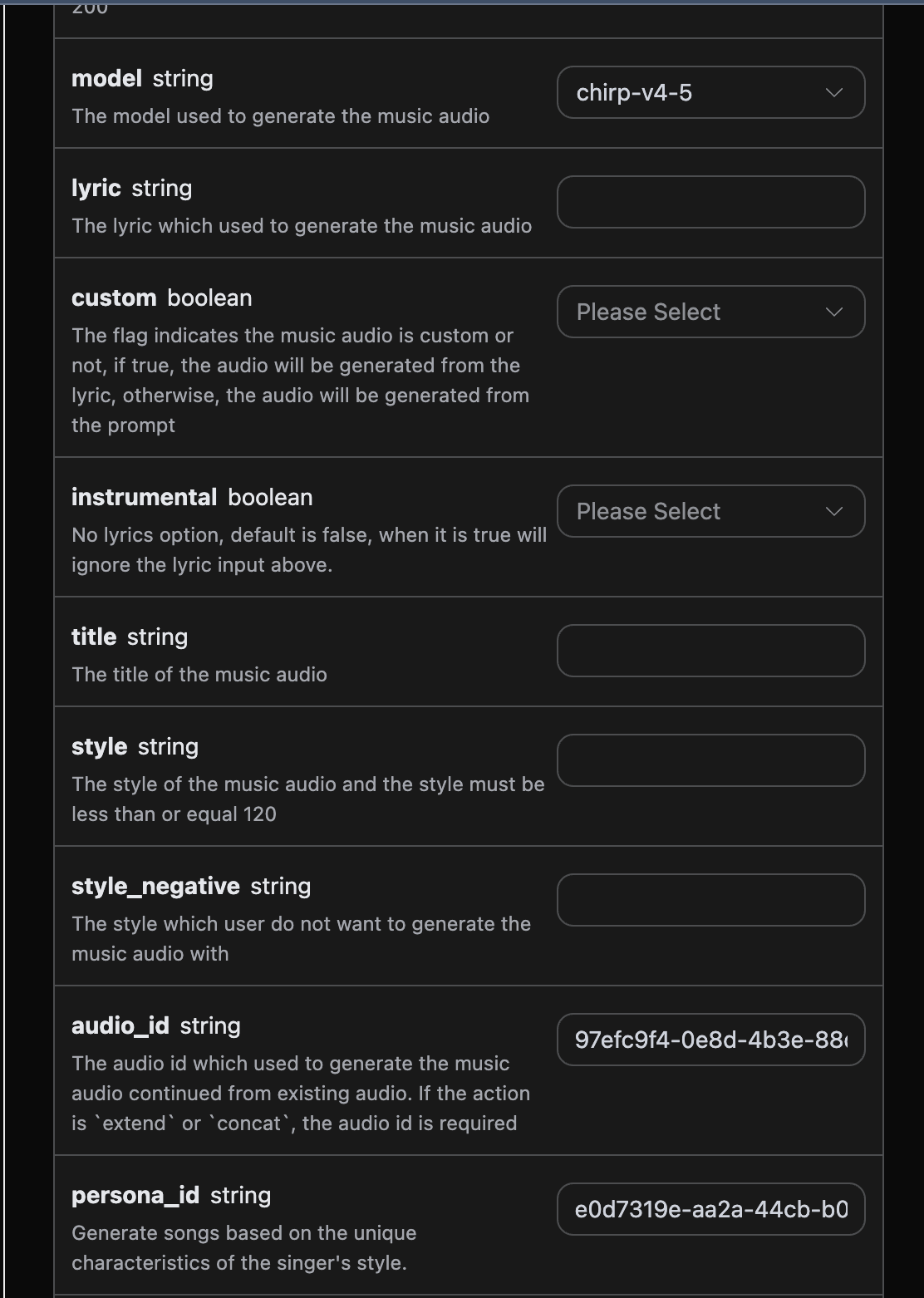
After filling in the fields, the following code is automatically generated:
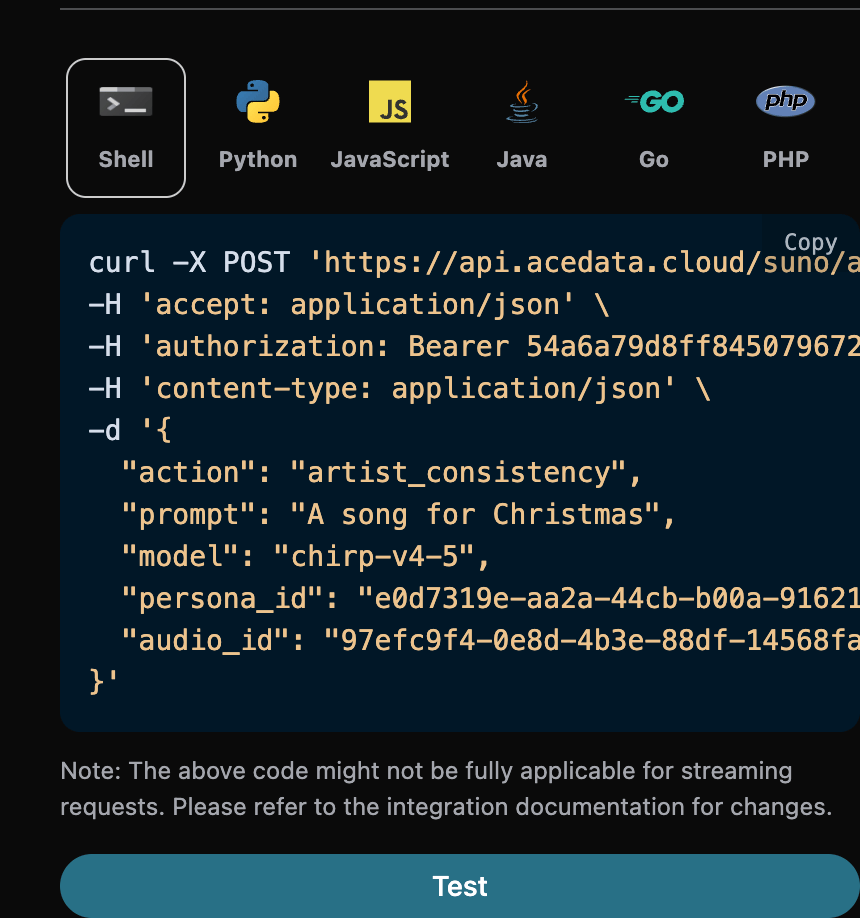
The corresponding Python code:
import requests

url = "https://api.acedata.cloud/suno/audios"

headers = {
    "accept": "application/json",
    "authorization": "Bearer {token}",
    "content-type": "application/json"
}

payload = {
    "action": "artist_consistency",
    "prompt": "A song for Christmas",
    "model": "chirp-v4-5",
    "persona_id": "e0d7319e-aa2a-44cb-b00a-916218d7cb0b",
    "audio_id": "97efc9f4-0e8d-4b3e-88df-14568fa1b11f"
}

response = requests.post(url, json=payload, headers=headers)
print(response.text)
Click Run, and you will get a result as follows:
{
  "success": true,
  "task_id": "9b732b1a-bd67-48bc-95e4-90140e06836f",
  "trace_id": "30fcd88e-7687-4137-92d7-913b58115204",
  "data": [
    {
      "id": "727a36e2-8dce-4df7-99e5-14e44635c80f",
      "title": "",
      "image_url": "https://cdn.acedata.cloud/e724d7f13d.png?example=image-003",
      "lyric": "",
      "audio_url": "https://cdn.acedata.cloud/assets/examples/fish/5ade0339-5f11-487e-aacc-06a908271706-8e3fcb0e5547.mp3",
      "video_url": "",
      "created_at": "2025-06-17T16:27:33.979Z",
      "model": "chirp-auk",
      "state": "succeeded",
      "style": "",
      "duration": 244.4
    },
    {
      "id": "3b33301a-b17e-4b25-8842-09b46dab1a36",
      "title": "",
      "image_url": "https://cdn.acedata.cloud/e724d7f13d.png?example=image-004",
      "lyric": "",
      "audio_url": "https://cdn.acedata.cloud/assets/examples/fish/5ade0339-5f11-487e-aacc-06a908271706-8e3fcb0e5547.mp3",
      "video_url": "",
      "created_at": "2025-06-17T16:27:33.979Z",
      "model": "chirp-auk",
      "state": "succeeded",
      "style": "",
      "duration": 229.88
    }
  ]
}
As you can see, the result is consistent with the one above, thereby achieving the functionality of generating songs using a singer style.
¶ Continue Generation Feature
If you want to continue generating an already generated Suno song, you can set the action parameter to extend and enter the ID of the song you want to extend. The song ID is obtained as described in Basic Usage. From the above, you can see that the song ID is:
"id": "97efc9f4-0e8d-4b3e-88df-14568fa1b11f"
Note that the
idin the lyrics here is the ID of the generated song. If you do not know how to generate a song, refer to Basic Usage above.
If you want to continue generating a song you uploaded, you can set the action parameter to upload_extend and enter the ID of the custom-uploaded song you want to extend. The song ID is obtained using the Suno Upload Generation API, as shown below:
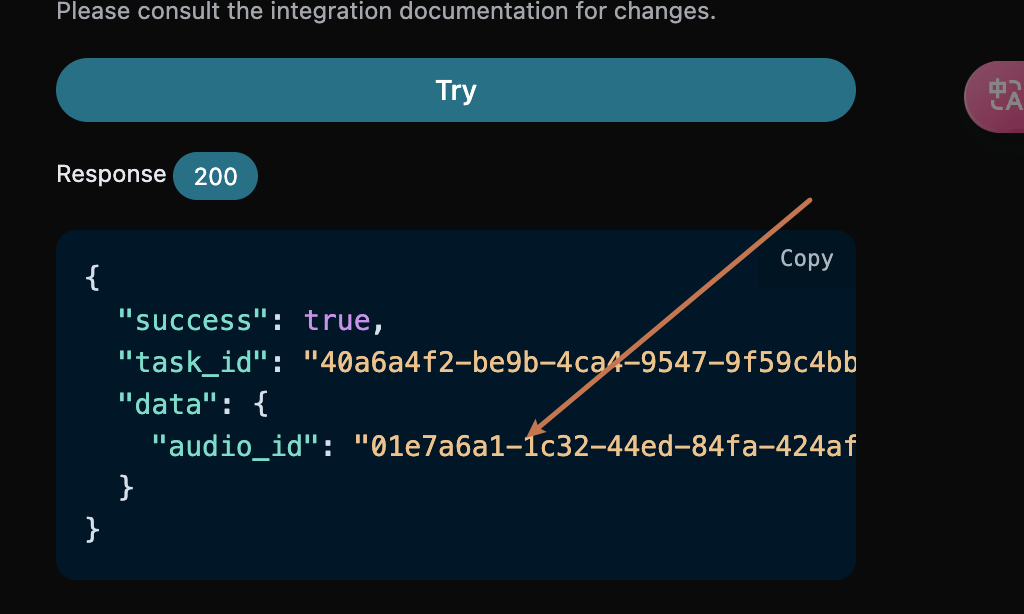
Next, you must enter the lyrics for the continuation segment and can specify a style:
- lyric: Lyrics used only to guide the newly generated segment after
continue_at; they will not replace the lyrics in the source audio before that point. - custom: Set to
trueto enable custom generation. This parameter defaults to false, which means generation usesprompt. - style: The song style of the continuation segment, optional.
- continue_at: The continuation boundary, in seconds. For example, 213.5 means generating the subsequent segment starting at 3 minutes and 33.5 seconds.
For extend and upload_extend, continue_at must be greater than 0 and supports fractional seconds, such as 30.792; it will not be rounded when submitted.
extendis used to continue creating from an existing song, not to replace the lyrics of the entire song. If you want the entire song to use new lyrics from the beginning, usegenerateto regenerate it; if you want to reinterpret an existing song, usecover. When you provide a full set of new lyrics, the original lyrics beforecontinue_atstill will not be replaced.
An example is shown below:
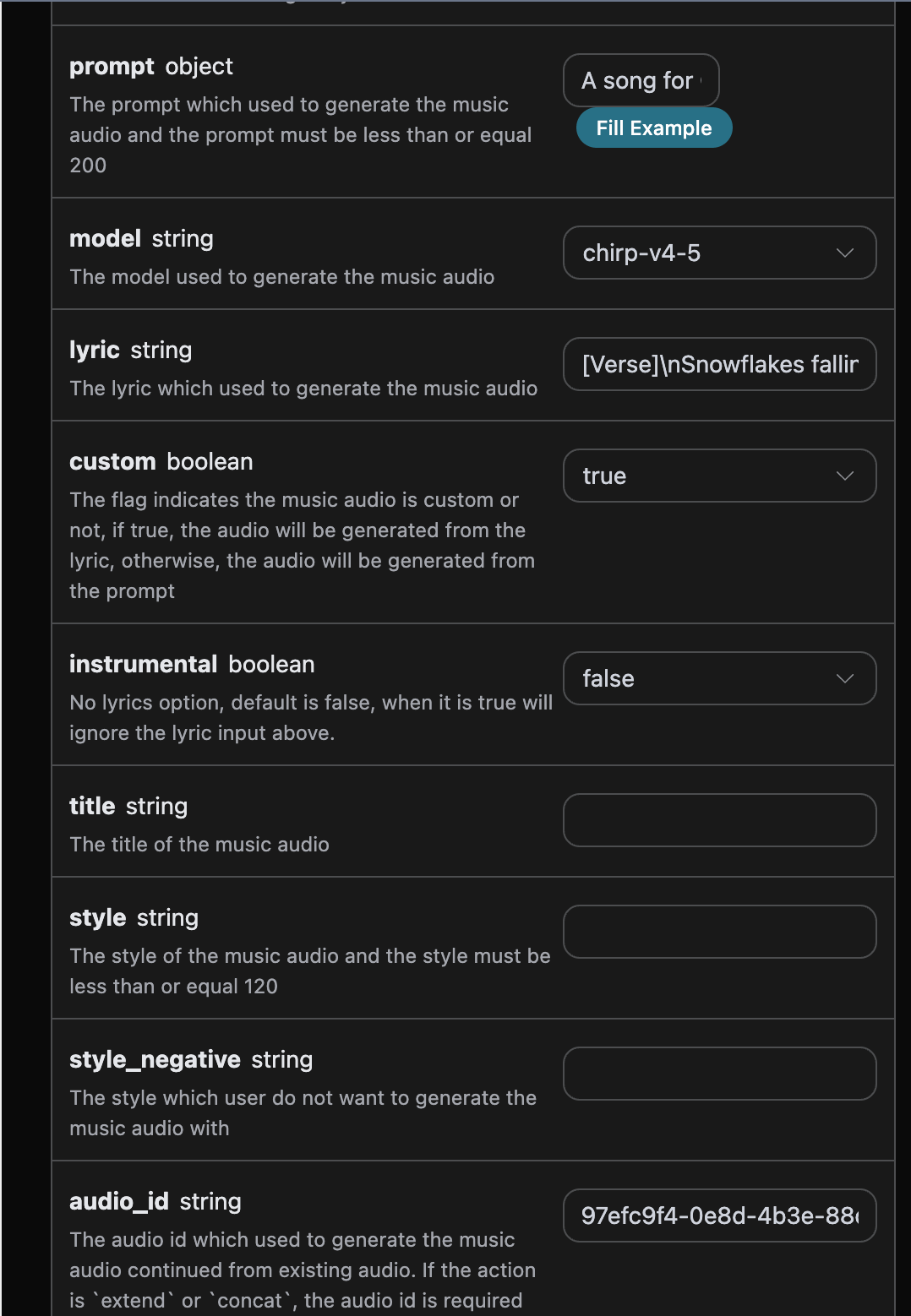
After completing the fields, the following code is automatically generated:
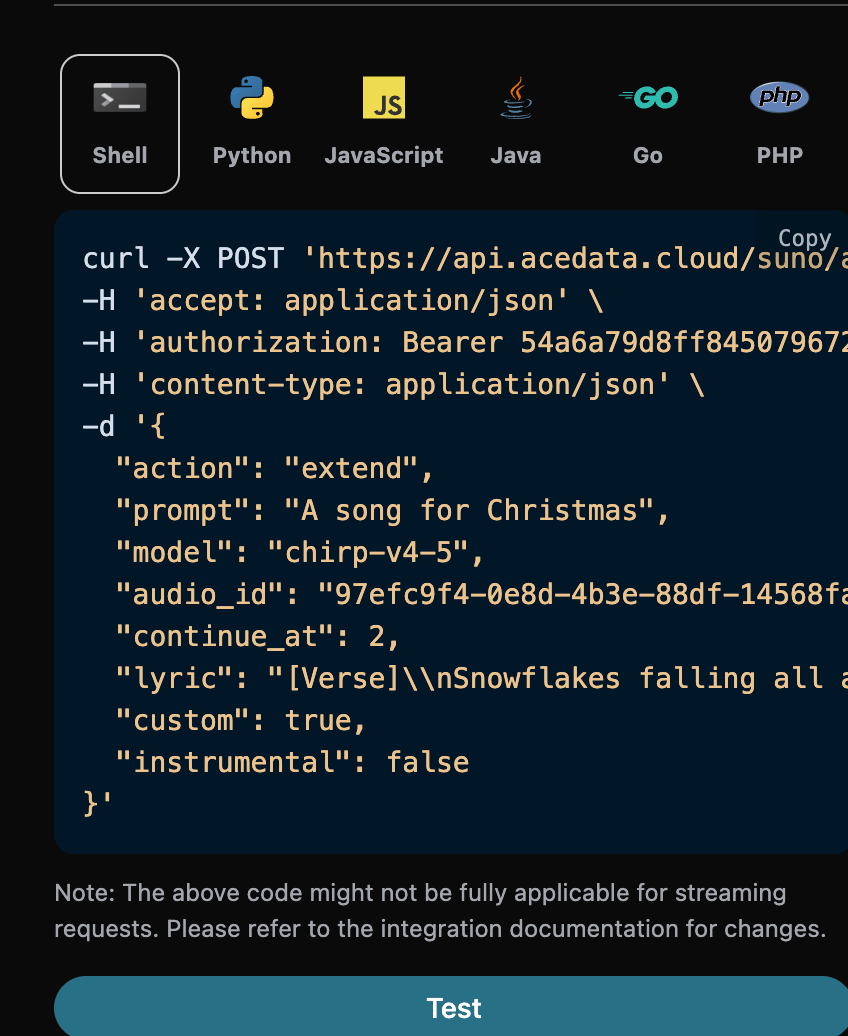
Below is a snapshot of an actual historical API call, in which continue_at is 2 seconds, so only the first 2 seconds belong to the original content before the continuation boundary. When extending a song near its end, set this value to the number of seconds at which you want the continuation to begin, and provide only the new segment to be sung after the boundary in lyric.
The corresponding Python code:
import requests

url = "https://api.acedata.cloud/suno/audios"

headers = {
    "accept": "application/json",
    "authorization": "Bearer {token}",
    "content-type": "application/json"
}

payload = {
    "action": "extend",
    "prompt": "A song for Christmas",
    "model": "chirp-v4-5",
    "audio_id": "97efc9f4-0e8d-4b3e-88df-14568fa1b11f",
    "continue_at": 2,
    "lyric": "[Verse]\\nSnowflakes falling all around\\nGlistening white\\nCovering the ground\\nChildren laughing\\nFull of delight\\nIn this winter wonderland tonight\\nSanta's sleigh\\nUp in the sky\\nRudolph's nose shining bright\\nOh my\\nHear the jingle bells\\nRinging so clear\\nBringing joy and holiday cheer\\n[Verse 2]\\nRoasting chestnuts by the fire's glow\\nChristmas lights\\nThey twinkle and show\\nFamilies gathering with love and cheer\\nSpreading warmth to everyone near",
    "custom": True,
    "instrumental": False
}

response = requests.post(url, json=payload, headers=headers)
print(response.text)
Click Run, and you will get a result like this:
{
  "success": true,
  "task_id": "75b835d9-30d1-4641-8524-0aeedbdc9e1a",
  "trace_id": "44c41045-a2e1-4d19-aafc-7abd239d0d5c",
  "data": [
    {
      "id": "0a1e1b10-c36a-41c9-9bfb-b26d9d25db98",
      "title": "",
      "image_url": "https://cdn.acedata.cloud/e724d7f13d.png?example=image-005",
      "lyric": "[Verse]\\nSnowflakes falling all around\\nGlistening white\\nCovering the ground\\nChildren laughing\\nFull of delight\\nIn this winter wonderland tonight\\nSanta's sleigh\\nUp in the sky\\nRudolph's nose shining bright\\nOh my\\nHear the jingle bells\\nRinging so clear\\nBringing joy and holiday cheer\\n[Verse 2]\\nRoasting chestnuts by the fire's glow\\nChristmas lights\\nThey twinkle and show\\nFamilies gathering with love and cheer\\nSpreading warmth to everyone near",
      "audio_url": "https://cdn.acedata.cloud/assets/examples/fish/5ade0339-5f11-487e-aacc-06a908271706-8e3fcb0e5547.mp3",
      "video_url": "",
      "created_at": "2025-06-17T16:38:35.509Z",
      "model": "chirp-auk",
      "state": "succeeded",
      "style": "",
      "duration": 165.92
    },
    {
      "id": "4334c5b4-0a44-4b26-a8f6-66cc4dbb8fc3",
      "title": "",
      "image_url": "https://cdn.acedata.cloud/e724d7f13d.png?example=image-006",
      "lyric": "[Verse]\\nSnowflakes falling all around\\nGlistening white\\nCovering the ground\\nChildren laughing\\nFull of delight\\nIn this winter wonderland tonight\\nSanta's sleigh\\nUp in the sky\\nRudolph's nose shining bright\\nOh my\\nHear the jingle bells\\nRinging so clear\\nBringing joy and holiday cheer\\n[Verse 2]\\nRoasting chestnuts by the fire's glow\\nChristmas lights\\nThey twinkle and show\\nFamilies gathering with love and cheer\\nSpreading warmth to everyone near",
      "audio_url": "https://cdn.acedata.cloud/assets/examples/fish/5ade0339-5f11-487e-aacc-06a908271706-8e3fcb0e5547.mp3",
      "video_url": "",
      "created_at": "2025-06-17T16:38:35.509Z",
      "model": "chirp-auk",
      "state": "succeeded",
      "style": "",
      "duration": 158.84
    }
  ]
}
As you can see, lyric in the result returns the lyrics text used for this continuation task. This field is not a verbatim transcription of the complete finished audio; for extend, the source audio before continue_at still uses the original lyrics, and the new lyrics are used only to guide the continuation segment.
¶ Get the Complete Song
The current model's extend result usually already includes the source audio before continue_at and the new content after the boundary. First, determine whether the returned audio is already a complete song based on its actual duration and content. If the returned audio is a standalone continuation segment, or if you need to explicitly merge multiple continuation steps into one song, use the concatenation function:
- action: Set to
concat. - audio_id: The ID of the last continuation segment.
For example, if the extended song's ID is 0a1e1b10-c36a-41c9-9bfb-b26d9d25db98, you can set the parameters as follows:
{
  "action": "concat",
  "audio_id": "0a1e1b10-c36a-41c9-9bfb-b26d9d25db98"
}
The other parameters remain unchanged. The result is a complete song, consisting of all song segments concatenated together, but only one song is returned, as shown in the following example:
{
  "success": true,
  "task_id": "0f794915-8418-4124-93f5-b7eb3a417167",
  "trace_id": "62afcce0-e7e5-44b8-8c2e-4bba12a4f414",
  "data": [
    {
      "id": "0efec7e0-11bf-4313-9981-2c0e7218d7dd",
      "title": "",
      "image_url": "https://cdn.acedata.cloud/e724d7f13d.png?example=image-007",
      "lyric": "[Verse]\\nSnowflakes falling all around\\nGlistening white\\nCovering the ground\\nChildren laughing\\nFull of delight\\nIn this winter wonderland tonight\\nSanta's sleigh\\nUp in the sky\\nRudolph's nose shining bright\\nOh my\\nHear the jingle bells\\nRinging so clear\\nBringing joy and holiday cheer\\n[Verse 2]\\nRoasting chestnuts by the fire's glow\\nChristmas lights\\nThey twinkle and show\\nFamilies gathering with love and cheer\\nSpreading warmth to everyone near\n[Verse]\\nSnowflakes falling all around\\nGlistening white\\nCovering the ground\\nChildren laughing\\nFull of delight\\nIn this winter wonderland tonight\\nSanta's sleigh\\nUp in the sky\\nRudolph's nose shining bright\\nOh my\\nHear the jingle bells\\nRinging so clear\\nBringing joy and holiday cheer\\n[Verse 2]\\nRoasting chestnuts by the fire's glow\\nChristmas lights\\nThey twinkle and show\\nFamilies gathering with love and cheer\\nSpreading warmth to everyone near",
      "audio_url": "https://cdn.acedata.cloud/assets/examples/fish/5ade0339-5f11-487e-aacc-06a908271706-8e3fcb0e5547.mp3",
      "video_url": "",
      "created_at": "2025-06-17T16:43:06.718Z",
      "model": "chirp-auk",
      "state": "succeeded",
      "style": "",
      "duration": 167.91997916666668,
      "concat_history": [
        {
          "continue_at": 2,
          "id": "97efc9f4-0e8d-4b3e-88df-14568fa1b11f",
          "infill": false,
          "source": "web",
          "type": "gen"
        },
        {
          "id": "0a1e1b10-c36a-41c9-9bfb-b26d9d25db98"
        }
      ]
    }
  ]
}
¶ Music Cover
After continuing to generate a song based on an existing song, the style of the returned song may not be quite suitable. If you want to create a cover of a previously generated song (custom-uploaded music is also supported), you need to use the music cover method, and you can specify the following:
- action: Set to
cover. When creating a cover of custom-uploaded music, it must be set toupload_cover. - audio_id: The ID of the previously generated song.
If you need to create a cover using a specified voice, you can also pass in persona_id. For a private voice created through /suno/voices, you must first upload the original song through /suno/upload with the same persona_id, and then use the returned audio_id for upload_cover. All steps must use the same service channel. There is no need to specify vocal_gender separately; a gender preference cannot replace a voice ID.
For example, if the previously generated song's ID is 0a1e1b10-c36a-41c9-9bfb-b26d9d25db98, you can set the parameters as follows:
{
  "action": "cover",
  "audio_id": "0a1e1b10-c36a-41c9-9bfb-b26d9d25db98",
  "prompt": "A song for Christmas",
  "model": "chirp-v4-5"
}
The other parameters remain unchanged. The result is a cover of the song, created from the previously generated song, as shown in the following example:
{
  "success": true,
  "task_id": "b9d43d06-2e0a-4b5e-9e0d-7dfab32e00ab",
  "trace_id": "6c5e567d-0fdc-4c44-9b36-4090d9a75ff5",
  "data": [
    {
      "id": "6988fa57-f810-41cf-afab-7838db2c77dc",
      "title": "",
      "image_url": "https://cdn.acedata.cloud/e724d7f13d.png?example=image-008",
      "lyric": "",
      "audio_url": "https://cdn.acedata.cloud/assets/examples/fish/5ade0339-5f11-487e-aacc-06a908271706-8e3fcb0e5547.mp3",
      "video_url": "",
      "created_at": "2025-06-17T16:44:13.007Z",
      "model": "chirp-auk",
      "state": "succeeded",
      "style": "",
      "duration": 182.4
    },
    {
      "id": "ce98b991-0258-4f05-8245-e43d4efa8fb8",
      "title": "",
      "image_url": "https://cdn.acedata.cloud/e724d7f13d.png?example=image-009",
      "lyric": "",
      "audio_url": "https://cdn.acedata.cloud/assets/examples/fish/5ade0339-5f11-487e-aacc-06a908271706-8e3fcb0e5547.mp3",
      "video_url": "",
      "created_at": "2025-06-17T16:44:13.007Z",
      "model": "chirp-auk",
      "state": "succeeded",
      "style": "",
      "duration": 179.72
    }
  ]
}
The generated results are similar to those above, completing the process of creating a cover of the previously generated song.
¶ Replace Section
replace_section regenerates the selected segment based on a time range in the source song and stitches the result back into the original song. replace_section_result_mode defaults to full_song, returning 2 complete songs that can be played directly without calling concat again.
¶ How to Fill in the Inputs
action:replace_section.audio_id: The ID of the full song to edit. When editing again, use thedata[].idof the full song selected from the previous edit, not thetask_id.model: The song generation model, such aschirp-v6.lyric: The new lyrics for the selected section to be sung. There is no need to provide the lyrics for the entire song to obtain a full song.prompt: Explicitly specify the new lyrics for the section being replaced. When changing lyrics, it is recommended to enter the same passage as inlyricto avoid having the two fields specify different lyrics. Existing requests that provide only the section’slyricand omitpromptcan still be used, but addingpromptalone does not guarantee that the lyric change will succeed.style,negative_tags: Optional style descriptions and exclusions; in this operation,promptis not an inspiration description as it is in ordinary song generation.replace_section_start,replace_section_end: The start and end times of the selection in the source song for this edit, in seconds; decimals are supported. The start must not be less than 0, and the end must be greater than the start and must not exceed the source song’s duration.replace_section_result_mode:full_song(default) returns 2 full songs;candidatesreturns 2 replacement candidates that have not yet been concatenated.
Do not treat “lyric must contain the complete lyrics after replacement, and prompt must contain the lyrics for the section” as a general rule. Providing complete lyrics can produce an excessively long replacement in some tasks, making the full song significantly longer after concatenation. Providing section lyrics also does not guarantee a fixed duration or word-for-word adherence to the lyrics; this is generative editing, and the actual audio needs to be checked.
¶ Start a task and obtain full songs
Below is an example of the request format. Replace YOUR_COMPLETED_AUDIO_ID and the time range with your own source song ID and actual selection; the example assumes that seconds 30–50 correspond to the following four lines.
{
  "action": "replace_section",
  "audio_id": "YOUR_COMPLETED_AUDIO_ID",
  "model": "chirp-v6",
  "custom": false,
  "instrumental": false,
  "lyric": "晚风吹过安静的街巷\n绿色风筝停在我身旁\n我们沿着河岸轻轻唱\n把今天的故事放心上",
  "prompt": "晚风吹过安静的街巷\n绿色风筝停在我身旁\n我们沿着河岸轻轻唱\n把今天的故事放心上",
  "replace_section_start": 30.0,
  "replace_section_end": 50.0,
  "replace_section_result_mode": "full_song",
  "async": true
}
After submission, use the returned task_id to query /suno/tasks, with the request body {"action":"retrieve","id":"YOUR_TASK_ID"}. Once the task is complete, obtain the id, audio_url, and duration of the two full songs from response.data in the task response, and choose one after listening to them. success: true means that the task executed successfully; it does not mean that the new lyrics were sung word for word or that the duration meets expectations.
¶ Selection, result checking, and editing again
- First listen to the source song, then use the timing information from
/suno/timingto determine the selection, covering complete musical phrases where possible. Do not select a range based on fixed indices in the lyrics array, and do not expect the rhythm to remain completely unchanged when replacing a section containing more phrases with only a few lines of lyrics. - Keep the number of lines, word count, and rhythm of the new lyrics as close as possible to the original content in the selection. Even when changing only a few words, you need to listen and verify; success cannot be guaranteed on that basis.
- Check whether the new words are sung in the target section, whether the transitions before and after it are natural, and whether the full song’s duration is reasonable.
full_songmeans that a full song is returned, not that it is the same length as the original; if the replacement segment becomes longer, the latter part will shift later accordingly. Thedurationrequest parameter is used only for ordinary generation and cannot lock the duration of a replacement segment. - The returned
lyricis lyrics metadata. In full-song mode, the complete lyrics are assembled when timing information for the source lyrics is available; it may be empty when that information cannot be obtained. It is not an audio transcription, and the presence of new words does not prove that they were sung in the audio. Timing alignment information should also be checked by listening, especially for outputs that have already been edited. - When editing again, use the selected full finished song ID as the new
audio_id, and check that song’s duration and selection again. Do not reuse the time coordinates from before the edit, and do not directly use the entirelyricreturned last time as the section input for this edit.
If the task has completed but the old words are still sung, words are omitted, or the song has become significantly longer, first check the source song ID, selection, and section lyrics, then check the other result. Increasing the frequency of task queries will not change the generated content. If the issue persists, retain the task_id, source song ID, request fields, selection, and result audio for investigation.
¶ Optional: Obtain candidates first, then concatenate manually
Set replace_section_result_mode: "candidates" only when you need to select a replacement candidate yourself. Candidates may include context and cannot be treated as full songs based on their duration alone. After selecting one, call concat with the candidate’s data[].id to obtain the full finished song.
The default full_song mode has already completed concatenation, so this step is not necessary.
¶ Vocal and instrumental separation
Billing: After action=stems succeeds, the standard charge per request is 0.56 Credits; the vocals and accompaniment returned by the same request are counted together as one request. Applicable usage discounts are determined by the actual bill, and failed requests are not charged. all_stems and extract_stem are charged at their respective rates.
When creating derivative works after generating a song and needing to work separately with the accompaniment and vocals, you can separate the instrumental accompaniment and a cappella vocals. You can specify the following:
- action: Set to
stems. - audio_id: The ID of the previously generated song.
For example, if the previously generated song ID is ec13e502-d043-4eb2-92ee-e900c6da69d1, you can set the parameters as follows:
{
  "action": "stems",
  "audio_id": "ec13e502-d043-4eb2-92ee-e900c6da69d1"
}
With the above parameters, you can obtain the vocal and instrumental separation result, as follows:
{
  "success": true,
  "task_id": "4050affc-f8a6-4cba-a86c-bf201eed053d",
  "trace_id": "5107ee58-687d-422f-9195-fa0e82e1fcc8",
  "data": [
    {
      "id": "e3de0928-085a-42c4-b982-3b24738d1989",
      "title": "Deck the Sky - Vocals",
      "image_url": "https://cdn.acedata.cloud/e724d7f13d.png?example=image-013",
      "lyric": "[Verse]\nSnowflakes dance on rooftops high\nChildren's laughter fills the sky\nCarols ring from church bells loud\nHolidays a joyful crowd\n[Verse 2]\nCandy canes and cocoa warm\nWrapped up tight in our own storm\nStockings hung with dreams and cheer\nMagic growing every year\n[Chorus]\nDeck the sky with twinkling stars\nHoliday joy feels ours and ours\nSing the songs of love and light\nChristmas glows so pure and bright\n[Verse 3]\nFireside tales of long ago\nReindeer prance in icy glow\nEvergreen and tinsel’s gleam\nChristmas time a lovely dream\n[Bridge]\nHearts are full with friends and kin\nMistletoe for love to win\nGifts of love and hope we share\nChristmas spirit everywhere\n[Chorus]\nDeck the sky with twinkling stars\nHoliday joy feels ours and ours\nSing the songs of love and light\nChristmas glows so pure and bright",
      "audio_url": "https://cdn.acedata.cloud/assets/examples/fish/5ade0339-5f11-487e-aacc-06a908271706-8e3fcb0e5547.mp3",
      "video_url": "https://cdn.acedata.cloud/assets/examples/gemini/04a043bd-6b23-4b4e-945c-ce48158c3eee-3a89912507c7.mp4?example=video-001",
      "created_at": "2025-01-05T07:49:16.881Z",
      "model": "",
      "state": "succeeded",
      "style": "holiday, jolly",
      "duration": 174.16
    },
    {
      "id": "ad5d7c89-709c-4eb4-a5a6-72f9f5e57fdb",
      "title": "Deck the Sky - Instrumental",
      "image_url": "https://cdn.acedata.cloud/e724d7f13d.png?example=image-014",
      "lyric": "",
      "audio_url": "https://cdn.acedata.cloud/assets/examples/fish/5ade0339-5f11-487e-aacc-06a908271706-8e3fcb0e5547.mp3",
      "video_url": "https://cdn.acedata.cloud/assets/examples/gemini/04a043bd-6b23-4b4e-945c-ce48158c3eee-3a89912507c7.mp4?example=video-002",
      "created_at": "2025-01-05T07:49:16.892Z",
      "model": "",
      "state": "succeeded",
      "style": "holiday, jolly",
      "duration": 174.16
    }
  ]
}
The generated result is similar to the above, completing the process of separating the vocals and instrumentals of the previously generated song.
¶ All-Stem Separation
The task waits until all audio tracks have been generated before returning a successful terminal state. The appearance of a playable URL during processing does not mean that the entire set of tracks is complete.
When all-stem separation is needed after generating a song, you can specify the following:
- action: Set to
all_stems. - audio_id: The ID of the previously generated song.
For example, if the ID of the previously generated song is bdf23a5a-59f5-4103-b452-054a824a7f9f, you can set the parameters as follows:
{
  "action": "all_stems",
  "audio_id": "bdf23a5a-59f5-4103-b452-054a824a7f9f"
}
Using the above parameters, you can obtain the all-stem separation result, as follows:
  "success": true,
  "task_id": "f4b16fb9-8478-4857-88c7-b9a1f0bb9518",
  "trace_id": "9c560ebd-4fc6-4bdb-988a-8890160a92fb",
  "data": [
    {
      "id": "f86ca64a-9519-4ea7-a592-52438e001412",
      "title": "安全之弦 (Vocals)",
      "image_url": "https://cdn.acedata.cloud/e724d7f13d.png?example=image-015",
      "lyric": "",
      "audio_url": "https://cdn.acedata.cloud/assets/examples/fish/5ade0339-5f11-487e-aacc-06a908271706-8e3fcb0e5547.mp3",
      "video_url": "",
      "created_at": "2025-06-11T02:40:30.770Z",
      "model": "chirp-ahi-stem-12-t1",
      "state": "succeeded",
      "duration": 154.92
    }, {
      "id": "99e649a7-a394-47b9-a915-d7f847285a36",
      "title": "安全之弦 (Backing Vocals)",
      "image_url": "https://cdn.acedata.cloud/e724d7f13d.png?example=image-016",
      "lyric": "",
      "audio_url": "https://cdn.acedata.cloud/assets/examples/fish/5ade0339-5f11-487e-aacc-06a908271706-8e3fcb0e5547.mp3",
      "video_url": "",
      "created_at": "2025-06-11T02:40:30.770Z",
      "model": "chirp-ahi-stem-12-t1",
      "state": "succeeded",
      "duration": 154.92
    }, {
      "id": "6d710bf7-809f-4fdc-bb63-b8cb3a456d42",
      "title": "安全之弦 (Drums)",
      "image_url": "https://cdn.acedata.cloud/e724d7f13d.png?example=image-017",
      "lyric": "",
      "audio_url": "https://cdn.acedata.cloud/assets/examples/fish/5ade0339-5f11-487e-aacc-06a908271706-8e3fcb0e5547.mp3",
      "video_url": "",
      "created_at": "2025-06-11T02:40:30.770Z",
      "model": "chirp-ahi-stem-12-t1",
      "state": "succeeded",
      "duration": 154.92
    }, {
      "id": "e05f07e3-7d80-4713-8e51-7f176c733543",
      "title": "安全之弦 (Bass)",
      "image_url": "https://cdn.acedata.cloud/e724d7f13d.png?example=image-018",
      "lyric": "",
      "audio_url": "https://cdn.acedata.cloud/assets/examples/fish/5ade0339-5f11-487e-aacc-06a908271706-8e3fcb0e5547.mp3",
      "video_url": "",
      "created_at": "2025-06-11T02:40:30.770Z",
      "model": "chirp-ahi-stem-12-t1",
      "state": "succeeded",
      "duration": 154.92
    },
{
      "id": "93fe7cd8-62fd-4739-b78e-142c7e0b8562",
      "title": "String of Safety (Guitar)",
      "image_url": "https://cdn.acedata.cloud/e724d7f13d.png?example=image-019",
      "lyric": "",
      "audio_url": "https://cdn.acedata.cloud/assets/examples/fish/5ade0339-5f11-487e-aacc-06a908271706-8e3fcb0e5547.mp3",
      "video_url": "",
      "created_at": "2025-06-11T02:40:30.770Z",
      "model": "chirp-ahi-stem-12-t1",
      "state": "succeeded",
      "duration": 154.92
    }, {
      "id": "8367d71c-fdd3-441c-8ebe-70c33cca821b",
      "title": "String of Safety (Keyboard)",
      "image_url": "https://cdn.acedata.cloud/e724d7f13d.png?example=image-020",
      "lyric": "",
      "audio_url": "https://cdn.acedata.cloud/assets/examples/fish/5ade0339-5f11-487e-aacc-06a908271706-8e3fcb0e5547.mp3",
      "video_url": "",
      "created_at": "2025-06-11T02:40:30.770Z",
      "model": "chirp-ahi-stem-12-t1",
      "state": "succeeded",
      "duration": 154.92
    }, {
      "id": "28c03590-731c-416e-8fd3-95cdb3d75043",
      "title": "String of Safety (Percussion)",
      "image_url": "https://cdn.acedata.cloud/e724d7f13d.png?example=image-021",
      "lyric": "",
      "audio_url": "https://cdn.acedata.cloud/assets/examples/fish/5ade0339-5f11-487e-aacc-06a908271706-8e3fcb0e5547.mp3",
      "video_url": "",
      "created_at": "2025-06-11T02:40:30.770Z",
      "model": "chirp-ahi-stem-12-t1",
      "state": "succeeded",
      "duration": 154.92
    }, {
      "id": "3d4c1a28-4e1c-485a-8201-d21bb93aca2f",
      "title": "String of Safety (Strings)",
      "image_url": "https://cdn.acedata.cloud/e724d7f13d.png?example=image-022",
      "lyric": "",
      "audio_url": "https://cdn.acedata.cloud/assets/examples/fish/5ade0339-5f11-487e-aacc-06a908271706-8e3fcb0e5547.mp3",
      "video_url": "",
      "created_at": "2025-06-11T02:40:30.770Z",
      "model": "chirp-ahi-stem-12-t1",
      "state": "succeeded",
      "duration": 154.92
    }, {
      "id": "b9db8ded-01ec-4e37-b8a5-64aab3a814c2",
      "title": "String of Safety (Synth)",
      "image_url": "https://cdn.acedata.cloud/e724d7f13d.png?example=image-023",
      "lyric": "",
      "audio_url": "https://cdn.acedata.cloud/assets/examples/fish/5ade0339-5f11-487e-aacc-06a908271706-8e3fcb0e5547.mp3",
      "video_url": "",
      "created_at": "2025-06-11T02:40:30.770Z",
      "model": "chirp-ahi-stem-12-t1",
      "state": "succeeded",
      "duration": 154.92
    }, {
      "id": "10a5248e-32e6-42b9-8da1-678a8a392aef",
      "title": "String of Safety (FX)",
      "image_url": "https://cdn.acedata.cloud/e724d7f13d.png?example=image-024",
      "lyric": "",
      "audio_url": "https://cdn.acedata.cloud/assets/examples/fish/5ade0339-5f11-487e-aacc-06a908271706-8e3fcb0e5547.mp3",
      "video_url": "",
      "created_at": "2025-06-11T02:40:30.770Z",
      "model": "chirp-ahi-stem-12-t1",
      "state": "succeeded",
      "duration": 154.92
    }, {
      "id": "2d272128-111f-4901-8f62-5ae1eb43095a",
      "title": "String of Safety (Brass)",
      "image_url": "https://cdn.acedata.cloud/e724d7f13d.png?example=image-025",
      "lyric": "",
      "audio_url": "https://cdn.acedata.cloud/assets/examples/fish/5ade0339-5f11-487e-aacc-06a908271706-8e3fcb0e5547.mp3",
      "video_url": "",
      "created_at": "2025-06-11T02:40:30.770Z",
      "model": "chirp-ahi-stem-12-t1",
      "state": "succeeded",
      "duration": 154.92
    }, {
      "id": "4a7c19a5-f8d4-4e4a-add9-aa0bad9307cc",
      "title": "String of Safety (Woodwinds)",
      "image_url": "https://cdn.acedata.cloud/e724d7f13d.png?example=image-026",
      "lyric": "",
      "audio_url": "https://cdn.acedata.cloud/assets/examples/fish/5ade0339-5f11-487e-aacc-06a908271706-8e3fcb0e5547.mp3",
      "video_url": "",
      "created_at": "2025-06-11T02:40:30.770Z",
      "model": "chirp-ahi-stem-12-t1",
      "state": "succeeded",
      "duration": 154.92
    }, {
      "id": "1ca774f9-3e75-48a6-941b-808875eadcd2",
      "title": "String of Safety (Vocals)",
      "image_url": "https://cdn.acedata.cloud/e724d7f13d.png?example=image-027",
      "lyric": "",
      "audio_url": "https://cdn.acedata.cloud/assets/examples/fish/5ade0339-5f11-487e-aacc-06a908271706-8e3fcb0e5547.mp3",
      "video_url": "",
      "created_at": "2025-06-11T02:40:30.770Z",
      "model": "chirp-ahi-stem-12-t1",
      "state": "succeeded",
      "duration": 154.92
    }, {
      "id": "14c5ffc7-addf-4fee-afd2-4b8b3e7ee470",
      "title": "String of Safety (Backing Vocals)",
      "image_url": "https://cdn.acedata.cloud/e724d7f13d.png?example=image-028",
      "lyric": "",
      "audio_url": "https://cdn.acedata.cloud/assets/examples/fish/5ade0339-5f11-487e-aacc-06a908271706-8e3fcb0e5547.mp3",
      "video_url": "",
      "created_at": "2025-06-11T02:40:30.771Z",
      "model": "chirp-ahi-stem-12-t1",
      "state": "succeeded",
      "duration": 154.92
    },
{
      "id": "9d044557-450d-48ab-90dc-8eaf6f1cdb6c",
      "title": "String of Safety (Drums)",
      "image_url": "https://cdn.acedata.cloud/e724d7f13d.png?example=image-029",
      "lyric": "",
      "audio_url": "https://cdn.acedata.cloud/assets/examples/fish/5ade0339-5f11-487e-aacc-06a908271706-8e3fcb0e5547.mp3",
      "video_url": "",
      "created_at": "2025-06-11T02:40:30.771Z",
      "model": "chirp-ahi-stem-12-t1",
      "state": "succeeded",
      "duration": 154.92
    }, {
      "id": "efd052d0-c12f-47b3-8282-1f3ef7610e1f",
      "title": "String of Safety (Bass)",
      "image_url": "https://cdn.acedata.cloud/e724d7f13d.png?example=image-030",
      "lyric": "",
      "audio_url": "https://cdn.acedata.cloud/assets/examples/fish/5ade0339-5f11-487e-aacc-06a908271706-8e3fcb0e5547.mp3",
      "video_url": "",
      "created_at": "2025-06-11T02:40:30.771Z",
      "model": "chirp-ahi-stem-12-t1",
      "state": "succeeded",
      "duration": 154.92
    }, {
      "id": "5775372b-292e-4420-96ef-60e57a60cc1f",
      "title": "String of Safety (Guitar)",
      "image_url": "https://cdn.acedata.cloud/e724d7f13d.png?example=image-031",
      "lyric": "",
      "audio_url": "https://cdn.acedata.cloud/assets/examples/fish/5ade0339-5f11-487e-aacc-06a908271706-8e3fcb0e5547.mp3",
      "video_url": "",
      "created_at": "2025-06-11T02:40:30.771Z",
      "model": "chirp-ahi-stem-12-t1",
      "state": "succeeded",
      "duration": 154.92
    }, {
      "id": "dab3f220-19cd-408e-9b96-30ec18f5b049",
      "title": "String of Safety (Keyboard)",
      "image_url": "https://cdn.acedata.cloud/e724d7f13d.png?example=image-032",
      "lyric": "",
      "audio_url": "https://cdn.acedata.cloud/assets/examples/fish/5ade0339-5f11-487e-aacc-06a908271706-8e3fcb0e5547.mp3",
      "video_url": "",
      "created_at": "2025-06-11T02:40:30.771Z",
      "model": "chirp-ahi-stem-12-t1",
      "state": "succeeded",
      "duration": 154.92
    }, {
      "id": "2d0cd6d4-af82-4bb5-86fe-d92bdb367157",
      "title": "String of Safety (Percussion)",
      "image_url": "https://cdn.acedata.cloud/e724d7f13d.png?example=image-033",
      "lyric": "",
      "audio_url": "https://cdn.acedata.cloud/assets/examples/fish/5ade0339-5f11-487e-aacc-06a908271706-8e3fcb0e5547.mp3",
      "video_url": "",
      "created_at": "2025-06-11T02:40:30.771Z",
      "model": "chirp-ahi-stem-12-t1",
      "state": "succeeded",
      "duration": 154.92
    }, {
      "id": "f3191a1a-5e8d-4afe-b638-3add222d52cd",
      "title": "String of Safety (Strings)",
      "image_url": "https://cdn.acedata.cloud/e724d7f13d.png?example=image-034",
      "lyric": "",
      "audio_url": "https://cdn.acedata.cloud/assets/examples/fish/5ade0339-5f11-487e-aacc-06a908271706-8e3fcb0e5547.mp3",
      "video_url": "",
      "created_at": "2025-06-11T02:40:30.771Z",
      "model": "chirp-ahi-stem-12-t1",
      "state": "succeeded",
      "duration": 154.92
    }, {
      "id": "a8834ea5-200b-4206-a812-9780ef336660",
      "title": "String of Safety (Synth)",
      "image_url": "https://cdn.acedata.cloud/e724d7f13d.png?example=image-035",
      "lyric": "",
      "audio_url": "https://cdn.acedata.cloud/assets/examples/fish/5ade0339-5f11-487e-aacc-06a908271706-8e3fcb0e5547.mp3",
      "video_url": "",
      "created_at": "2025-06-11T02:40:30.771Z",
      "model": "chirp-ahi-stem-12-t1",
      "state": "succeeded",
      "duration": 154.92
    }, {
      "id": "f50d1a31-ef72-400a-b8ae-0367849d007d",
      "title": "String of Safety (FX)",
      "image_url": "https://cdn.acedata.cloud/e724d7f13d.png?example=image-036",
      "lyric": "",
      "audio_url": "https://cdn.acedata.cloud/assets/examples/fish/5ade0339-5f11-487e-aacc-06a908271706-8e3fcb0e5547.mp3",
      "video_url": "",
      "created_at": "2025-06-11T02:40:30.771Z",
      "model": "chirp-ahi-stem-12-t1",
      "state": "succeeded",
      "duration": 154.92
    }, {
      "id": "cb581673-23cc-40d6-9f9b-0f76720f0d18",
      "title": "String of Safety (Brass)",
      "image_url": "https://cdn.acedata.cloud/e724d7f13d.png?example=image-037",
      "lyric": "",
      "audio_url": "https://cdn.acedata.cloud/assets/examples/fish/5ade0339-5f11-487e-aacc-06a908271706-8e3fcb0e5547.mp3",
      "video_url": "",
      "created_at": "2025-06-11T02:40:30.771Z",
      "model": "chirp-ahi-stem-12-t1",
      "state": "succeeded",
      "duration": 154.92
    }, {
      "id": "d91cfb52-f0a3-4546-bf8a-2ad14c3775a5",
      "title": "String of Safety (Woodwinds)",
      "image_url": "https://cdn.acedata.cloud/e724d7f13d.png?example=image-038",
      "lyric": "",
      "audio_url": "https://cdn.acedata.cloud/assets/examples/fish/5ade0339-5f11-487e-aacc-06a908271706-8e3fcb0e5547.mp3",
      "video_url": "",
      "created_at": "2025-06-11T02:40:30.771Z",
      "model": "chirp-ahi-stem-12-t1",
      "state": "succeeded",
      "duration": 154.92
    }
  ]
}
The generated result is similar to the above, completing the process of separating the vocals and instrumentals of the previously generated song.
¶ Add an Audio Track
add_stem generates a target instrument or vocal track for the specified audio and is called through POST /suno/audios.
- Required:
action,audio_id,stem_type. - Optional:
model,prompt,title,style,negative_tags,weirdness,style_influence,audio_weight,max_mode,variety. - Billing: 0.672 Credits in normal mode; 1.344 Credits when
max_modeistrue.
{
  "action": "add_stem",
  "audio_id": "dead4ee5-df4d-417b-8f7e-717722fae51a",
  "stem_type": "bass",
  "model": "chirp-v6",
  "prompt": "Add warm bass guitar",
  "style": "minimal piano pulse with warm bass guitar",
  "negative_tags": "vocals",
  "variety": "normal",
  "max_mode": false,
  "async": true
}
Final-state response:
{
  "success": true,
  "task_id": "82851953-9590-4334-8bb8-ae30ccadc815",
  "trace_id": "862bbcce-1678-44ff-982d-8b439c126a5e",
  "data": [
    {
      "id": "0adc26ca-2720-4c69-b237-457a986d70e3",
          "audio_url": "https://cdn.acedata2.cloud/suno/0adc26ca-2720-4c69-b237-457a986d70e3.mp3",
      "model": "chirp-v6",
      "state": "succeeded",
      "duration": 12.8
    },
    {
      "id": "e2d39a6c-1d20-4a40-adaf-b2551815d869",
          "audio_url": "https://cdn.acedata2.cloud/suno/e2d39a6c-1d20-4a40-adaf-b2551815d869.mp3",
      "model": "chirp-v6",
      "state": "succeeded",
      "duration": 12.36
    }
  ],
  "cost": {"amount": 0.6048, "currency": "credit", "list_amount": 0.672}
}
¶ Extract Stems
extract_stem extracts the target stem from the specified audio and also returns a complementary version with that stem removed. It is called via POST /suno/audios.
- Required:
action,audio_id,stem_type. - Optional:
audio_format; the current public dual-channel contract only supportsmp3. - Billing: 1.12 Credits.
{
  "action": "extract_stem",
  "audio_id": "dead4ee5-df4d-417b-8f7e-717722fae51a",
  "stem_type": "bass",
  "audio_format": "mp3",
  "async": true
}
The data in the final-state response retains a flat audio list, and stem_sets indicates the correspondence between the target stem and the complementary stem:
{
  "success": true,
  "task_id": "ae9557d0-4ff7-4a35-bcde-d881e78fbfe5",
  "trace_id": "82c51a55-7627-41a5-b72b-1b9775ca25f2",
  "data": [
    {"id":"3084d7e1-4278-4733-8b56-56f7ecf3f859","title":"(Bass)","audio_url":"https://cdn.acedata2.cloud/suno/3084d7e1-4278-4733-8b56-56f7ecf3f859.mp3","model":"chirp-v6","state":"succeeded","duration":12.8,"stem_set":1},
    {"id":"19b83ca9-a51d-494f-a41d-5b0957f3295e","title":"(Without Bass)","audio_url":"https://cdn.acedata2.cloud/suno/19b83ca9-a51d-494f-a41d-5b0957f3295e.mp3","model":"chirp-v6","state":"succeeded","duration":12.8,"stem_set":1},
    {"id":"7eb431e8-f4db-4915-902e-0e89d2b3185a","title":"(Bass)","audio_url":"https://cdn.acedata2.cloud/suno/7eb431e8-f4db-4915-902e-0e89d2b3185a.mp3","model":"chirp-v6","state":"succeeded","duration":12.8,"stem_set":2},
    {"id":"495d29cc-5790-4d0a-8b95-9551a6127b61","title":"(Without Bass)","audio_url":"https://cdn.acedata2.cloud/suno/495d29cc-5790-4d0a-8b95-9551a6127b61.mp3","model":"chirp-v6","state":"succeeded","duration":12.8,"stem_set":2}
  ],
  "stem_sets": [
    {"stem_type":"bass","isolated":{"id":"3084d7e1-4278-4733-8b56-56f7ecf3f859","state":"succeeded","stem_set":1},"remainder":{"id":"19b83ca9-a51d-494f-a41d-5b0957f3295e","state":"succeeded","stem_set":1}},
    {"stem_type":"bass","isolated":{"id":"7eb431e8-f4db-4915-902e-0e89d2b3185a","state":"succeeded","stem_set":2},"remainder":{"id":"495d29cc-5790-4d0a-8b95-9551a6127b61","state":"succeeded","stem_set":2}}
  ],
  "cost": {"amount": 1.008, "currency": "credit", "list_amount": 1.12}
}
¶ Generate Sound Effects
sounds generates one-shot or loopable sound effects based on a text description and is called via POST /suno/audios.
- Required:
action,sound,sound_type. - Optional:
model,bpm,key,audio_format;audio_formatcurrently only supportsmp3. sound_type:one-shotorloop.- Billing: 0.112 Credits.
{
  "action": "sounds",
  "sound": "single soft analog synth pluck, no reverb",
  "sound_type": "one-shot",
  "model": "chirp-v6",
  "bpm": 120,
  "key": "C",
  "audio_format": "mp3",
  "async": true
}
{
  "success": true,
  "task_id": "f6716546-d118-40a0-ad15-09999f9f22ba",
  "trace_id": "da4c7895-e494-4bd8-83bd-132e006c94e3",
  "data": [
    {"id":"b3cd3e7d-96e4-48ef-abde-73c7ddee8b4a","title":"single soft analog synth pluck, no reverb","audio_url":"https://cdn.acedata2.cloud/suno/b3cd3e7d-96e4-48ef-abde-73c7ddee8b4a.mp3","model":"chirp-v6","state":"succeeded","duration":10},
    {"id":"f1517867-b76a-4cdf-b006-9ce6e653e0a5","title":"single soft analog synth pluck, no reverb","audio_url":"https://cdn.acedata2.cloud/suno/f1517867-b76a-4cdf-b006-9ce6e653e0a5.mp3","model":"chirp-v6","state":"succeeded","duration":10}
  ],
  "cost": {"amount": 0.1008, "currency": "credit", "list_amount": 0.112}
}
¶ Adjust Audio Speed
adjust_speed adjusts the playback speed of the specified audio and is called through POST /suno/audios.
- Required:
action,audio_id,speed_multiplier,title. - Optional:
keep_pitch. speed_multiplier: Range 0.25–4.- Pricing: 0.28 Credits.
{
  "action": "adjust_speed",
  "audio_id": "dead4ee5-df4d-417b-8f7e-717722fae51a",
  "speed_multiplier": 1.1,
  "keep_pitch": true,
  "title": "Suno contract verification speed 1.1x",
  "async": true
}
The source audio is 9.8 seconds long, and the result at 1.1x speed is 8.909090909 seconds:
{
  "success": true,
  "task_id": "c5860fdd-76b1-40a1-b5b5-ec047e471c8a",
  "trace_id": "292ed097-3631-441c-ac80-52f326b62726",
  "data": [
    {
      "id": "02534b52-45a7-4961-834a-f473a407e62c",
      "title": "Suno contract verification speed 1.1x",
      "audio_url": "https://cdn.acedata2.cloud/suno/02534b52-45a7-4961-834a-f473a407e62c.mp3",
      "model": "chirp-v6",
      "state": "succeeded",
      "duration": 8.909090909090908
    }
  ],
  "cost": {"amount": 0.252, "currency": "credit", "list_amount": 0.28}
}
Generative models are stochastic. The API guarantees consistent parameter semantics, task states, and response structures, but does not guarantee that different requests will generate identical waveforms.
¶ Advanced Parameters for Custom Generation
The official service allows the advanced parameters weirdness==>Weirdness, style_influence==>Style Influence, and audio_weight==>Audio Influence to be used for generation in custom mode, as shown in the following official example:
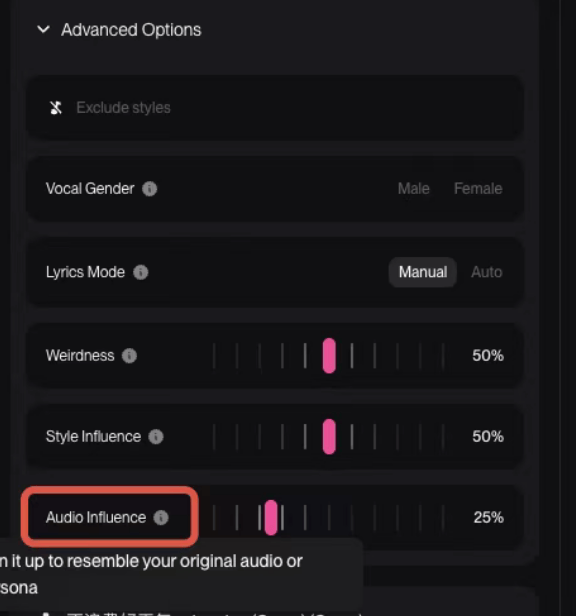
The advanced parameters all range from 0 to 1, and the specific parameters are shown in the following image:
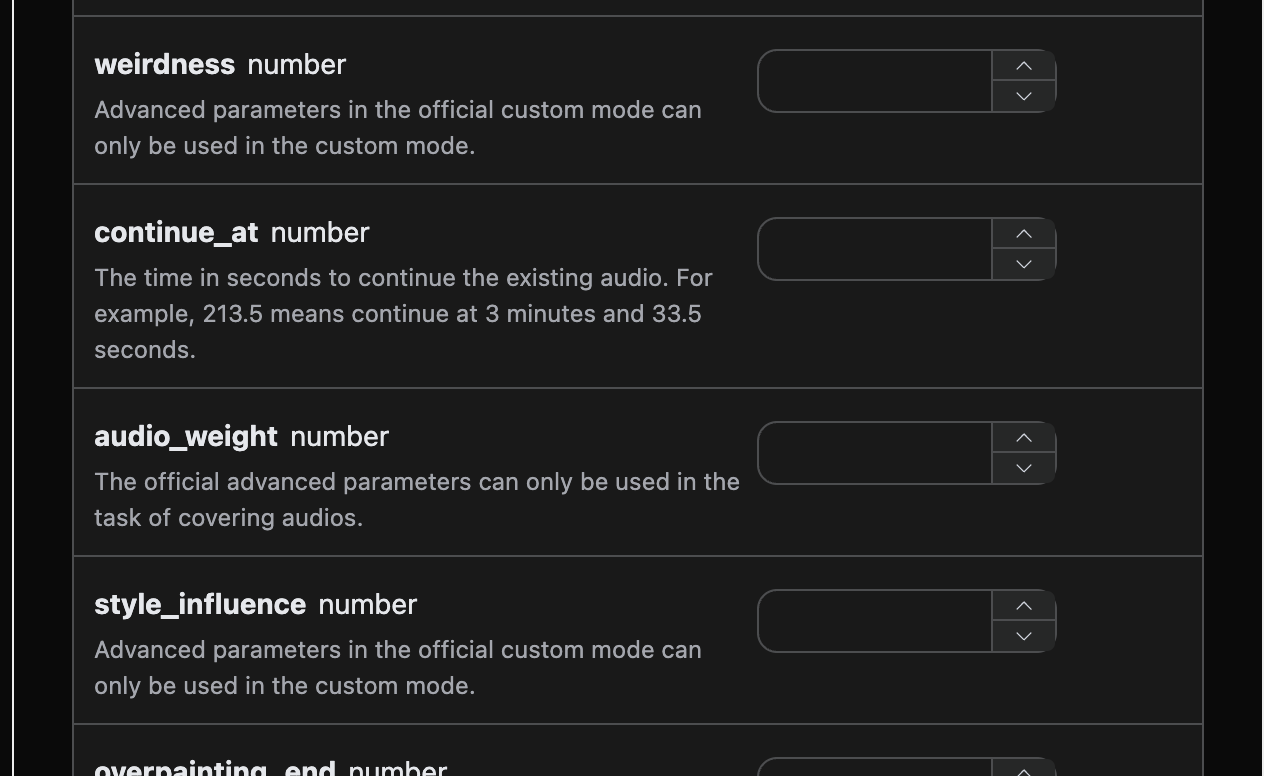
After the fields are filled in, the following code is automatically generated:
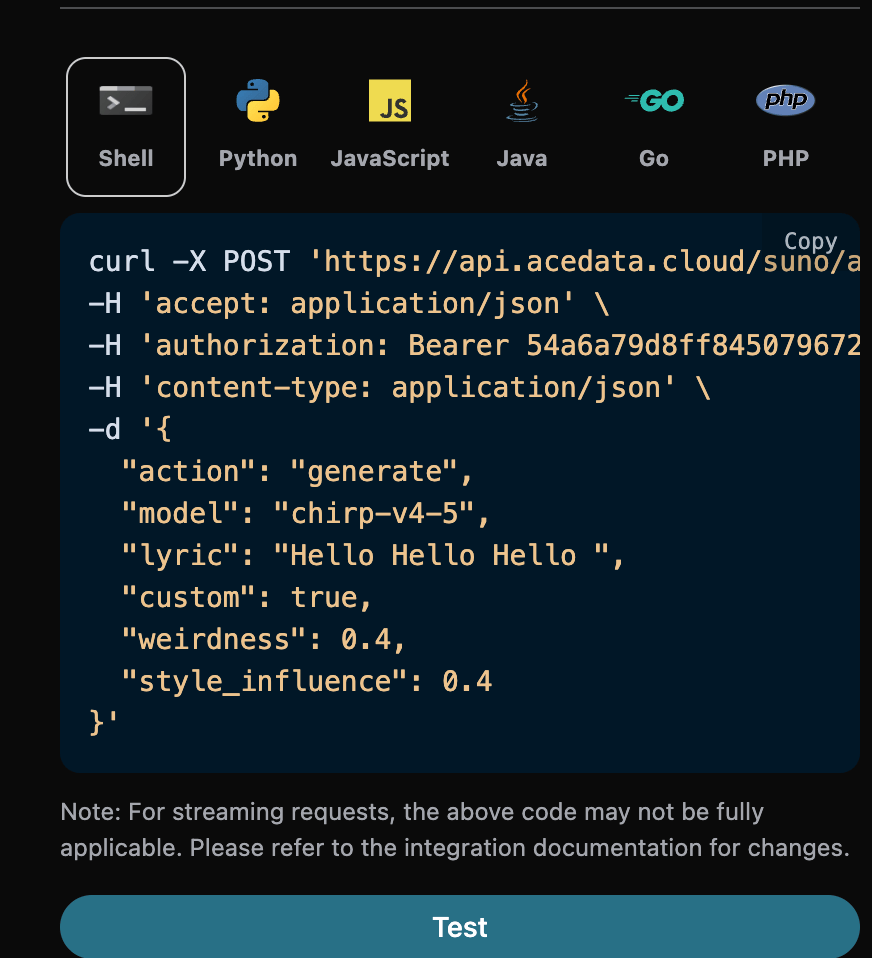
The corresponding Python code:
import requests

url = "https://api.acedata.cloud/suno/audios"

headers = {
    "accept": "application/json",
    "authorization": "Bearer {token}",
    "content-type": "application/json"
}

payload = {
    "action": "generate",
    "model": "chirp-v4-5",
    "lyric": "Hello Hello Hello ",
    "custom": True,
    "weirdness": 0.4,
    "style_influence": 0.4,
    "audio_weight": 0.4
}

response = requests.post(url, json=payload, headers=headers)
print(response.text)
Click Run, and you will get a result as follows:
{
  "success": true,
  "task_id": "2f3aa682-e1a7-43a9-9fbb-ed0ce8668a4b",
  "trace_id": "07408194-7deb-4a52-a36d-9a9a13143b5f",
  "data": [
    {
      "id": "c66e2077-7580-43f2-9937-c67a8afcd8bd",
      "title": "",
      "image_url": "https://cdn.acedata.cloud/e724d7f13d.png?example=image-039",
      "lyric": "Hello Hello Hello ",
      "audio_url": "https://cdn.acedata.cloud/assets/examples/fish/5ade0339-5f11-487e-aacc-06a908271706-8e3fcb0e5547.mp3",
      "video_url": "",
      "created_at": "2025-07-10T12:54:35.199Z",
      "model": "chirp-auk",
      "state": "succeeded",
      "style": "",
      "duration": 187.92
    },
    {
      "id": "a922f97b-307c-4c4d-aae3-a47ba8202a10",
      "title": "",
      "image_url": "https://cdn.acedata.cloud/e724d7f13d.png?example=image-040",
      "lyric": "Hello Hello Hello ",
      "audio_url": "https://cdn.acedata.cloud/assets/examples/fish/5ade0339-5f11-487e-aacc-06a908271706-8e3fcb0e5547.mp3",
      "video_url": "",
      "created_at": "2025-07-10T12:54:35.199Z",
      "model": "chirp-auk",
      "state": "succeeded",
      "style": "",
      "duration": 229.64
    }
  ]
}
This uses advanced parameters to generate a custom song, with results similar to those above.
¶ Controlling Song Duration
By default, the duration of a generated song is determined by the model, usually between 30 seconds and 4 minutes. If you need a longer or shorter finished song, you can specify the desired duration using the duration parameter, in seconds, as an integer between 10 and 360.
This parameter is used for song generation in custom mode (custom is true). It is important to note that duration is a directional hint, not a hard constraint: the model takes this value into account during generation but does not guarantee it will be reached. In tests, the actual duration was usually significantly shorter than the desired value, and the durations of the two songs returned by the same request could differ by several times. Even with identical requests, the durations obtained from multiple submissions may vary considerably. Therefore, do not use it as a precise duration control; if your application requires a fixed duration, trim the finished song yourself or retry after receiving it.
The corresponding Python code:
import requests

url = "https://api.acedata.cloud/suno/audios"

headers = {
    "accept": "application/json",
    "authorization": "Bearer {token}",
    "content-type": "application/json"
}

payload = {
    "action": "generate",
    "model": "chirp-v5-5",
    "custom": True,
    "title": "Under the City Lights",
    "style": "lo-fi piano",
    "lyric": "[Verse]\nSunrise creepin\nGold on the floor\n[Chorus]\nUnder the city lights\n",
    "duration": 330
}

response = requests.post(url, json=payload, headers=headers)
print(response.text)
Note that duration in the request is the desired duration, while the duration field for each song in the response data is that song's actual duration. The two have the same name but different meanings, and the actual duration is not guaranteed to equal the desired value. Lyric length is one of the main factors affecting the duration of the finished song; if you need a longer finished song, it is recommended that you also provide more complete lyrics.
The API validates that duration is an integer from 10 to 360; it remains only a generation target, not a guarantee of the finished song's length.
¶ Add Instrumental Feature
In August 2025, Suno introduced the Add Instrumental feature. First, you need to upload an a cappella song without accompaniment and let Suno add instrumental music to it. You can first go to the Suno Upload API to upload an a cappella song without accompaniment. The corresponding operation is shown in the image below:
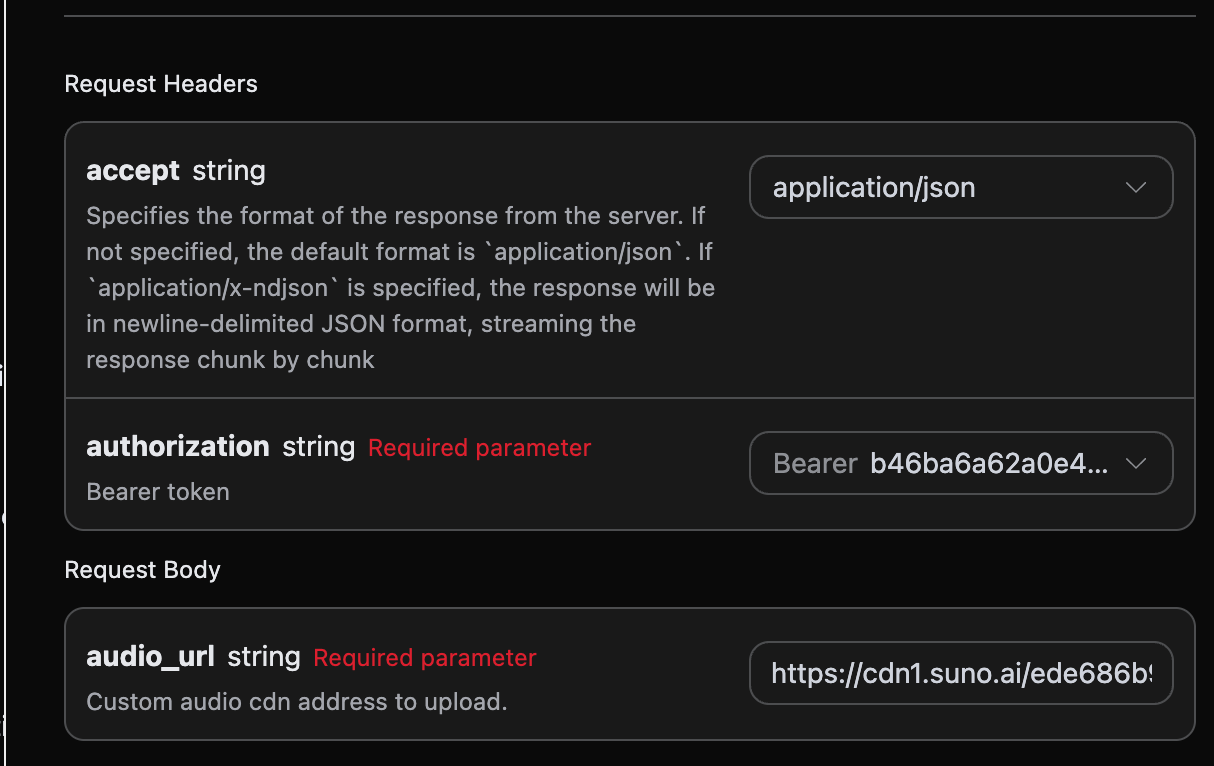
Then, you need to record the audio_id after uploading. The result is shown in the image below:
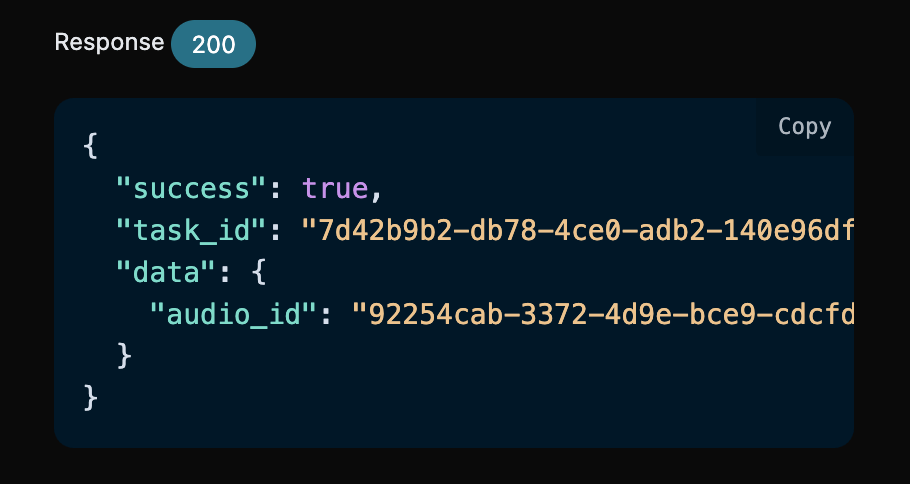
Finally, we obtained an audio_id: 92254cab-3372-4d9e-bce9-cdcfdbc39070. Then we also need to fill in the following parameters:
- action: Set to
underpainting. - underpainting_start: The start time for adding accompaniment to the uploaded song. The default value is 0.
- underpainting_end: The end time for adding accompaniment to the uploaded song. It must be less than the total duration of the song.
- audio_id: The ID of the uploaded a cappella song without accompaniment.
- style: The style of the accompaniment. It is best not to use lyrics, since this is accompaniment.
After filling them in, the code is automatically generated as follows:
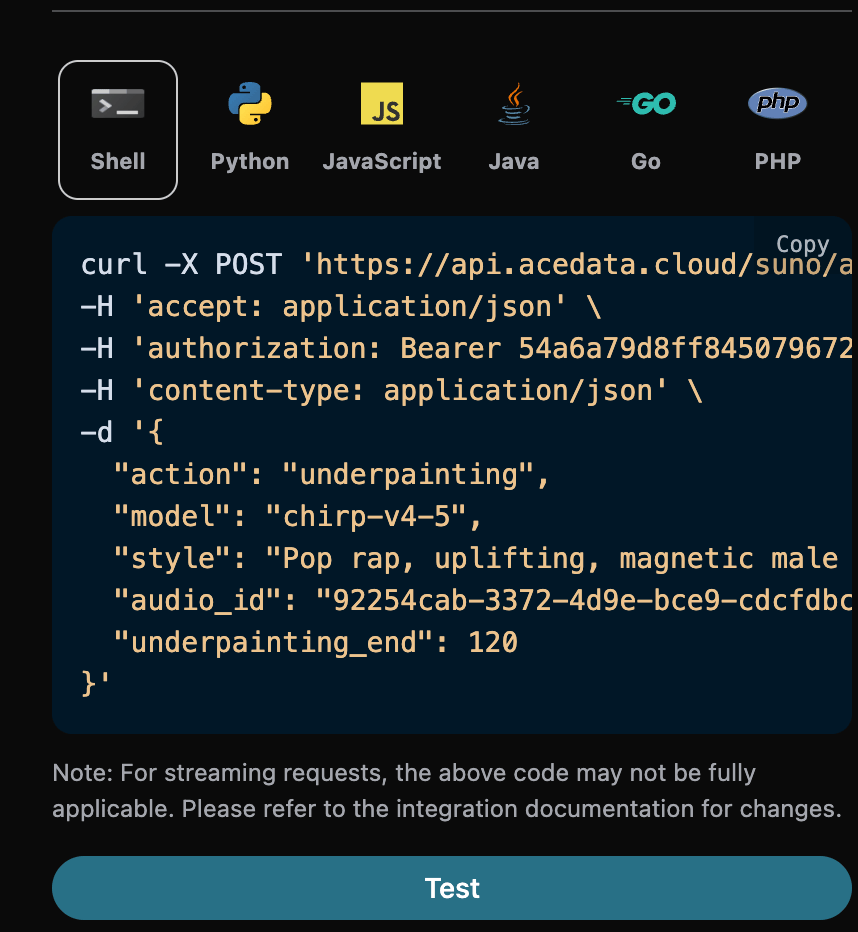
The corresponding Python code:
import requests

url = "https://api.acedata.cloud/suno/audios"

headers = {
    "accept": "application/json",
    "authorization": "Bearer {token}",
    "content-type": "application/json"
}

payload = {
    "action": "underpainting",
    "model": "chirp-v4-5",
    "style": "Pop rap, uplifting, magnetic male vocals, piano, synth, electric guitar, driving bass, clear structure",
    "audio_id": "92254cab-3372-4d9e-bce9-cdcfdbc39070",
    "underpainting_end": 120
}

response = requests.post(url, json=payload, headers=headers)
print(response.text)
Click Run, and you will get a result as follows:
{
  "success": true,
  "task_id": "822d2e14-c535-4d48-a4e5-1b6ab00b04a7",
  "trace_id": "257eac2c-8e4f-44d0-8454-5e215111eefa",
  "data": [
    {
      "id": "2788cd21-bd84-422d-beb5-859c60fbf5b6",
      "title": "",
      "image_url": "https://cdn.acedata.cloud/e724d7f13d.png?example=image-041",
      "lyric": "",
      "audio_url": "https://cdn.acedata.cloud/assets/examples/fish/5ade0339-5f11-487e-aacc-06a908271706-8e3fcb0e5547.mp3",
      "video_url": "",
      "created_at": "2025-08-27T15:25:42.548Z",
      "model": "chirp-v4",
      "state": "succeeded",
      "style": "Pop rap, uplifting, magnetic male vocals, piano, synth, electric guitar, driving bass, clear structure",
      "duration": 10.16
    },
    {
      "id": "a4bb7220-e971-4cbf-a626-b86c648bcf55",
      "title": "",
      "image_url": "https://cdn.acedata.cloud/e724d7f13d.png?example=image-042",
      "lyric": "",
      "audio_url": "https://cdn.acedata.cloud/assets/examples/fish/5ade0339-5f11-487e-aacc-06a908271706-8e3fcb0e5547.mp3",
      "video_url": "",
      "created_at": "2025-08-27T15:25:42.548Z",
      "model": "chirp-v4",
      "state": "succeeded",
      "style": "Pop rap, uplifting, magnetic male vocals, piano, synth, electric guitar, driving bass, clear structure",
      "duration": 2.52
    }
  ]
}
This completes the process of adding accompaniment to the uploaded a cappella song without accompaniment. The result is similar to the one above.
¶ Add Vocals Feature
In August 2025, Suno introduced the Add Vocals feature. First, you need to upload an instrumental track and let Suno write lyrics and add singing vocals. You can first go to the Suno Upload API to upload an a cappella song without accompaniment. The corresponding operation is shown in the image below:
Then, you need to record the audio_id after uploading. The result is shown in the image below:
Finally, we obtained an audio_id: 92254cab-3372-4d9e-bce9-cdcfdbc39070. Then we also need to fill in the following parameters:
- action: Set to
overpainting. - overpainting_start: The start time for adding vocals to the uploaded song. The default value is 0.
- overpainting_end: The end time for adding vocals to the uploaded song. It must be less than the total duration of the song.
- audio_id: The ID of the uploaded a cappella song without accompaniment.
- custom: In this mode, custom mode must be used to enter lyrics.
- lyric: The lyrics entered in custom mode.
- style: The style of the accompaniment.
After filling them in, the code is automatically generated as follows:
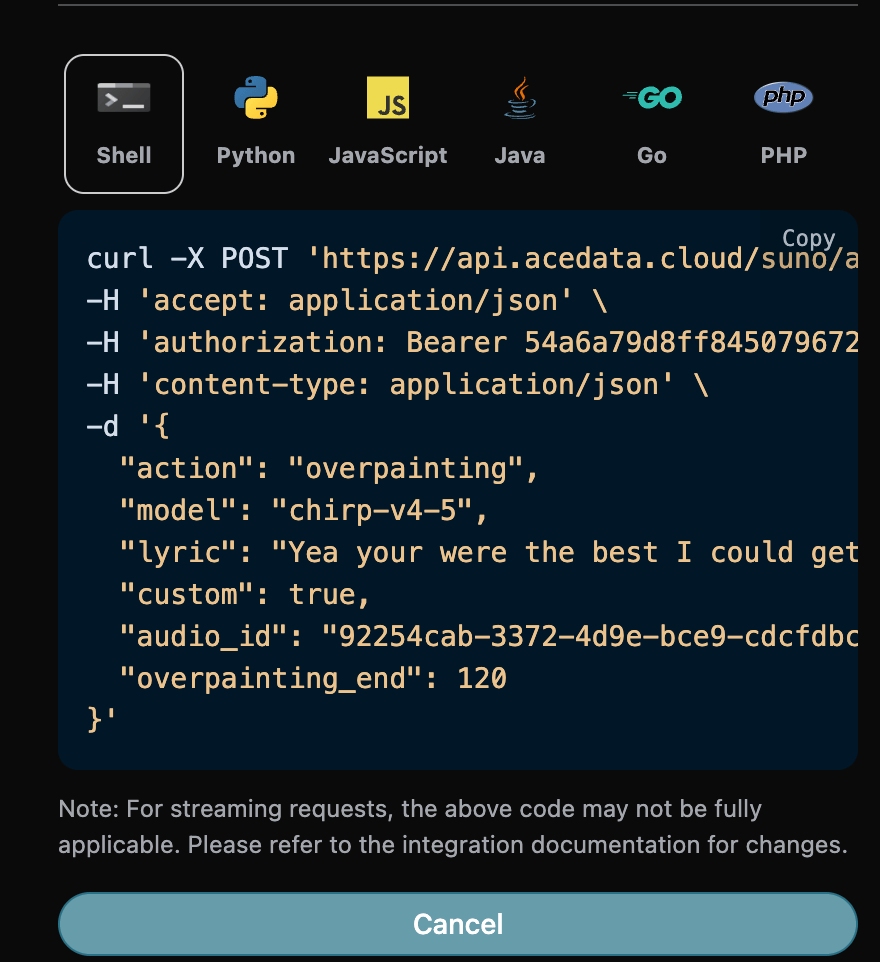
The corresponding Python code:
import requests

url = "https://api.acedata.cloud/suno/audios"

headers = {
    "accept": "application/json",
    "authorization": "Bearer {token}",
    "content-type": "application/json"
}

payload = {
    "action": "overpainting",
    "model": "chirp-v4-5",
    "lyric": "Yea your were the best I could get \\nBut I knew that it couldn’t last \\nStayed down since we were friends \\nHad to leave those thoughts in the past \\nMade like 40k just last week \\nOn top of the 20 with my babe\\ndon’t care for what niggas say",
    "custom": True,
    "audio_id": "92254cab-3372-4d9e-bce9-cdcfdbc39070",
    "overpainting_end": 120
}

response = requests.post(url, json=payload, headers=headers)
print(response.text)
Click Run, and you will get a result as follows:
{
  "success": true,
  "task_id": "31bb250e-6614-49ec-ac85-631f224daeba",
  "trace_id": "efe8e7f3-9a65-4f13-a9f8-51e8478899df",
  "data": [
    {
      "id": "a597f945-64df-4722-a631-d436450832bd",
      "title": "",
      "image_url": "https://cdn.acedata.cloud/e724d7f13d.png?example=image-043",
      "lyric": "Yea your were the best I could get \\nBut I knew that it couldn’t last \\nStayed down since we were friends \\nHad to leave those thoughts in the past \\nMade like 40k just last week \\nOn top of the 20 with my babe\\ndon’t care for what niggas say",
      "audio_url": "https://cdn.acedata.cloud/assets/examples/fish/5ade0339-5f11-487e-aacc-06a908271706-8e3fcb0e5547.mp3",
      "video_url": "",
      "created_at": "2025-08-27T15:33:51.550Z",
      "model": "chirp-v4",
      "state": "succeeded",
      "style": "",
      "duration": 105.32
    },
    {
      "id": "b41a8b91-3d88-4ebd-a6cf-732764b24954",
      "title": "",
      "image_url": "https://cdn.acedata.cloud/e724d7f13d.png?example=image-044",
      "lyric": "Yea your were the best I could get \\nBut I knew that it couldn’t last \\nStayed down since we were friends \\nHad to leave those thoughts in the past \\nMade like 40k just last week \\nOn top of the 20 with my babe\\ndon’t care for what niggas say",
      "audio_url": "https://cdn.acedata.cloud/assets/examples/fish/5ade0339-5f11-487e-aacc-06a908271706-8e3fcb0e5547.mp3",
      "video_url": "",
      "created_at": "2025-08-27T15:33:51.550Z",
      "model": "chirp-v4",
      "state": "succeeded",
      "style": "",
      "duration": 148.16
    }
  ]
}
This completes the process of adding vocals to the uploaded a cappella song without accompaniment, with results similar to those above.
¶ Remaster Feature
In December 2025, Suno introduced the Remaster feature, which can regenerate songs but cannot be used across accounts. We also need to fill in the following parameters:
- action: Set to
remaster. - audio_id: The ID of the song to be regenerated.
- model: Only v4.5+ and v5 are supported.
- variation_category: Only supported in v5 and above, and has only three values: high, normal, and subtle.
After filling them in, the following code is generated automatically:
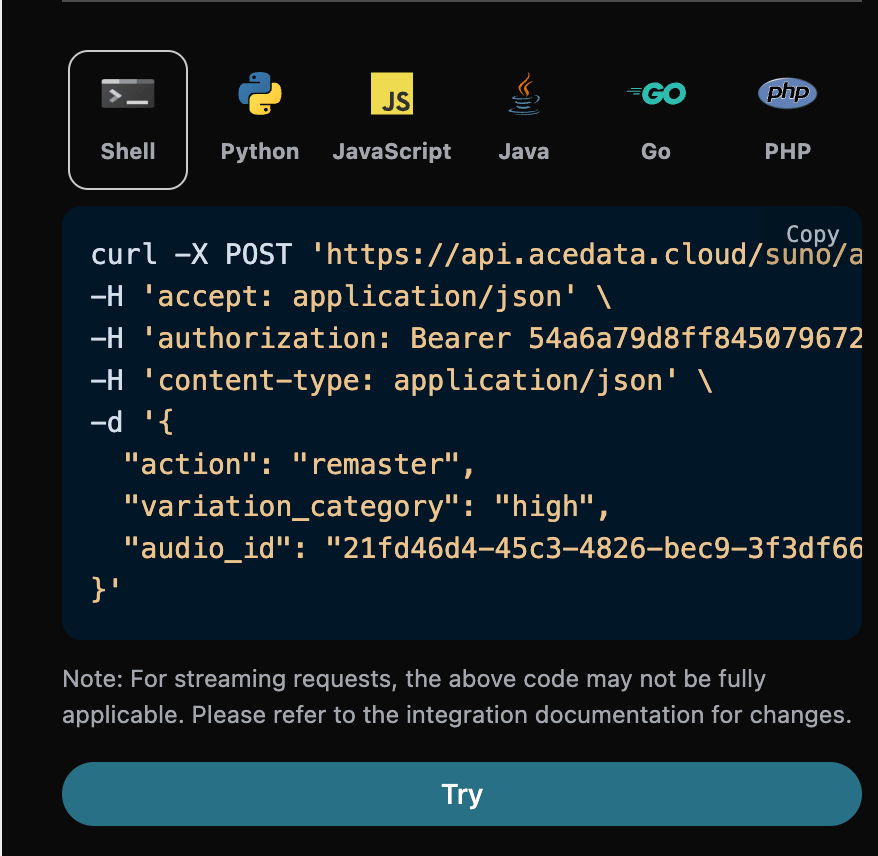
The corresponding Python code:
import requests

url = "https://api.acedata.cloud/suno/audios"

headers = {
    "accept": "application/json",
    "authorization": "Bearer {token}",
    "content-type": "application/json"
}

payload = {
    "action": "remaster",
    "variation_category": "high",
    "audio_id": "21fd46d4-45c3-4826-bec9-3f3df667902e"
}

response = requests.post(url, json=payload, headers=headers)
print(response.text)
Click Run, and you will get a result as follows:
{
  "success": true,
  "task_id": "791ee74c-9363-4352-afe7-babb19b89899",
  "trace_id": "77acda57-c3d4-4e11-a506-4f50e0609916",
  "data": [
    {
      "id": "b0515cdf-9cb5-46cd-b0fe-10a239dc9274",
      "title": "Navidad en costura  (Remastered)",
      "image_url": "https://cdn.acedata.cloud/e724d7f13d.png?example=image-045",
      "image_large_url": "https://cdn.acedata.cloud/e724d7f13d.png?example=image-046",
      "lyric": "En Teror las clases siguen,\nni en Navidad hay parón;\ncose el grupo entre villancicos\ny un buen trocito de turrón.\nLa Popular abre sus puertas,\ny el taller suena mejor;\nhilo, aguja y canto alegre\nlo pasaremos mejor\nSeguimos en las costuras,\ncon música y diversión;\nlos alumnos comeremos\nGolosinas un montón ",
      "audio_url": "https://cdn.acedata.cloud/assets/examples/fish/5ade0339-5f11-487e-aacc-06a908271706-8e3fcb0e5547.mp3",
      "video_url": "",
      "created_at": "2025-12-04T13:09:59.936Z",
      "model": "chirp-v4",
      "state": "succeeded",
      "style": "Villancico",
      "duration": 32.2
    },
    {
      "id": "06edab94-a4f9-4c0c-abac-a2e8a97c76a8",
      "title": "Navidad en costura  (Remastered)",
      "image_url": "https://cdn.acedata.cloud/e724d7f13d.png?example=image-047",
      "image_large_url": "https://cdn.acedata.cloud/e724d7f13d.png?example=image-048",
      "lyric": "En Teror las clases siguen,\nni en Navidad hay parón;\ncose el grupo entre villancicos\ny un buen trocito de turrón.\nLa Popular abre sus puertas,\ny el taller suena mejor;\nhilo, aguja y canto alegre\nlo pasaremos mejor\nSeguimos en las costuras,\ncon música y diversión;\nlos alumnos comeremos\nGolosinas un montón ",
      "audio_url": "https://cdn.acedata.cloud/assets/examples/fish/5ade0339-5f11-487e-aacc-06a908271706-8e3fcb0e5547.mp3",
      "video_url": "",
      "created_at": "2025-12-04T13:09:59.936Z",
      "model": "chirp-v4",
      "state": "succeeded",
      "style": "Villancico",
      "duration": 32.2
    }
  ]
}
This completes the process of regenerating an existing song, with results similar to those above.
¶ Mashup Generation Feature
In December 2025, Suno introduced the Mashup feature, which can generate a song based on two reference songs. We also need to fill in the following parameters:
- action: Set to
mashup. - mashup_audio_ids: The IDs of the two reference songs.
After filling them in, the following code is generated automatically:
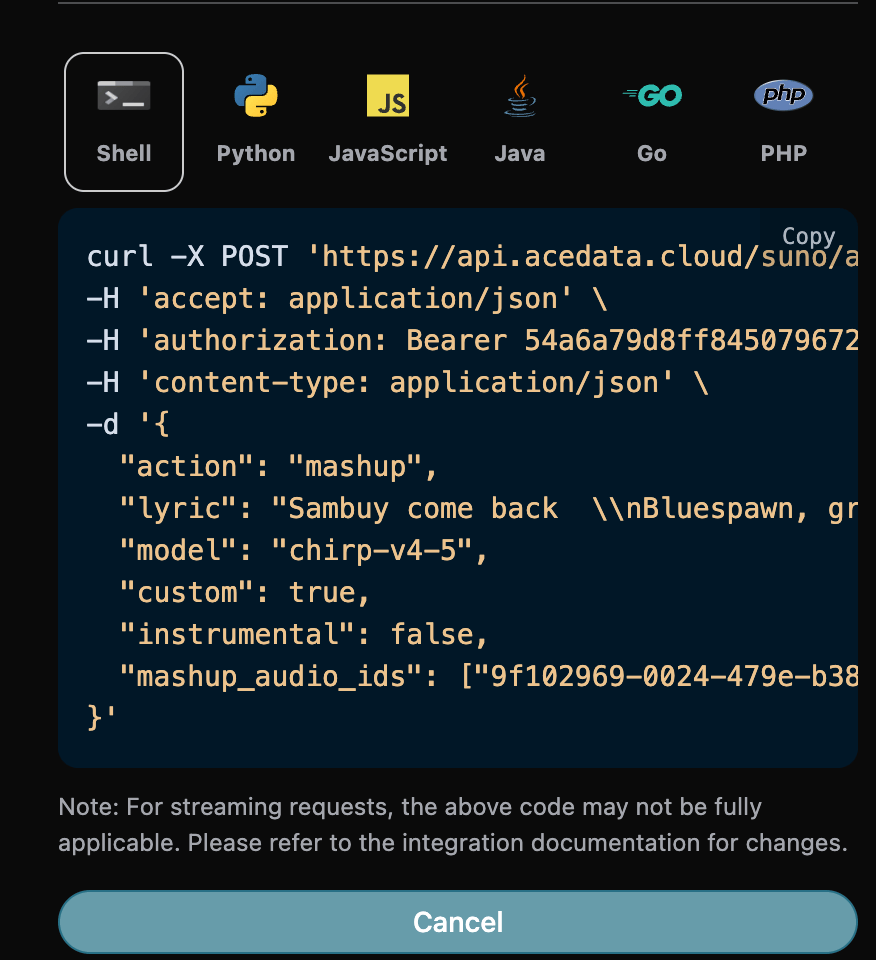
The corresponding Python code:
import requests

url = "https://api.acedata.cloud/suno/audios"

headers = {
    "accept": "application/json",
    "authorization": "Bearer {token}",
    "content-type": "application/json"
}

payload = {
    "action": "mashup",
    "lyric": "Sambuy come back  \\nBluespawn, greenspawn are making you a spawn  \\n\\nSambuy come  \\nSambuy come back  \\nBluespawn, greenspawn are making you a spawn  \\n\\nSambuy come  \\nSambuy come back  \\nBluespawn, greenspawn are making you a spawn  \\n\\nSambuy come  \\nSambuy come back  \\nSambuy come, Sambuy come back  \\nBluespawn, greenspawn are making you a spawn  \\n\\nSambuy come  \\nSambuy come back  \\nBluespawn, greenspawn are making you a spawn  \\nSambuy come back",
    "model": "chirp-v4-5",
    "custom": True,
    "instrumental": False,
    "mashup_audio_ids": ["9f102969-0024-479e-b38f-c0c5db21383d","6aebb715-701c-433f-b976-a7ff5cf16255"]
}

response = requests.post(url, json=payload, headers=headers)
print(response.text)
Click Run, and you will see a result as follows:
{
  "success": true,
  "task_id": "3fe070eb-2ab1-4424-909c-acfe3ca761af",
  "trace_id": "2b220382-7a84-4853-ae43-05cdcad233a9",
  "data": [
    {
      "id": "5ff751dc-0e72-4de9-a54b-2cad50984b47",
      "title": "",
      "image_url": "https://cdn.acedata.cloud/e724d7f13d.png?example=image-049",
      "image_large_url": "https://cdn.acedata.cloud/e724d7f13d.png?example=image-050",
      "lyric": "Sambuy come back  \\nBluespawn, greenspawn are making you a spawn  \\n\\nSambuy come  \\nSambuy come back  \\nBluespawn, greenspawn are making you a spawn  \\n\\nSambuy come  \\nSambuy come back  \\nBluespawn, greenspawn are making you a spawn  \\n\\nSambuy come  \\nSambuy come back  \\nSambuy come, Sambuy come back  \\nBluespawn, greenspawn are making you a spawn  \\n\\nSambuy come  \\nSambuy come back  \\nBluespawn, greenspawn are making you a spawn  \\nSambuy come back",
      "audio_url": "https://cdn.acedata.cloud/assets/examples/fish/5ade0339-5f11-487e-aacc-06a908271706-8e3fcb0e5547.mp3",
      "video_url": "",
      "created_at": "2026-01-25T15:13:30.181Z",
      "model": "chirp-v4-5",
      "state": "succeeded",
      "style": "",
      "duration": 219.08
    },
    {
      "id": "19c515c4-d7b3-4a17-8ab0-dd1ebd4861b8",
      "title": "",
      "image_url": "https://cdn.acedata.cloud/e724d7f13d.png?example=image-051",
      "image_large_url": "https://cdn.acedata.cloud/e724d7f13d.png?example=image-052",
      "lyric": "Sambuy come back  \\nBluespawn, greenspawn are making you a spawn  \\n\\nSambuy come  \\nSambuy come back  \\nBluespawn, greenspawn are making you a spawn  \\n\\nSambuy come  \\nSambuy come back  \\nBluespawn, greenspawn are making you a spawn  \\n\\nSambuy come  \\nSambuy come back  \\nSambuy come, Sambuy come back  \\nBluespawn, greenspawn are making you a spawn  \\n\\nSambuy come  \\nSambuy come back  \\nBluespawn, greenspawn are making you a spawn  \\nSambuy come back",
      "audio_url": "https://cdn.acedata.cloud/assets/examples/fish/5ade0339-5f11-487e-aacc-06a908271706-8e3fcb0e5547.mp3",
      "video_url": "",
      "created_at": "2026-01-25T15:13:30.181Z",
      "model": "chirp-v4-5",
      "state": "succeeded",
      "style": "",
      "duration": 163.12
    }
  ]
}
This completes the operation of generating a mashup from the reference songs, with results similar to those above.
¶ Samples: Generate Songs Using Samples
Here, samples refers to sampling a segment from a single audio track: select the start and end times from an existing audio track and use that segment as sampling material for creation. This differs from the Inspo feature described below, which uses 1 to 4 complete reference audio tracks for inspiration. The following parameters need to be filled in:
- action: Set to
samples. - samples_start: The sampling start time (in seconds), defaults to 0 and must not be less than 0.
- samples_end: The sampling end time (in seconds), required and must be greater than the start time.
- audio_id: The ID of the reference song to be sampled.
After filling them in, the code is automatically generated as follows:
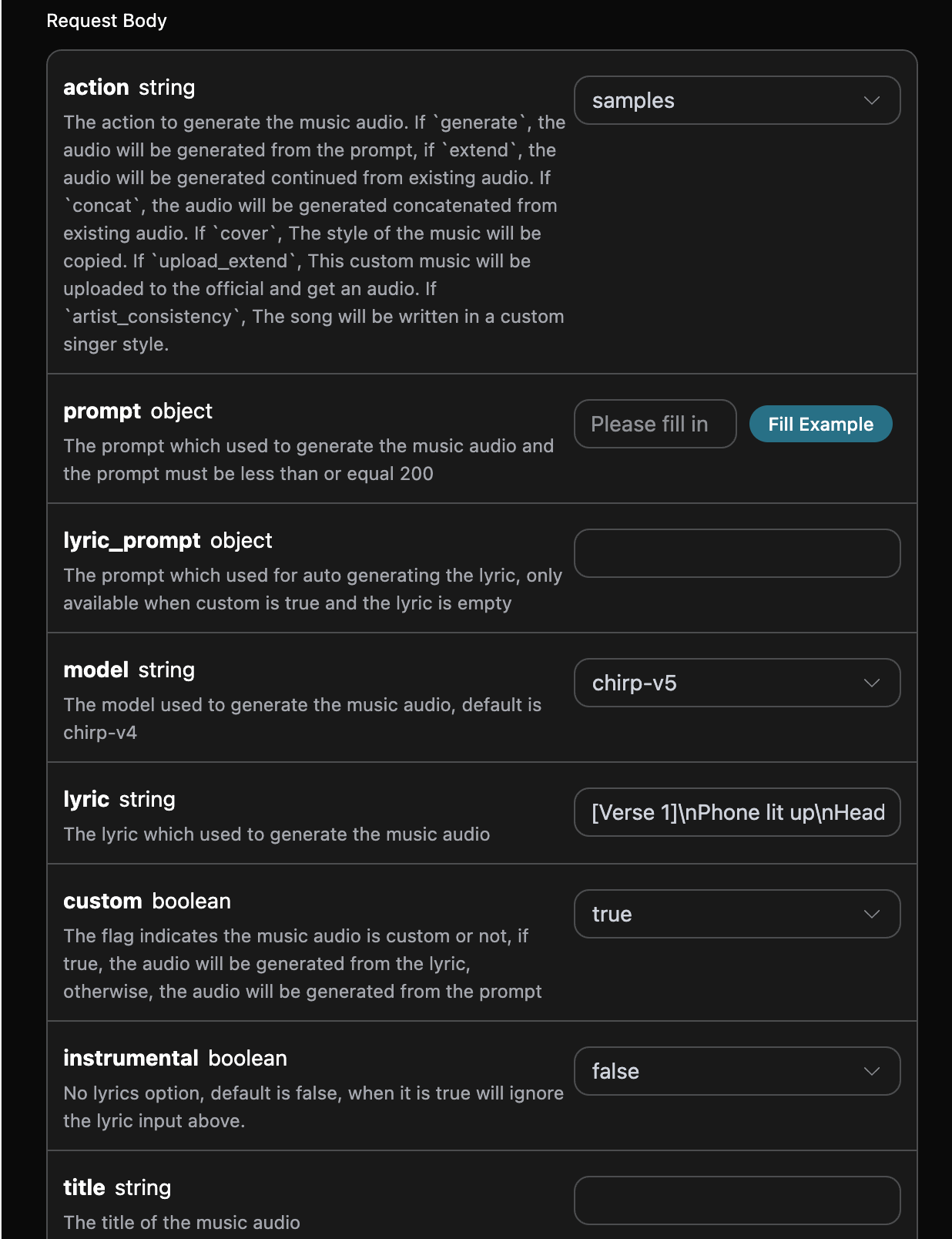
The corresponding Python code:
import requests

url = "https://api.acedata.cloud/suno/audios"

headers = {
    "accept": "application/json",
    "authorization": "Bearer {token}",
    "content-type": "application/json"
}

payload = {
    "action": "samples",
    "model": "chirp-v5",
    "lyric": "[Verse 1]\\nPhone lit up\\nHeadline in my hand\\nFeels made up\\nStill says “you won’t understand”\\nYour name\\nMy name\\nSide by side in the scroll\\nCold black text\\nOn a story I used to hold\\n\\n[Chorus]\\nYou’re breaking news\\nAnd I’m just breaking\\nFront-page truth\\nHeart still shaking\\nEverybody reads\\nWhat we already knew\\nYou’re a story now\\nAnd I’m the one you broke it to\\n\\n[Verse 2]\\nNeighbors talk\\nThrough a half-closed door\\nCoffee cools\\nOn a cracked old floor\\nYour suitcase snaps\\nLike a camera flash\\nOne last quote\\nThen you cut to black\\n\\n[Chorus]\\nYou’re breaking news\\nAnd I’m just breaking\\nFront-page truth\\nHeart still shaking\\nEverybody reads\\nWhat we already knew\\nYou’re a story now\\nAnd I’m the one you broke it to\\n\\n[Bridge]\\nIs there a line\\nWhere we rewind\\nOr just a feed\\nThat leaves us behind\\nTell me\\nWho gets\\nThe final view\\nWhen I stop trending\\nWith you\\n\\n[Chorus]\\nYou’re breaking news\\nAnd I’m just breaking\\nFront-page truth\\nHeart still shaking\\nEverybody reads\\nWhat we already knew\\nYou’re a story now\\nAnd I’m the one you broke it to (yeah)",
    "custom": True,
    "instrumental": False,
    "audio_id": "0fa07665-6b8e-4a8b-8bd3-7e0cfcdada88",
    "samples_end": 102.16,
    "samples_start": 59.88
}

response = requests.post(url, json=payload, headers=headers)
print(response.text)
Click Run, and you will see a result as follows:
{
    "success": true,
    "task_id": "12135a45-6384-4683-9bb1-64f19933915a",
    "trace_id": "683e559d-340e-4c72-8fae-e683442ac7e9",
    "data": [
        {
            "id": "9a0b680f-a9ea-4a36-8695-8ea777ab6ee7",
            "title": "Whistle in the Wind",
            "image_url": "https://cdn.acedata.cloud/e724d7f13d.png?example=image-053",
            "image_large_url": "https://cdn.acedata.cloud/e724d7f13d.png?example=image-054",
            "lyric": "[Verse 1]\nPhone lit up\nHeadline in my hand\nFeels made up\nStill says “you won’t understand”\nYour name\nMy name\nSide by side in the scroll\nCold black text\nOn a story I used to hold\n[Chorus]\nYou’re breaking news\nAnd I’m just breaking\nFront-page truth\nHeart still shaking\nEverybody reads\nWhat we already knew\nYou’re a story now\nAnd I’m the one you broke it to\n[Verse 2]\nNeighbors talk\nThrough a half-closed door\nCoffee cools\nOn a cracked old floor\nYour suitcase snaps\nLike a camera flash\nOne last quote\nThen you cut to black\n[Chorus]\nYou’re breaking news\nAnd I’m just breaking\nFront-page truth\nHeart still shaking\nEverybody reads\nWhat we already knew\nYou’re a story now\nAnd I’m the one you broke it to\n[Bridge]\nIs there a line\nWhere we rewind\nOr just a feed\nThat leaves us behind\nTell me\nWho gets\nThe final view\nWhen I stop trending\nWith you\n[Chorus]\nYou’re breaking news\nAnd I’m just breaking\nFront-page truth\nHeart still shaking\nEverybody reads\nWhat we already knew\nYou’re a story now\nAnd I’m the one you broke it to (yeah)",
            "audio_url": "https://cdn.acedata.cloud/assets/examples/fish/5ade0339-5f11-487e-aacc-06a908271706-8e3fcb0e5547.mp3",
            "video_url": "",
            "created_at": "2026-01-31T14:34:45.043Z",
            "model": "chirp-v5",
            "state": "succeeded",
            "style": "acoustic with a hint of optimism,folk-pop,female vocals",
            "duration": 176.92
        },
        {
            "id": "66473dee-3aaf-43b2-80fd-76568b3abbb1",
            "title": "Whistle in the Wind",
            "image_url": "https://cdn.acedata.cloud/e724d7f13d.png?example=image-055",
            "image_large_url": "https://cdn.acedata.cloud/e724d7f13d.png?example=image-056",
            "lyric": "[Verse 1]\nPhone lit up\nHeadline in my hand\nFeels made up\nStill says “you won’t understand”\nYour name\nMy name\nSide by side in the scroll\nCold black text\nOn a story I used to hold\n[Chorus]\nYou’re breaking news\nAnd I’m just breaking\nFront-page truth\nHeart still shaking\nEverybody reads\nWhat we already knew\nYou’re a story now\nAnd I’m the one you broke it to\n[Verse 2]\nNeighbors talk\nThrough a half-closed door\nCoffee cools\nOn a cracked old floor\nYour suitcase snaps\nLike a camera flash\nOne last quote\nThen you cut to black\n[Chorus]\nYou’re breaking news\nAnd I’m just breaking\nFront-page truth\nHeart still shaking\nEverybody reads\nWhat we already knew\nYou’re a story now\nAnd I’m the one you broke it to\n[Bridge]\nIs there a line\nWhere we rewind\nOr just a feed\nThat leaves us behind\nTell me\nWho gets\nThe final view\nWhen I stop trending\nWith you\n[Chorus]\nYou’re breaking news\nAnd I’m just breaking\nFront-page truth\nHeart still shaking\nEverybody reads\nWhat we already knew\nYou’re a story now\nAnd I’m the one you broke it to (yeah)",
            "audio_url": "https://cdn.acedata.cloud/assets/examples/fish/5ade0339-5f11-487e-aacc-06a908271706-8e3fcb0e5547.mp3",
            "video_url": "",
            "created_at": "2026-01-31T14:34:45.043Z",
            "model": "chirp-v5",
            "state": "succeeded",
            "style": "acoustic with a hint of optimism,folk-pop,female vocals",
            "duration": 177.48
        }
    ]
}
This completes the process of generating a song from a sample, with results similar to those above.
¶ Inspo Inspiration Creation Feature
The Inspo inspiration creation feature can generate new music from 1 to 4 complete reference audio clips and supports dragging and dropping or uploading audio as inspiration sources. The API uses the existing inspo action: the client provides publicly accessible audio URLs, and the service automatically prepares the reference audio and creates the music, without requiring the client to read the lyrics, style, or duration separately and then assemble the request. It differs from the interval sampling described above and from Cover, which replicates the original song's style. The following parameters need to be provided:
- action: Set to
inspo. - audio_urls: A list of reference audio URLs; 1 to 4 publicly accessible audio addresses must be provided.
- model: The model to use;
chirp-v6is recommended. - prompt: Lyrics or a creative prompt (optional).
- instrumental: When set to
true, generates an instrumental track without using lyrics. - persona_id: Uses the specified voice on service channels that support this combination; the reference audio is bound during preparation to the resource environment required by that voice.
- lyric_prompt: Used to generate lyrics automatically when
custom=trueandlyricis not provided.
Note: Reference audio must be a publicly accessible audio file. If the reference audio exactly matches a known recording in the platform's music library, Suno may reject the generation due to copyright checks. It is recommended to use your own audio or audio generated by Suno as an inspiration source.
The corresponding Python code:
import requests

url = "https://api.acedata.cloud/suno/audios"

headers = {
    "accept": "application/json",
    "authorization": "Bearer {token}",
    "content-type": "application/json"
}

payload = {
    "action": "inspo",
    "model": "chirp-v6",
    "audio_urls": [
        "https://cdn.acedata.cloud/uploads/a0bc051f-42c2-4a46-aeb4-582dcc884ad2"
    ],
    "prompt": "Rework these references as warm acoustic folk with soft vocals"
}

response = requests.post(url, json=payload, headers=headers)
print(response.text)
A verified historical response snapshot is retained below; the snapshot uses chirp-v5, which was current at the time, while chirp-v6 is recommended for the current request example. The response structure is the same:
{
    "success": true,
    "task_id": "725e6b41-78d0-4adf-856c-05e81098c029",
    "trace_id": "8c2f0b3e-2f6a-4738-8b1d-c58068ca3dab",
    "data": [
        {
            "id": "20ca5628-86e0-4c32-8ae4-9f0c481e45f3",
            "title": "Inspo Demo",
            "image_url": "https://cdn.acedata.cloud/e724d7f13d.png?example=image-057",
            "lyric": "",
            "audio_url": "https://cdn.acedata.cloud/assets/examples/fish/5ade0339-5f11-487e-aacc-06a908271706-8e3fcb0e5547.mp3",
            "video_url": "",
            "created_at": "2026-06-18T13:01:53.910Z",
            "model": "chirp-v5",
            "state": "succeeded",
            "style": "acoustic, folk, warm",
            "duration": 36.92
        },
        {
            "id": "8744a796-9961-45af-868d-4f3bc1c44257",
            "title": "Inspo Demo",
            "image_url": "https://cdn.acedata.cloud/e724d7f13d.png?example=image-058",
            "lyric": "",
            "audio_url": "https://cdn.acedata.cloud/assets/examples/fish/5ade0339-5f11-487e-aacc-06a908271706-8e3fcb0e5547.mp3",
            "video_url": "",
            "created_at": "2026-06-18T13:01:53.910Z",
            "model": "chirp-v5",
            "state": "succeeded",
            "style": "acoustic, folk, warm",
            "duration": 84.16
        }
    ]
}
This completes the inspiration creation process, and the returned result is the same as for regular song generation.
¶ Asynchronous Callback
Since Suno takes a relatively long time to generate music, approximately 1–2 minutes, the HTTP request will remain connected if the API does not respond for a long time, resulting in additional system resource consumption. Therefore, this API also supports asynchronous callbacks.
The overall process is as follows: when the client initiates a request, it additionally specifies a callback_url field. After the client initiates the API request, the API immediately returns a result containing a task_id field, which represents the current task ID. Once the task is complete, the generated music results are sent as POST JSON to the callback_url specified by the client, including the task_id field, so the task results can be associated using the ID.
Below, we will use an example to understand how this works in practice.
First, a Webhook callback is a service that can receive HTTP requests, and developers should replace it with the URL of their own HTTP server. For convenience, this demonstration uses a public Webhook example website, https://webhook.site/. Open the website to obtain a Webhook URL, as shown below:

Copy this URL to use it as a Webhook. The example used here is https://webhook.site/03e60575-3d96-4132-b681-b713d78116e2.
Next, we can set the callback_url field to the Webhook URL above and fill in the prompt, as shown below:
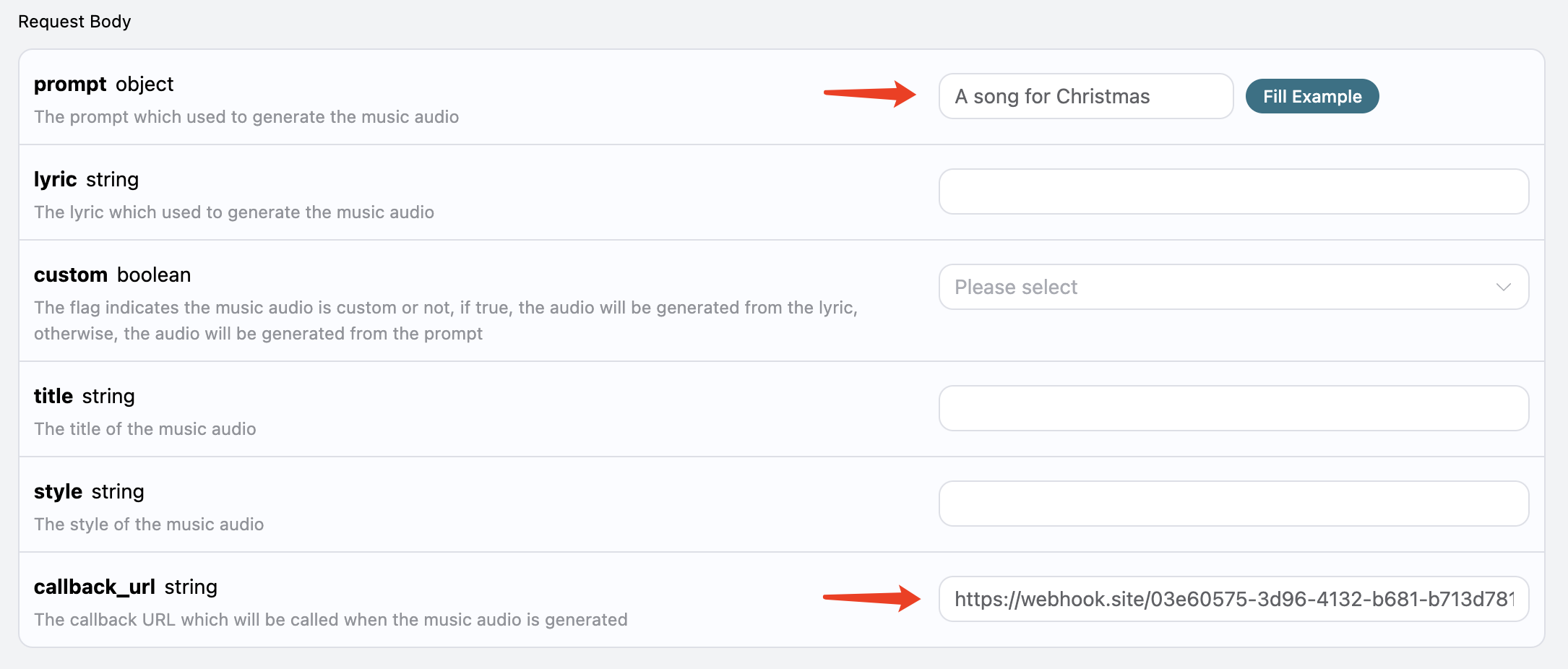
Click Run, and you will immediately receive a result as follows:
{
  "task_id": "44472ab8-783b-4054-b861-5bf14e462f60"
}
After a short wait, we can observe the generated song results at https://webhook.site/03e60575-3d96-4132-b681-b713d78116e2, as shown below:
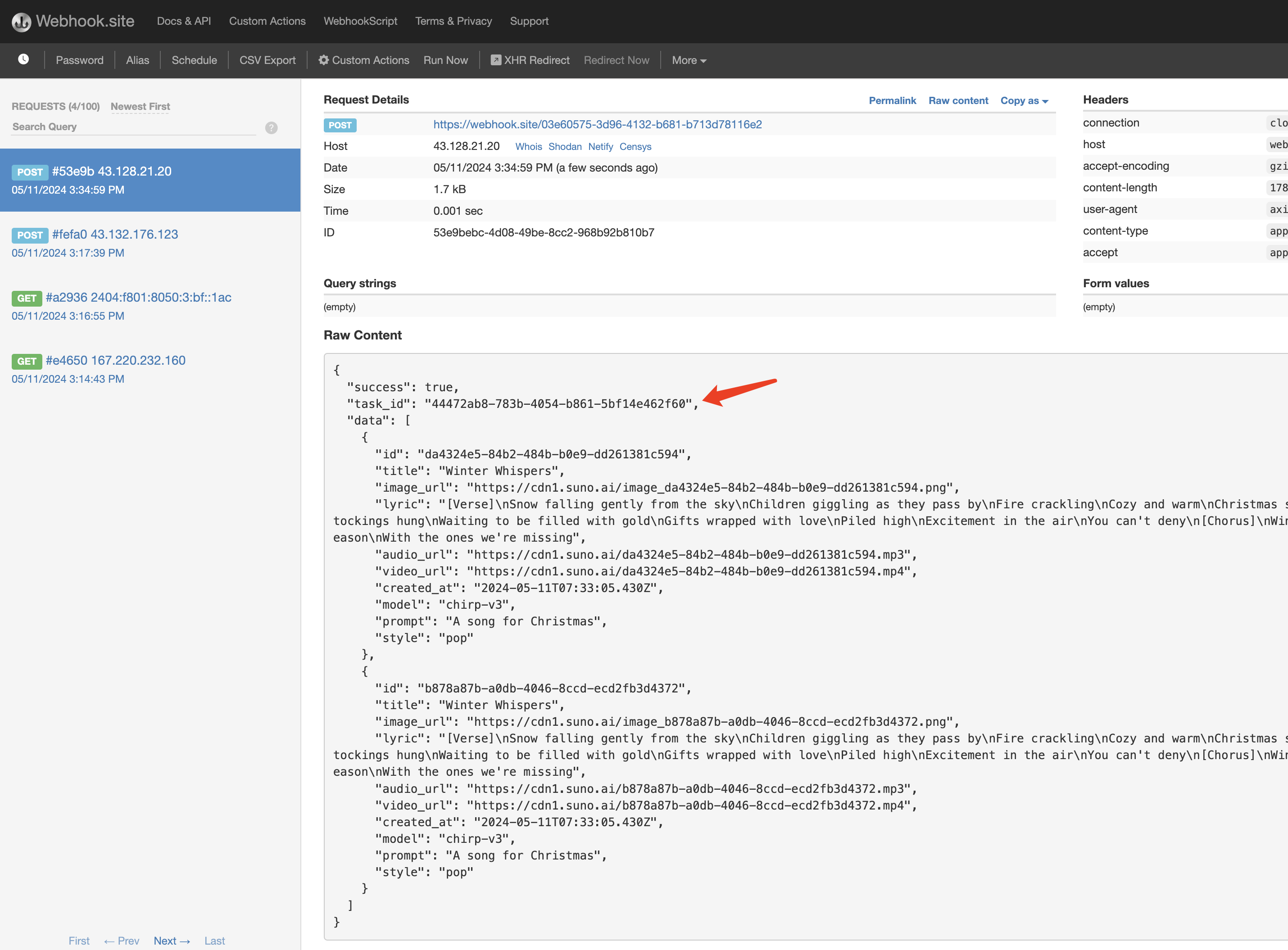
The content is as follows:
{
  "success": true,
  "task_id": "44472ab8-783b-4054-b861-5bf14e462f60",
  "data": [
    {
      "id": "da4324e5-84b2-484b-b0e9-dd261381c594",
      "title": "Winter Whispers",
      "image_url": "https://cdn.acedata.cloud/e724d7f13d.png?example=image-059",
      "lyric": "[Verse]\nSnow falling gently from the sky\nChildren giggling as they pass by\nFire crackling\nCozy and warm\nChristmas spirit begins to swarm\n[Verse 2]\nTwinkling lights\nA sight to behold\nStockings hung\nWaiting to be filled with gold\nGifts wrapped with love\nPiled high\nExcitement in the air\nYou can't deny\n[Chorus]\nWinter whispers in the wind\nJoy and love it brings\nLet's celebrate this season\nWith the ones we're missing",
      "audio_url": "https://cdn.acedata.cloud/assets/examples/fish/5ade0339-5f11-487e-aacc-06a908271706-8e3fcb0e5547.mp3",
      "video_url": "https://cdn.acedata.cloud/assets/examples/gemini/04a043bd-6b23-4b4e-945c-ce48158c3eee-3a89912507c7.mp4?example=video-003",
      "created_at": "2024-05-11T07:33:05.430Z",
      "model": "chirp-v3",
      "prompt": "A song for Christmas",
      "style": "pop"
    },
    {
      "id": "b878a87b-a0db-4046-8ccd-ecd2fb3d4372",
      "title": "Winter Whispers",
      "image_url": "https://cdn.acedata.cloud/e724d7f13d.png?example=image-060",
      "lyric": "[Verse]\nSnow falling gently from the sky\nChildren giggling as they pass by\nFire crackling\nCozy and warm\nChristmas spirit begins to swarm\n[Verse 2]\nTwinkling lights\nA sight to behold\nStockings hung\nWaiting to be filled with gold\nGifts wrapped with love\nPiled high\nExcitement in the air\nYou can't deny\n[Chorus]\nWinter whispers in the wind\nJoy and love it brings\nLet's celebrate this season\nWith the ones we're missing",
      "audio_url": "https://cdn.acedata.cloud/assets/examples/fish/5ade0339-5f11-487e-aacc-06a908271706-8e3fcb0e5547.mp3",
      "video_url": "https://cdn.acedata.cloud/assets/examples/gemini/04a043bd-6b23-4b4e-945c-ce48158c3eee-3a89912507c7.mp4?example=video-004",
      "created_at": "2024-05-11T07:33:05.430Z",
      "model": "chirp-v3",
      "prompt": "A song for Christmas",
      "style": "pop"
    }
  ]
}
As you can see, the result contains a task_id field, and the other fields are similar to those above. This field can be used to associate the task with its results.
Of course, we can also obtain the results through streaming. We only need to set the value of accept in the request header to application/x-ndjson. The following example input demonstrates this:
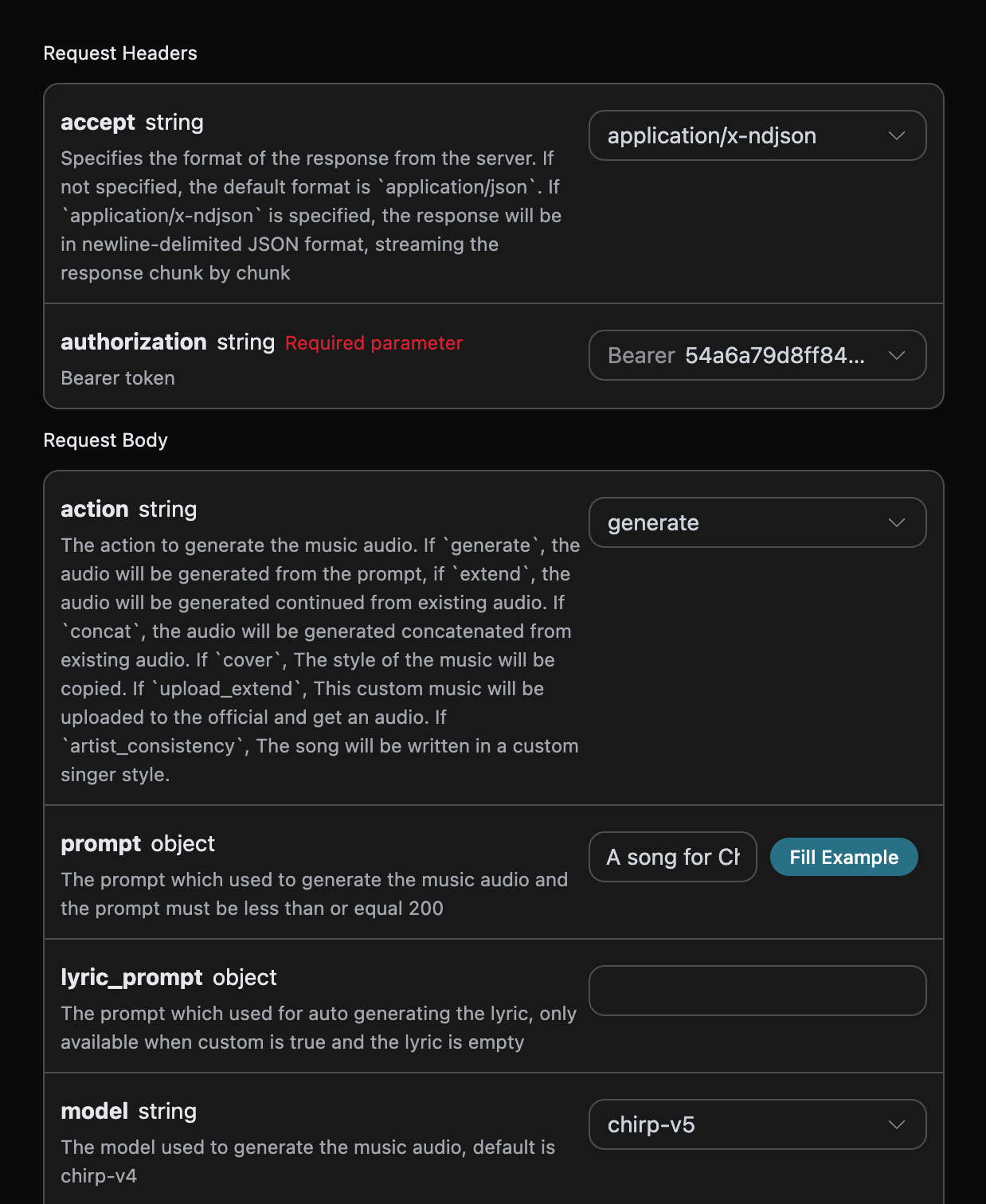
While waiting, we can receive the following output:
{"success":true,"task_id":"1af4b454-ce84-4512-a0a2-de3f8574ecd8","data":[{"id":"1f610752-f426-4fd5-89a8-ba2ad0370881","title":"Snowflakes and Mistletoe","lyric":"[Verse]\nLights are tangled on the tree again\nThe cat’s knocked over the wreath\nCookies burning in the oven too\nBut I’m still grinning through my teeth\n[Prechorus]\nSnow is falling like glitter in the sky\nI’ve got a feeling this year’s gonna fly\n[Chorus]\nSnowflakes and mistletoe\nEverywhere I go\nI know\nLove is the gift\nThe glow\nSnowflakes and mistletoe\n[Verse 2]\nGrandma’s singing a little off-key\nThe kids are laughing too loud\nThe dog’s stolen a turkey leg\nChaos is a Christmas crowd\n[Prechorus]\nBut the fire’s crackling\nWarm and bright\nAnd my heart’s a candle tonight\n[Chorus]\nSnowflakes and mistletoe\nEverywhere I go\nI know\nLove is the gift\nThe glow\nSnowflakes and mistletoe","audio_url":"","video_url":"","created_at":"2025-12-13T11:29:25.101Z","model":"chirp-v5","state":"pending","prompt":"A song for Christmas","style":"uplifting, orchestral with bells and acoustic guitar"},{"id":"d1a3109d-799b-401e-b032-4b501bcf26f3","title":"Snowflakes and Mistletoe","lyric":"[Verse]\nLights are tangled on the tree again\nThe cat’s knocked over the wreath\nCookies burning in the oven too\nBut I’m still grinning through my teeth\n[Prechorus]\nSnow is falling like glitter in the sky\nI’ve got a feeling this year’s gonna fly\n[Chorus]\nSnowflakes and mistletoe\nEverywhere I go\nI know\nLove is the gift\nThe glow\nSnowflakes and mistletoe\n[Verse 2]\nGrandma’s singing a little off-key\nThe kids are laughing too loud\nThe dog’s stolen a turkey leg\nChaos is a Christmas crowd\n[Prechorus]\nBut the fire’s crackling\nWarm and bright\nAnd my heart’s a candle tonight\n[Chorus]\nSnowflakes and mistletoe\nEverywhere I go\nI know\nLove is the gift\nThe glow\nSnowflakes and mistletoe","audio_url":"","video_url":"","created_at":"2025-12-13T11:29:25.101Z","model":"chirp-v5","state":"pending","prompt":"A song for Christmas","style":"uplifting, orchestral with bells and acoustic guitar"}]}
{"success":true,"task_id":"1af4b454-ce84-4512-a0a2-de3f8574ecd8","trace_id":"4440342a-41c4-4140-8bb1-3537a598ca2e","data":[{"id":"1f610752-f426-4fd5-89a8-ba2ad0370881","title":"Snowflakes and Mistletoe","image_url": "https://cdn.acedata.cloud/e724d7f13d.png?example=image-073","image_large_url": "https://cdn.acedata.cloud/e724d7f13d.png?example=image-074","lyric":"[Verse]\nLights are tangled on the tree again\nThe cat’s knocked over the wreath\nCookies burning in the oven too\nBut I’m still grinning through my teeth\n[Prechorus]\nSnow is falling like glitter in the sky\nI’ve got a feeling this year’s gonna fly\n[Chorus]\nSnowflakes and mistletoe\nEverywhere I go\nI know\nLove is the gift\nThe glow\nSnowflakes and mistletoe\n[Verse 2]\nGrandma’s singing a little off-key\nThe kids are laughing too loud\nThe dog’s stolen a turkey leg\nChaos is a Christmas crowd\n[Prechorus]\nBut the fire’s crackling\nWarm and bright\nAnd my heart’s a candle tonight\n[Chorus]\nSnowflakes and mistletoe\nEverywhere I go\nI know\nLove is the gift\nThe glow\nSnowflakes and mistletoe","audio_url":"https://cdn.acedata.cloud/assets/examples/fish/5ade0339-5f11-487e-aacc-06a908271706-8e3fcb0e5547.mp3","video_url":"","created_at":"2025-12-13T11:29:25.101Z","model":"chirp-v5","state":"succeeded","prompt":"A song for Christmas","style":"uplifting, orchestral with bells and acoustic guitar","duration":129.92},{"id":"d1a3109d-799b-401e-b032-4b501bcf26f3","title":"Snowflakes and Mistletoe","image_url": "https://cdn.acedata.cloud/e724d7f13d.png?example=image-075","image_large_url": "https://cdn.acedata.cloud/e724d7f13d.png?example=image-076","lyric":"[Verse]\nLights are tangled on the tree again\nThe cat’s knocked over the wreath\nCookies burning in the oven too\nBut I’m still grinning through my teeth\n[Prechorus]\nSnow is falling like glitter in the sky\nI’ve got a feeling this year’s gonna fly\n[Chorus]\nSnowflakes and mistletoe\nEverywhere I go\nI know\nLove is the gift\nThe glow\nSnowflakes and mistletoe\n[Verse 2]\nGrandma’s singing a little off-key\nThe kids are laughing too loud\nThe dog’s stolen a turkey leg\nChaos is a Christmas crowd\n[Prechorus]\nBut the fire’s crackling\nWarm and bright\nAnd my heart’s a candle tonight\n[Chorus]\nSnowflakes and mistletoe\nEverywhere I go\nI know\nLove is the gift\nThe glow\nSnowflakes and mistletoe","audio_url":"https://cdn.acedata.cloud/assets/examples/fish/5ade0339-5f11-487e-aacc-06a908271706-8e3fcb0e5547.mp3","video_url":"","created_at":"2025-12-13T11:29:25.101Z","model":"chirp-v5","state":"succeeded","prompt":"A song for Christmas","style":"uplifting, orchestral with bells and acoustic guitar","duration":127.16}]}
The streaming response pushes the processing status and final result in sequence for the same task_id; only the first and final actual responses are retained above, with repeated intermediate updates omitted.
¶ Error Handling
If an error occurs, you will receive an error message similar to the following:
{
  "success": false,
  "error": {
    "code": "forbidden",
    "message": "Song Description contained artist name: eminem"
  },
  "trace_id": "9bb7c2f4-3b7b-4965-b50a-f663874b1b6f",
  "task_id": "9bb3a2a6-c438-436d-a9f3-fa466abc077c"
}
Below is a list of HTTP Status Code, error.code, and error.message:
The
stylelength limit varies by model; if a length error is returned, shorten the content and follow the limit in the response. | Status Code |error.code|error.message| | ----------- | ----------------------------- | ------------------------------------------------------------------------------------------ | | 400 |bad_request|The song id does not exist or has been taken offline.| | 400 |bad_request|Prompt too long.| | 400 |bad_request|Tags too long.| | 400 |bad_request|Uploaded audio matches existing work of art.| | 400 |bad_request|instrumental must be a boolean| | 400 |bad_request|Title too long.| | 400 |bad_request|Topic too long.| | 400 |bad_request|style must be less than or equal 120| | 400 |bad_request|custom must be a boolean| | 400 |bad_request|audio_id is required when extend audio| | 400 |bad_request|continue_at is required when extend audio| | 400 |bad_request|continue_at must be a number greater than 0| | 400 |bad_request|lyric is required when extend audio and instrumental is false| | 400 |bad_request|prompt is required when generate audio| | 400 |bad_request|lyric is required when generate custom audio| | 403 |forbidden|Prompt likely malformed| | 403 |forbidden|Prompt likely copyrighted| | 403 |forbidden|Prompt contained inappropriate material| | 403 |forbidden|Song Description flagged for moderation| | 403 |forbidden|Song Description contained artist name| | 403 |forbidden|Tags contained artist name| | 403 |forbidden|Lyrics contained copyrighted material| | 403 |forbidden|Song Description contained producer tag| | 403 |forbidden|Generic openAI error| | 403 |forbidden|Prompt flagged for moderation| | 429 |too_many_requests|Too many requests. Please try again later.| | 500 |api_error|Unable to generate lyrics from song description| | 500 |api_error|job failed with unknown error| | 500 |api_error|service under maintenance, generation paused| | 500 |api_error|the account may have been offline| | 500 |suno_processing_unavailable|Music processing is unavailable. Contact support with the trace ID.| | 500 |suno_model_unavailable|The selected model is unavailable for this operation. Contact support with the trace ID.| | 500 |suno_processing_failed|Music processing returned no audio. Contact support with the trace ID.| | 504 |timeout|timeout while waiting for audio generation|
For temporary rate limits where the request has clearly not yet been accepted, the platform may wait and retry a limited number of times within the time budget for the current request. If 429 (too_many_requests) is still returned, please try again later; failed requests are not charged.
When using async=true or callback_url, receiving a task_id only means that the task has been created; it does not mean that generation succeeded. Please confirm the final result of the original task through the callback or the Suno Tasks API; do not resubmit before the final state is clear, to avoid creating duplicate tasks.