
SeeDream Images Generation API 对接说明
本文将介绍一种 SeeDream Images Generation API 对接说明,它是可以通过输入自定义参数来生成 SeeDream 官方的图片。
¶ 申请流程
要使用 SeeDream Images Generation API,首先到 Ace Data Cloud 控制台 获取您的 API Token,留作备用。
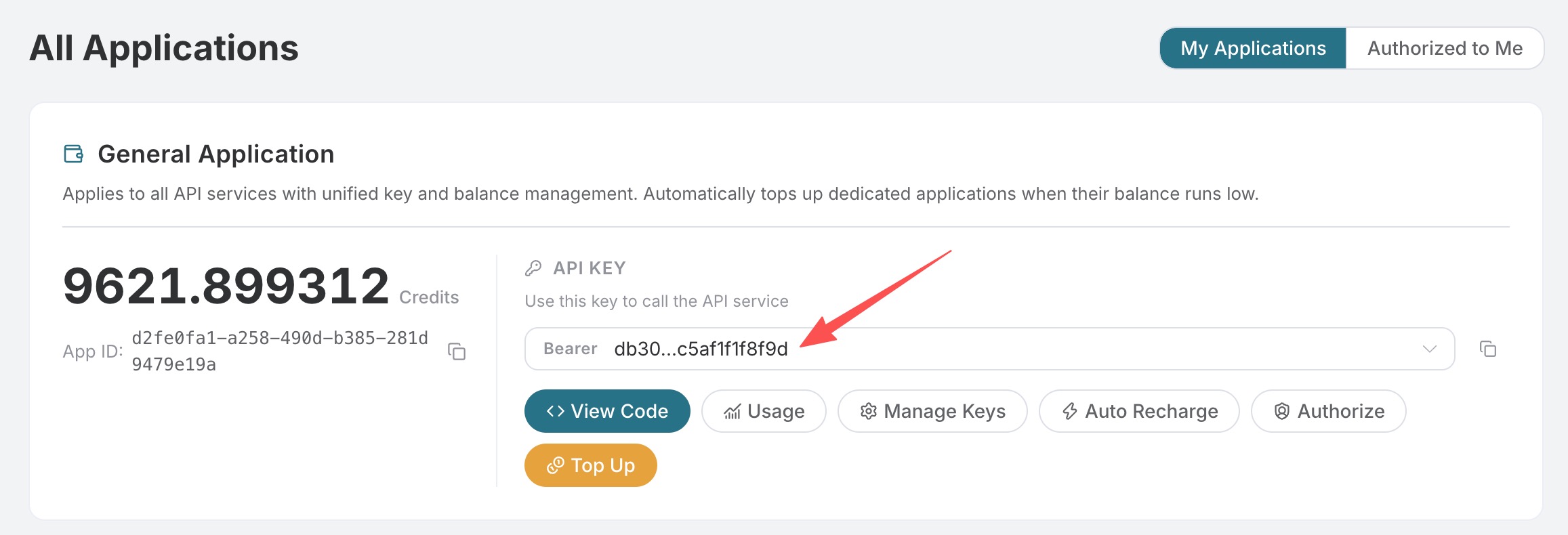
如果你尚未登录或注册,会自动跳转到登录页面邀请你注册和登录,完成后会自动返回当前页面。
通用应用的 API Key 可用于账号已开放的服务;专用应用的 Key 按该应用的服务范围使用。请检查 Key 的权限、有效期和限额,并确认应用余额足以支付本次请求。可用试用额度以账号显示为准,余额不足时可在 控制台 充值。
¶ 模型选型
| 模型 | 适用场景 |
|---|---|
doubao-seedream-5-5-261028 |
多轮编辑、文生透明图、多参考图透明编辑、图层拆分与文字图层识别 |
doubao-seedream-5-0-flash-260915 |
低延迟单图生成、多参考图编辑、透明图编辑与图层拆分 |
doubao-seedream-5-0-pro-260628 |
单图生成、精细编辑、透明图编辑与图层拆分 |
doubao-seedream-5-0-lite-260128 |
单图、组图、流式输出与联网搜索 |
doubao-seedream-4-5-251128 / doubao-seedream-4-0-250828 |
旧版图像生成和编辑 |
5.5 和 5.0 Flash 使用相同的 POST /seedream/images,都支持 1K、1.5K、2K 和最多 10 张参考图。两款模型的图层拆分任务都只接收一张图片,返回 URL。5.5 可设置 layer_decomposition_options: {"max_images": 12, "text_recognition": true}。最多输出 100 张图片(包含底图),可识别的文字图层会在 data[].text_recognition 返回逐行文字和样式。5.0 Flash 最多返回 1 张底图和 16 个图层。
5.5 支持用 background: "transparent" 直接生成透明 PNG。5.0 Flash 的透明图编辑需要一张有透明通道的参考图。5.5 按成功输出图的像素档位收费,并按每张输入参考图加收 0.13 Credits。5.0 Flash 按每张成功输出图收 0.31 Credits,参考图免费。图层拆分按实际成功输出张数计费,底图也计入。参见 实时定价。
¶ 基本使用
首先先了解下基本的使用方式,就是输入提示词 prompt、 生成行为 action、图片尺寸 size,便可获得处理后的结果,首先需要简单地传递一个 action 字段,它的值为 generate,然后我们还需要输入提示词,具体的内容如下:

可以看到这里我们设置了 Request Headers,包括:
accept:想要接收怎样格式的响应结果,这里填写为application/json,即 JSON 格式。authorization:调用 API 的密钥,申请之后可以直接下拉选择。
另外设置了 Request Body,包括:
prompt:提示词。model:请传入上表中的完整模型 ID。image:输入图片 URL、Base64 字符串或数组。5.5、5.0 Pro 和 5.0 Flash 最多 10 张参考图。size:分辨率档位或宽x高。5.5、5.0 Pro 和 5.0 Flash 支持1K、1.5K、2K。5.0 Lite 支持2K、3K、4K。sequential_image_generation: 组图:基于您输入的内容,生成的一组内容关联的图片。doubao-seedream-5-0-lite-260128、doubao-seedream-4-5-251128、doubao-seedream-4-0-250828支持该参数,默认disabled。stream: 控制是否开启流式输出模式。doubao-seedream-5-0-lite-260128、doubao-seedream-4-5-251128、doubao-seedream-4-0-250828支持该参数,默认是false。response_format: 指定生成图像的返回格式。默认是url,也支持b64_json。watermark: 是否在生成的图片中添加水印。默认是true。output_format:输出格式为jpeg或png。5.5 默认 PNG,5.0 Pro/Flash/Lite 默认 JPEG。tools: 配置模型要调用的工具,目前支持web_search(联网搜索)。仅 Seedream 5.0 Lite 支持。optimize_prompt_options: 提示词优化配置。5.0 Pro 支持standard/fast;5.5、5.0 Flash、5.0 Lite 与 4.5 仅支持standard;4.0 支持standard/fast。background:支持transparent和opaque。5.5 另支持auto。透明输出使用 PNG。layer_decomposition:5.5、5.0 Pro 和 5.0 Flash 支持。设为true时必须输入一张 PNG/JPEG,可不传prompt自动拆分,或用自然语言/<bbox>指定元素;size支持auto/1K/1.5K/2K。该模式不能与组图、流式、联网搜索或background同用。callback_url:需要回调结果的 URL。async:是否以异步模式处理。设为true时接口立即返回task_id,无需提供callback_url,随后通过/seedream/tasks轮询获取结果。
选择之后,可以发现右侧也生成了对应代码,如图所示:
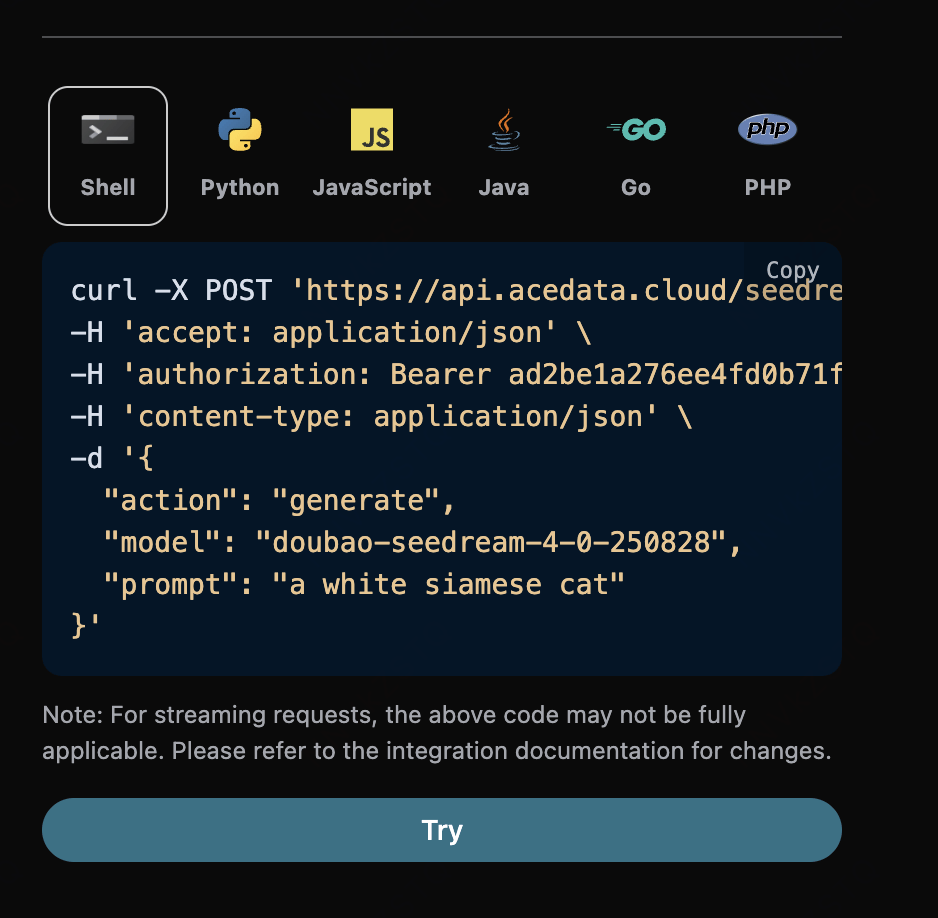
点击「Try」按钮即可进行测试,如上图所示,这里我们就得到了如下结果:
{
  "success": true,
  "task_id": "80ceeed1-17d4-4eb7-82e0-18b34290f36e",
  "trace_id": "96b7fdc8-0fc8-4e2e-82a9-83c0a82f0a08",
  "data": [
    {
      "prompt": "A single matte blue cube centered on a clean white studio background, neutral lighting",
      "size": "2048x2048",
      "image_url": "https://cdn.acedata.cloud/assets/examples/seedream/db93b46e-c302-4676-8a11-63f0ba638a27-1c6f66f6b7e8.jpg"
    }
  ]
}
返回结果一共有多个字段,介绍如下:
success,此时视频生成任务的状态情况。task_id,此时视频生成任务 ID。trace_id,此时视频生成跟踪 ID。data,此时图像生成任务的结果列表。image_url,此时图片生成任务的链接。prompt,提示词。size: 生成图的像素
可以看到我们得到了满意的图片信息,我们只需要根据结果中 data 的图片链接地址获取生成的 SeeDream 图片即可。
另外如果想生成对应的对接代码,可以直接复制生成,例如 CURL 的代码如下:
curl -X POST 'https://api.acedata.cloud/seedream/images' \
-H 'accept: application/json' \
-H 'authorization: Bearer ${token}' \
-H 'content-type: application/json' \
-d '{
  "action": "generate",
  "model": "doubao-seedream-5-0-lite-260128",
  "prompt": "A single matte blue cube centered on a clean white studio background, neutral lighting"
}'
¶ 编辑图片任务
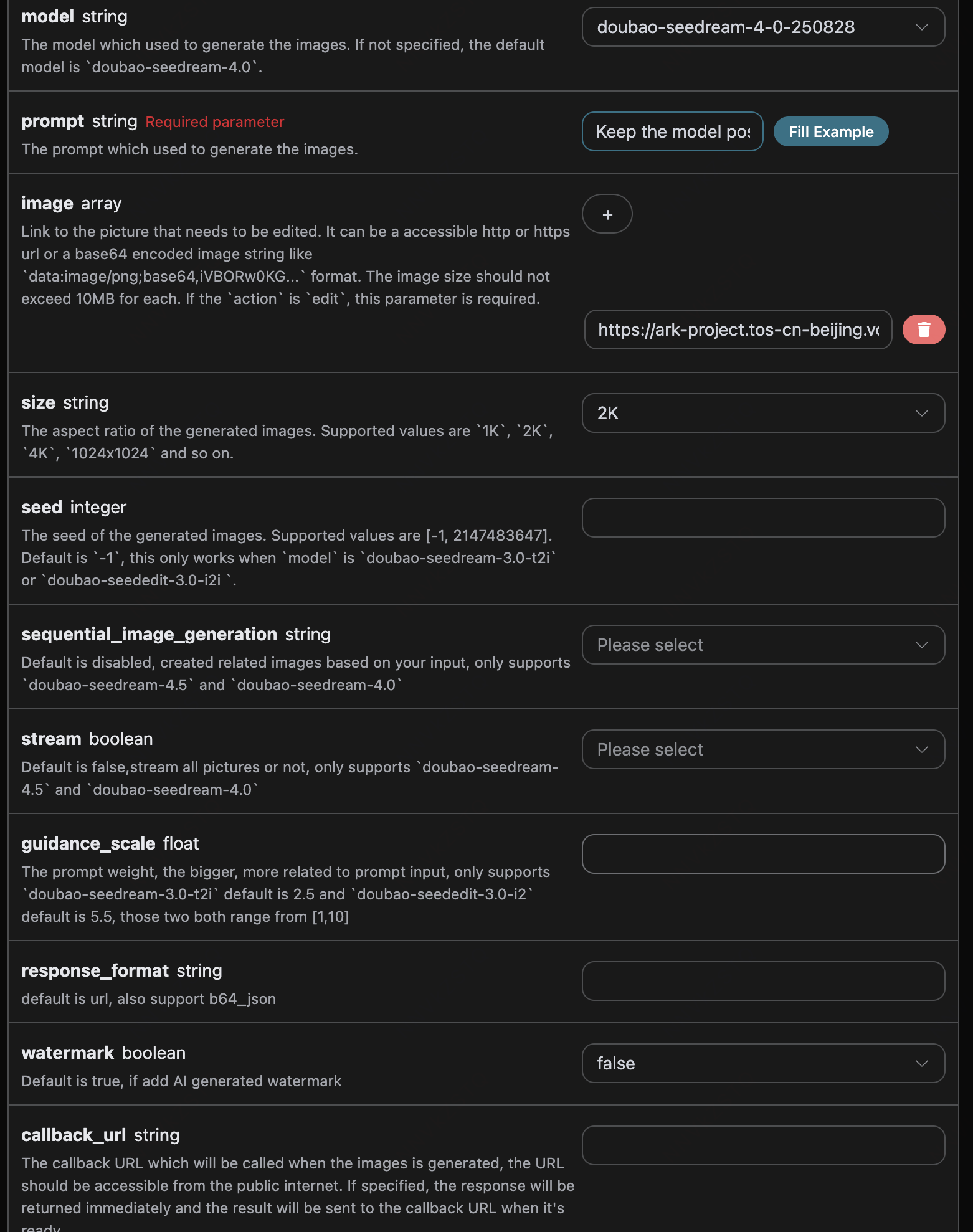
如果想对某张图片进行编辑的话, 首先参数image必须传入需要编辑的图片链接
- model:传入上表中支持图像编辑的完整模型 ID。
- image:上传需要编辑的图片,一张或者多张
填写样例如下:
对应的代码:
import requests

url = "https://api.acedata.cloud/seedream/images"

headers = {
    "accept": "application/json",
    "authorization": "Bearer {token}",
    "content-type": "application/json"
}

payload = {
    "model": "doubao-seedream-4-0-250828",
  "prompt": "Keep the model pose and the liquid garment flowing shape unchanged. Change the clothing material from silver metal to completely transparent water (or glass). Through the liquid flow, the details of the model skin are visible. The light and shadow effect shifts from reflection to refraction.",
  "image": ["https://ark-project.tos-cn-beijing.volces.com/doc_image/seedream4_5_imageToimage.png"],
  "size": "2K",
  "watermark": False
}

response = requests.post(url, json=payload, headers=headers)
print(response.text)
点击运行,可以发现会立即得到一个结果,如下:
{
    "success": true,
    "task_id": "c9aaffa2-b8ac-40ff-8468-43e77cb9ddde",
    "trace_id": "131a40c3-2eaf-44c9-af28-c9b408577286",
    "data": [
        {
            "prompt": "Keep the model pose and the liquid garment flowing shape unchanged. Change the clothing material from silver metal to completely transparent water (or glass). Through the liquid flow, the details of the model skin are visible. The light and shadow effect shifts from reflection to refraction.",
            "size": "2048x2048",
            "image_url": "https://platform.cdn.acedata.cloud/seedream/3e88db7e-4771-4f6a-adbd-5ae4590c5d59.jpg"
        }
    ]
}
可以看到,生成的效果是对原图片进行编辑的效果,结果与上文类似。
¶ 图层拆分(Seedream 5.0 Pro)
图层拆分会把一张输入图拆为 1 张底图和最多 16 个可独立编辑的透明 PNG 图层。以下请求让模型自动识别主要元素;如需指定元素,可增加 prompt,也可以在提示词中使用归一化 <bbox> 坐标。
curl -X POST 'https://api.acedata.cloud/seedream/images' \
-H 'accept: application/json' \
-H 'authorization: Bearer ${token}' \
-H 'content-type: application/json' \
-d '{
  "model": "doubao-seedream-5-0-pro-260628",
  "image": "https://example.com/poster.png",
  "layer_decomposition": true,
  "size": "2K",
  "watermark": false
}'
返回的 data 按 z_index 从底到顶排列。底图的 z_index 为 0;图层还包含 name、description 和 bounding_box.absolute/normalized。使用绝对坐标重组时,将图层缩放到 [right-left, bottom-top],放到 [left, top],再按 z_index 升序叠放。任一图层生成失败时整次拆分失败。
¶ 流式输出
Lite/4.x 设置 stream: true 时,请求头使用 accept: application/x-ndjson。接口逐行返回 image_generation.partial_succeeded 或 image_generation.partial_failed,最后返回唯一的 image_generation.completed 事件及最终 usage;只有完成事件触发一次计费。流式模式不能与 async 或 callback_url 同用。
¶ 异步回调
由于 SeeDream Images Generation API 生成的时间相对较长,大约需要 1-2 分钟,如果 API 长时间无响应,HTTP 请求会一直保持连接,导致额外的系统资源消耗,所以本 API 也提供了异步回调的支持。
整体流程是:客户端发起请求的时候,额外指定一个 callback_url 字段,客户端发起 API 请求之后,API 会立马返回一个结果,包含一个 task_id 的字段信息,代表当前的任务 ID。当任务完成之后,生成图片的结果会通过 POST JSON 的形式发送到客户端指定的 callback_url,其中也包括了 task_id 字段,这样任务结果就可以通过 ID 关联起来了。
如果你没有可供回调的公网地址,也可以不指定 callback_url,而是在请求中设置 async 字段为 true。此时接口同样会立即返回 task_id,但不会推送结果,你需要携带该 task_id 调用 /seedream/tasks 接口轮询任务状态来获取最终结果。
下面我们通过示例来了解下具体怎样操作。
点击运行,可以发现会立即得到一个结果,如下:
{
  "task_id": "c9aaffa2-b8ac-40ff-8468-43e77cb9ddde"
}
内容如下:
{
    "success": true,
    "task_id": "c9aaffa2-b8ac-40ff-8468-43e77cb9ddde",
    "trace_id": "131a40c3-2eaf-44c9-af28-c9b408577286",
    "data": [
        {
            "prompt": "Keep the model pose and the liquid garment flowing shape unchanged. Change the clothing material from silver metal to completely transparent water (or glass). Through the liquid flow, the details of the model skin are visible. The light and shadow effect shifts from reflection to refraction.",
            "size": "2048x2048",
            "image_url": "https://platform.cdn.acedata.cloud/seedream/3e88db7e-4771-4f6a-adbd-5ae4590c5d59.jpg"
        }
    ]
}
可以看到结果中有一个 task_id 字段,其他的字段都和上文类似,通过该字段即可实现任务的关联。
¶ 错误处理
在调用 API 时,如果遇到错误,API 会返回相应的错误代码和信息。例如:
400 token_mismatched:Bad request, possibly due to missing or invalid parameters.400 api_not_implemented:Bad request, possibly due to missing or invalid parameters.401 invalid_token:Unauthorized, invalid or missing authorization token.429 too_many_requests:Too many requests, you have exceeded the rate limit.500 api_error:Internal server error, something went wrong on the server.
¶ 错误响应示例
{
  "success": false,
  "error": {
    "code": "api_error",
    "message": "fetch failed"
  },
  "trace_id": "2cf86e86-22a4-46e1-ac2f-032c0f2a4e89"
}
¶ 结论
通过本文档,您已经了解了如何使用 SeeDream Images Generation API 可通过输入提示词来生成图片。希望本文档能帮助您更好地对接和使用该 API。如有任何问题,请随时联系我们的技术支持团队。