
New Monetization Ideas for Tech Bloggers: Turning an API Review into a Revenue-Generating Asset
As a tech blogger, you may have experienced this: staying up late to write a lengthy article, getting thousands of views, but only earning a few cents or a couple of dollars from platform traffic sharing.
In fact, your content can do much more than that. By writing reviews and tutorials for AI APIs, you can naturally guide readers to use Ace Data Cloud services and earn commissions through a distribution system—plus, these articles will remain on search engines, continuously bringing you new users over time. This article will clarify how to do it.
¶ 1. Tech Bloggers Have an Advantage in API Distribution
Your readers are the target users. The audience for your technical articles consists of developers, product managers, and technical leads, who happen to be the core demographic for API products. Regular promotions require effort to find precise traffic, while your readers are already there.
Your content has long tails. A well-written "Suno API Usage Tutorial" may still be found on Baidu/Google two years later. Content is not like ads, which stop after one run—it will remain.
Trust is inherently high. Readers come to learn technology; the tools you recommend and the runnable code you provide are far more credible than hard ads. As long as the review is objective and the examples are real, readers are willing to follow you to the final step.
¶ 2. Confirm the Commission Rules First
Commissions only come from valid orders that meet current rules. Levels, ratios, invitation attribution, confirmation periods, and withdrawal conditions are subject to the promotion methods and commission rules and the current display in the distribution backend; refunds, risk control, order status, and existing invitation relationships may affect the final result.
¶ 3. The Best Types of Articles for Conversion
¶ Type 1: API Comparison Reviews
The search intent of users during selection is the strongest—"XX API Comparison" "Best XX API." These readers are already making decisions; you just need to help them complete the final step.
Example topics:
- "AI Painting API Comparison: Midjourney vs DALL·E vs Flux vs Seedream"
- "OpenAI API vs DeepSeek API Comprehensive Comparison: Price, Speed, Effect"
- "AI Video Generation API Showdown: Sora, Luma, Veo, Kling Who's Better?"
Structure: Introduction of each solution → Dimension breakdown (Price / Speed / Quality / Documentation / Stability) → Code + Effect comparison → Conclusion recommendation → "If you want to try it yourself, register for free at Ace Data Cloud."
¶ Type 2: Complete Technical Tutorials
Teach readers step-by-step how to create something using the API. As readers follow along, they will inevitably need to register for an API Key, leading to natural conversion.
Example topics:
- "Build an AI Music Generator with Python + Suno API (Complete Code)"
- "Add AI Painting Functionality to Your App in 5 Minutes"
- "Build an Intelligent Customer Service Bot Based on DeepSeek API"
Writing points: Code must be complete and runnable, include real running result screenshots, state at the beginning that registration at Ace Data Cloud is required to obtain the Key, and all example base_urls should point to api.acedata.cloud.
¶ Type 3: Project Practical Sharing
Share a complete project you have actually done that utilized the platform's API. Readers are attracted by the project → Want to replicate → Need the API → Register through your link.
¶ 4. Create a Presentable Cover/Image
The cover and example images of technical articles directly affect click-through rates. Stop searching through image libraries for ages—use gpt-image-2 to generate a relevant image in seconds.
Online interface: studio.acedata.cloud/openai-image
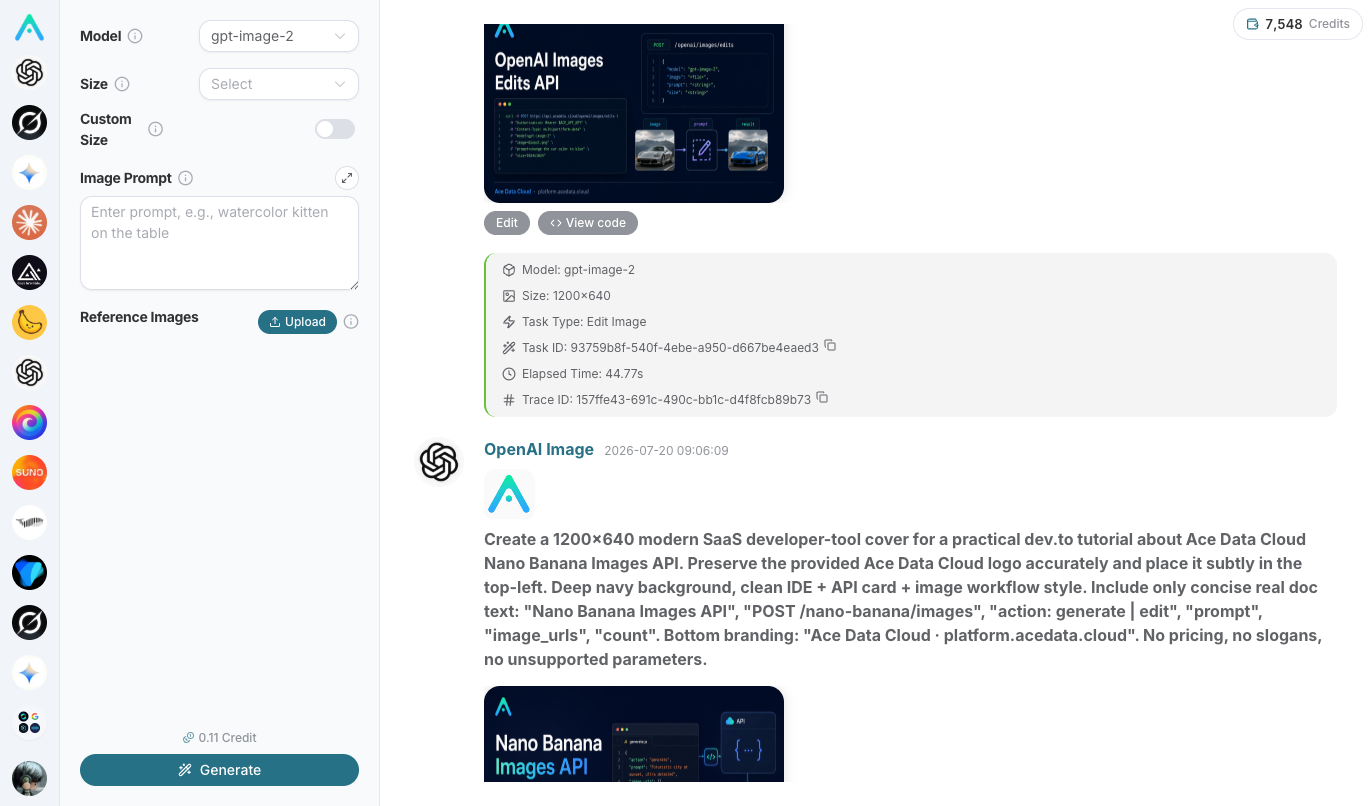
Or directly call the API (this is also a piece of example code that can be included in the article):
curl -X POST https://api.acedata.cloud/openai/images/generations \
  -H "Authorization: Bearer $ACEDATACLOUD_API_KEY" \
  -H "Content-Type: application/json" \
  -d '{
    "model": "gpt-image-2",
    "prompt": "Deep blue technology style blog cover, theme AI API comparison, flat illustration, leave space for title",
    "size": "1536x1024"
  }'
If you want to create a co-branded cover with a logo, you can use the image editing API https://api.acedata.cloud/openai/images/edits (multipart, image[] can be repeated to send multiple images, including the official logo background https://cdn.acedata.cloud/1mma4f.png for blending).
¶ 5. Where to Publish and How to Get More Visibility
Distributing a slightly rewritten article across multiple platforms maximizes coverage:
| Platform | Features | Suitable Content |
|---|---|---|
| CSDN | High Baidu weight, many developers | Tutorials, Integration Guides |
| Zhihu | Good for long-tail searches, suitable for depth | Comparison, Selection Analysis |
| Juejin | Concentrated on front-end/full-stack | Project Practice, Code Tutorials |
| Medium / Dev.to | International audience | English Reviews, Tutorials |
| GitHub | Excellent SEO | Open Source Projects + README Guidance |
Title formula: [Core Keyword] + [Comparison/Tutorial/Practice] + [Specific Result], for example, "Midjourney API Integration Tutorial: 3 Steps to Achieve AI Painting Functionality (Includes Complete Code)." Naturally incorporate keywords in the title, at the beginning and end of paragraphs, in image alt text, and in code comments.
¶ Let AI Help You Distribute Content
Studio supports connecting your Zhihu, Juejin, Xiaohongshu, and other accounts, allowing AI to help you search for topics, generate images, draft, and publish. Entry: Studio input box → "Add Content (+)" → "Connect," open studio.acedata.cloud/console/connectors:
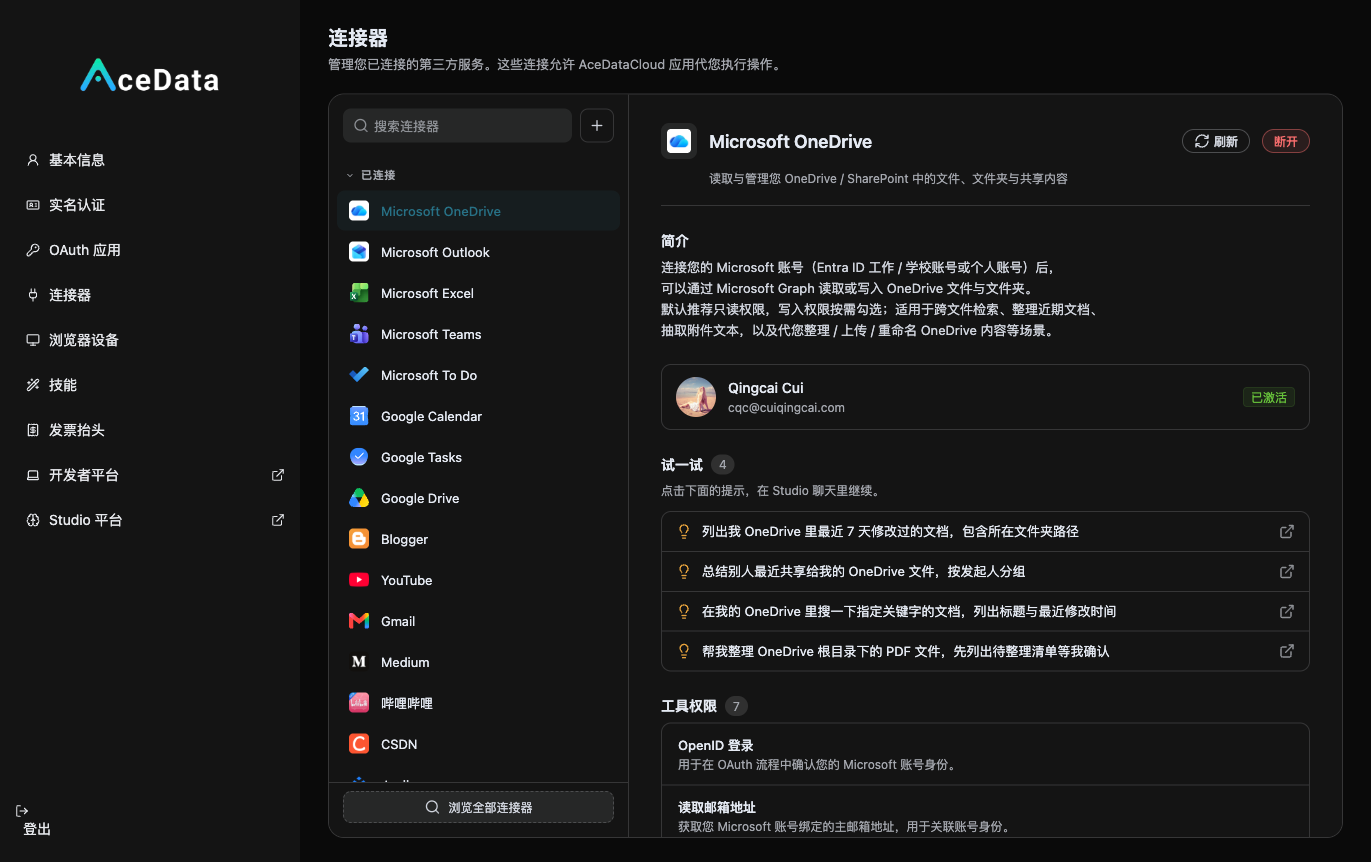
Once connected, you can run a complete loop in Studio of "Search Articles → gpt-image-2 for Images → Publish on Zhihu / Juejin" (publishing will require your confirmation). Zhihu also supports internal and external search and trending topics, making it easier for you to choose topics that ride the wave of current events.
Advanced: Scheduled Unattended Operation. Open studio.acedata.cloud/chatgpt/scheduled, set a scheduled task to let the AI automatically "search for hot topics → match images → publish" every day. Note: Unattended publishing must add the skills used to the task's allowed_skills whitelist, otherwise it will report skill_not_active failure.
¶ VI. Article Opening Template (Feel free to modify)
# XX API Integration Tutorial: From Registration to First Call

Recently, while working on [your project], I needed an API for [AI capability].
After comparing several options, I chose Ace Data Cloud (https://platform.acedata.cloud),
the reason being [your real reason: cheap / stable / comprehensive interfaces / good documentation].
Today, I will share the integration process.

## Register and Obtain API Key
1. Open https://platform.acedata.cloud
2. Register an account (email / WeChat / GitHub login)
3. Create an API Token in the console
...
¶ VII. Write Your First Article Now
- Go to Distribution Console to get your invitation link.
- Choose an AI service you are familiar with, write a review or tutorial, and use gpt-image-2 to set up the cover.
- Publish it on 2–3 technical platforms, then move on to write the next one.
Content accumulation has a compounding effect—these articles will work for you on search engines for 24 hours after being published. Your technical writing skills can finally be monetized directly.
👉 Start: platform.acedata.cloud
👉 Need help: Customer Service