
Student AI Side Hustle Practice: Starting with Real Content and Promotion
At the end of the month, living expenses are running low, wanting to buy new headphones but the budget is insufficient, seeing others doing part-time jobs but afraid of affecting studies—this is a cycle almost every student has encountered.
The good news is: you already hold an "asset" that others have yet to realize—AI tools you use every day, along with a whole circle of classmates who are also using AI. Connecting these two can become a side hustle practice that requires no inventory but does need continuous time investment and content operation.
This article will guide you step by step: from registration, obtaining your exclusive invitation link, to creating shareable content with AI, and then improving based on real feedback.
¶ 1. Why Students Are Particularly Suited for This
You are already using AI. You use it to polish papers, debug code, translate literature, create course design illustrations... You are not promoting a strange product, but sharing something you rely on every day. Real experience is the strongest persuasion.
Your social circle is a natural venue. Class groups, club groups, lab groups, graduate exam groups, friend circles—these people have highly overlapping needs, and almost everyone has AI usage scenarios. You do not need to cold start unfamiliar traffic.
Participating in Ace Data Cloud promotion requires no upfront promotion fees and has no mandatory KPIs; however, you will still invest time, content creation, account operation, and customer support costs. Only valid orders that meet the current rules may generate commissions.
¶ 2. First Confirm the Commission Rules
Participation in promotion requires no upfront promotion fees, but still requires investment in time, content creation, and account operation. Commissions only come from valid orders that meet the current rules. Levels, ratios, invitation attribution, confirmation periods, and withdrawal conditions are subject to the promotion methods and commission rules and the current display in the distribution backend; refunds, risk control, order status, and existing invitation relationships may all affect the final results.
¶ 3. Get Started: From Registration to Sending Out the First Content
¶ Step 1: Register + Obtain Exclusive Invitation Link (5 minutes)
- Open platform.acedata.cloud and register an account (WeChat scan is the fastest).
- Enter the Distribution Console.
- Copy your exclusive invitation link, which is in the format:
https://platform.acedata.cloud/?inviter_id=<your_user_ID>.
From now on, all shares should include this link.
¶ Step 2: Use AI to Create "Shareable" Content
Just sharing the link won't get attention. What really works is—first use AI to create something that makes people go "wow," then casually mention "I used this platform."
The easiest way to achieve results is through AI-generated images. Open the online image generation interface of Studio studio.acedata.cloud/openai-image and directly generate with gpt-image-2, producing images in seconds:
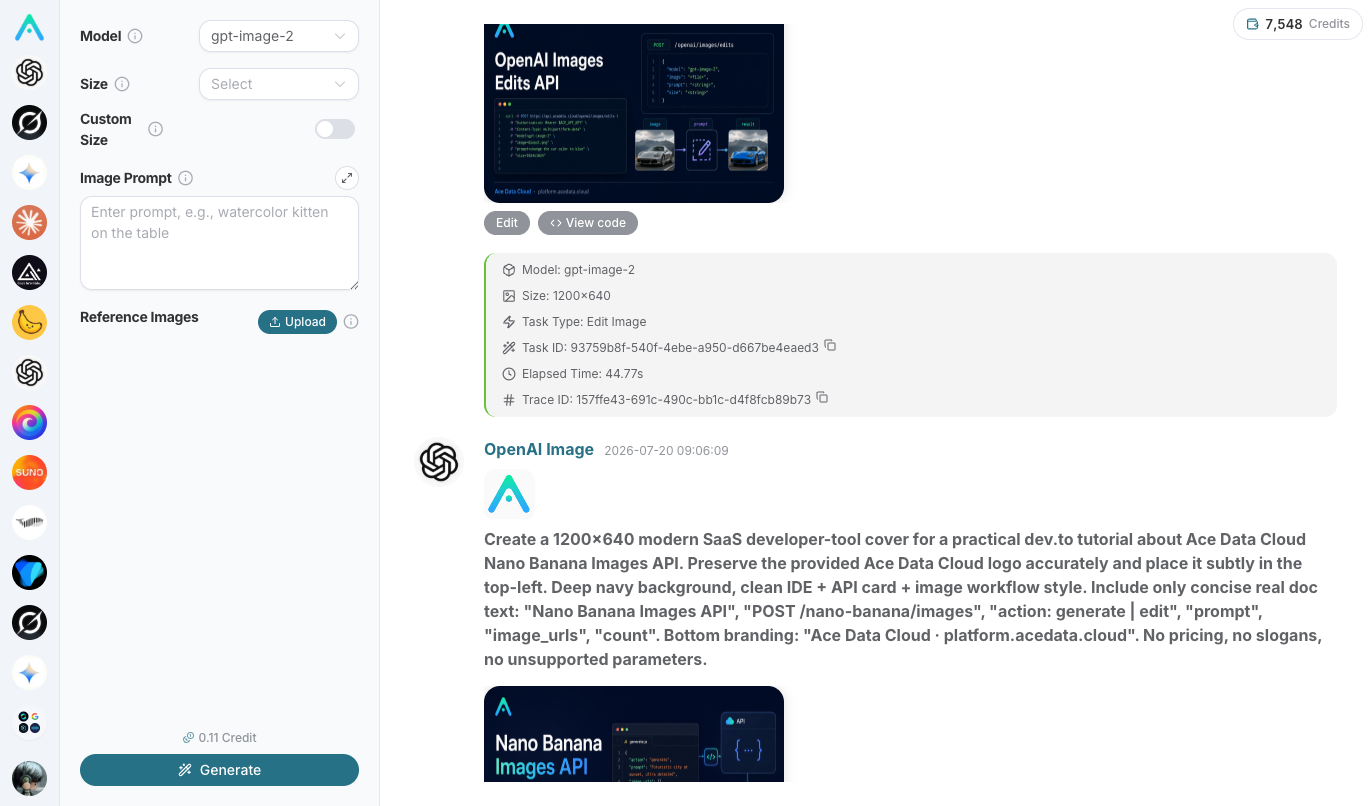
If you know a bit of code, you can also directly call the API:
curl -X POST https://api.acedata.cloud/openai/images/generations \
  -H "Authorization: Bearer $ACEDATACLOUD_API_KEY" \
  -H "Content-Type: application/json" \
  -d '{
    "model": "gpt-image-2",
    "prompt": "A minimalist campus illustration suitable for sharing on social media, warm color tones, hand-drawn feel",
    "size": "1024x1024"
  }'
After obtaining the image, pair it with a genuine sharing caption, such as:
Sharing a lifesaver for finals week 📚 I use the same platform Ace Data Cloud for paper polishing, code debugging, and PPT illustrations. One account can use GPT, DeepSeek, Claude, Gemini, and generate images, saving more than opening separate memberships. Those who want to try can register from my link👉 (attach your invitation link)
¶ Step 3 (Advanced): Connect Accounts and Let AI Help You Post to Content Platforms
If you want to do it more systematically, Studio supports connecting your Zhihu, Juejin, Xiaohongshu accounts, etc., allowing AI to help you search for hot topics, generate images, draft content, and even publish.
Entry: Studio chat input box → "Add Content (+)" → "Connect," which will open studio.acedata.cloud/console/connectors:
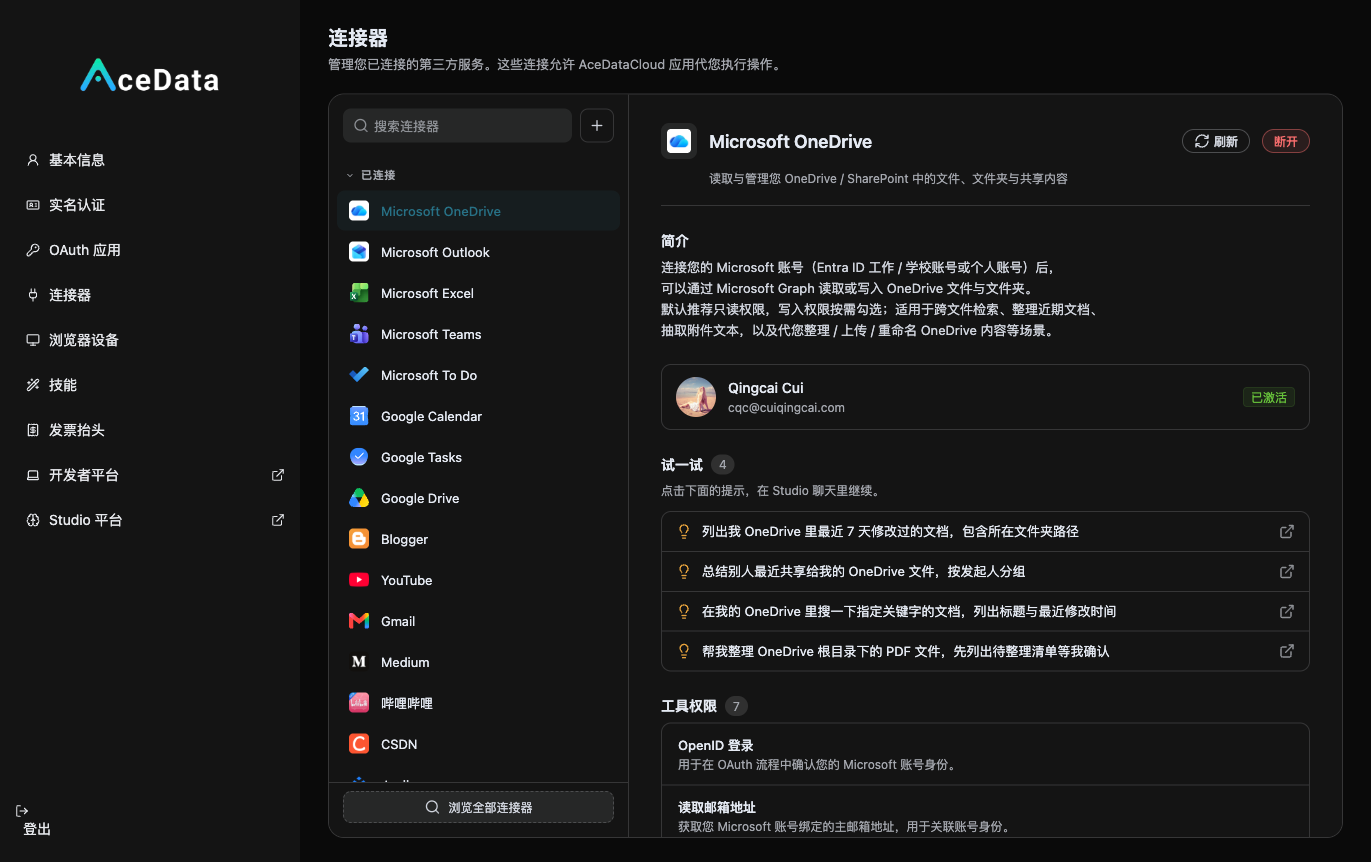
Once you connect Zhihu / Juejin / Xiaohongshu here, you can let AI in Studio follow the complete process of "search content → use gpt-image-2 for images → publish" (publishing will require your confirmation). For busy students attending classes, this saves a lot of effort compared to manual formatting and posting.
¶ 4. When to Promote and to Whom
No need to spam, no need for hard selling, just find the right timing to promote naturally:
| Scenario | What You Can Say |
|---|---|
| Classmate asks "Is there any good AI?" | "I've been using this, registration is free" + link |
| Group is discussing ChatGPT / papers | "Recommend a more convenient one, all can be used with one account" + link |
| Someone complains that AI memberships are expensive | Private message "This one has a good cost-performance ratio, can try" |
| You showcase AI-generated images/music | "Using this platform" + link |
| Club public account / group announcement | Write an article "List of AI tools I often use" |
A few high-demand time points to remember: back-to-school season, exam weeks, thesis season (every year from March to June, September to December), during these times, students' AI needs are at their peak, and promotion effects are the best.
Design and media students can focus on AI drawing (Midjourney / Flux / Seedream); computer science students benefit more from APIs—one platform can access ChatGPT, Claude, Gemini, Suno, Luma, and a bunch of services, useful for course projects / competitions / thesis.
¶ 5. A Few Honest Words
- Don't send mass advertisements, classmates will be annoyed. Natural sharing and sincere recommendations are effective.
- Understand it yourself first, your genuine work is the best material.
- Invite classmates to join—if they register through you and start promoting, when the users they invite make purchases, you as the superior can still receive a 20% commission.
- If you have questions, contact customer service 👉 platform.acedata.cloud/support.
¶ Six, Start Now
This is probably the lowest cost trial and error you can have during your university years: no money spent, no new skills to learn, not too much time taken, and no loss if it doesn't work out; if it does, by graduation, you might already have a source of ongoing commissions in your hands.
👉 Register now: platform.acedata.cloud 👉 Check your promotion data: Distribution Console