
Nano Banana Image API: What Makes Consistency Generation So Strong, with Real Examples
Google's Nano Banana (Gemini series image model) has gained popularity not just for its ability to "create images," but for its consistency: when changing backgrounds, styles, expressions, or handling complex actions and clothing, the main features remain stable, transitions are natural, and stitching marks are almost imperceptible. This makes it very suitable for tasks involving "the same subject, multiple versions."
This article explains how to use the Nano Banana API on Ace Data Cloud, with several real generated examples illustrating its strengths. The interface is POST https://api.acedata.cloud/nano-banana/images, and the documentation can be found at platform.acedata.cloud/documents/nano-banana-images. You can obtain a Token from the console to use it, with a free quota available for first-time users.
¶ Let's Run a Request
The simplest usage is action: generate + model + prompt. Image generation is slower than conversation, so it is recommended to add "async": true to first get the task_id and then poll:
curl -X POST 'https://api.acedata.cloud/nano-banana/images' \
  -H 'authorization: Bearer {token}' \
  -H 'content-type: application/json' \
  -d '{
    "action": "generate",
    "model": "nano-banana",
    "async": true,
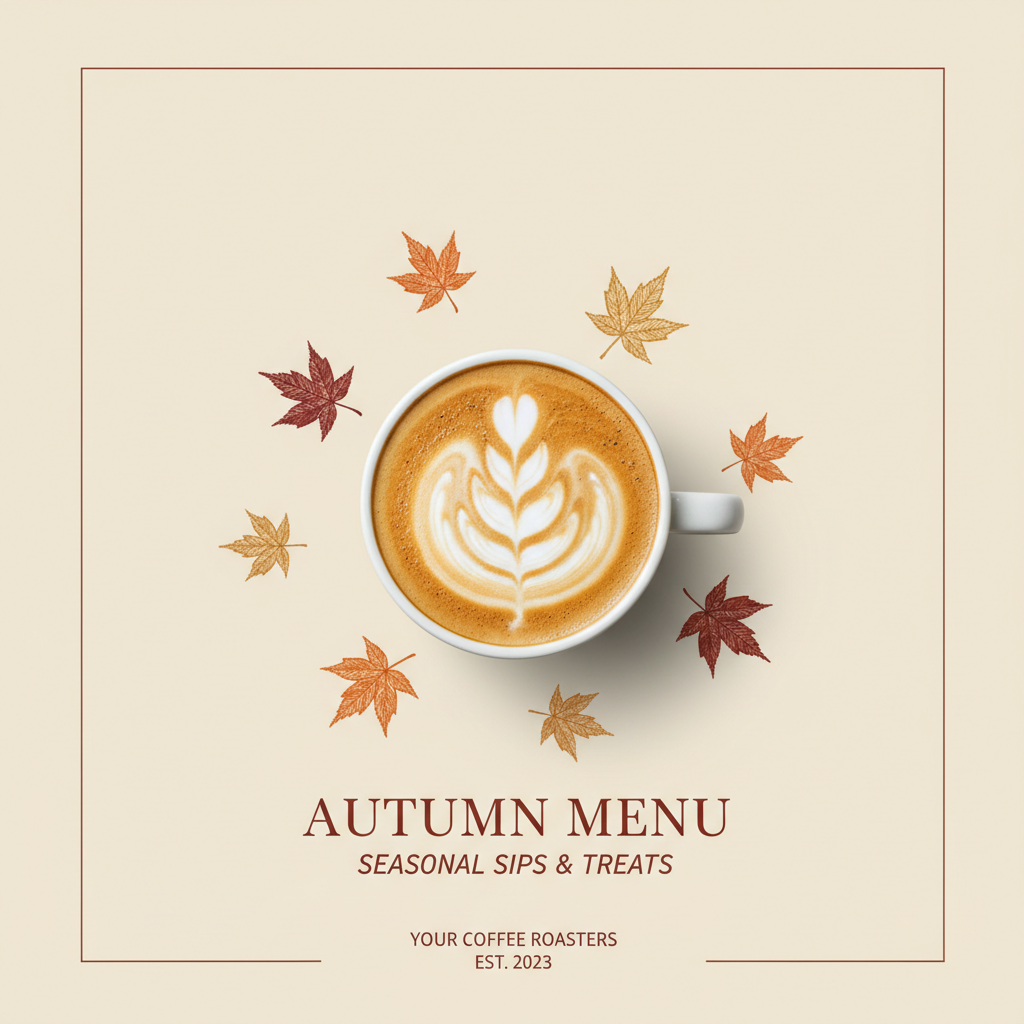
    "prompt": "A clean minimal social media poster for a specialty coffee shop autumn menu. Warm cream background, a cup of latte with leaf art in the center, small hand-drawn maple leaves, elegant layout with empty headline space at top, soft natural light, product photography style."
  }'
It will immediately return a task_id, and then you can poll /nano-banana/tasks until image_url appears in data:
curl -X POST 'https://api.acedata.cloud/nano-banana/tasks' \
  -H 'authorization: Bearer {token}' \
  -H 'content-type: application/json' \
  -d '{"id": "74d3df89-9394-4cc1-bb50-f44e653036b1", "action": "retrieve"}'
This is the actual result from the above request—clean layout, with space left for the title, ready to be used for a social media poster:
It is recommended to explicitly specify the
modelto choose which version to use (nano-banana,nano-banana-2, ornano-banana-pro); if not specified, the server will use the default model.
¶ Several Playful Uses That Can Stand Out
The following are typical uses centered around "consistency" (the example images are real generated):
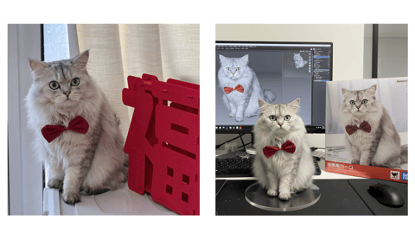
¶ 1. 2D Image to 3D Figurine
Prompt: Generate a commercial model of the character in the image, with a realistic environment. The model is placed on a computer desk, using a circular acrylic base; the computer screen displays the modeling process, with a BANDAI packaging box featuring the original image placed beside it.
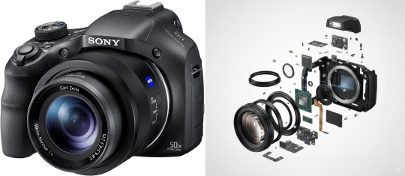
¶ 2. Product Exploded View / Internal Structure Analysis
Prompt: An ultra-detailed exploded view of the product, with metal parts and electronic components floating in mid-air, perfectly arranged to reveal the internal structure, futuristic technological aesthetics, 8K, soft cinematic lighting, highly realistic, pure white background.
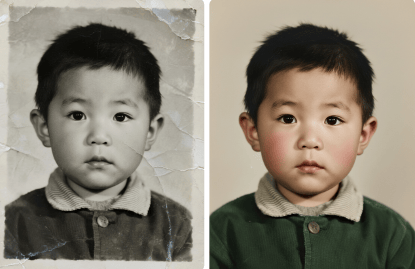
¶ 3. Old Photo Restoration and Coloring
Prompt: Restore this scratched black-and-white old photo, removing all blemishes and damages, significantly enhancing clarity, and applying natural and realistic coloring.
¶ 4. E-commerce Product Placement / Multi-element Group Image
Prompt: A model posing in front of a white car, in a street scene with buildings on both sides; she is wearing a black dress and white high heels, holding a white handbag in one hand.
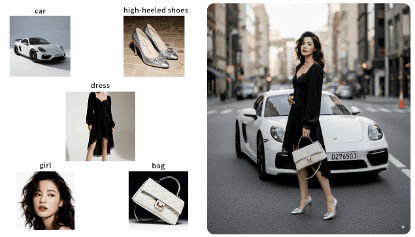
In addition, one-click outfit changes/expression changes/action changes, multi-angle shots, group photos, meme grids, model OOTD layouts, sketches to 3D physical objects, architectural isometric modeling, etc., are all natural extensions of its strong consistency—just change the prompt, and the request method remains the same.
¶ Beyond Generation: Image Editing
If you want to "edit" rather than "generate," simply change the action to the corresponding behavior and provide image (change background, unify style, repair, local editing), with the request structure being the same as above. This is also where Nano Banana is more practical compared to pure text-to-image models—it can handle both "generation" and "editing."
¶ Pricing and Access
Specific pricing and quotas are subject to the service page: https://platform.acedata.cloud/services/nano-banana. The platform charges based on usage, and one Token can access all services, with a free quota available for first-time applications. You can run the examples above before deciding.
By the way, Nano Banana's ability to "batch generate images of the same subject" can easily be turned into a resellable tool—figurine generators, old photo restorations, and bulk production of e-commerce product images are all existing demands. Distributing the tool or registration link and earning commissions through the Ace Data Cloud Revenue Alliance from users you register is an additional income stream beyond content.
¶ Reference Links
- Documentation: https://platform.acedata.cloud/documents/nano-banana-images
- Services and Pricing: https://platform.acedata.cloud/services/nano-banana
- Obtain Token: https://platform.acedata.cloud/console/applications
Use the free quota to generate an image and experience its consistency before deciding which process to integrate it into.