
Building a Content Production Line with Gemini + Nano Banana + Veo: From Copy to Images to Video
Those who create content know that the real time-consuming part is not any single step, but rather the "connection" of these steps: selecting topics, writing copy, finding images, and then editing a video often requires moving back and forth between four or five tools.
This article discusses a specific task—using three models from Ace Data Cloud (api.acedata.cloud) to take "a piece of content" from text all the way to video, all accomplished with the same API Token and the same request method. Each of the three models handles a segment:
- Gemini (
/gemini/chat/completions) — writing copy, creating titles, and expanding a one-sentence request into a structured script; - Nano Banana (
/nano-banana/images) — generating images, posters, and covers; - Veo (
/veo/videos) — turning static images into short videos with cinematic language.
There’s no need to register with three different companies or recharge three times. You can call all the services on the platform with just one Token obtained from the console, and the first application comes with free credits to test it out.
Below, we will walk through the real process of "creating content for a coffee shop's autumn new products," with each step accompanied by curl commands that can be directly copied and executed, along with the actual generated results.
¶ Step One: Let Gemini Write the Request as a Script
The starting point for content is usually a vague statement, such as "write something for a coffee shop's autumn new products." Gemini excels at organizing such verbal requests into executable structures. The interface is in OpenAI compatible format, and the messages field contains the dialogue.
curl -X POST 'https://api.acedata.cloud/gemini/chat/completions' \
  -H 'authorization: Bearer {token}' \
  -H 'content-type: application/json' \
  -d '{
    "model": "gemini-3.1-pro-preview",
    "max_tokens": 1200,
    "messages": [
      {"role": "system", "content": "You are a copywriter responsible for social media content. The output should be concise and directly usable."},
      {"role": "user", "content": "Write for a specialty coffee shop's autumn maple latte: 1) a title no longer than 15 words; 2) a short text in the style of Xiaohongshu (within 120 words); 3) an English prompt for the image; 4) an English description for the short video."}
    ]
  }'
The response is in the standard chat.completion structure, with the main text in choices[0].message.content, and usage will provide the actual token consumption (billing is based on tokens):
{
  "id": "chatcmpl-2026...",
  "model": "gemini-3.1-pro-preview",
  "object": "chat.completion",
  "choices": [
    {
      "index": 0,
      "message": {
        "role": "assistant",
        "content": "Title: A Cup of Maple, Embracing Autumn\nText: …\nImage prompt: A cozy autumn latte with maple leaf art...\nVideo shot: Slow top-down push-in on a maple-leaf latte, steam rising..."
      },
      "finish_reason": "stop"
    }
  ],
  "usage": { "prompt_tokens": 96, "completion_tokens": 724, "total_tokens": 820 }
}
Note: The
gemini-3.xseries of flash/pro are reasoning models, which consume a portion of reasoning tokens before responding. It is recommended to setmax_tokensto 512 or more; otherwise, the reasoning may fill the budget and return empty content.
Gemini is natively multimodal, so if you already have a real photo, you can replace the content of a message with an array of content blocks, including both text and image_url (supporting public image URLs or data:image/...;base64,), allowing it to "write copy based on the image." The two English prompts obtained in this step will serve as inputs for the subsequent image and video.
¶ Step Two: Let Nano Banana Generate Images
With the prompts in hand, the image generation is handed over to Nano Banana (Google's Gemini series image model). Its strength lies in clean visuals and well-organized layouts, making it ideal for social media posters that require "space for titles." Image generation is slower than dialogue, so it is recommended to add "async": true to first obtain a task_id, and then poll for results.
curl -X POST 'https://api.acedata.cloud/nano-banana/images' \
  -H 'authorization: Bearer {token}' \
  -H 'content-type: application/json' \
  -d '{
    "action": "generate",
    "model": "nano-banana",
    "async": true,
    "prompt": "A clean minimal social media poster for a specialty coffee shop autumn menu. Warm cream background, a cup of latte with leaf art in the center, small hand-drawn maple leaves, elegant layout with empty headline space at top, soft natural light, product photography style."
  }'
Immediately, a task_id is returned, and then you can poll /nano-banana/tasks until data contains image_url:
curl -X POST 'https://api.acedata.cloud/nano-banana/tasks' \
  -H 'authorization: Bearer {token}' \
  -H 'content-type: application/json' \
  -d '{"id": "74d3df89-9394-4cc1-bb50-f44e653036b1", "action": "retrieve"}'
This is the actual result generated from the above request (the top white space is just right for the title):
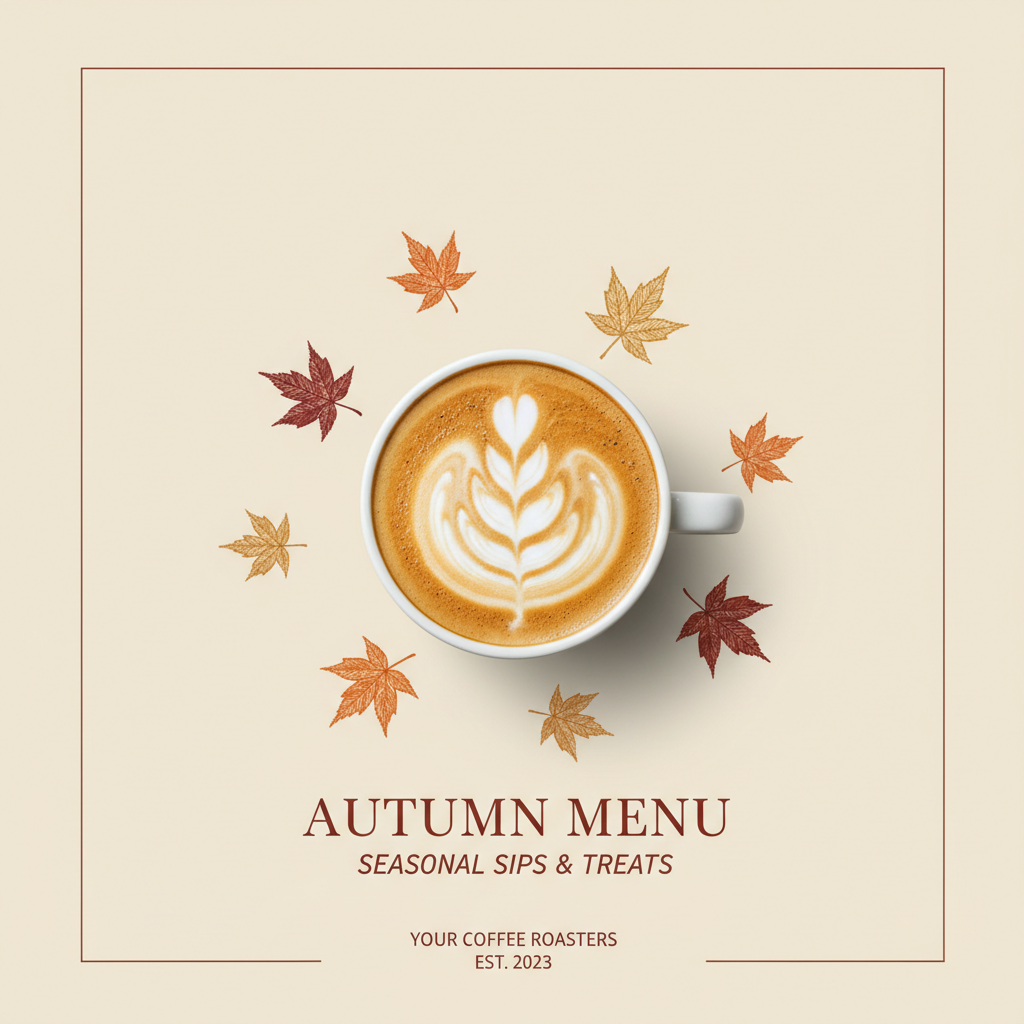
If you want to "edit an image" rather than "generate"—for example, changing the background of a real product image, unifying the style of multiple images, or restoring an old photo—simply change the action to the corresponding behavior and include image, keeping the request method the same.
¶ Step Three: Let Veo Turn the Image into a Shot
With the poster ready, we can add a few seconds of dynamic short video for an opening or social media loop. Veo understands cinematic language: if you clearly describe "subject + lighting + camera position + movement + rhythm," it will generate accordingly. Video generation takes 1-2 minutes, and similarly follows an asynchronous process.
curl -X POST 'https://api.acedata.cloud/veo/videos' \
  -H 'authorization: Bearer {token}' \
  -H 'content-type: application/json' \
  -d '{
    "action": "text2video",
    "model": "veo31-fast",
    "async": true,
    "prompt": "Extreme slow-motion macro of a hummingbird hovering beside a dew-covered flower at golden hour, wings frozen mid-beat, shallow depth of field, cinematic."
  }'
Return the task_id, and poll /veo/tasks until state is succeeded to obtain the video_url. Below is a segment that was actually generated (using veo31-fast):
📹 https://cdn.acedata.cloud/5e1f2c52a9.mp4
If you want to make the poster in the second step "move," replace action with image2video and pass image_urls to start the video from this image. The optional models for Veo are veo31-fast, veo31, veo3, veo3-fast: the fast series is used for quickly testing directions, while the quality tier is used for producing final pieces.
¶ Connect the Three Steps
The shapes of these three interfaces are intentionally unified: they all use the same Bearer Token, are all POST + JSON, and time-consuming tasks like videos/images support async + /tasks polling (or use callback_url for callbacks). So you can completely write a script of several dozen lines to string it into a pipeline:
- User/operations provide a sentence requirement → Call Gemini to get
title + body + image prompt + shot description; - Pass the image prompt to Nano Banana → Get
image_url; - Pass the shot description (or that image) to Veo → Get
video_url; - Store the title, body, image, and video, and schedule for release.
What used to require moving between four tools has become a single call chain.
¶ Parts That Can Easily Turn into Revenue
This pipeline itself has two uses:
- Self-traffic generation: Consistently producing images + short videos is the "continuous supply" most content accounts lack. And these contents naturally carry the tools you use—put the registration link on your homepage, and every piece of content you post is an exposure. Ace Data Cloud's Revenue Alliance offers commissions on user consumption through your registration link.
- Reselling as a service: Wrap the above script in a layer of interface, and you have a small tool for "inputting topics and generating images and videos with one click." Your cost is the part charged by the platform based on usage, which you can sell to businesses that need to produce content in bulk.
In either case, the underlying components are just these three interfaces.
¶ Reference Links
- Gemini conversation documentation: https://platform.acedata.cloud/documents/gemini-chat-completions
- Nano Banana image documentation: https://platform.acedata.cloud/documents/nano-banana-images
- Veo video documentation: https://platform.acedata.cloud/documents/veo-videos
- Get Token / Check balance: https://platform.acedata.cloud/console/applications
One Token, three models, a production line from text to video. First, use the free quota to run it through, then decide how to use it.