
Pixverse Video Generation API Integration Guide
This article will introduce a Pixverse Videos Generation API integration guide, which can generate official Pixverse videos by inputting custom parameters.
¶ Application and Usage
To use the Pixverse Videos Generation API, first go to the Ace Data Cloud Console to obtain your API Token and keep it for later use.

If you have not logged in or registered yet, you will be automatically redirected to the login page to register and log in, and you will automatically return to the current page after completion.
One API Token can call all services on the platform, without needing to apply separately for each service. The first application will be given free credits for a free trial; when credits are insufficient, you can recharge the general balance in the Console.
📘 Full documentation: Pixverse Videos Generation API →
¶ Basic Usage
You can generate videos based on prompts, for example, you can enter quiver, as shown in the image:
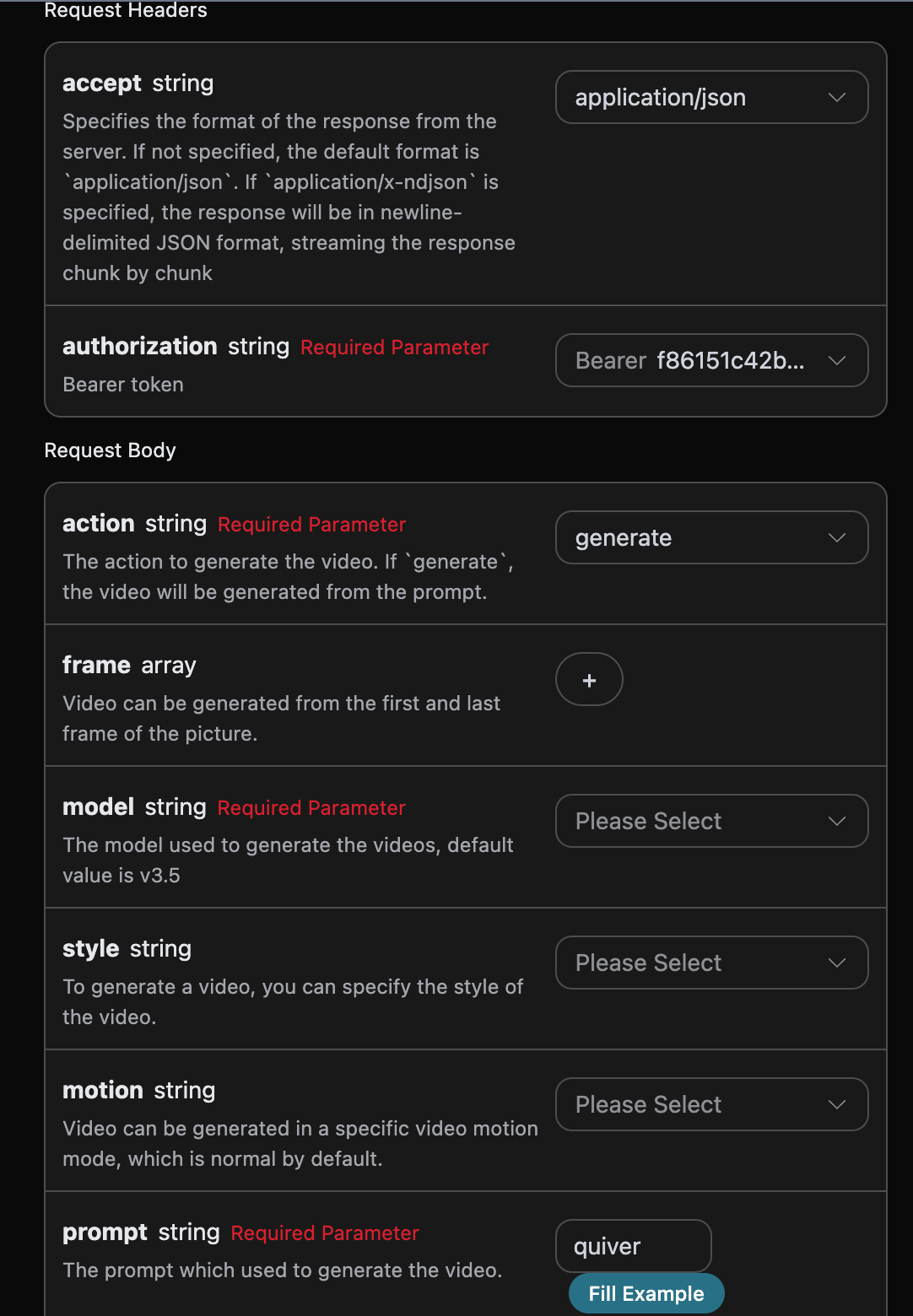
The generated code is as follows:

Main request parameters:
model: The model for generating videos, default isv3.5.action: The video generation action, default isgenerate, optionalextend.prompt: The prompt for generating videos (required).style: Optional video style.motion: Motion mode, default is normal.quality: Video resolution, default is540p.duration: Video duration, 5 or 8 seconds, default is 5.image_url: First-frame reference image, optional.aspect_ratio: Aspect ratio, default is16:9.seed: Optional, fixed random seed.template_id: Optional, specifies the template effect.callback_url: The URL that needs callback results.async: Optional, when set totrue, the interface immediately returnstask_id, without needing to providecallback_url; then obtain the result by polling through the corresponding task query interface.
You can click the “Try” button to test the API directly. Wait 1-2 minutes, and the result is as follows:
{
  "success": true,
  "task_id": "69e677ca-f1de-419f-99a4-cb39ea0cb5fc",
  "trace_id": "e544f904-ac13-4b42-a26e-2de69d9ac06b",
  "data": [
    {
      "id": 317982208110208,
      "first_frame": "",
      "video_width": 0,
      "video_height": 0,
      "prompt": "quiver",
      "model": "v3.5",
      "quality": "360p",
      "motion": "normal",
      "video_url": "https://cdn.acedata.cloud/assets/examples/gemini/04a043bd-6b23-4b4e-945c-ce48158c3eee-3a89912507c7.mp4",
      "template_id": 0,
      "template_name": "",
      "style": "",
      "aspect_ratio": "16:9",
      "duration": 5,
      "extended": 0,
      "last_frame": "",
      "seed": 0,
      "asset_id": 0,
      "asset_name": ""
    }
  ]
}
It can be seen that at this point we have obtained the content of a video, including the video ID, video link, video resolution, video duration, and so on.
The field descriptions are as follows:
- success: Whether generation was successful. If successful, it is
true; otherwise, it isfalse - task_id: The ID of this generation task
- trace_id: The tracking ID of this generation task
- data: A list containing detailed information about the generated video.
- id: The unique ID of the generated video, which can later be used for extended generation based on this ID
- first_frame: The first-frame image link of the video
- last_frame: The last-frame image link of the video
- video_width: The width of this video result
- video_height: The height of this video result
- prompt: The prompt for this video generation task
- model: The model used for this video generation task
- video_url: The video link for this video generation task
- template_id: The template effect ID used by the video
- template_name: The template effect name used by the video
- asset_id: The character ID used by the video
- asset_name: The character name used by the video
- style: The style of this video generation task
- aspect_ratio: The dimensions of this video
- extended: Whether this video was generated through extension; 0 means it was not generated through extension, otherwise it was generated through extension
¶ Generate Videos with Custom First and Last Frames
If you want to generate a video with custom first and last frames, you can enter the image links for the first and last frames:
At this time, the frame field can pass content similar to the following:
- First-frame image

- Last-frame image

Next, if we want to custom-generate a song based on lyrics, title, and style, we can specify the following content:
- action: The action of this video generation task, divided into two types: generate video
action, extend videoextend - prompt: The prompt for this video generation task.
- frame: An array of first- and last-frame video links for this video generation.
The filling example is as follows:
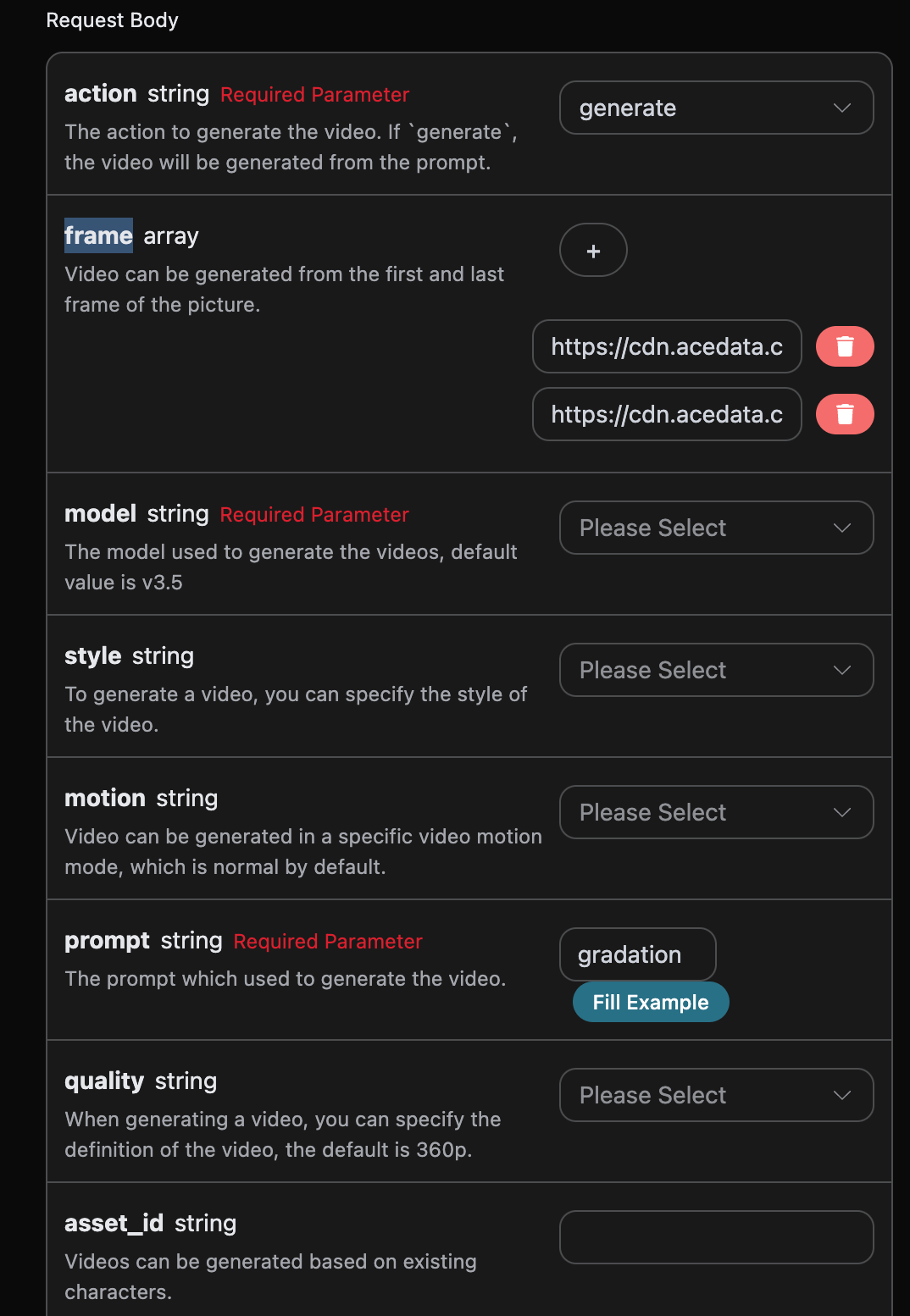
After filling it in, the following code is automatically generated:
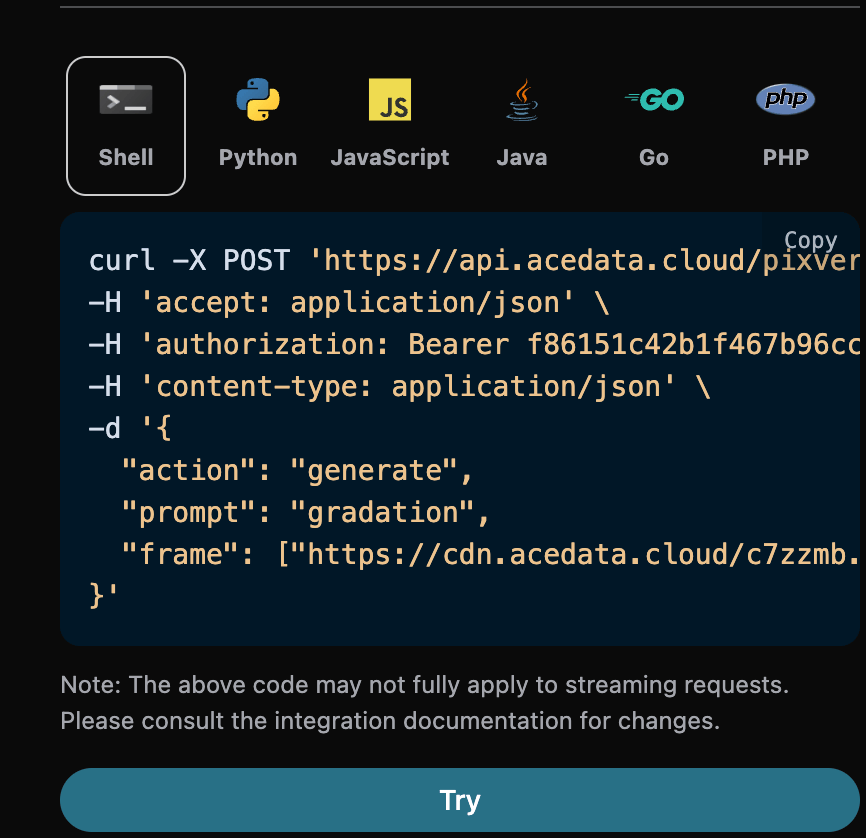
Corresponding Shell code:
curl -X POST 'https://api.acedata.cloud/pixverse/videos' \
-H 'accept: application/json' \
-H 'authorization: Bearer {token}' \
-H 'content-type: application/json' \
-d '{
  "action": "generate",
  "prompt": "gradation",
  "frame": ["https://cdn.acedata.cloud/c7zzmb.png","https://cdn.acedata.cloud/fqd8br.png"]
}'
The test is allowed, and the generated result is similar.
¶ Custom Video Template Effect Generation
If you want to use a specific video template effect to generate a video, we only need to add a template ID field template_id to specify the template effect. We provide the following template effects,
the specific template effects are shown in the image below:
[
    {
        "display_name": "Muscle Surge",
        "workflow_tag": "muscle_241128",
        "template_id": 308621408717184,
        "thumbnail_path": "https://media.pixverse.ai/asset%2Ftemplate%2Fwithbaby.gif",
        "thumbnail_video_path": "",
        "marker": "hot",
        "created_at": "2024-11-28T17:53:21Z",
        "updated_at": "2024-12-25T10:19:28Z",
        "display_prompt": "Show off your strong muscles and have everyone hooked.",
        "i18n_json": "{\"zh-CN\":{\"display_name\":\"Become a muscular man\",\"display_prompt\":\"Experience the joy of being a macho man\"}}",
        "example_list": "[{\"img_id\":113750602,\"img_url\":\"https://media.pixverse.ai/upload%2F920dc791-8c9f-4518-8761-82958a827190.png\"},{\"img_id\":113750690,\"img_url\":\"https://media.pixverse.ai/upload%2Fddd29e75-beeb-461c-9388-3e14c2709e73.png\"},{\"img_id\":113750791,\"img_url\":\"https://media.pixverse.ai/upload%2Ff2853009-8238-4e0f-93ec-cfc68fee28b7.png\"}]",
        "qualities": [
            "360p",
            "540p",
            "720p",
            "1080p"
        ]
    }, {
        "display_name": "Hug Your Love",
        "workflow_tag": "hug_love_241030",
        "template_id": 303624424723200,
        "thumbnail_path": "https://media.pixverse.ai/asset%2Ftemplate%2Fhug2.gif",
        "thumbnail_video_path": "",
        "marker": "hot",
        "created_at": "2024-10-31T12:07:47Z",
        "updated_at": "2025-01-06T05:32:42Z",
        "display_prompt": "Hug each other\t",
        "i18n_json": "{\"zh-CN\":{\"display_name\":\"Loving hugs\",\"display_prompt\":\"Hug each other\"}}",
        "example_list": "[{\"img_id\":113741803,\"img_url\":\"https://media.pixverse.ai/upload%2Fb2626bc2-050d-4ea6-a864-e2054c012df5.png\"},{\"img_id\":113750690,\"img_url\":\"https://media.pixverse.ai/upload%2Fddd29e75-beeb-461c-9388-3e14c2709e73.png\"}]",
        "qualities": [
            "360p",
            "540p",
            "720p",
            "1080p"
        ]
    }, {
        "display_name": "Alive Art",
        "workflow_tag": "alive_art_241028",
        "template_id": 302325299721280,
        "thumbnail_path": "https://media.pixverse.ai/asset%2Ftemplate%2Faliveart.gif",
        "thumbnail_video_path": "",
        "marker": "default",
        "created_at": "2024-10-24T03:55:29Z",
        "updated_at": "2025-01-06T05:32:53Z",
        "display_prompt": "The [OBJECT] comes to life and walks out of the [SCENE]",
        "i18n_json": "{\"zh-CN\":{\"display_name\":\"Lifelike\",\"display_prompt\":\"It has come to life!\"}}",
        "example_list": "",
        "qualities": [
            "360p",
            "540p",
            "720p",
            "1080p"
        ]
    }, {
        "display_name": "Sheep Curls",
        "workflow_tag": "sheep_241208",
        "template_id": 310371322329472,
        "thumbnail_path": "https://media.pixverse.ai/asset%2Ftemplate%2FSheepCurls.gif",
        "thumbnail_video_path": "",
        "marker": "new",
        "created_at": "2024-12-08T15:14:11Z",
        "updated_at": "2024-12-25T10:19:28Z",
        "display_prompt": "Change hairstyle for a better mood",
        "i18n_json": "{\"zh-CN\":{\"display_name\":\"Everything can have sheep curls\",\"display_prompt\":\"In a bad mood? Try changing your hairstyle\"}}",
        "example_list": "[{\"img_id\":113741803,\"img_url\":\"https://media.pixverse.ai/upload%2Fb2626bc2-050d-4ea6-a864-e2054c012df5.png\"},{\"img_id\":113750690,\"img_url\":\"https://media.pixverse.ai/upload%2Fddd29e75-beeb-461c-9388-3e14c2709e73.png\"}]",
        "qualities": [
            "360p",
            "540p",
            "720p",
            "1080p"
        ]
    }, {
        "display_name": "Sailor Moon",
        "workflow_tag": "meishaonv_241225",
        "template_id": 313359138372032,
        "thumbnail_path": "https://media.pixverse.ai/asset%2Ftemplate%2Fmeishaonv2.gif",
        "thumbnail_video_path": "",
        "marker": "",
        "created_at": "2024-12-25T12:29:05Z",
        "updated_at": "2025-01-06T05:32:33Z",
        "display_prompt": "Moon Prism Power, Make Up!",
        "i18n_json": "{\"zh-CN\":{\"display_name\":\"Become a Sailor Guardian\",\"display_prompt\":\"Moon Crystal Power, Transform!\"}}",
        "example_list": "",
        "qualities": [
            "360p",
            "540p",
            "720p",
            "1080p"
        ]
    }, {
        "display_name": "Black Myth: Wukong",
        "workflow_tag": "heiwukong_241225",
        "template_id": 313359209531840,
        "thumbnail_path": "https://media.pixverse.ai/asset%2Ftemplate%2Fmonkey.gif",
        "thumbnail_video_path": "",
        "marker": "",
        "created_at": "2024-12-25T12:29:40Z",
        "updated_at": "2025-01-06T05:32:25Z",
        "display_prompt": "I am Sun Wukong, the Victorious Fighting Buddha!",
        "i18n_json": "{\"zh-CN\":{\"display_name\":\"Black Wukong Engine\",\"display_prompt\":\"Ride westward and face destiny head-on!\"}}",
        "example_list": "",
        "qualities": [
            "360p",
            "540p",
            "720p",
            "1080p"
        ]
    }, {
        "display_name": "Santa's Secret Gifts",
        "workflow_tag": "santa_gift_241213",
        "template_id": 311521768592256,
        "thumbnail_path": "https://media.pixverse.ai/asset%2Ftemplate%2Fgift111.gif",
        "thumbnail_video_path": "",
        "marker": "new",
        "created_at": "2024-12-15T03:16:32Z",
        "updated_at": "2024-12-30T06:08:16Z",
        "display_prompt": "I want a:",
        "i18n_json": "{\"zh-CN\":{\"display_name\":\"Christmas Gift Mystery Box\",\"display_prompt\":\"I want:\"}}",
        "example_list": "[{\"img_id\":113741803,\"img_url\":\"https://media.pixverse.ai/upload%2Fb2626bc2-050d-4ea6-a864-e2054c012df5.png\"},{\"img_id\":113750690,\"img_url\":\"https://media.pixverse.ai/upload%2Fddd29e75-beeb-461c-9388-3e14c2709e73.png\"}]",
        "qualities": [
            "360p",
            "540p",
            "720p",
            "1080p"
        ]
    },
{
        "display_name": "Where is Santa?",
        "workflow_tag": "where_is_santa_241213",
        "template_id": 311521879229312,
        "thumbnail_path": "https://media.pixverse.ai/asset%2Ftemplate%2Fwheresanta.gif",
        "thumbnail_video_path": "",
        "marker": "new",
        "created_at": "2024-12-15T03:17:26Z",
        "updated_at": "2024-12-30T06:08:24Z",
        "display_prompt": "Discovering Santa Claus in the parallel world!",
        "i18n_json": "{\"zh-CN\":{\"display_name\":\"Where is Santa Claus hiding?\",\"display_prompt\":\"“Discover” Santa Clauses all around the world\"}}",
        "example_list": "[{\"img_id\":119280295,\"img_url\":\"https://media.pixverse.ai/upload%2Fde34a072-325e-4d86-88d9-2daef292e1b4.jpeg\"},{\"img_id\":119280616,\"img_url\":\"https://media.pixverse.ai/upload%2F5b4da0a2-86c3-4204-adda-74bfa7c3d0d1.jpg\"}]",
        "qualities": [
            "360p",
            "540p",
            "720p",
            "1080p"
        ]
    }, {
        "display_name": "Christmas OOTD",
        "workflow_tag": "tobe_santa_241219",
        "template_id": 312314911869312,
        "thumbnail_path": "https://media.pixverse.ai/asset%2Ftemplate%2Fbesanta33.gif",
        "thumbnail_video_path": "",
        "marker": "new",
        "created_at": "2024-12-19T14:51:09Z",
        "updated_at": "2024-12-30T06:08:08Z",
        "display_prompt": "Dress up as a Christmas star",
        "i18n_json": "{\"zh-CN\":{\"display_name\":\"Christmas Battle Outfit\",\"display_prompt\":\"Find out which Christmas outfit suits you\"}}",
        "example_list": "[{\"img_id\":113741803,\"img_url\":\"https://media.pixverse.ai/upload%2Fb2626bc2-050d-4ea6-a864-e2054c012df5.png\"},{\"img_id\":113750690,\"img_url\":\"https://media.pixverse.ai/upload%2Fddd29e75-beeb-461c-9388-3e14c2709e73.png\"}]",
        "qualities": [
            "360p",
            "540p",
            "720p",
            "1080p"
        ]
    }, {
        "display_name": "We Are Venom!",
        "workflow_tag": "venom_241030",
        "template_id": 303624537709312,
        "thumbnail_path": "https://media.pixverse.ai/asset%2Ftemplate%2FWeAreVenom.gif",
        "thumbnail_video_path": "",
        "marker": "default",
        "created_at": "2024-10-31T12:08:42Z",
        "updated_at": "2024-12-25T10:19:28Z",
        "display_prompt": "Transform into a [BLACK] Venom",
        "i18n_json": "{\"zh-CN\":{\"display_name\":\"Venom Transformation!\",\"display_prompt\":\"Transform into [Black] Venom\"}}",
        "example_list": "[{\"img_id\":113750602,\"img_url\":\"https://media.pixverse.ai/upload%2F920dc791-8c9f-4518-8761-82958a827190.png\"},{\"img_id\":113750690,\"img_url\":\"https://media.pixverse.ai/upload%2Fddd29e75-beeb-461c-9388-3e14c2709e73.png\"},{\"img_id\":113750791,\"img_url\":\"https://media.pixverse.ai/upload%2Ff2853009-8238-4e0f-93ec-cfc68fee28b7.png\"}]",
        "qualities": [
            "360p",
            "540p"
        ]
    }, {
        "display_name": "Hot Harley Quinn",
        "workflow_tag": "harley_quinn_241121",
        "template_id": 307489434436288,
        "thumbnail_path": "https://media.pixverse.ai/asset%2Ftemplate%2FHotHarleyQuinn.gif",
        "thumbnail_video_path": "",
        "marker": "default",
        "created_at": "2024-11-22T08:21:19Z",
        "updated_at": "2024-12-26T07:40:43Z",
        "display_prompt": "Transform into Harley Quinn, mastering allure and chaos",
        "i18n_json": "{\"zh-CN\":{\"display_name\":\"Harley Quinn Transformation\",\"display_prompt\":\"Transform into Harley Quinn, mastering allure and madness\"}}",
        "example_list": "[{\"img_id\":113741803,\"img_url\":\"https://media.pixverse.ai/upload%2Fb2626bc2-050d-4ea6-a864-e2054c012df5.png\"},{\"img_id\":113742000,\"img_url\":\"https://media.pixverse.ai/upload%2F19090035-612e-40ed-9c8d-a7aaf781d492.png\"},{\"img_id\":113742074,\"img_url\":\"https://media.pixverse.ai/upload%2F50ed9020-7b58-4dd9-aa39-ff06b9e0df12.png\"}]",
        "qualities": [
            "360p",
            "540p"
        ]
    }, {
        "display_name": "Crazy Cat Woman",
        "workflow_tag": "cat_woman_241121",
        "template_id": 307489548427968,
        "thumbnail_path": "https://media.pixverse.ai/asset%2Ftemplate%2FCrazyCatWoman.gif",
        "thumbnail_video_path": "",
        "marker": "default",
        "created_at": "2024-11-22T08:22:15Z",
        "updated_at": "2024-12-26T07:40:24Z",
        "display_prompt": "Transform into a Crazy Cat Woman and slay",
        "i18n_json": "{\"zh-CN\":{\"display_name\":\"Crazy Catwoman Transformation\",\"display_prompt\":\"Transform into a seductive Catwoman and captivate the whole crowd!\"}}",
        "example_list": "[{\"img_id\":113742074,\"img_url\":\"https://media.pixverse.ai/upload%2F50ed9020-7b58-4dd9-aa39-ff06b9e0df12.png\"},{\"img_id\":113750690,\"img_url\":\"https://media.pixverse.ai/upload%2Fddd29e75-beeb-461c-9388-3e14c2709e73.png\"},{\"img_id\":113750791,\"img_url\":\"https://media.pixverse.ai/upload%2Ff2853009-8238-4e0f-93ec-cfc68fee28b7.png\"}]",
        "qualities": [
            "360p",
            "540p"
        ]
    }, {
        "display_name": "Wonder Woman",
        "workflow_tag": "wonder_woman_241202",
        "template_id": 309283958194560,
        "thumbnail_path": "https://media.pixverse.ai/asset%2Ftemplate%2FWonderWoman.gif",
        "thumbnail_video_path": "",
        "marker": "default",
        "created_at": "2024-12-02T11:45:11Z",
        "updated_at": "2024-12-26T07:40:35Z",
        "display_prompt": "Transform into Wonder Woman and conquer the impossible",
        "i18n_json": "{\"zh-CN\":{\"display_name\":\"Wonder Woman Transformation\",\"display_prompt\":\"Become Wonder Woman and conquer all impossibilities\"}}",
        "example_list": "[{\"img_id\":113742074,\"img_url\":\"https://media.pixverse.ai/upload%2F50ed9020-7b58-4dd9-aa39-ff06b9e0df12.png\"},{\"img_id\":113750791,\"img_url\":\"https://media.pixverse.ai/upload%2Ff2853009-8238-4e0f-93ec-cfc68fee28b7.png\"}]",
        "qualities": [
            "360p",
            "540p"
        ]
    },
{
        "display_name": "Hulk",
        "workflow_tag": "hulk_241106",
        "template_id": 304826314164992,
        "thumbnail_path": "https://media.pixverse.ai/asset%2Ftemplate%2FHulk.gif",
        "thumbnail_video_path": "",
        "marker": "default",
        "created_at": "2024-11-07T07:08:47Z",
        "updated_at": "2024-12-26T07:38:48Z",
        "display_prompt": "Unleash the Beast",
        "i18n_json": "{\"zh-CN\":{\"display_name\":\"Summon the Hulk\",\"display_prompt\":\"Transform into the Hulk and smash everything\"}}",
        "example_list": "[{\"img_id\":113750602,\"img_url\":\"https://media.pixverse.ai/upload%2F920dc791-8c9f-4518-8761-82958a827190.png\"},{\"img_id\":113750690,\"img_url\":\"https://media.pixverse.ai/upload%2Fddd29e75-beeb-461c-9388-3e14c2709e73.png\"},{\"img_id\":113750791,\"img_url\":\"https://media.pixverse.ai/upload%2Ff2853009-8238-4e0f-93ec-cfc68fee28b7.png\"}]",
        "qualities": [
            "360p",
            "540p",
            "720p",
            "1080p"
        ]
    }, {
        "display_name": "Joker's Rebirth",
        "workflow_tag": "joker_241106",
        "template_id": 304826126435072,
        "thumbnail_path": "https://media.pixverse.ai/asset%2Ftemplate%2Fcapcut_joker.gif",
        "thumbnail_video_path": "",
        "marker": "default",
        "created_at": "2024-11-07T07:07:16Z",
        "updated_at": "2024-12-26T07:38:54Z",
        "display_prompt": "Transform into a Joker",
        "i18n_json": "{\"zh-CN\":{\"display_name\":\"Joker's Rebirth\",\"display_prompt\":\"Transform into a Joker and smile eerily\"}}",
        "example_list": "[{\"img_id\":113750602,\"img_url\":\"https://media.pixverse.ai/upload%2F920dc791-8c9f-4518-8761-82958a827190.png\"},{\"img_id\":113750690,\"img_url\":\"https://media.pixverse.ai/upload%2Fddd29e75-beeb-461c-9388-3e14c2709e73.png\"},{\"img_id\":113750791,\"img_url\":\"https://media.pixverse.ai/upload%2Ff2853009-8238-4e0f-93ec-cfc68fee28b7.png\"}]",
        "qualities": [
            "360p",
            "540p",
            "720p",
            "1080p"
        ]
    }, {
        "display_name": "Batman",
        "workflow_tag": "bat_man_241106",
        "template_id": 304826374632192,
        "thumbnail_path": "https://media.pixverse.ai/asset%2Ftemplate%2Fcapcut_batman.gif",
        "thumbnail_video_path": "",
        "marker": "default",
        "created_at": "2024-11-07T07:09:17Z",
        "updated_at": "2024-12-26T07:39:00Z",
        "display_prompt": "Transform into a Batman and embrace the night",
        "i18n_json": "{\"zh-CN\":{\"display_name\":\"Batman Returns\",\"display_prompt\":\"Transform into Batman and protect the night\"}}",
        "example_list": "[{\"img_id\":113741803,\"img_url\":\"https://media.pixverse.ai/upload%2Fb2626bc2-050d-4ea6-a864-e2054c012df5.png\"},{\"img_id\":113750690,\"img_url\":\"https://media.pixverse.ai/upload%2Fddd29e75-beeb-461c-9388-3e14c2709e73.png\"}]",
        "qualities": [
            "360p",
            "540p",
            "720p",
            "1080p"
        ]
    }, {
        "display_name": "Iron Man",
        "workflow_tag": "iron_man_241106",
        "template_id": 304826054394624,
        "thumbnail_path": "https://media.pixverse.ai/asset%2Ftemplate%2Fcapcut_ironman.gif",
        "thumbnail_video_path": "",
        "marker": "default",
        "created_at": "2024-11-07T07:06:40Z",
        "updated_at": "2024-12-26T07:39:06Z",
        "display_prompt": "Activate Iron Mode",
        "i18n_json": "{\"zh-CN\":{\"display_name\":\"Iron Man Transformation\",\"display_prompt\":\"Activate Iron Mode\"}}",
        "example_list": "[{\"img_id\":113741803,\"img_url\":\"https://media.pixverse.ai/upload%2Fb2626bc2-050d-4ea6-a864-e2054c012df5.png\"},{\"img_id\":113750690,\"img_url\":\"https://media.pixverse.ai/upload%2Fddd29e75-beeb-461c-9388-3e14c2709e73.png\"}]",
        "qualities": [
            "360p",
            "540p",
            "720p",
            "1080p"
        ]
    }, {
        "display_name": "Hair Growth Magic",
        "workflow_tag": "hair_magic_241128",
        "template_id": 308552687706496,
        "thumbnail_path": "https://media.pixverse.ai/asset%2Ftemplate%2Fcapcut_hairgrowth.gif",
        "thumbnail_video_path": "",
        "marker": "default",
        "created_at": "2024-11-28T08:34:06Z",
        "updated_at": "2024-12-25T10:19:28Z",
        "display_prompt": "Grow lots of hair. Never be bald.",
        "i18n_json": "{\"zh-CN\":{\"display_name\":\"King of Hair Volume\",\"display_prompt\":\"Grow charming hair and never worry about baldness.\"}}",
        "example_list": "[{\"img_id\":113750602,\"img_url\":\"https://media.pixverse.ai/upload%2F920dc791-8c9f-4518-8761-82958a827190.png\"},{\"img_id\":113750690,\"img_url\":\"https://media.pixverse.ai/upload%2Fddd29e75-beeb-461c-9388-3e14c2709e73.png\"},{\"img_id\":113750791,\"img_url\":\"https://media.pixverse.ai/upload%2Ff2853009-8238-4e0f-93ec-cfc68fee28b7.png\"}]",
        "qualities": [
            "360p",
            "540p",
            "720p",
            "1080p"
        ]
    }, {
        "display_name": "COLORFUL Venom!",
        "workflow_tag": "random_venom_241104",
        "template_id": 304358279051648,
        "thumbnail_path": "https://media.pixverse.ai/asset%2Ftemplate%2Fcapcut_colorfulvenom.gif",
        "thumbnail_video_path": "",
        "marker": "default",
        "created_at": "2024-11-04T15:39:54Z",
        "updated_at": "2024-12-25T10:19:28Z",
        "display_prompt": "Transform into a [COLORFUL] Venom",
        "i18n_json": "{\"zh-CN\":{\"display_name\":\"Venom! (Colorful Mystery Box Edition)\",\"display_prompt\":\"Transform into [Colorful] Venom\"}}",
        "example_list": "[{\"img_id\":113741803,\"img_url\":\"https://media.pixverse.ai/upload%2Fb2626bc2-050d-4ea6-a864-e2054c012df5.png\"},{\"img_id\":113750690,\"img_url\":\"https://media.pixverse.ai/upload%2Fddd29e75-beeb-461c-9388-3e14c2709e73.png\"}]",
        "qualities": [
            "360p",
            "540p"
        ]
    },
{
        "display_name": "Who is Venom?",
        "workflow_tag": "who_is_venom_241112",
        "template_id": 305714097668480,
        "thumbnail_path": "https://media.pixverse.ai/asset%2Ftemplate%2Fcapcut_whoisvenom.gif",
        "thumbnail_video_path": "",
        "marker": "default",
        "created_at": "2024-11-12T07:33:35Z",
        "updated_at": "2024-12-25T10:19:28Z",
        "display_prompt": "Which one of you guys is Venom? ",
        "i18n_json": "{\"zh-CN\":{\"display_name\":\"Guess who is Venom?\",\"display_prompt\":\"Of the two, one must be Venom, quickly reveal your true form\"}}",
        "example_list": "[{\"img_id\":111917190,\"img_url\":\"https://media.pixverse.ai/upload%2F6a6a0f6a-99be-4eac-83a1-9d265ca65823.png\"},{\"img_id\":111917753,\"img_url\":\"https://media.pixverse.ai/upload%2F079945d6-01aa-4688-9e9a-02e308c01db5.png\"},{\"img_id\":111917942,\"img_url\":\"https://media.pixverse.ai/upload%2F814307ed-4123-4f6b-a32e-4072b55378cb.png\"}]",
        "qualities": [
            "360p",
            "540p"
        ]
    }, {
        "display_name": "Get a Venom buddy",
        "workflow_tag": "baby_venom_241114",
        "template_id": 306059795500352,
        "thumbnail_path": "https://media.pixverse.ai/asset%2Ftemplate%2Fcapcut_venombuddy.gif",
        "thumbnail_video_path": "",
        "marker": "default",
        "created_at": "2024-11-14T06:26:53Z",
        "updated_at": "2024-12-25T10:19:28Z",
        "display_prompt": "Your Venom buddy appears and gives you a hug",
        "i18n_json": "{\"zh-CN\":{\"display_name\":\"Summon your Venom buddy\",\"display_prompt\":\"Your Venom buddy returns to your side and embraces you affectionately\"}}",
        "example_list": "[{\"img_id\":113741803,\"img_url\":\"https://media.pixverse.ai/upload%2Fb2626bc2-050d-4ea6-a864-e2054c012df5.png\"},{\"img_id\":113750690,\"img_url\":\"https://media.pixverse.ai/upload%2Fddd29e75-beeb-461c-9388-3e14c2709e73.png\"}]",
        "qualities": [
            "360p",
            "540p",
            "720p",
            "1080p"
        ]
    }, {
        "display_name": "Wicked Shots",
        "workflow_tag": "wicked_paintings_241028",
        "template_id": 303788802773760,
        "thumbnail_path": "https://media.pixverse.ai/asset%2Ftemplate%2Fcapcut_wickedshot.gif",
        "thumbnail_video_path": "",
        "marker": "default",
        "created_at": "2024-11-01T10:25:30Z",
        "updated_at": "2024-12-25T10:19:28Z",
        "display_prompt": "The [SUBJECT] in the picture smiles wickedly and starts firing",
        "i18n_json": "{\"zh-CN\":{\"display_name\":\"Spray everything\",\"display_prompt\":\"Gives a wicked smile, then pulls out a machine gun and starts spraying\"}}",
        "example_list": "",
        "qualities": [
            "360p",
            "540p",
            "720p",
            "1080p"
        ]
    }, {
        "display_name": "Squish It",
        "workflow_tag": "squish_it_241028",
        "template_id": 302325299692608,
        "thumbnail_path": "https://media.pixverse.ai/asset%2Ftemplate%2Fcapcut_squishit.gif",
        "thumbnail_video_path": "",
        "marker": "default",
        "created_at": "2024-10-24T03:55:29Z",
        "updated_at": "2024-12-25T10:19:28Z",
        "display_prompt": "A pair of hands appears and squishes the [OBJECT] as if it's slime",
        "i18n_json": "{\"zh-CN\":{\"display_name\":\"Squishing is more stress-relieving\",\"display_prompt\":\"Turns into squishable slime\"}}",
        "example_list": "",
        "qualities": [
            "360p",
            "540p",
            "720p",
            "1080p"
        ]
    }, {
        "display_name": "Lego Blast",
        "workflow_tag": "lego_blast_241028",
        "template_id": 302325299702848,
        "thumbnail_path": "https://media.pixverse.ai/asset%2Ftemplate%2Fcapcut_legoblast.gif",
        "thumbnail_video_path": "",
        "marker": "default",
        "created_at": "2024-10-24T03:55:29Z",
        "updated_at": "2024-12-25T10:19:28Z",
        "display_prompt": "The [OBJECT] shatters into pieces of Legos",
        "i18n_json": "{\"zh-CN\":{\"display_name\":\"Lego Big Bang\",\"display_prompt\":\"Explodes and shatters into pieces of Lego bricks\"}}",
        "example_list": "",
        "qualities": [
            "360p",
            "540p",
            "720p",
            "1080p"
        ]
    }, {
        "display_name": "Leggy Run",
        "workflow_tag": "leggy_run_241028",
        "template_id": 302325299711040,
        "thumbnail_path": "https://media.pixverse.ai/asset%2Ftemplate%2Fcapcut_leggyrun.gif",
        "thumbnail_video_path": "",
        "marker": "hot",
        "created_at": "2024-10-24T03:55:29Z",
        "updated_at": "2024-12-25T10:19:28Z",
        "display_prompt": "The [OBJECT] grows legs and runs away",
        "i18n_json": "{\"zh-CN\":{\"display_name\":\"Everyone has long legs\",\"display_prompt\":\"Grows a pair of legs and then starts running around\"}}",
        "example_list": "",
        "qualities": [
            "360p",
            "540p",
            "720p",
            "1080p"
        ]
    }, {
        "display_name": "Monster Invades",
        "workflow_tag": "monster_invasion_241028",
        "template_id": 302325299682368,
        "thumbnail_path": "https://media.pixverse.ai/asset%2Ftemplate%2Fcapcut_monster.gif",
        "thumbnail_video_path": "",
        "marker": "default",
        "created_at": "2024-10-24T03:55:29Z",
        "updated_at": "2024-12-25T10:19:28Z",
        "display_prompt": "A monster suddenly appears in the [SCENE] and starts walking around",
        "i18n_json": "{\"zh-CN\":{\"display_name\":\"Monster invasion\",\"display_prompt\":\"A monster suddenly appears in the scene\"}}",
        "example_list": "",
        "qualities": [
            "360p",
            "540p",
            "720p",
            "1080p"
        ]
    },
{
        "display_name": "Wizard Hat",
        "workflow_tag": "animal_wizard_241028",
        "template_id": 302325299661888,
        "thumbnail_path": "https://media.pixverse.ai/asset%2Ftemplate%2Fcapcut_wizardhat.gif",
        "thumbnail_video_path": "",
        "marker": "hot",
        "created_at": "2024-10-24T03:55:29Z",
        "updated_at": "2024-12-25T10:19:28Z",
        "display_prompt": "The [SUBJECT] wears a magic wizard hat",
        "i18n_json": "{\"zh-CN\":{\"display_name\":\"Wear a Magic Hat\",\"display_prompt\":\"A cute magic hat appears on top of the head\"}}",
        "example_list": "",
        "qualities": [
            "360p",
            "540p",
            "720p",
            "1080p"
        ]
    }, {
        "display_name": "Zombie Hand",
        "workflow_tag": "zombie_hand_241028",
        "template_id": 302325299672128,
        "thumbnail_path": "https://media.pixverse.ai/asset%2Ftemplate%2Fcapcut_weirdhand.gif",
        "thumbnail_video_path": "",
        "marker": "hot",
        "created_at": "2024-10-24T03:55:29Z",
        "updated_at": "2024-12-25T10:19:28Z",
        "display_prompt": "A zombie hand appears in the [SCENE]",
        "i18n_json": "{\"zh-CN\":{\"display_name\":\"Zombie Hand Appears\",\"display_prompt\":\"A zombie hand emerges from the scene in the image\"}}",
        "example_list": "",
        "qualities": [
            "360p",
            "540p",
            "720p",
            "1080p"
        ]
    }, {
        "display_name": "Zombie Mode",
        "workflow_tag": "zombie_mode_241028",
        "template_id": 302325299651648,
        "thumbnail_path": "https://media.pixverse.ai/asset%2Ftemplate%2Fcapcut_zombiemode.gif",
        "thumbnail_video_path": "",
        "marker": "hot",
        "created_at": "2024-10-24T03:55:29Z",
        "updated_at": "2024-12-25T10:19:28Z",
        "display_prompt": "The [SUBJECT] suddenly transforms into a zombie.",
        "i18n_json": "{\"zh-CN\":{\"display_name\":\"Oh No, I Turned into a Zombie\",\"display_prompt\":\"Suddenly turns into a zombie\"}}",
        "example_list": "",
        "qualities": [
            "360p",
            "540p",
            "720p",
            "1080p"
        ]
    }
]
We can select a template_id above to generate a video. We will use 302325299651648 as an example to generate a video. The other parameters are similar to the basic usage. The specific parameters are shown in the figure below:
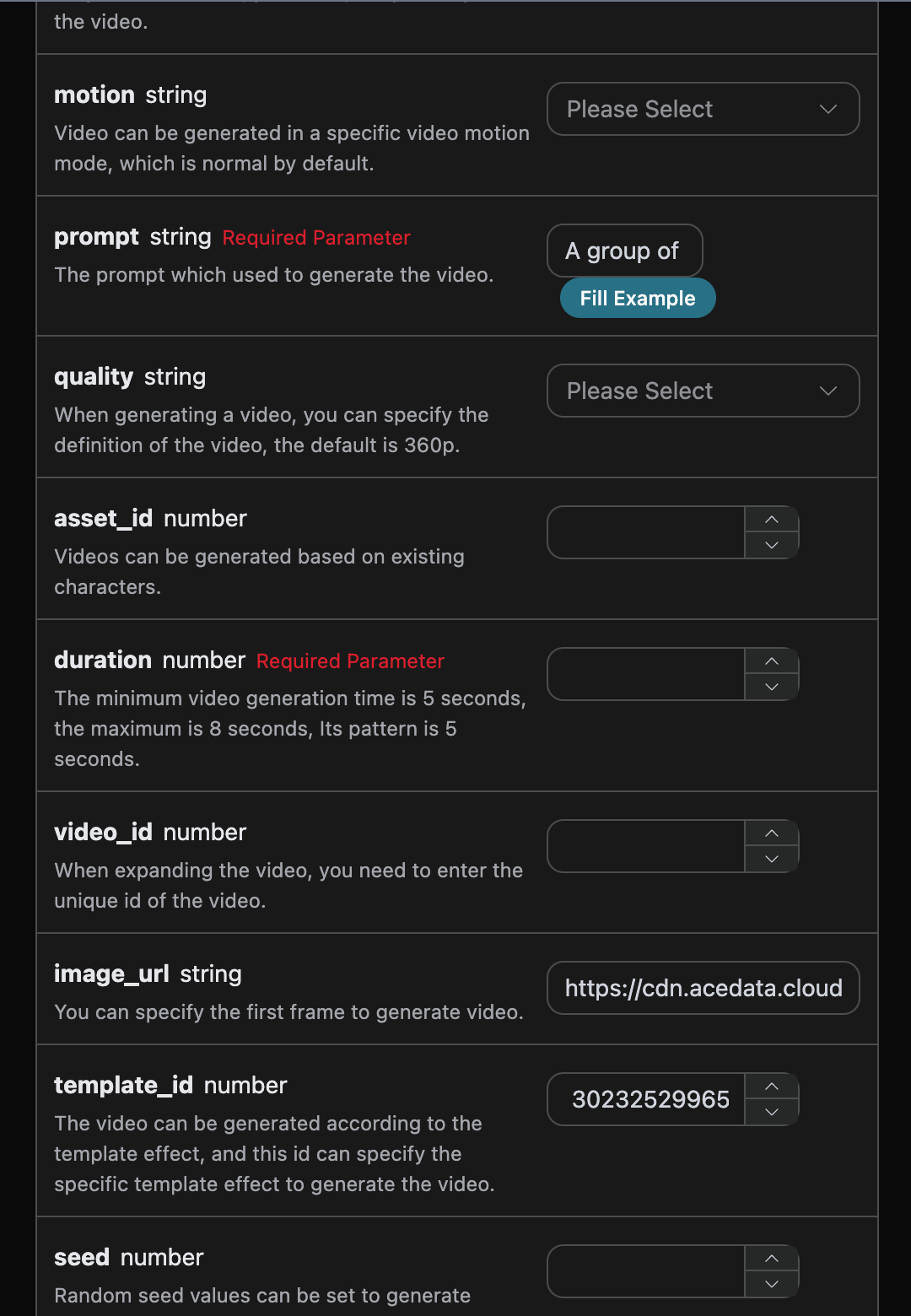
After filling them in, the code is automatically generated as follows:

The corresponding Python code:
import requests

url = "https://api.acedata.cloud/pixverse/videos"

headers = {
    "accept": "application/json",
    "authorization": "Bearer {token}",
    "content-type": "application/json"
}

payload = {
    "action": "generate",
    "prompt": "A group of people began to dance",
    "template_id": 302325299651648,
    "image_url": "https://cdn.acedata.cloud/n3r1mc.png"
}

response = requests.post(url, json=payload, headers=headers)
print(response.text)
Click Run, and you can see that a result is returned, as follows:
{
  "success": true,
  "task_id": "cf127eee-d23d-44c9-945c-793e68f86720",
  "trace_id": "aa7ed21d-8363-4eeb-a46a-a120e31b4fde",
  "data": [
    {
      "id": 318162170958272,
      "first_frame": "",
      "video_width": 0,
      "video_height": 0,
      "prompt": "A group of people began to dance",
      "model": "v3.5",
      "quality": "360p",
      "motion": "normal",
      "video_url": "https://cdn.acedata.cloud/assets/examples/gemini/04a043bd-6b23-4b4e-945c-ce48158c3eee-3a89912507c7.mp4",
      "template_id": 302325299651648,
      "template_name": "Zombie Mode",
      "style": "",
      "aspect_ratio": "16:9",
      "duration": 5,
      "extended": 0,
      "last_frame": "",
      "seed": 0,
      "asset_id": 0,
      "asset_name": ""
    }
  ]
}
It can be seen that the result content is the same as the video template effect, which implements the function of using template effects to generate videos.
¶ Continue Extending Video Generation Features
If you want to extend an already generated Pixverse video, you can set the action parameter to extend and enter the ID of the video that needs to be extended. The video ID is obtained according to the basic usage, as shown in the figure below:
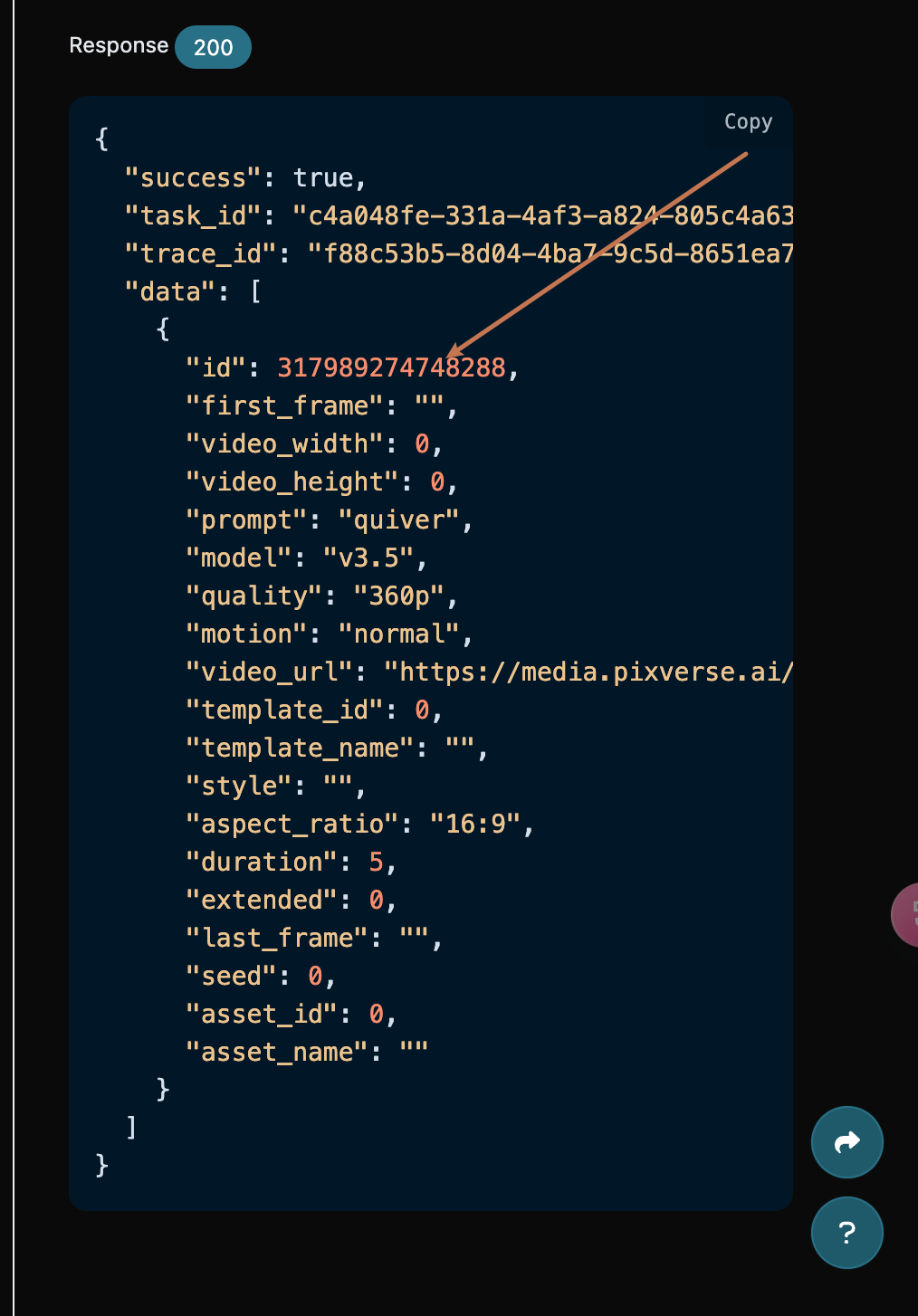
At this point, you can see that the video ID is:
"id": 317989274748288
Note that the
idin the video here is the ID of the generated video. If you do not know how to generate a video, you can refer to the basic usage above to generate a video.
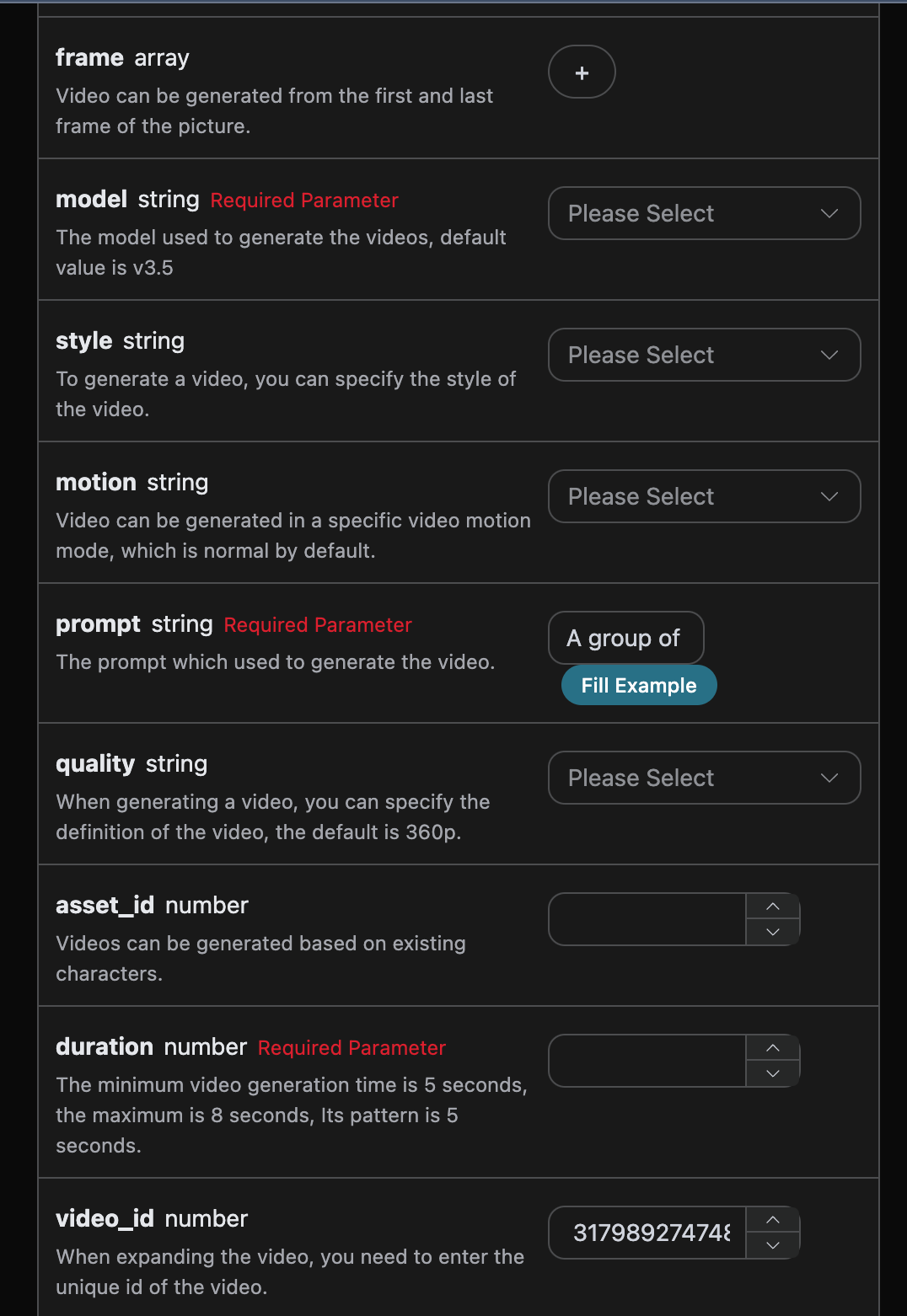
Next, we must fill in lyrics and customize the style to generate a song, then the following content can be specified:
- action: The behavior of this video generation task, generally including normal generation
generateand video extensionextend. - prompt: The prompt for this video generation.
- video_id: The reference video ID for this video extension task.
The filling example is as follows:
After filling them in, the code is automatically generated as follows:

The corresponding Python code:
import requests

url = "https://api.acedata.cloud/pixverse/videos"

headers = {
    "accept": "application/json",
    "authorization": "Bearer {token}",
    "content-type": "application/json"
}

payload = {
    "action": "extend",
    "prompt": "A group of people began to dance",
    "video_id": 317989274748288
}

response = requests.post(url, json=payload, headers=headers)
print(response.text)
Click Run, and you can see that a result is returned, as follows:
{
  "success": true,
  "task_id": "38b6d70d-eea2-40da-9f8b-945df93e831b",
  "trace_id": "b105bbb6-faf1-4d86-9c10-4b8a8e638d05",
  "data": [
    {
      "id": 318162960027008,
      "first_frame": "",
      "video_width": 0,
      "video_height": 0,
      "prompt": "A group of people began to dance",
      "model": "v3.5",
      "quality": "360p",
      "motion": "normal",
      "video_url": "https://cdn.acedata.cloud/assets/examples/gemini/04a043bd-6b23-4b4e-945c-ce48158c3eee-3a89912507c7.mp4",
      "template_id": 0,
      "template_name": "",
      "style": "",
      "aspect_ratio": "16:9",
      "duration": 5,
      "extended": 1,
      "last_frame": "",
      "seed": 0,
      "asset_id": 0,
      "asset_name": ""
    }
  ]
}
It can be seen that the result content is consistent with the above, which achieves the video extension generation feature.
¶ Generate Videos with Custom Characters
If you want to generate a video based on a character in an image, you need to additionally enter the character
ID field asset_id created from the image. The asset_id field is obtained using the Pixverse Character API, and the specific result is shown in the image below:
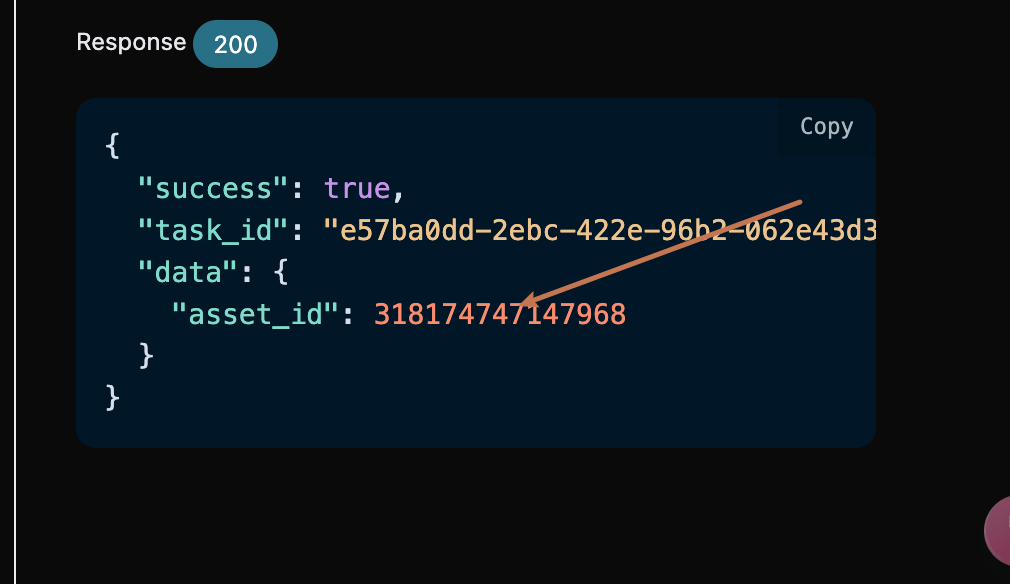
After the character ID is generated, you can generate a video according to the basic usage. Here, asset_id= 318174747147968 is used as an example. The specific parameters are as follows:
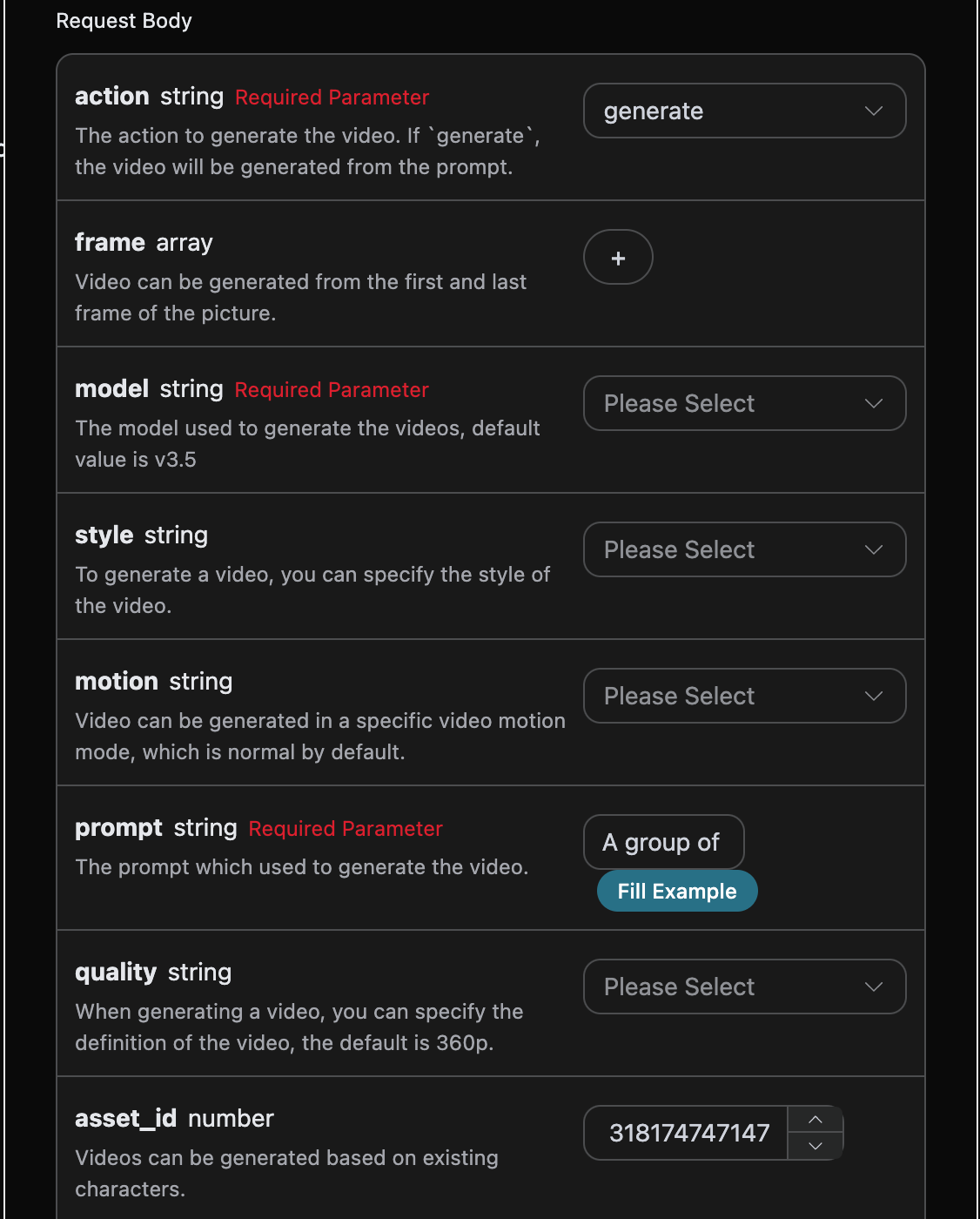
After clicking Run, you can generate the video result for the custom character. The specific result is shown in the image below:
{
  "success": true,
  "task_id": "d39994c7-53ba-4c3f-ae8f-44287c487d51",
  "trace_id": "32da3212-2d4c-4302-87ef-01ecb903a92b",
  "data": [
    {
      "id": 318175009783232,
      "first_frame": "",
      "video_width": 0,
      "video_height": 0,
      "prompt": "A group of people began to dance",
      "model": "v3.5",
      "quality": "360p",
      "motion": "normal",
      "video_url": "https://cdn.acedata.cloud/assets/examples/gemini/04a043bd-6b23-4b4e-945c-ce48158c3eee-3a89912507c7.mp4",
      "template_id": 0,
      "template_name": "",
      "style": "",
      "aspect_ratio": "16:9",
      "duration": 5,
      "extended": 0,
      "last_frame": "",
      "seed": 0,
      "asset_id": 318174747147968,
      "asset_name": "my-46169546-a9c0-4437-96ee-a9750bbd489f"
    }
  ]
}
The generated result is similar to the above, which completes the process of generating a video based on a character.
¶ Currently Supported Effect Templates
¶ Template IDs and corresponding effects:
| Template ID | Effect |
|---|---|
| 321958627120000 | AI is sending you an object |
| 324641581197696 | Let's sway together! |
| 324641385496960 | 360° Rotating Microwave |
| 325367418993728 | Sakura Utopia |
| 325501134629952 | Polar Bear Alert! |
| 315447659476032 | No Discord, No Concord |
| 324640938615168 | Everything Can Be a Plush Toy |
| 308621408717184 | Become a Muscular Hunk |
| 313358700761536 | Everything Can Become a Transformer |
| 316645675647872 | Cigar Boss |
| 321956810449792 | Oscar-Winning Actor |
| 323578865822784 | Gender Converter |
| 303624424723200 | Loving Hug |
| 313555098280384 | Put on a Bikini |
| 313649491716544 | Tiger's Hug |
| 313649622731200 | Angel Wings |
| 316826014376384 | Hug Jesus |
| 315446315336768 | Loving Kiss |
| 322852853601344 | Everything Can Walk the Red Carpet |
| 304826314164992 | Hulk Transformation |
| 315447659476032 | Black Wukong Engine |
| 313359138372032 | Become a Magical Girl Warrior |
| 308552687706496 | King of Hair Volume |
| 307489548427968 | Crazy Catwoman Transformation |
| 304826126435072 | Joker Rebirth |
| 304826374632192 | Batman Returns |
| 304358279051648 | Venom! (Colored Blind Box Edition) |
| 304826054394624 | Iron Man Transformation |
| 317013509917440 | New Year Battle Skirt |
| 313358844899776 | Be Your Own God of Wealth |
| 313359048325568 | The First Snuggle of the Year of the Snake |
| 307489434436288 | Harley Quinn Transformation |
| 311521768592256 | Christmas Gift Blind Box |
| 311521879229312 | Where Is Santa Claus Hiding? |
| 312314911869312 | Christmas Battle Outfit |
| 306059795500352 | Summon the Venom Brothers |
| 303788802773760 | Spray Everything |
| 302325299702848 | LEGO Explosion |
| 302325299682368 | Monster Invasion |
| 302325299661888 | Put on a Magic Hat |
| 302325299651648 | Oh No, I Turned into a Zombie |
| 302325299672128 | Zombie Hands Appear |
¶ Styles:
| Motion Mode | Effect |
|---|---|
| normal | Normal Mode |
| fast | Performance Mode |
¶ Camera Movement
| Parameter | Effect |
|---|---|
| horizontal_left | Horizontal Left |
| horizontal_right | Horizontal Right |
| vertical_up | Vertical Up |
| vertical_down | Vertical Down |
| crane_up | Rising Shot |
| hitchcock | Hitchcock Zoom |
| zoom_in | Zoom In |
| zoom_out | Zoom Out |
| quickly_zoom_in | Quick Push In |
| quickly_zoom_out | Quick Pull Out |
| smooth_zoom_in | Smooth Push In |
| super_dolly_out | Super Pull Out |
| left_follow | Left Follow Shot |
| right_follow | Right Follow Shot |
| pan_left | Left Arc |
| pan_right | Right Arc |
| fix_bg | Fixed Shot |
| camera_rotation | Camera Rotation |
| robo_arm | Robotic Arm Movement |
| whip_pan | Whip Pan |
¶ Asynchronous Callback
Since Pixverse takes a relatively long time to generate music, approximately 1–2 minutes, if the API does not respond for a long time, the HTTP request will remain connected, resulting in additional system resource consumption. Therefore, this API also provides support for asynchronous callbacks.
The overall process is: when the client initiates a request, it additionally specifies a callback_url field. After the client initiates an API request, the API immediately returns a result containing a task_id field, representing the current task ID. After the task is completed, the result of generating the music will be sent in POST JSON format to the callback_url specified by the client, which also includes the task_id field, so that the task results can be associated through the ID.
Next, let us understand the specific operation through an example.
First, a Webhook callback is a service that can receive HTTP requests. Developers should replace it with the URL of their own HTTP server. For convenience in this demonstration, we use a public Webhook sample website https://webhook.site/. Opening this website will provide a Webhook URL, as shown in the figure:

Copy this URL, and it can be used as a Webhook. The example here is https://webhook.site/8dc4cd74-4f4c-49ab-95c8-fa503cca5534.
Next, we can set the field callback_url to the Webhook URL above, while filling in prompt, as shown in the figure:
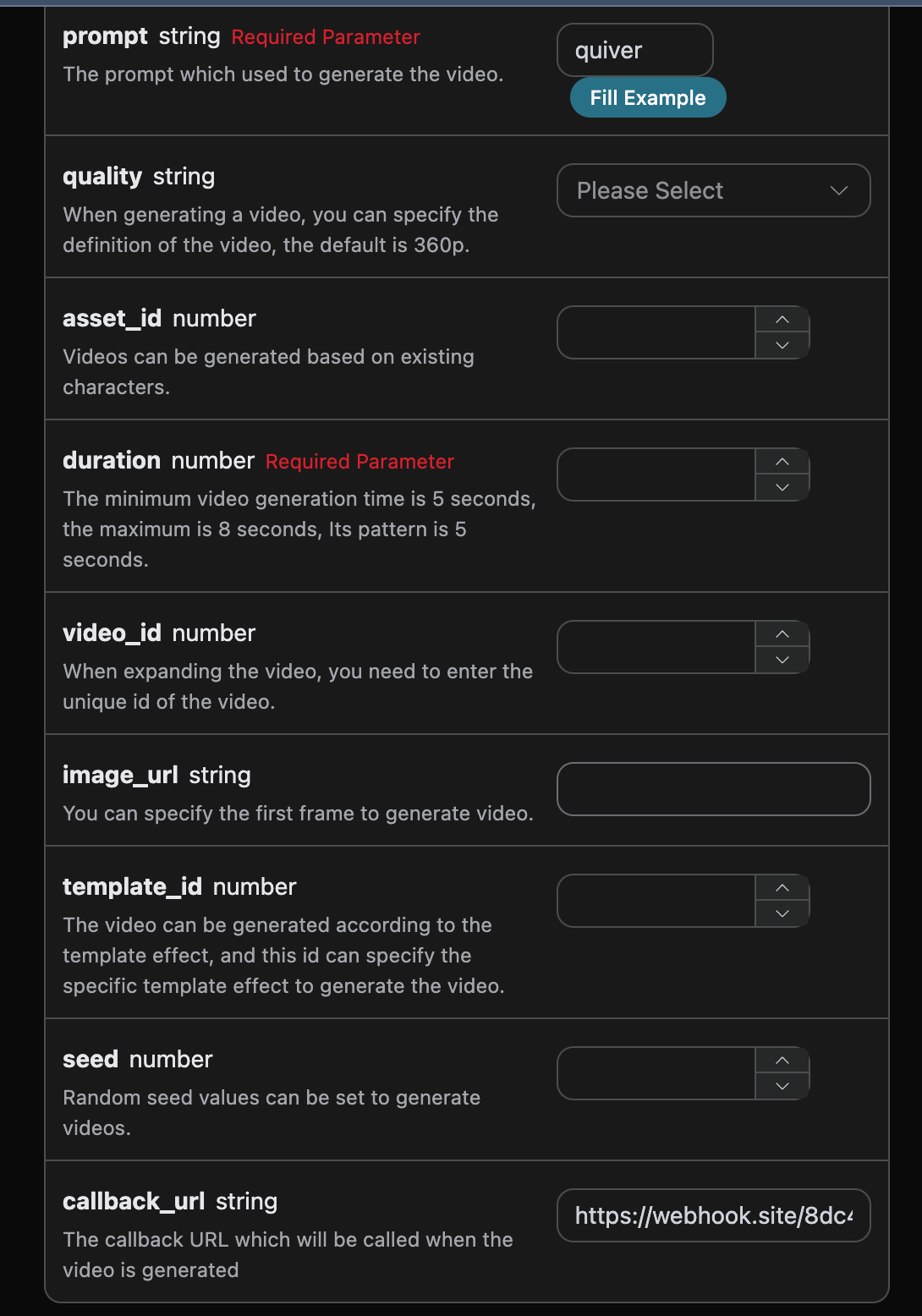
Click Run, and you will find that a result is returned immediately, as follows:
{
  "task_id": "84acf7e2-66a7-407a-8295-f0cc7a58579b"
}
After waiting for a moment, we can observe the result of the generated song at https://webhook.site/8dc4cd74-4f4c-49ab-95c8-fa503cca5534, as shown in the figure:
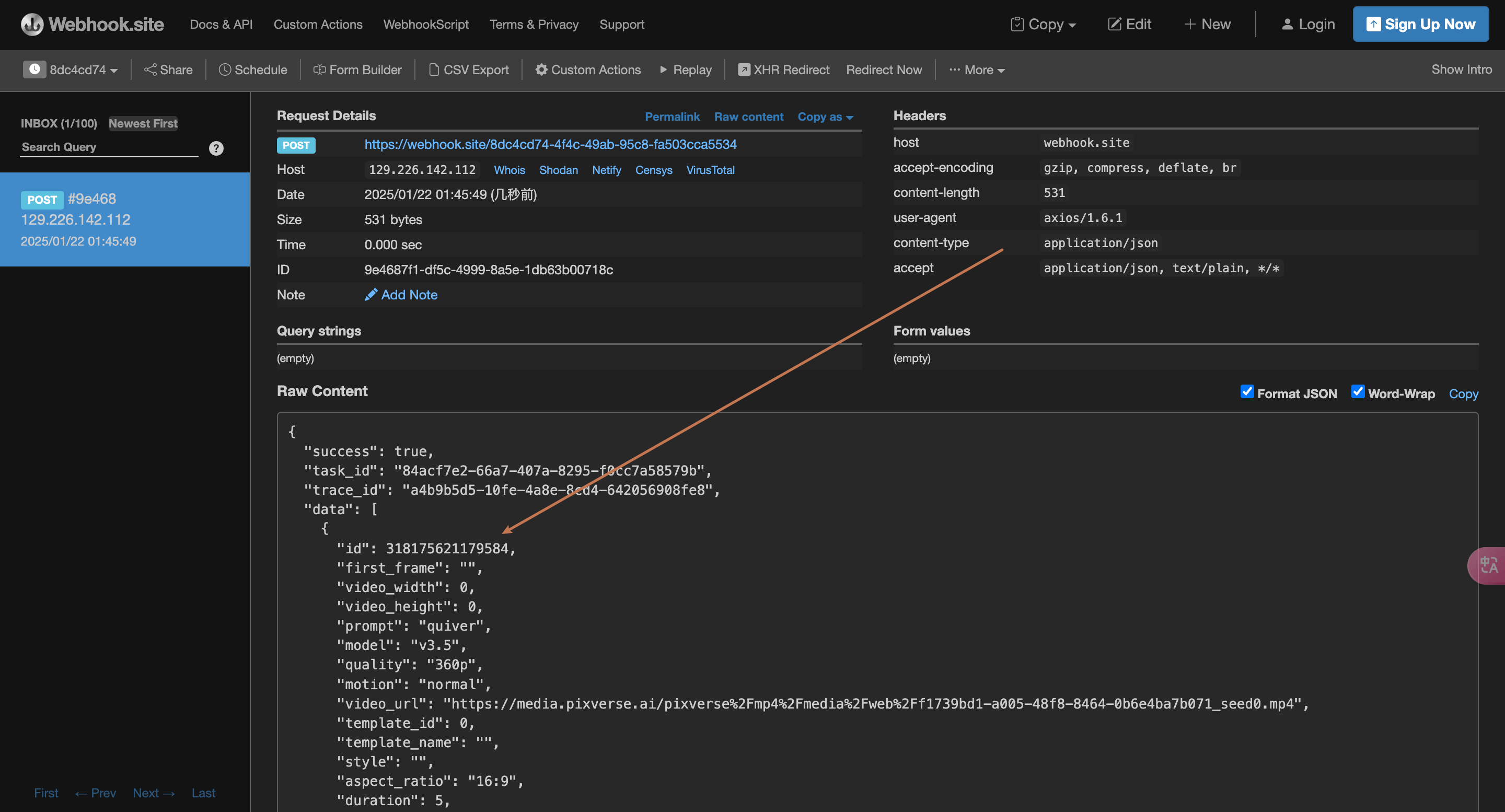
The content is as follows:
{
  "success": true,
  "task_id": "84acf7e2-66a7-407a-8295-f0cc7a58579b",
  "trace_id": "a4b9b5d5-10fe-4a8e-8cd4-642056908fe8",
  "data": [
    {
      "id": 318175621179584,
      "first_frame": "",
      "video_width": 0,
      "video_height": 0,
      "prompt": "quiver",
      "model": "v3.5",
      "quality": "360p",
      "motion": "normal",
      "video_url": "https://cdn.acedata.cloud/assets/examples/gemini/04a043bd-6b23-4b4e-945c-ce48158c3eee-3a89912507c7.mp4",
      "template_id": 0,
      "template_name": "",
      "style": "",
      "aspect_ratio": "16:9",
      "duration": 5,
      "extended": 0,
      "last_frame": "",
      "seed": 0,
      "asset_id": 0,
      "asset_name": ""
    }
  ]
}
It can be seen that there is a task_id field in the result. The other fields are similar to those above, and this field can be used to associate tasks.
¶ Error Handling
If an error occurs, you will receive an error message similar to the following:
{
  "success": false,
  "error": {
    "code": "forbidden",
    "message": "Song Description contained artist name: eminem"
  },
  "trace_id": "9bb7c2f4-3b7b-4965-b50a-f663874b1b6f",
  "task_id": "9bb3a2a6-c438-436d-a9f3-fa466abc077c"
}