
Nano Banana Images API 对接说明
本文介绍 Nano Banana Images API 的对接与使用。该接口支持两种能力:图像生成(generate) 与 图像编辑(edit)。
¶ 申请流程
要使用 Nano Banana Images API,首先到 Ace Data Cloud 控制台 获取您的 API Token,留作备用。
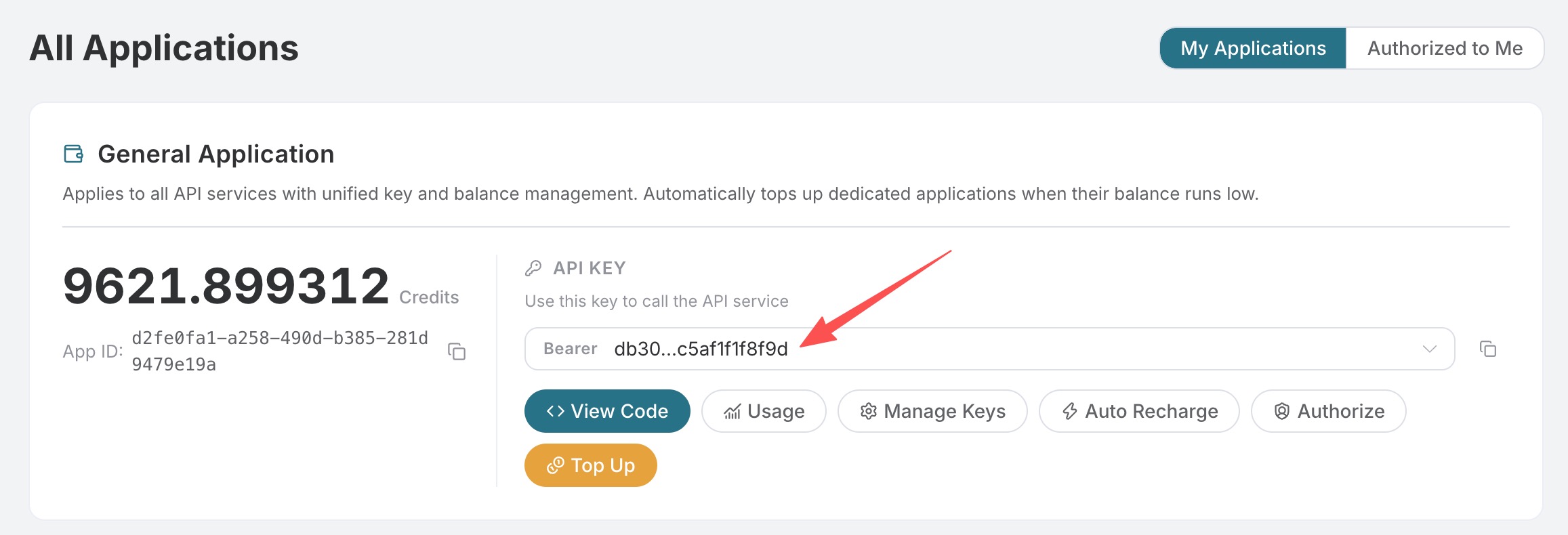
如果你尚未登录或注册,会自动跳转到登录页面邀请你注册和登录,完成后会自动返回当前页面。
通用应用的 API Key 可用于账号已开放的服务;专用应用的 Key 按该应用的服务范围使用。请检查 Key 的权限、有效期和限额,并确认应用余额足以支付本次请求。可用试用额度以账号显示为准,余额不足时可在 控制台 充值。
📘 完整文档:Nano Banana Images API →
¶ 接口概览
-
Base URL:
https://api.acedata.cloud -
Endpoint:
POST /nano-banana/images -
认证方式:HTTP Header 中携带
authorization: Bearer {token} -
请求头:
accept: application/jsoncontent-type: application/json
-
动作(action):
generate:根据文本提示词生成图片edit:基于给定图片进行编辑
-
模型(model)(可选):
nano-banana(默认):基于 Gemini 2.5 Flash Image,速度快,成本低nano-banana-2-lite:基于 Gemini 3.1 Flash Lite Image,仅支持 1K,生成速度快nano-banana-2:基于 Gemini 3.1 Flash Image Preview,Pro 级质量 + Flash 速度nano-banana-2.1:新一代高效图像模型,支持 1K、2K、4K 生图与编辑nano-banana-pro:基于 Gemini 3 Pro Image Preview,最高质量nano-banana:official、nano-banana-2-lite:official、nano-banana-2:official、nano-banana-pro:official:对应模型的官方渠道版本,画质与稳定性更佳,计费不同
-
异步回调:可选,通过
callback_url接收任务完成通知与结果 -
图片数量:可选,通过
count指定 1–4 张,默认 1 张;每张图片由独立生成调用完成;普通技术失败或提供方安全拒绝只影响对应调用,其余成功图片照常返回,并按实际成功张数计费 -
Nano Banana 2 按张计费:
nano-banana-2的4K为 0.33 Credits/张,1K和2K为 0.28 Credits/张。以成功返回的张数为准。
¶ 快速开始:生成图片(action=generate)
最小必需参数:action、prompt
当你只想根据提示词直接出图时,设置 action 为 generate,并提供清晰的 prompt 即可。
¶ 请求示例(cURL)
curl -X POST 'https://api.acedata.cloud/nano-banana/images' \
  -H 'authorization: Bearer {token}' \
  -H 'accept: application/json' \
  -H 'content-type: application/json' \
  -d '{
    "action": "generate",
    "model": "nano-banana-pro",
    "prompt": "A photorealistic close-up portrait of an elderly Japanese ceramicist with deep, sun-etched wrinkles and a warm, knowing smile. He is carefully inspecting a freshly glazed tea bowl. The setting is his rustic, sun-drenched workshop. The scene is illuminated by soft, golden hour light streaming through a window, highlighting the fine texture of the clay. Captured with an 85mm portrait lens, resulting in a soft, blurred background (bokeh). The overall mood is serene and masterful. Vertical portrait orientation.",
    "count": 1
  }'
¶ 请求示例(Python)
import requests

url = "https://api.acedata.cloud/nano-banana/images"
headers = {
    "authorization": "Bearer {token}",
    "accept": "application/json",
    "content-type": "application/json",
}
payload = {
    "action": "generate",
    "model": "nano-banana-pro",
    "prompt": (
        "A photorealistic close-up portrait of an elderly Japanese ceramicist "
        "with deep, sun-etched wrinkles and a warm, knowing smile. He is carefully "
        "inspecting a freshly glazed tea bowl. The setting is his rustic, sun-drenched "
        "workshop. The scene is illuminated by soft, golden hour light streaming through "
        "a window, highlighting the fine texture of the clay. Captured with an 85mm "
        "portrait lens, resulting in a soft, blurred background (bokeh). The overall mood "
        "is serene and masterful. Vertical portrait orientation."
    ),
    "count": 1
}
resp = requests.post(url, json=payload, headers=headers)
print(resp.json())
¶ 成功返回示例
{
  "success": true,
  "task_id": "70e6931b-6e34-43db-9e36-8765e2809d04",
  "trace_id": "60df8d38-f265-4986-aec7-75c9220bced2",
  "data": [
    {
      "prompt": "A photorealistic close-up portrait of an elderly Japanese ceramicist with deep, sun-etched wrinkles and a warm, knowing smile. He is carefully inspecting a freshly glazed tea bowl. The setting is his rustic, sun-drenched workshop. The scene is illuminated by soft, golden hour light streaming through a window, highlighting the fine texture of the clay. Captured with an 85mm portrait lens, resulting in a soft, blurred background (bokeh). The overall mood is serene and masterful. Vertical portrait orientation.",
      "image_url": "https://cdn.acedata.cloud/assets/examples/nanobanana/1d0160b4-93f9-4229-8926-ea9ef0bed336-34b3dc2195e8.png"
    }
  ]
}
¶ 字段说明
-
success:本次请求是否成功。 -
task_id:任务 ID。 -
trace_id:链路追踪 ID,便于排查问题。 -
count:请求生成或编辑的图片数量,支持 1–4,默认 1。data只包含生成成功的图片,并按实际返回张数计费。每个生成调用都强制使用提供方原生安全策略;某个调用被拒不会影响其他成功调用,全部调用均被拒时返回 403。 -
data[]:结果列表。prompt:用于生成的提示词(回显)。image_url:生成图片的直链 URL。
注:
/nano-banana/images仅需action与prompt即可生成图片
¶ 编辑图片(action=edit)
当你希望基于已有图片进行编辑时,设置 action 为 edit,并通过 image_urls 传入待编辑的图片链接列表(1 张或多张),同时提供描述编辑目标的 prompt。
比如这里我们提供一张人物照片,一张衣服照片,让人物穿上这个衣服,就可以同时传入图片链接,并且指定 action 为 edit,URL 可以是 HTTP URL,以 https 或 http 协议的公开可访问链接,也可以是 Base64 编码的图片,如 data:image/png;base64,iVBORw0KGgoAAAANSUhEUgAAA+gAAAVGCAMAAAA6u2FyAAADAFBMVEXq6uwdHCEeHyMdHS....
¶ 请求示例(cURL)
curl -X POST 'https://api.acedata.cloud/nano-banana/images' \
  -H 'authorization: Bearer {token}' \
  -H 'accept: application/json' \
  -H 'content-type: application/json' \
  -d '{
    "action": "edit",
    "prompt": "let this man wear on this T-shirt",
    "image_urls": [
      "https://cdn.acedata.cloud/v8073y.png",
      "https://cdn.acedata.cloud/44xlah.png"
    ],
    "count": 1
  }'
¶ 请求示例(Python)
import requests

url = "https://api.acedata.cloud/nano-banana/images"
headers = {
    "authorization": "Bearer {token}",
    "accept": "application/json",
    "content-type": "application/json",
}
payload = {
    "action": "edit",
    "prompt": "let this man wear on this T-shirt",
    "image_urls": [
        "https://cdn.acedata.cloud/v8073y.png",
        "https://cdn.acedata.cloud/44xlah.png"
    ],
    "count": 1
}
resp = requests.post(url, json=payload, headers=headers)
print(resp.json())
¶ 成功返回示例
{
  "success": true,
  "task_id": "93f11baf-347b-4bb4-9520-8653cb46d6a3",
  "trace_id": "a9063166-26ed-4451-85b5-54e896817c69",
  "data": [
    {
      "prompt": "let this man wear on this T-shirt",
      "image_url": "https://platform.cdn.acedata.cloud/nanobanana/8e9e0253-26f4-45b9-b3f8-ac1aed1c284b.png"
    }
  ]
}
¶ 字段说明
image_urls[]:待编辑图片 URL 列表(必须可公网访问)。可传多张,服务会结合这些素材与prompt完成编辑。- 其余字段同「生成图片」返回。
¶ 异步回调(可选,推荐)
生成或编辑可能需要一定时间。为避免长连接占用资源,建议通过 callback_url 使用 Webhook 回调:
- 在请求体中添加
callback_url,例如你的服务端 Webhook 地址(需可公网访问,支持 POST JSON)。 - API 会 立即返回 包含
task_id的响应(或包含基本结果)。 - 当任务完成后,平台将以
POST的方式将完整 JSON 发送至callback_url。你可以通过task_id将请求与结果关联。
回调载荷示例(字段结构与同步成功返回一致):
{
  "success": true,
  "task_id": "6a97bf49-df50-4129-9e46-119aa9fca73c",
  "trace_id": "9b4b1ff3-90f2-470f-b082-1061ec2948cc",
  "data": [
    {
      "prompt": "a white siamese cat",
      "image_url": "https://platform.cdn.acedata.cloud/nanobanana/xxxxxxxx-xxxx-xxxx-xxxx-xxxxxxxxxxxx.png"
    }
  ]
}
¶ 错误处理
调用失败时会返回标准错误格式与追踪 ID。常见错误如下:
-
400
token_mismatched:请求不合法或参数错误。 -
400
api_not_implemented:接口未实现(请联系支持)。 -
401
invalid_token:鉴权失败或缺少 Token。 -
403
forbidden:提供方原生安全策略拒绝了请求或生成结果。该调用不会返回图片,也不会计费;多图请求仍可返回并计费其他成功调用。 -
429
too_many_requests:请求频率超限。 -
500
api_error:服务端异常。
¶ 错误响应示例
{
  "success": false,
  "error": {
    "code": "api_error",
    "message": "Internal server error."
  },
  "trace_id": "2cf86e86-22a4-46e1-ac2f-032c0f2a4e89"
}
¶ 参数对照与注意事项
- 必填:
action、prompt - 编辑专用:
image_urls(数组,至少 1 项) - 可选:
model(默认nano-banana,可选nano-banana-2-lite、nano-banana-2、nano-banana-2.1、nano-banana-pro;除nano-banana-2.1外还有对应的:official官方渠道版本)、aspect_ratio(auto或具体宽高比,如1:1、16:9)、resolution(分辨率,如1K、2K、4K;nano-banana-2-lite仅支持1K)、callback_url(用于异步回调) - Headers:必须提供
authorization: Bearer {token};accept建议设为application/json - 图片可访问性:
image_urls必须为可公网访问的直链(HTTP/HTTPS),建议使用 HTTPS - 幂等与追踪:保留
task_id与trace_id,便于故障排查与结果关联
显式传 "aspect_ratio": "auto" 会根据提示词里的比例、方向或版式选择最接近的预设,适用于生成和编辑。例如提示词写「YouTube 缩略图」,就可以选到 16:9。提示词没有尺寸要求或自动判断不可用时,文生图使用默认画幅,改图跟随第一张参考图,使用最接近的受支持比例。省略该字段时使用默认画幅或参考图比例。已有明确的画幅要求时,直接传具体比例。