
HappyHorse Videos API 对接说明
本文介绍 HappyHorse Videos API 的对接方式。该接口通过统一的 /happyhorse/videos 入口和 action 参数支持文生视频、首帧图生视频、参考图生视频和视频编辑。
¶ 申请流程
要使用 HappyHorse Videos API,首先到 Ace Data Cloud 控制台 获取您的 API Token,留作备用。
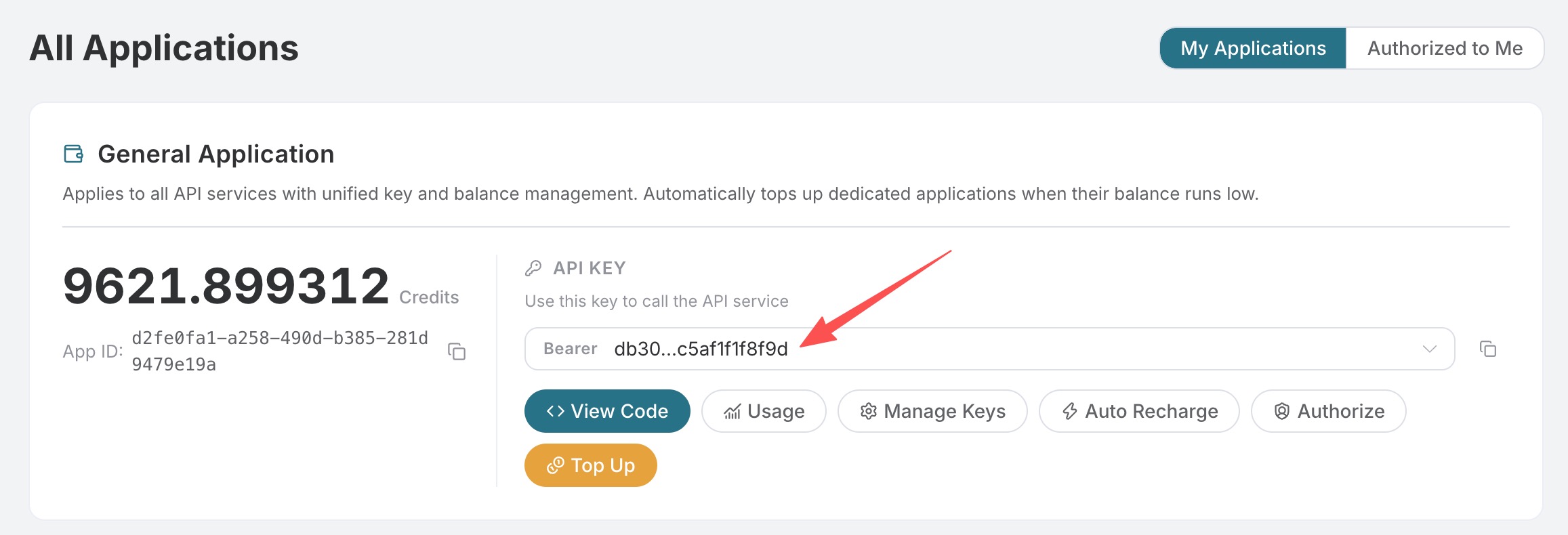
如果你尚未登录或注册,会自动跳转到登录页面邀请你注册和登录,完成后会自动返回当前页面。
通用应用的 API Key 可用于账号已开放的服务;专用应用的 Key 按该应用的服务范围使用。请检查 Key 的权限、有效期和限额,并确认应用余额足以支付本次请求。可用试用额度以账号显示为准,余额不足时可在 控制台 充值。
📘 完整文档:HappyHorse Videos API →
¶ 操作类型
action 决定本次请求的生成模式:
generate:文生视频,默认 action,支持happyhorse-1.0-t2v和happyhorse-1.1-t2v,必须传入prompt。image_to_video:首帧图生视频,支持happyhorse-1.0-i2v和happyhorse-1.1-i2v,必须传入image_url。reference_to_video:参考图生视频,支持happyhorse-1.0-r2v和happyhorse-1.1-r2v,必须传入prompt和 1–9 张image_urls。video_edit:视频编辑,支持happyhorse-1.0-video-edit,必须传入prompt和video_url,可额外传入 0–5 张参考图image_urls。
各动作默认使用 1.1 模型;video_edit 目前只有 happyhorse-1.0-video-edit。
¶ 基本使用
文生视频只需要提供 prompt,也可以指定 resolution、ratio、duration 等参数:
{
  "action": "generate",
  "model": "happyhorse-1.1-t2v",
  "prompt": "A cinematic white horse lifts its head, the mane moves gently in the sunrise wind, slow camera push in, warm film lighting",
  "resolution": "720P",
  "ratio": "16:9",
  "duration": 5
}
返回结果示例如下:
{
  "success": true,
  "task_id": "27837f92-d1c1-4db4-ad9a-4e6e81d9f6c1",
  "trace_id": "6071ab5e-2f37-46f0-9e07-f1e378112e69",
  "data": [
    {
      "id": "9650580f-6d9e-4bc1-823a-29011790c5cb",
      "video_url": "https://cdn.acedata.cloud/assets/examples/happyhorse/27837f92-d1c1-4db4-ad9a-4e6e81d9f6c1-2c108ce23554.mp4",
      "state": "succeeded",
      "duration": 5,
      "resolution": "720P",
      "ratio": null
    }
  ]
}
字段说明:
success:本次请求是否成功。task_id:Ace Data Cloud 侧任务 ID,可用于查询任务状态。trace_id:本次请求的跟踪 ID,用于排查问题。data:视频结果列表。id:HappyHorse 侧的任务 ID。video_url:生成视频的 CDN 链接地址。state:任务状态,可选pending/succeeded/error。duration:计费视频时长,单位秒;video_edit为输入和输出视频时长合计。resolution:输出分辨率。ratio:输出宽高比。
对应的 CURL 代码如下:
curl -X POST 'https://api.acedata.cloud/happyhorse/videos' \
-H 'authorization: Bearer ${bearer_token}' \
-H 'accept: application/json' \
-H 'content-type: application/json' \
-d '{
  "action": "generate",
  "model": "happyhorse-1.1-t2v",
  "prompt": "A cinematic white horse lifts its head, the mane moves gently in the sunrise wind, slow camera push in, warm film lighting",
  "resolution": "720P",
  "ratio": "16:9",
  "duration": 5
}'
对应的 Python 代码如下:
import requests

url = "https://api.acedata.cloud/happyhorse/videos"

headers = {
    "accept": "application/json",
    "authorization": "Bearer {token}",
    "content-type": "application/json",
}

payload = {
    "action": "generate",
    "model": "happyhorse-1.1-t2v",
    "prompt": "A cinematic white horse lifts its head, the mane moves gently in the sunrise wind, slow camera push in, warm film lighting",
    "resolution": "720P",
    "ratio": "16:9",
    "duration": 5,
}

response = requests.post(url, json=payload, headers=headers)
print(response.text)
¶ 首帧图生视频
使用 image_to_video 时,image_url 会作为视频首帧。输出宽高比会尽量跟随首帧图片,因此该动作不需要传 ratio。
{
  "action": "image_to_video",
  "model": "happyhorse-1.1-i2v",
  "image_url": "https://cdn.acedata.cloud/b1c82e4937.png",
  "prompt": "A cinematic white horse lifts its head, the mane moves gently in the sunrise wind, slow camera push in, warm film lighting",
  "resolution": "1080P",
  "duration": 5
}
¶ 参考图生视频
使用 reference_to_video 时,image_urls 可以传入 1–9 张参考图。提示词中可以用 character1、character2 等方式引用对应顺序的图片。
{
  "action": "reference_to_video",
  "model": "happyhorse-1.1-r2v",
  "prompt": "character1 walks forward through a sunrise meadow with the warm leather and gold trim style from character2",
  "image_urls": [
    "https://cdn.acedata.cloud/b1c82e4937.png",
    "https://cdn.acedata.cloud/eb75d88a3f.png"
  ],
  "resolution": "720P",
  "ratio": "16:9",
  "duration": 5
}
¶ 视频编辑
video_edit 的输出时长和画幅继承源视频,传入 duration 或 ratio 不会改变它们;图生视频的画幅也继承源图片。编辑费用按输入和输出视频时长合计计算。
使用 video_edit 时必须传入待编辑视频 video_url 和编辑意图 prompt。可选的 image_urls 会作为参考图,例如换装、风格迁移或局部替换。audio_setting 可选 auto 或 origin,其中 origin 表示保留原视频音频。
{
  "action": "video_edit",
  "model": "happyhorse-1.0-video-edit",
  "prompt": "Apply the warm leather and gold trim style from the reference image while preserving the original camera motion",
  "video_url": "https://cdn.acedata.cloud/assets/examples/happyhorse/27837f92-d1c1-4db4-ad9a-4e6e81d9f6c1-2c108ce23554.mp4",
  "image_urls": [
    "https://cdn.acedata.cloud/eb75d88a3f.png"
  ],
  "resolution": "720P",
  "audio_setting": "auto"
}
¶ 异步回调
视频生成需要一定处理时间。如果不希望保持长连接等待,可以传入 callback_url,此时 API 会立即返回 task_id,任务完成后会将最终结果 POST 到该地址:
{
  "action": "generate",
  "prompt": "A horse running through a snowy forest",
  "duration": 5,
  "callback_url": "https://your-domain.com/callback/happyhorse"
}
立即返回的结果如下:
{
  "task_id": "b8976e18-32dc-4718-9ed8-1ea090fcb6ea"
}
如果只希望轮询,不需要回调,也可以传入 "async": true,随后通过 HappyHorse Tasks API 查询任务结果。
¶ 计费说明
HappyHorse 按输出视频秒数和分辨率计费:
720P:低至约 $0.105 / 秒。1080P:低至约 $0.18 / 秒。video_edit:按输入视频和输出视频时长合计计费,实际计费时长以任务完成后的统计为准。
失败的任务不计费,也不占用免费额度。
¶ 错误处理
当请求出现问题时,API 会返回对应的错误码与说明,常见的如下:
400:请求参数有误,例如 action 与 model 不匹配、缺少prompt/image_url/video_url,或duration超出 3–15 秒范围。401:鉴权失败,token 无效或与 API 不匹配。403:余额不足,或提示词命中内容审核被拒绝。429:请求过于频繁,触发限流,请稍后重试。500:服务器内部错误或生成失败。