
Posting Articles on Zhihu: AI Assists in Topic Selection, Writing, Image Matching, and Review

Zhihu is one of the best platforms for "knowledge-based content" on the Chinese internet—users are patient enough to read long articles, willing to like and bookmark professional content, and the content has an exceptionally long tail lifecycle (a good article can be found for several years). For those engaged in commission-based work, white-labeling, promoting API Platforms, or managing white-label API Platforms, Zhihu is an excellent channel to establish a "professional image" and attract organic traffic to your name.
This article is a step-by-step practical guide: connecting Zhihu from scratch, then letting AI search for hot topics → write articles → use gpt-image-2 for images → publish on Zhihu → come back to read approval/comment data, and finally teaching you how to automate the entire process on a schedule. All commands and screenshots are real.
¶ Zero, What Can This Zhihu Skill Do (Clarifying, No Fluff)
The Zhihu skill has two layers of capabilities and two sets of authentication, both real:
| Capability | Authentication | What You Can Let AI Do |
|---|---|---|
Search (search.py) |
Zhihu Open Platform Token (Bearer) | On-site search, global search, check hot lists—AI finds topics and materials by itself |
Read/Write (blog.py) |
Your login Cookie (BYOC) | List your own articles/answers + approval/comment/collection counts, post articles, answer questions |
In other words, it is not a tool for "writing in isolation"—it can first search for real hot topics and materials online, then write, and after finishing, directly post to your own account, and even come back to help you read data. This is the key to continuous output and traffic generation.
Posting has a confirmation gate: by default, it is in dry-run mode (only demonstrating without taking real action), and you need to add
--confirmto actually post. It is also recommended to first save as a private draft. This means AI will not post without your consent.
¶ One, Connect to Zhihu (Just Log In, 3 Minutes)
Zhihu read/write uses the most convenient Cookie authorization—no need to apply for a developer account or fill in an API key:
- Use the ACE browser extension to capture a login state in a browser where you are already logged into Zhihu (
zhihu.com); - Open the connection page studio.acedata.cloud/console/connectors, find Zhihu, and connect the captured Cookie;
- Done. After this, AI can read and write on Zhihu as "you."
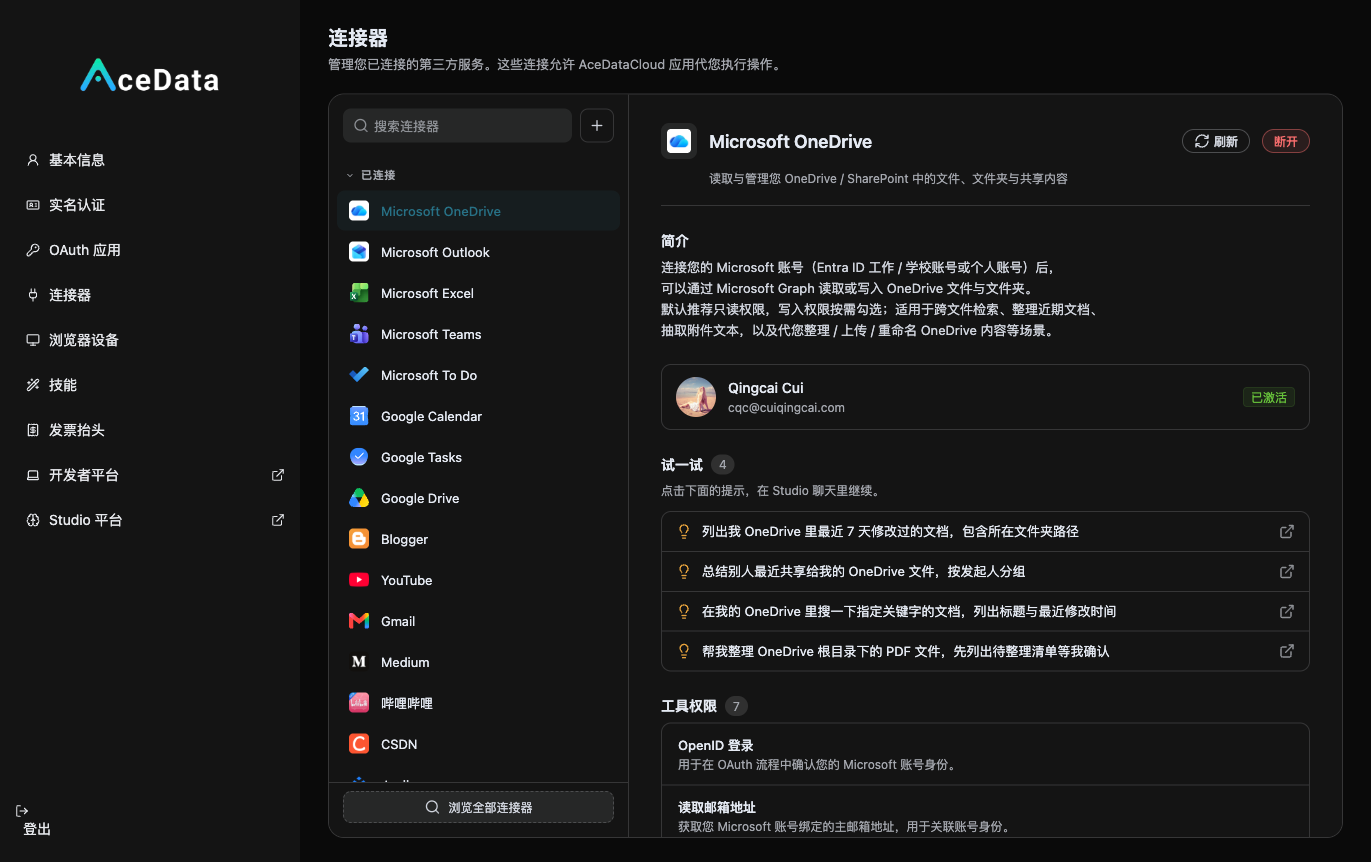
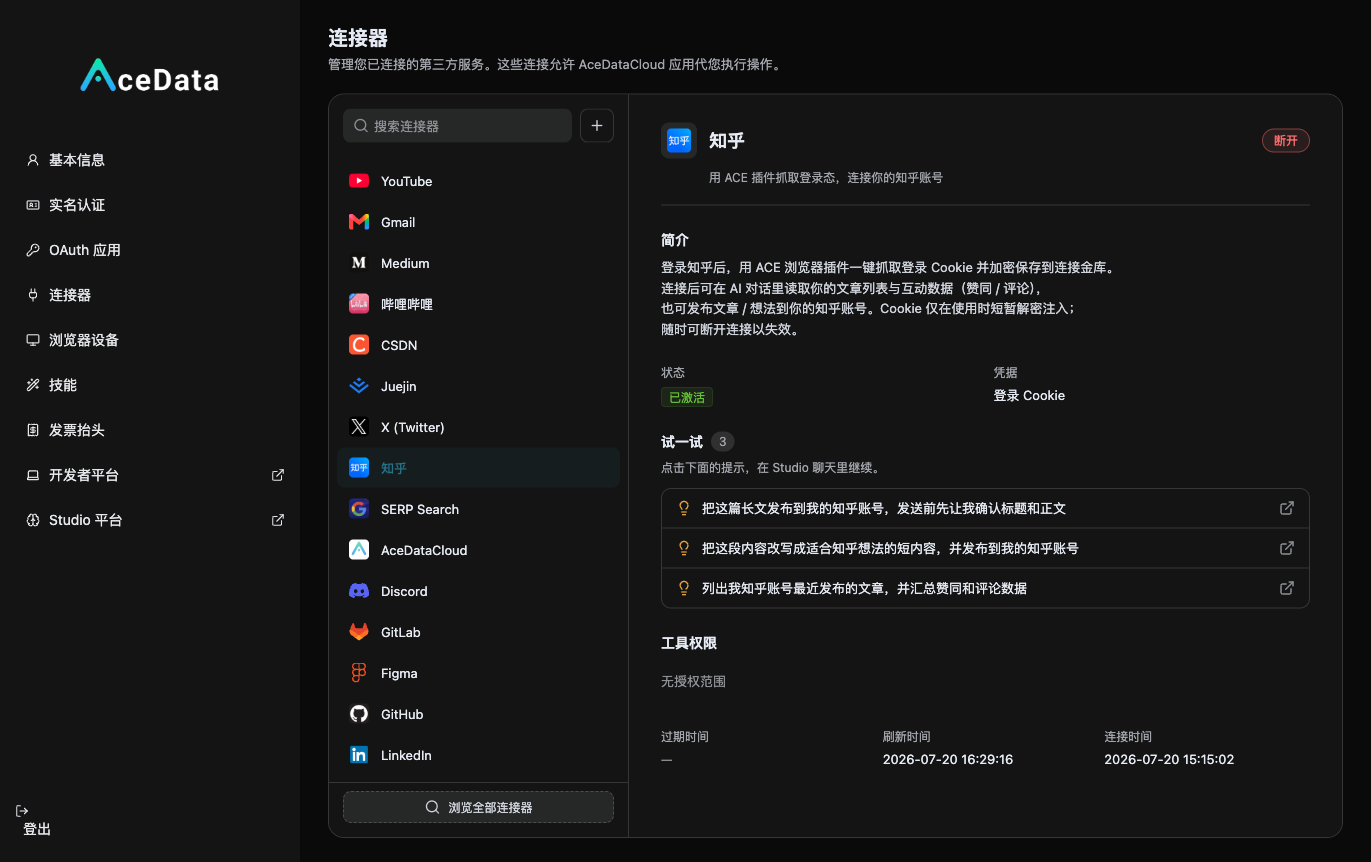
The authorization is for your own account, and the content posted will be under your name. The Cookie is like "temporarily borrowing your logged-in identity," and you can log out of Zhihu at any time to reclaim it. If the Cookie expires (posting returns 401/403), just reconnect using the extension to capture it again.
After connecting, the first thing to do is let AI verify the connection—tell it in the Studio:
"Use the Zhihu skill to execute
whoamito confirm which account I am connected to."
It will return something like {"name": "Your Nickname", "url_token": "...", ...}. If you see your nickname, it means the connection is successful.
¶ Two, Let AI Search for Hot Topics and Select Topics
This is a step many people overlook: Don’t let AI make things up; let it search online first. The Zhihu skill comes with on-site search, global search, and hot lists. Just speak plainly in the Studio:
"Use the Zhihu skill to check today's hot list, then globally search for discussions on 'gpt-image-2 / AI generated images', and help me filter out 3 suitable topics for writing a Zhihu article that can naturally include AI tool recommendations."
AI will actually call (you don’t need to remember these commands, just understand what it’s doing):
python3 search.py hot --limit 10                 # Zhihu hot list
python3 search.py global "AI 生图 gpt-image-2" --count 15   # Global search for real materials
python3 search.py search "AI 绘画 平替" --count 5           # On-site search to see how similar articles are written
After obtaining real hot topics and competing articles, the topics it provides you are not just random guesses, but based on real search popularity. This step determines whether your article will be searched for and whether it will attract traffic.
¶ Three, Let AI Write a "Zhihu-Approved" Long Article
Once the topic is selected, let AI start writing. Give it a clear structure and distribution intent:
"Using the second topic, write a Zhihu article of about 1500 words. Structure: real pain points at the beginning → how I used Ace Data Cloud's gpt-image-2 to solve it → step-by-step with effects → naturally guide to 'those who want to try it themselves can enter here' at the end. Naturally include my invitation link
https://platform.acedata.cloud/?inviter_id=<your user ID>in the text. The tone should be like someone genuinely sharing their experience, not like an advertisement."
Zhihu appreciates this approach:
- The title should resemble a real question / real viewpoint, not like a hard sell. Zhihu users are extremely sensitive to advertisements.
- Provide enough value first, then include the link—use a genuinely useful tutorial/review to satisfy the reader, with the link as a natural exit for "those who want to try it themselves."
- Long-tail keywords—think about what target users will search for ("How to use XX", "XX alternatives", "XX comparison"), and naturally embed them in the title and text to capture search traffic.
¶ Four, Use gpt-image-2 to Add Images to the Article (Text and Images Together, Completion Rate Doubles)
Purely text-based Zhihu articles have a low completion rate. Images are a hard indicator. You don’t need to know Photoshop—just let AI generate using gpt-image-2:
"Provide a cover image and two illustrative images for this article, generated with gpt-image-2, in a dark tech style, without fake numbers."
The real interface behind it:
curl -X POST https://api.acedata.cloud/openai/images/generations \
  -H "Authorization: Bearer $ACEDATACLOUD_API_KEY" \
  -H "Content-Type: application/json" \
  -d '{
    "model": "gpt-image-2",
    "prompt": "Dark tech style cover, theme: Generate e-commerce product images with AI at the click of a button, simple and modern, no text watermark",
    "size": "1536x1024"
  }'
You can also manually generate it directly in the gpt-image-2 interface of Studio studio.acedata.cloud/openai-image, and then give the image to AI ### article.
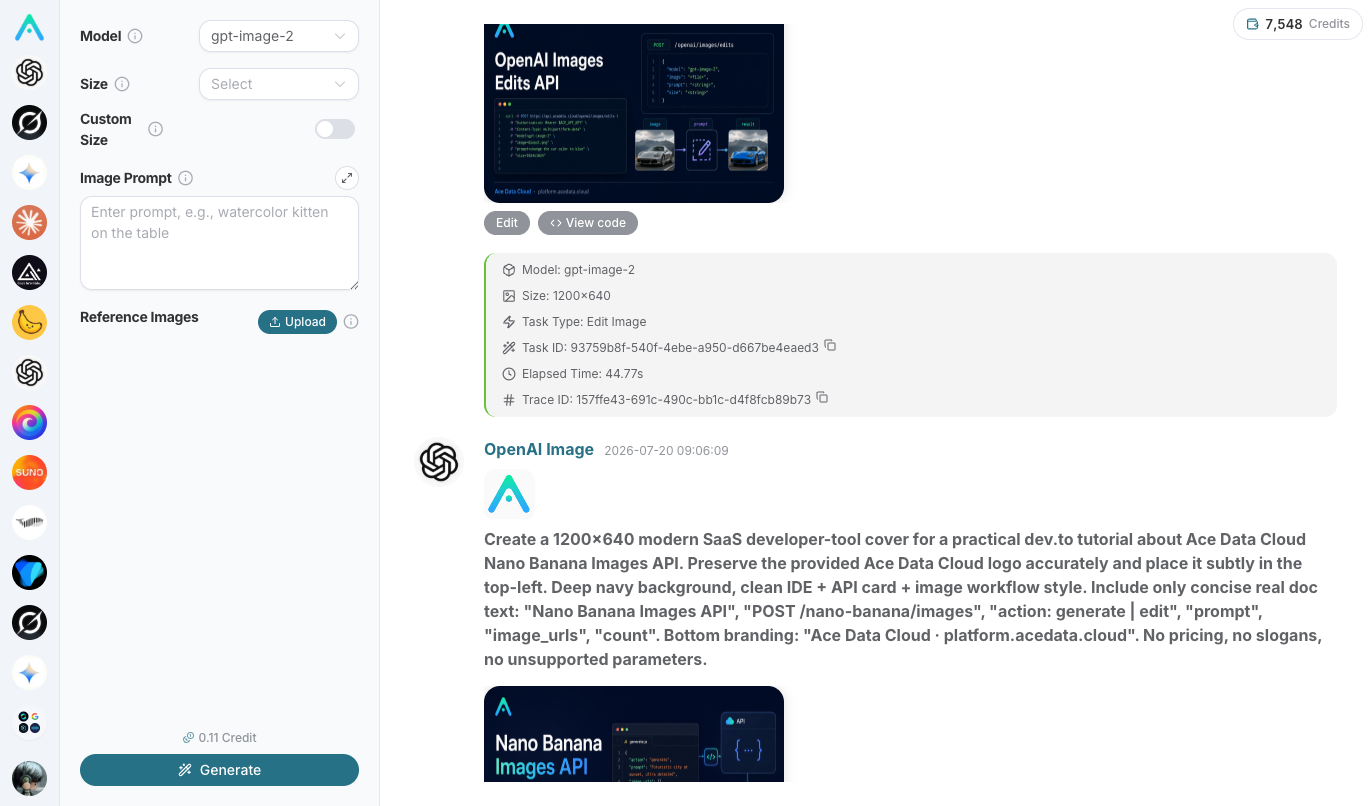
Good news: Zhihu images will be automatically hosted by AI. Zhihu will block any external linked images that are not from its own CDN, so when publishing, the skill will automatically re-upload any external linked images in your article (including Markdown
and HTML<img>) to Zhihu's image hosting and rewrite the links. This means you can just use regular public image URLs, and the images won't be lost.
¶ V. Publishing: First draft, you take a look, then public
Publishing has a confirmation gate, which is to protect you:
- AI first runs a dry-run (only tells you "what will be published", without making any real changes), showing you the title, content, and number of images;
- You confirm OK, and let it save as a private draft (
--draft-only --confirm) — you check it again on Zhihu; - When you really want to publish, let it officially release it (
--confirm).
Corresponding real commands (AI executes automatically, you just need to understand the process):
python3 blog.py publish --title "Title" --content-file article.html                      # dry-run, just demonstration
python3 blog.py publish --title "Title" --content-file article.html --draft-only --confirm  # save private draft (safe)
python3 blog.py publish --title "Title" --content-file article.html --confirm             # officially publish
After publishing, let AI take a screenshot / give you the article link, and your first Zhihu traffic article is online.
¶ VI. Come back to read data, continuously optimize
Publishing is not the end. After a few days, let AI help you read the data:
"List my recent articles and the number of likes/comments on Zhihu, which ones have good data? Write the next one in that direction."
Behind it:
python3 blog.py articles --limit 20     # My articles + number of likes/comments
python3 blog.py article <id>            # Detailed data for a single article
Whichever article has good data, continue writing along that topic and style. Content matters, data will tell you the answer.
¶ VII. Set up monitored scheduled content tasks
The real leverage is here — use Studio's Scheduled Tasks to let the entire process run automatically every day/week:
Open studio.acedata.cloud/chatgpt/scheduled, create a new task:
- schedule: Every morning at 9 AM (cron);
- prompt: "Look at Zhihu's hot list and the entire network's search, choose a topic related to AI image generation/API, write a long Zhihu article, use gpt-image-2 for images, include my invitation link in the text, save as a private draft for my review."
- Allowed skills for unattended operation (allowed_skills): Must add the
zhihuskill, otherwise it will fail withskill_not_activeduring unattended operation.
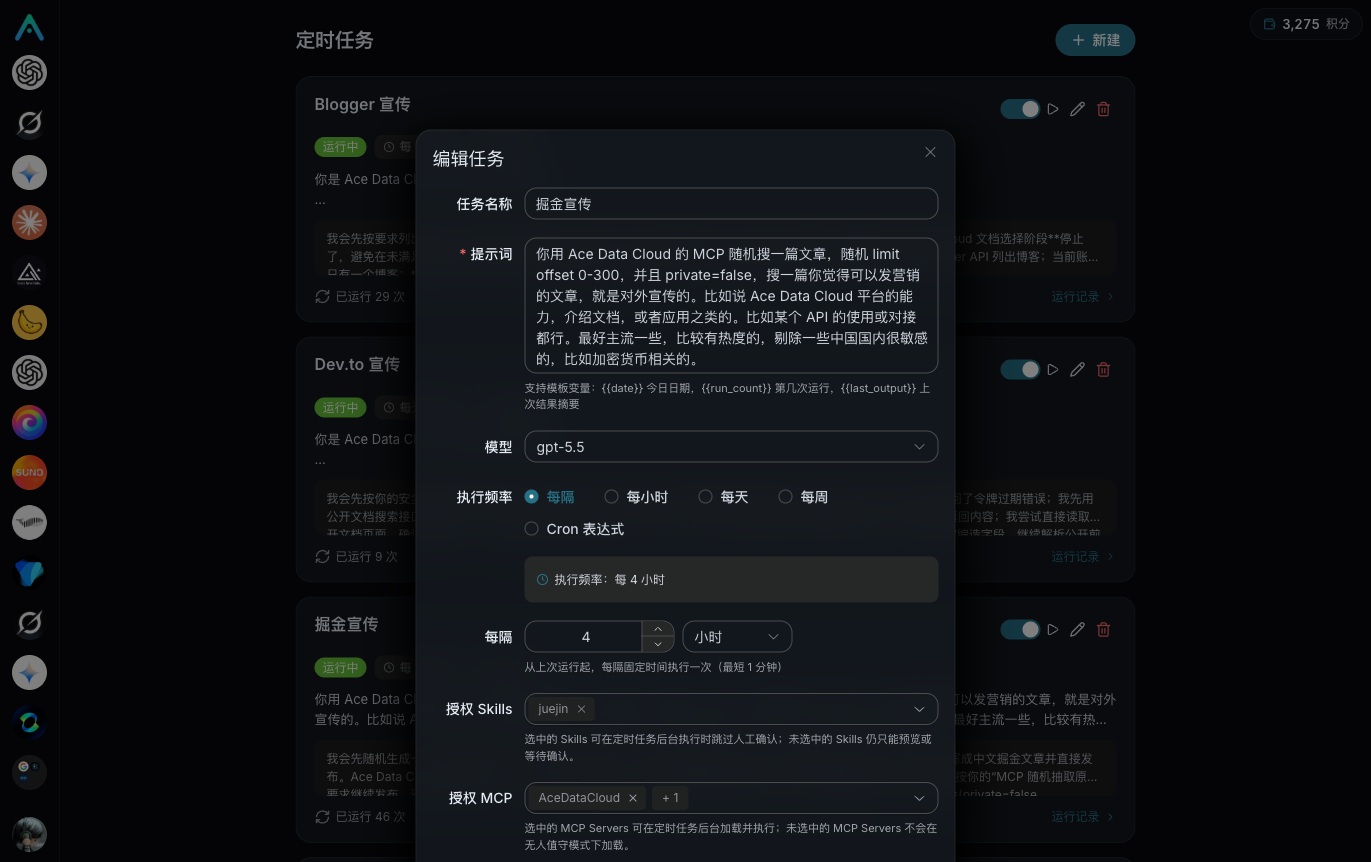
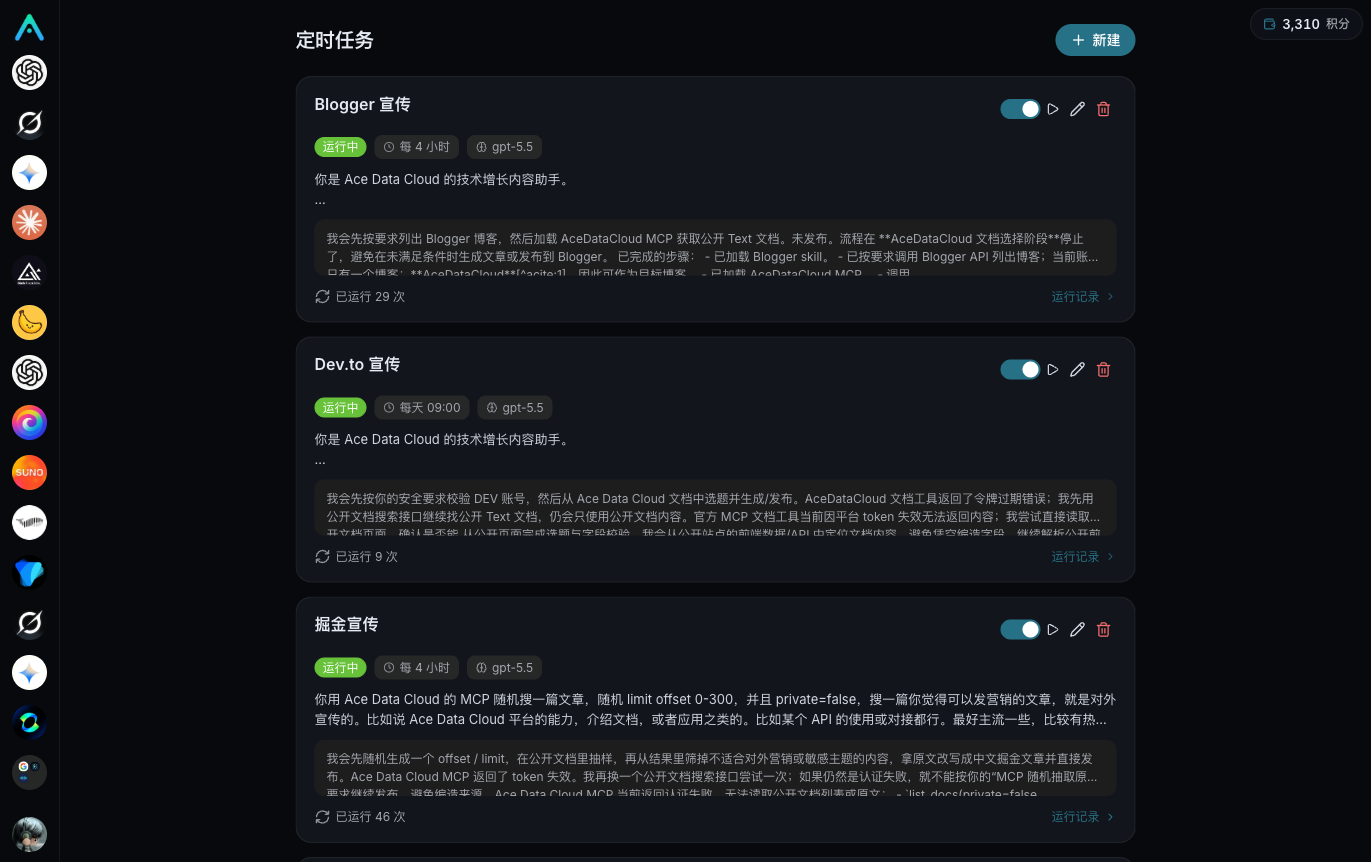
Once set up, it will automatically help you search for hot topics, write articles, generate images, and save drafts every day — you only need to spend two minutes reviewing and clicking publish. This is an automated traffic machine that produces long-term output with "one-time setup."
To be safe, I recommend leaving unattended operation only up to draft stage, allowing you to manually review before publishing — it saves effort and keeps control. Once you get the hang of it and trust the results, you can let it publish automatically.
¶ VIII. Honest reminders (don't mess up your account)
- Zhihu is very sensitive to hard ads and spamming — repeatedly posting the same content or having only links throughout is likely to be limited or even banned. Treat it as an amplifier, not a spamming machine.
- Don't post ten similar articles in one day. Better to have fewer but high-quality pieces; one well-collected article is worth more than ten unread ones.
- A question can only have one answer; if you need to change it, use "edit answer," and the skill will prompt you.
- Publishing defaults to conservative (first draft) — this leaves you with the final check.
Publish your first article on Zhihu, then check the traffic in the backend. This is one of the most cost-effective long-term investments — an article you write today may still be bringing you traffic next year.