
Posting on WeChat Official Account: Managing Your Own Private Traffic Pool
In the Chinese world, the WeChat Official Account has an irreplaceable value that no other platform can match—it is "private domain." The followers on platforms like Zhihu and Xiaohongshu belong to the platform, but the followers of the official account are truly yours, users you can reach repeatedly. For those engaged in long-term business (whether through commissions, white labels, or APIs), consolidating traffic into the official account is the most solid step.
This article teaches you how to connect to the official account, allowing AI to help you format the content, upload images, and save it in the draft box.
¶ What This Connector Can Do (Honestly)
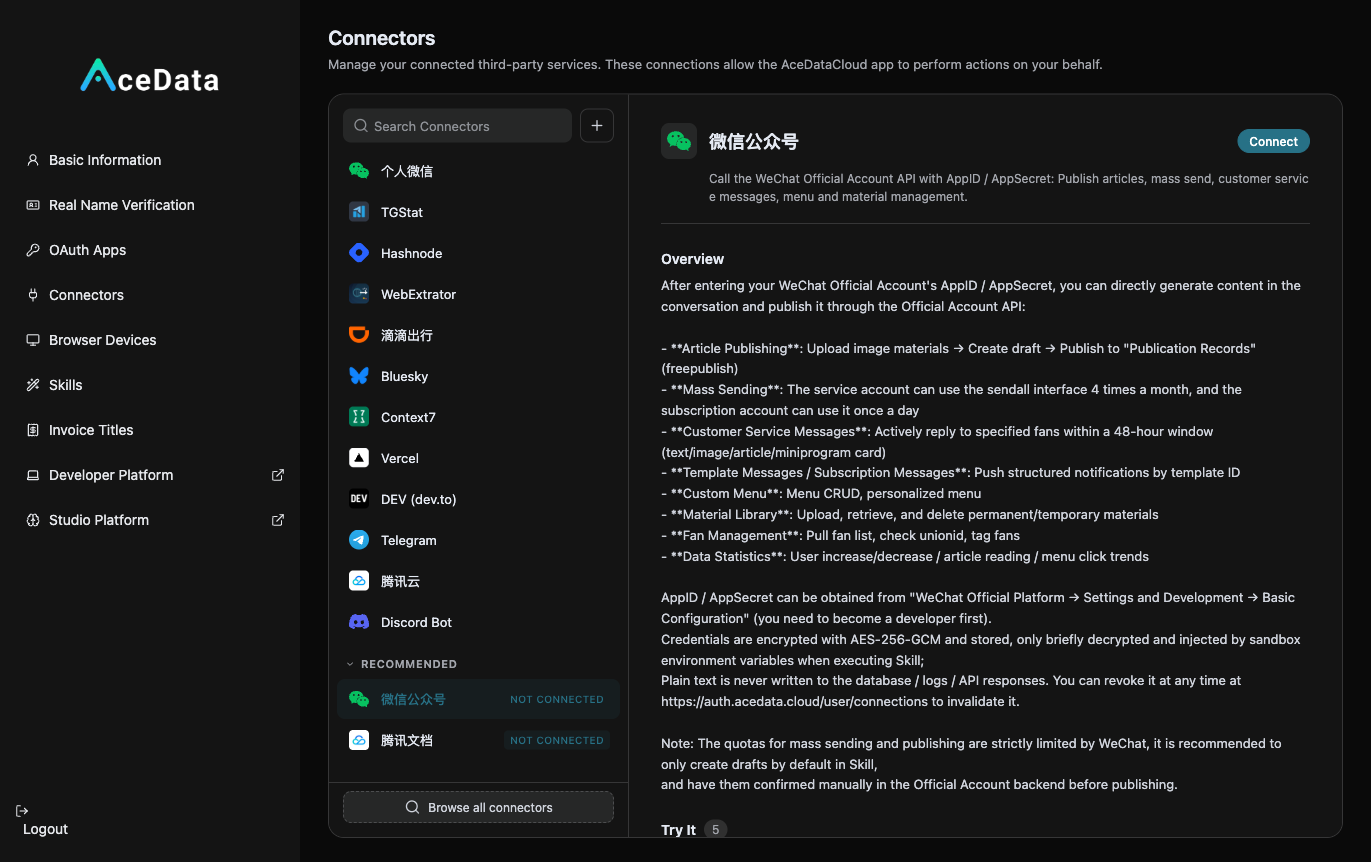
- Authorization Method: Official account's AppID + AppSecret (using the WeChat MP official server API to exchange for access_token).
- Capabilities: Convert conversations into draft articles, list/delete drafts, upload images that will appear in the main text, send customer service messages within a 48-hour window, view follower statistics, manage the bottom menu, etc.
- Important—Defaults to "Draft": The official account has strict quotas for mass messaging (subscription accounts once a day, service accounts four times a month). Once a mass message is sent, it consumes valuable quotas and cannot be revoked. Therefore, the connector treats
freepublish/submit,mass/*as dangerous operations—it defaults to formatting the content, uploading images, and saving it in the draft box, leaving the final mass sending decision to you. This is an intentional protection. - Two Preconditions: ① Mass sending/publishing requires an authenticated corporate account (personal accounts and unverified accounts can only save drafts/send customer service messages); ② The source IP for each call must be in the official account backend IP whitelist (an
errcode 40164indicates it has not been added to the whitelist; add the IP as per theerrmsg).
¶ Step by Step: Connect → Let AI Format and Save Draft → You Manually Mass Send
¶ 1. Connect Your Official Account
Log in to the WeChat Official Platform (mp.weixin.qq.com) → Settings and Development → Basic Configuration, obtain the AppID and AppSecret (and add the IP prompted by the connector to the IP whitelist). Then open https://studio.acedata.cloud/console/connectors, find wechat, and fill in the AppID + AppSecret.
¶ 2. Let AI Write Content + Upload Images + Save Draft
In Studio, say:
"Help me write an official account article titled 'I moved all the commonly used AIs to one website, saving half the money,' format it neatly, include 2 images, guide to follow at the end, and place my invitation link, then save it as a draft (do not mass send)."
For images, let AI generate using gpt-image-2: POST https://api.acedata.cloud/openai/images/generations, body {"model":"gpt-image-2","prompt":"...","size":"1024x1024"}, authenticate with the platform API Key; the connector will upload the images as materials into the main text.
¶ 3. Check the Draft Box, Then Manually Mass Send
Go to the draft box in the official account backend to verify the formatting is correct, then choose an appropriate time to manually mass send—you control the final mass sending quota.
¶ Don't Forget to Embed Your Distribution Link (This is the Source of Income)
Naturally place your exclusive invitation link copied from the distribution backend in the content. For invitation attribution, levels, ratios, confirmation periods, and withdrawal conditions, see Promotion Methods and Commission Rules; only valid orders that meet the current rules may generate commissions.
¶ Content Suggestions (What Works for Official Accounts)
- Reformatting: The official account is a platform where "formatting determines quality," let AI format the content neatly and match the images.
- Titles Determine Open Rates: Open rates are generally low, so titles should either hit pain points or offer strong benefits.
- One Article, One Theme: Followers expect valuable in-depth content, not fragments.
- Guide to Follow + Retention: At the end, "Follow to avoid getting lost" and "Reply with keywords to receive XX," turning one-time readers into long-term followers.
¶ Honest Reminders
- Mass sending has quotas, defaults to saving drafts—this is a platform rule, not a connector limitation. You control the final mass sending.
- Requires an authenticated official account + may need IP whitelist; the first connection has a few more steps than cookie-based platforms, but once set up, it can be used long-term.
- The official account is a slow process—gaining followers is not fast, but each retained follower has high value.
The official account is the only truly "owned" traffic pool in the Chinese world. Use other platforms (Zhihu/Xiaohongshu/Bilibili) to drive traffic and attract new users, and use the official account to retain and consolidate—one-time traffic and long-term assets, both are necessary.