
Completing the First API Call with the Client
After the website is ready, clients often ask, "Where do I register? Where is the Key? How do I fill in the address in the code?" This article organizes what you need to deliver clearly. Clients use their own account and Key, not the webmaster's Key for sharing.
Prepare the activated page domain, API domain, and documentation for a main promoted service. For the first test, choose a small request to check costs, avoiding batch or long video tasks.
¶ First, send this activation instruction to the client
You can copy the text below directly, just replace the website and service name. Do not fill in anyone's real Key.
Welcome to our AI API service!

First, open 【your page domain】 and register or log in to your own account.
Go to the console, activate the service according to the target service documentation, and obtain your own API Key.

You will need the following items for integration:
API Address (Base URL): 【your API domain】
Service / Model: 【public service or model name】
Integration Documentation: 【your internal documentation link】

Please obtain and keep your API Key in your own account, do not send it to me.
Try a small request according to the documentation; confirm the price before proceeding when payment is required.
If you encounter any issues, you can send the error message, time of occurrence, and request identifier to customer service, but do not include the complete Key.
¶ After registration, confirm you have returned to your site
Have the client click register or log in from your page domain. After completion, the address bar should return to your page domain, not stay on an unrelated website.
After clicking Log in, complete the authentication using the email, phone, or third-party method enabled by the site. The login may pop up on the current page or open a unified authentication page; this is determined by the webmaster's Login presentation mode, not the API Key acquisition entry.
Existing accounts can log in directly; if you need to verify the first-time client ownership, you must use a test account that has never been registered. Because a shared identity system is used here, not every white-label site re-registers a set of independent accounts.
¶ The Key is obtained by the client in their own console
Have the client open Console → Applications on their site, find the application they need to use, and then click Manage Keys (for general applications) or Keys (for dedicated applications). After entering the keys page, click the Create button in the upper right corner. Do not confuse the "Account Token" in the sidebar with the API Key here.
The application page path is /console/applications, and the keys page path is /console/credentials; entering from the application will carry the corresponding application. The activation requirements for different services are subject to the corresponding documentation.
In the creation window, fill in an easily recognizable name, such as "First Access Test." If you need to control the testing scope, set usage limits, expiration time, and allowed APIs according to the page prompts, then click create. When API restrictions are not enabled, the page will prompt "No restrictions, all APIs can be called"; do not assume that hiding the service directory restricts the Key.
After the list refreshes, use the copy icon next to the key to save it in your secure configuration, do not send it directly to customer service. Existing keys can be adjusted in name and restrictions through "Edit"; confirm whether changes will affect the programs currently using it before making modifications.
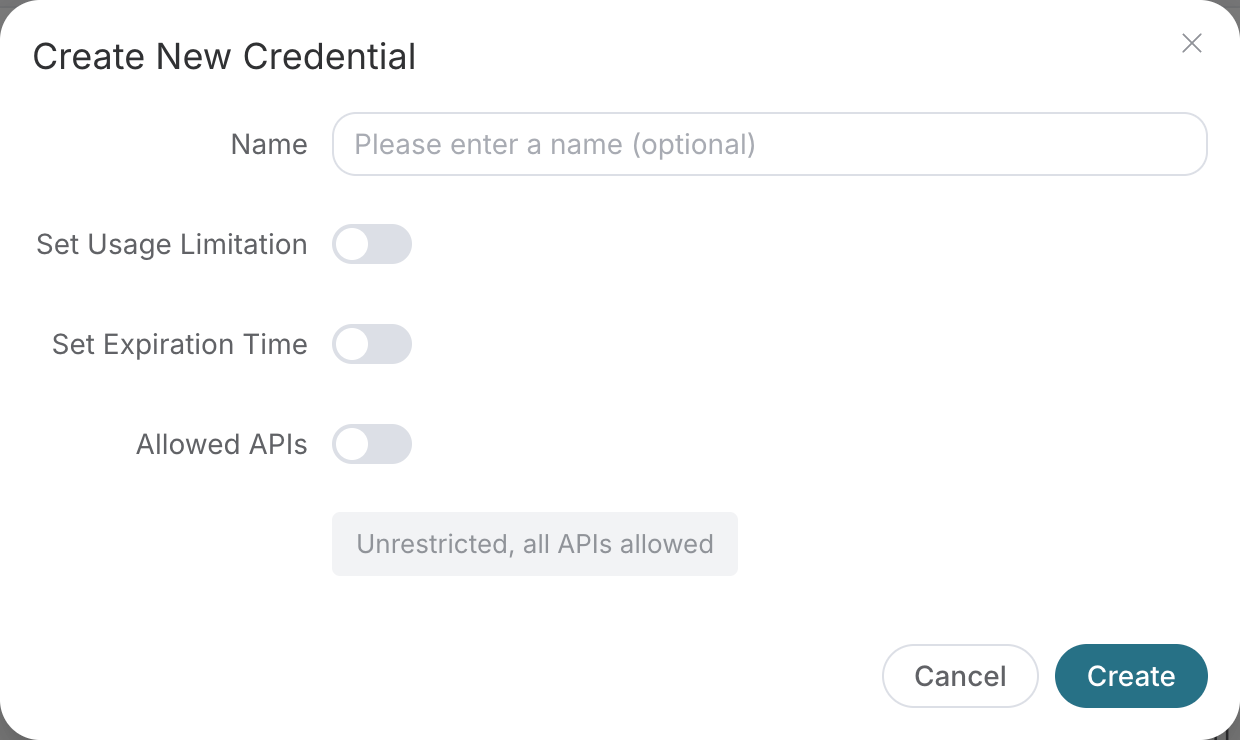
Photographed on September 6, 2026, at the official Platform, the same credential form is also used in the white-label console. Only a blank form is displayed, without creating or showing any real Keys.
The API Key can be understood as "the key for the program to use the service":
- Each client, project, and environment should ideally use separate Keys.
- Store it in the secure configuration of the server or tools, not in the web front end or public code.
- Do not send it to the webmaster, do not send it in group chats, and do not include it in tutorials.
- The webmaster cannot disable a client's Key across accounts solely based on white-label configuration.
¶ Do not fill in the four items incorrectly
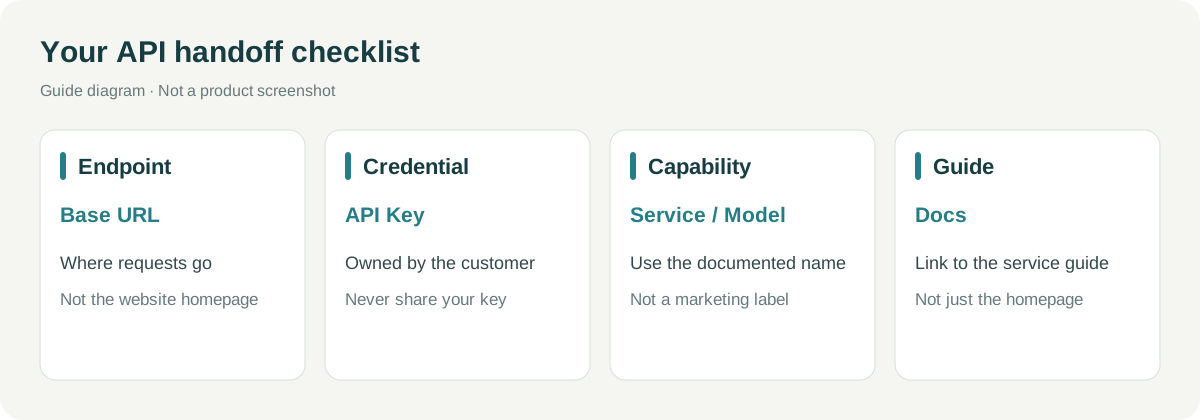
| Information | What it is | Common Mistakes |
|---|---|---|
| Base URL | The address where the program sends requests | Filled in as the documentation page domain |
| API Key | The client's own calling credential | Filled in as the login password or promotional link |
| Service / Model | The public service or model name required by the documentation | Changed to their own marketing name |
| Docs | The integration instruction page | Only provided the homepage, letting the client find it themselves |
Native interfaces, OpenAI compatible protocols, MCP, etc., have different methods: for the first time, only choose one that the client actually needs, configure according to the corresponding documentation, and do not require testing all methods.
¶ Test a minimal request, then check usage records
Copy the minimal example from the service documentation, only replacing the required address, Key, and necessary parameters. Confirm the current price before submission.
After seeing the results, open the usage records in the client's console, check the request by time, and verify the service, consumption, and balance changes. Music or video tasks may first return a task identifier; you need to continue querying according to the documentation, and do not consider "submitted" as "completed."
One successful call + one corresponding usage record is considered that this integration has basically gone through. This article does not display fictional response data.
If there is an error, retain the time, path, status code, and publicly available request identifier. Do not send the entire request header to customer service, as it may contain the Key.
¶ Testing completed, handle the test Key
Keys used only for acceptance can be deactivated or deleted by the client in their own credentials page. Operate only after confirming it is no longer needed, do not mistakenly delete the production Key. Then confirm that the old Key has been rejected with a low-risk request.
Services hidden in the directory may still be called by valid Keys: hiding the directory does not equate to calling permissions; if scope control is needed, it must be configured separately and the actual authorization capability must be accepted.
After completing this article: The client knows where to register, where to obtain the Key, which address and documentation to use; the minimal request and usage can correspond; neither party needs to exchange keys.
Next article: Understanding Clients and Revenue · Return to the Roadmap