
OpenClaw Provider 插件配置指南
¶ 1. 获取 API Key
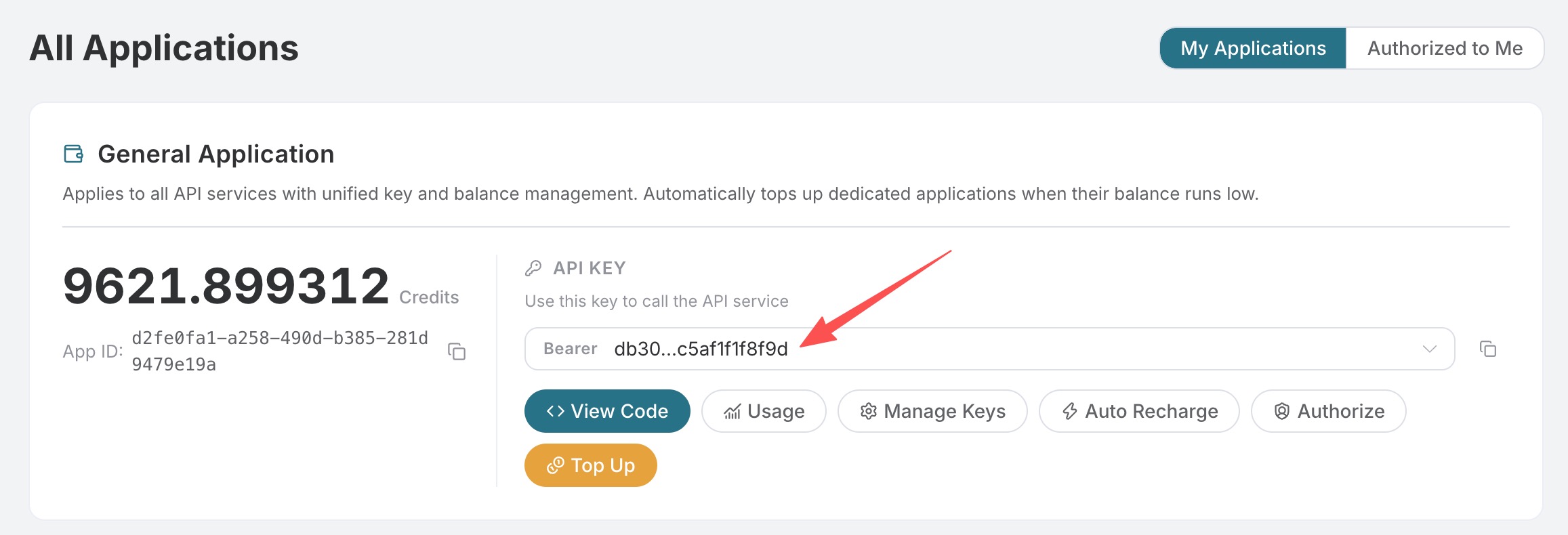
打开 Ace Data Cloud 应用列表,进入可用的应用并复制 API Key。
¶ 2. 安装 OpenClaw 和插件
npm install -g openclaw@latest
openclaw plugins install npm:@acedatacloud/openclaw-provider@2026.5.34 --pin
插件要求 OpenClaw 2026.4.2 或更高版本,当前原生提供 Chat 和 Web Search 能力。
¶ 3. 配置 Key
推荐使用 onboarding:
openclaw onboard \
  --auth-choice acedatacloud-api-key \
  --acedata-api-key "你的 API Key"
也可以使用环境变量:
export ACEDATACLOUD_API_KEY="你的 API Key"
¶ 4. 可选:手动配置
不使用 onboarding 时,在 ~/.openclaw/openclaw.json 中启用插件并设置默认模型:
{
  "agents": {
    "defaults": {
      "model": { "primary": "acedatacloud/MODEL_ID" }
    }
  },
  "plugins": {
    "allow": ["acedatacloud"],
    "entries": {
      "acedatacloud": { "enabled": true }
    }
  }
}
不要把 API Key 写进该文件;继续使用环境变量。
¶ 5. 选择模型并验证
openclaw plugins info acedatacloud --runtime
openclaw plugins doctor
openclaw models list --all --provider acedatacloud
openclaw agent --local --session-id coding-plan-check \
  --model acedatacloud/MODEL_ID --json -m "Reply only OK"
将 MODEL_ID 替换为 Coding Plan 当前提供的模型。需要设为默认模型时运行:
openclaw models set acedatacloud/MODEL_ID
调用记录可在 使用历史 查看。401 表示 Key 无效;模型不存在时先检查 exact ID 和插件版本。插件目录中的 cost: 0 仅表示不由 OpenClaw 重复估算,实际费用仍由 Ace Data Cloud 记录。
¶ Web Search
openclaw infer web search \
  --provider acedatacloud --query "latest AI agent frameworks" --limit 5
当前不要把插件介绍中的图像、视频或音乐能力当作 OpenClaw 原生 Provider 能力。