
Cloudflare Turnstile Protocol Recognition API Integration Guide
This article introduces a Cloudflare Turnstile protocol recognition API integration guide, which allows users to complete verification through automatic background decoding by submitting a Website Key, without needing to recognize or click on the Turnstile CAPTCHA.
¶ Application Process
To use the Cloudflare Turnstile protocol recognition API, first go to the Ace Data Cloud Console to obtain your API Token for later use.
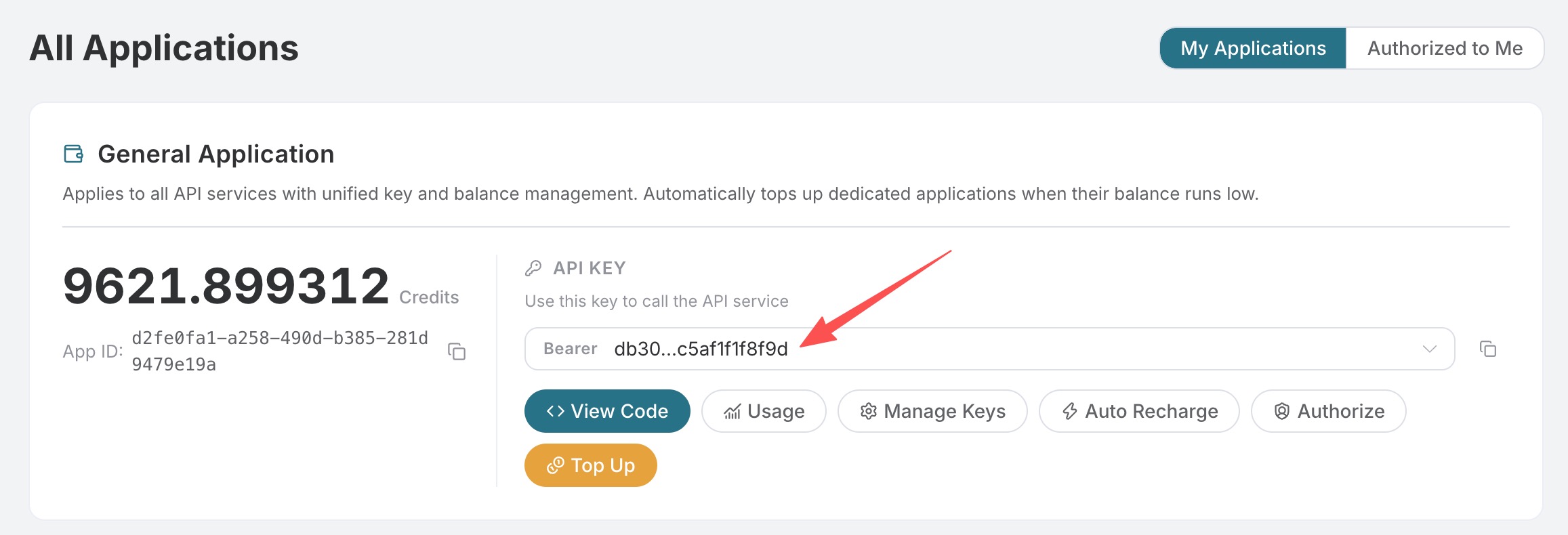
If you have not yet logged in or registered, you will be automatically redirected to the login page to register and log in, and you will automatically return to the current page once finished.
An API Key for a general application can be used for services enabled for the account; a Key for a dedicated application can be used within that application's service scope. Please check the Key's permissions, validity period, and limits, and confirm that the application balance is sufficient to pay for this request. Available trial credits are subject to what is displayed in your account; if the balance is insufficient, you can top up in the Console.
📘 Full documentation: Cloudflare Turnstile Protocol Recognition API →
¶ Basic Usage
First, let's look at the basic usage: enter the URL of the website whose Turnstile CAPTCHA needs to be processed to obtain the processed result. First, simply pass a website_url field. Our example website is https://react-turnstile.vercel.app, and we need to obtain the website_key from the website_url page. First, open this page, press F12 to enter the console, and perform a global search for cf-turnstile on the Elements tab. You can then find the container element that hosts Turnstile, where the string corresponding to data-sitekey is the value of website_key.
The Request Headers to set include:
accept: The format in which you want to receive the response; enterapplication/jsonhere, meaning JSON format.authorization: The key used to call the API; after applying for it, you can select it directly from the dropdown.
The Request Body is also set, including:
website_url: The URL of the website whose CAPTCHA needs to be processed.website_key: The website key identifier (sitekey) in Cloudflare Turnstile.action: An optional parameter, required only when the target website has set a customactionfor the Turnstile widget.cdata: An optional parameter, required only when the target website has set a customcDatafor the Turnstile widget.
Click the “Try” button to test it, and here we obtain the following result:
{
  "token": "0.mNQ2f9uP6mQ0y3H5Q8bqO7iM......",
  "started_at": 1784885653.0,
  "finished_at": 1784885665.4,
  "elapsed": 12.4
}
The returned result contains several fields, described as follows:
token: The verification result after processing this Cloudflare Turnstile CAPTCHA task.started_at,finished_at: The times when this request began processing and produced a result, as Unix timestamps (seconds, floating-point).elapsed: The total time taken for this processing (seconds).
As you can see, we obtained the verification result from processing the Turnstile CAPTCHA. We can then use it in a POST request or a simulated submission to the target website. It is for one-time use, is valid for 120s, and is recommended to be used within 60s. When submitting, this token is typically sent to the target website as the cf-turnstile-response parameter. The Python code for calling token verification is as follows:
import requests

token = '{token}'

data = {
    'cf-turnstile-response': token
}

response = requests.post('https://react-turnstile.vercel.app', data=data)

if response.status_code == 200:
    print(response.text)
Also, if you want to generate the corresponding integration code, you can copy the generated code directly. For example, the CURL code is as follows:
curl -X POST 'https://api.acedata.cloud/captcha/token/turnstile' \
-H 'accept: application/json' \
-H 'authorization: Bearer {token}' \
-H 'content-type: application/json' \
-d '{
  "website_key": "0x4AAAAAAADnPIDROrmt1Wwj",
  "website_url": "https://react-turnstile.vercel.app"
}'
The Python integration code is as follows:
import requests

url = "https://api.acedata.cloud/captcha/token/turnstile"

headers = {
    "accept": "application/json",
    "authorization": "Bearer {token}",
    "content-type": "application/json"
}

payload = {
    "website_key": "0x4AAAAAAADnPIDROrmt1Wwj",
    "website_url": "https://react-turnstile.vercel.app"
}

response = requests.post(url, json=payload, headers=headers)
print(response.text)
¶ Asynchronous Mode (async)
By default, the API is synchronous and blocking: a request waits until token processing is complete before returning. If you are using multi-solver rotation and want to “receive a task_id immediately after submitting a task, schedule other solvers first, and come back later to retrieve the result,” you can pass async: true in the request body.
After passing async: true, the endpoint immediately returns a task_id without blocking and waiting:
{
  "task_id": "61138bb6-19aa-11ec-a9c8-0242ac110002",
  "trace_id": "2efa9340-b21b-4e26-9e14-4aac95f343ab"
}
To actively check progress, you can use the task_id to query POST /captcha/tasks (once every 3–5 seconds is recommended). This endpoint does not trigger or advance task processing; the server will continue processing even if you do not query, lose your connection, or exit the client:
curl -X POST 'https://api.acedata.cloud/captcha/tasks' \
-H 'accept: application/json' \
-H 'authorization: Bearer {token}' \
-H 'content-type: application/json' \
-d '{
  "task_id": "61138bb6-19aa-11ec-a9c8-0242ac110002"
}'
While processing, it returns status: processing; once processing is complete, it returns status: ready and the token:
{
  "success": true,
  "task_id": "61138bb6-19aa-11ec-a9c8-0242ac110002",
  "status": "ready",
  "token": "0.mNQ2f9uP6mQ0y3H5Q8bqO7iM......"
}
Billing information: In asynchronous mode, creating a task and reading the “processing” status are not charged; a one-time charge is incurred when the client first reads a successful result (consistent with existing behavior and synchronous mode pricing). The server advances the task independently, but does not charge in advance simply because the task completes in the background. If a task does not succeed within 120 seconds, it terminates with HTTP 504 timeout and is not charged. /captcha/tasks is not responsible for advancing tasks.
Note: Cloudflare Turnstile does not currently support Bring Your Own Proxy, so this endpoint does not accept a
proxyparameter; if one is passed, it returns400 invalid_proxy.
¶ Error Handling
When calling the API, if an error occurs, the API returns the corresponding error code and message. For example:
400 token_mismatched: Bad request, possibly due to missing or invalid parameters.400 invalid_proxy: Bad request, proxy is not supported for this captcha type.401 invalid_token: Unauthorized, invalid or missing authorization token.429 too_many_requests: Too many requests, you have exceeded the rate limit.500 api_error: Internal server error, something went wrong on the server.
¶ Error Response Example
{
  "success": false,
  "error": {
    "code": "api_error",
    "message": "fetch failed"
  },
  "trace_id": "2cf86e86-22a4-46e1-ac2f-032c0f2a4e89"
}
¶ Conclusion
Through this document, you have learned how to use the Cloudflare Turnstile protocol recognition API to allow users to complete verification without recognizing and clicking the Turnstile captcha, by simply submitting the Website Key for automatic decoding in the background. We hope this document helps you better integrate and use the API. If you have any questions, please feel free to contact our technical support team.