
Global Proxy Integration Instructions
This document mainly introduces the integration instructions for Ace Data Cloud's global proxy, including application methods, usage methods, and other specific content.
¶ Application Method
To use global services, you can first go to the "application page" to apply. The first application comes with a free quota of 1 point.

If you are not logged in, you will be automatically redirected to the login page. After logging in, you can continue with the application.
¶ Usage Method
After the application is completed, you can check your application results in the "console," as shown in the figure:
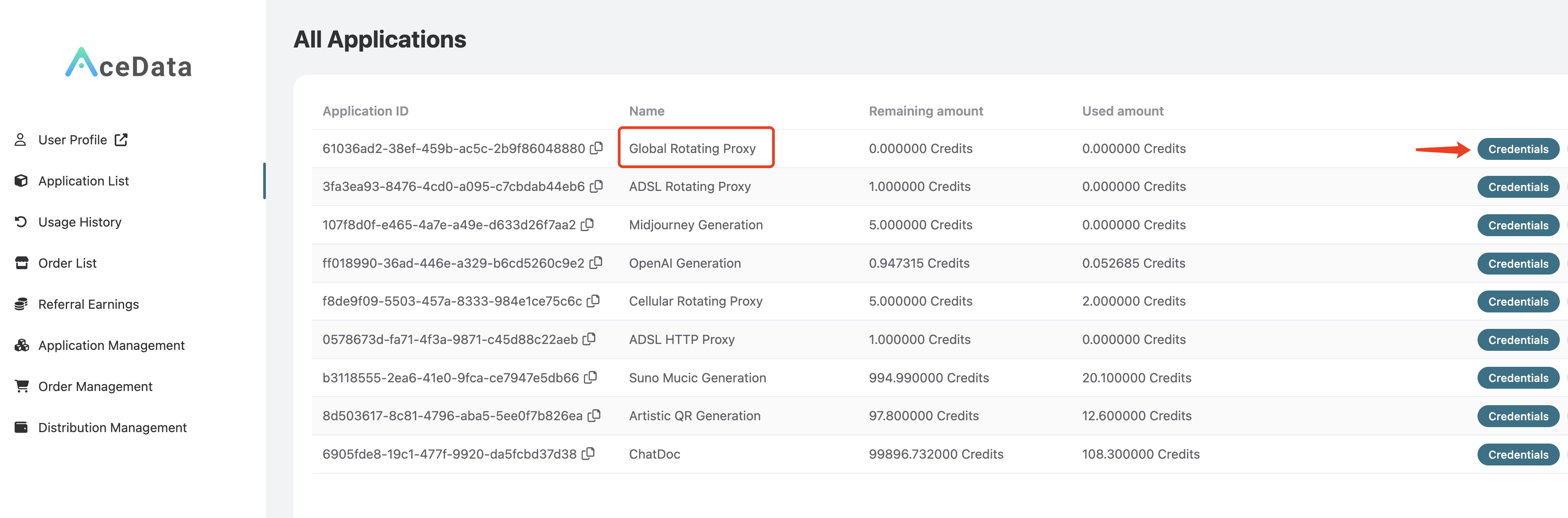
Click on "Credentials" to view the username and password for using the global proxy service, separated by a colon. The username is 8 characters long, and the password is 32 characters long, as shown in the figure:
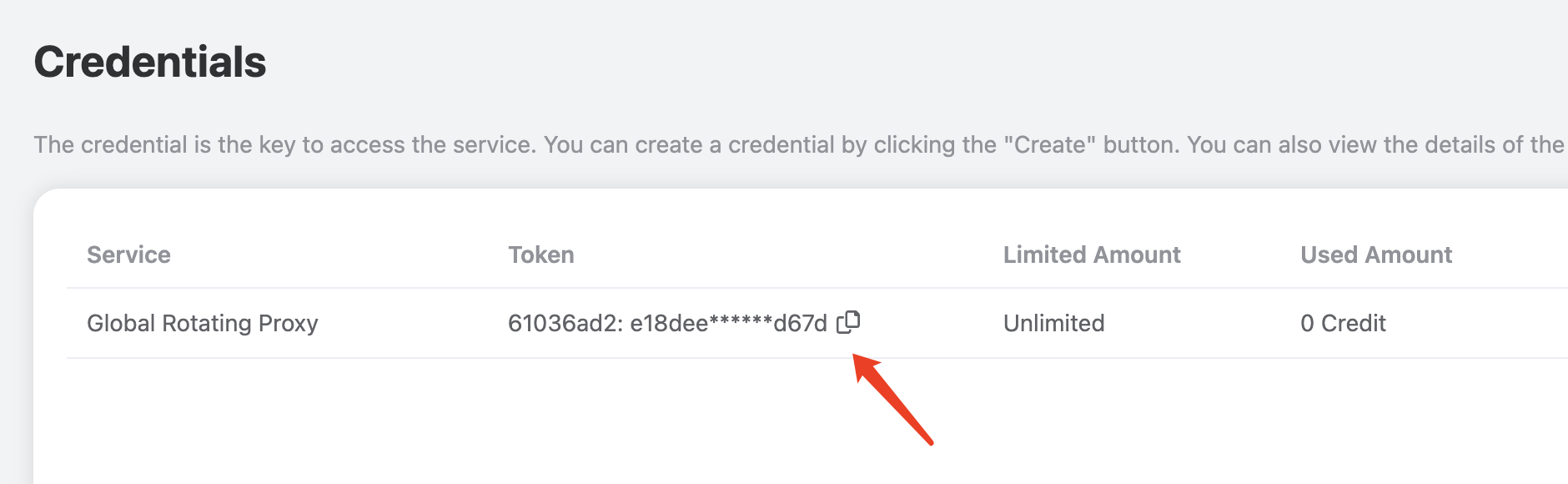
This proxy is a rotating proxy, so you only need to set a fixed proxy address and port when using it. The proxy address and port are global.proxy.acedata.cloud and 30007, respectively. This proxy supports HTTP/HTTPS/SOCKS protocols and can be used to request websites using HTTP and HTTPS protocols.
Note: This proxy can only be used in networks outside of China. It cannot be used in mainland China.
¶ Command Testing
Once you have the proxy's username and password, the easiest way to test is through the curl command line. If you haven't installed it yet, please refer to https://curl.se/ for installation.
If the current proxy's username and password are 1f78266a:eff0896726224fa2a99fe82dd1f07562, you can test it with the following curl command:
curl -x 1f78266a:eff0896726224fa2a99fe82dd1f07562@global.proxy.acedata.cloud:30007 https://ipinfo.io
Here, we use curl's -x parameter to specify the proxy address. The default proxy protocol is HTTP/HTTPS, and the requested URL is https://ipinfo.io, which can return the real IP address and location of the requester.
Note: The above username and password may be invalid; please replace them with your own username and password.
The output result is as follows:
{
  "ip": "66.206.249.77",
  "hostname": "host-66-206-249-77.public.eastlink.ca",
  "city": "Kirkland Lake",
  "region": "Ontario",
  "country": "CA",
  "loc": "48.1446,-80.0377",
  "org": "AS11260 EastLink",
  "postal": "P2N",
  "timezone": "America/Toronto",
  "readme": "https://ipinfo.io/missingauth"
}
As you can see, the returned result's country is CA, which represents Canada. If you run it again, you can get a different result; each request has a random IP exit.
¶ Code Integration
Below is an example of how to set up the proxy using Python:
import requests

proxy = 'http://{proxy_username}:{proxy_password}@global.proxy.acedata.cloud:30007'

proxies = {
    'http': proxy,
    'https': proxy
}

for _ in range(3):
    resp = requests.get('https://ipinfo.io', proxies=proxies)
    print(resp.text)
Here, we first declare the proxy URL and define it as the proxy variable. The protocol is HTTP, followed by the username and password for the tunnel proxy (i.e., the username and password displayed in the console, separated by a colon), followed by an @ symbol, and then the proxy address and port.
Note: You need to replace
{proxy_username}:{proxy_password}in the above code with your proxy username and password. The final result should look likeproxy = 'http://1f78266a:eff0896726224fa2a99fe82dd1f07562@global.proxy.acedata.cloud:30007', without the{and}characters.
Next, we declare a proxies variable, configuring two key-value pairs, with the keys being http and https, and both values being the proxy variable, indicating that for both HTTP and HTTPS protocol websites, the requests will use the proxy defined by the proxy variable. We then define a loop to test the proxy three times.
The output result is as follows:
{
  "ip": "103.190.205.165",
  "hostname": "assigned-for-client.adnsl.com",
  "city": "Paltan",
  "region": "Dhaka Division",
  "country": "BD",
  "loc": "23.7362,90.4143",
  "org": "AS38203 ADN Telecom Ltd.",
  "postal": "1000",
  "timezone": "Asia/Dhaka",
  "readme": "https://ipinfo.io/missingauth"
}
{
  "ip": "74.111.25.181",
  "hostname": "pool-74-111-25-181.syrcny.fios.verizon.net",
  "city": "Syracuse",
  "region": "New York",
  "country": "US",
  "loc": "43.0481,-76.1474",
  "org": "AS701 Verizon Business",
  "postal": "13201",
  "timezone": "America/New_York",
  "readme": "https://ipinfo.io/missingauth"
}
{
  "ip": "207.113.168.248",
  "city": "LaPorte",
  "region": "Indiana",
  "country": "US",
  "loc": "41.6106,-86.7225",
  "org": "AS13428 Surf Air Wireless, LLC",
  "postal": "46350",
  "timezone": "America/Chicago",
  "readme": "https://ipinfo.io/missingauth"
}
As you can see, the proxy IP obtained from each run is random, and the IP's location indeed comes from different countries and cities around the world.
Of course, the above proxy setup method is actually a relatively simple setup method.
In fact, the above code is equivalent to setting an additional header - Proxy Authorization during the request, so the above code can also be rewritten as follows:
import requests
import base64

proxy_host = 'global.proxy.acedata.cloud'
proxy_port = '30007'
proxy_username = '{proxy_username}' # 8-character username
proxy_password = '{proxy_password}' # 32-character password

credentials = base64.b64encode(
    f'{proxy_username}:{proxy_password}'.encode()).decode()

proxies = {
    'http': f'http://{proxy_host}:{proxy_port}',
    'https': f'http://{proxy_host}:{proxy_port}'
}

headers = {
    'Proxy-Authorization': f'Basic {credentials}'
}

for _ in range(3):
    resp = requests.get('https://ipinfo.io',
                        proxies=proxies, headers=headers)
    print(resp.text)
As you can see, here we set the proxy's username and password through the Proxy-Authorization request header (which needs to be Base64 encoded), and the running effect of this code is the same.
For other languages, such as JavaScript's axios, similar setup methods can also be used:
const axios = require("axios");
const base64 = require("base64");

const proxy_host = "global.proxy.acedata.cloud";
const proxy_port = "30007";
const proxy_username = "{proxy_username}"; // 8-character username
const proxy_password = "{proxy_password}"; // 32-character password

const credentials = base64.encode(`${proxy_username}:${proxy_password}`);

const proxies = {
  http: `http://${proxy_host}:${proxy_port}`,
  https: `http://${proxy_host}:${proxy_port}`,
};

const headers = {
  "Proxy-Authorization": `Basic ${credentials}`,
};

for (let i = 0; i < 3; i++) {
  axios
    .get("https://ipinfo.io", { proxies, headers })
    .then((resp) => console.log(resp.data))
    .catch((err) => console.error(err));
}
The running effect is the same.
For the setup methods in other languages, please refer to the above text and rewrite accordingly.
¶ Region Filtering
We can filter by region by adding region to the username. For example, if you want to select a proxy from the United States, the original username is 1f78266a, then you can change the username to 1f78266a-region-us, and the above curl can be rewritten as follows:
curl -x 1f78266a-region-us:eff0896726224fa2a99fe82dd1f07562@global.proxy.acedata.cloud:30007 https://ipinfo.io
Region list:
| Country or Region Name | Country/Region Code |
|---|---|
| United States | us |
| Hong Kong | hk |
| Andorra | ad |
| United Arab Emirates | ae |
| Afghanistan | af |
| Antigua and Barbuda | ag |
| Anguilla | ai |
| Albania | al |
| Armenia | am |
| Angola | ao |
| Antarctica | aq |
| Argentina | ar |
| American Samoa | as |
| Austria | at |
| Australia | au |
| Aruba | aw |
| Åland Islands | ax |
| Azerbaijan | az |
| Bosnia and Herzegovina | ba |
| Barbados | bb |
| Bangladesh | bd |
| Belgium | be |
| Burkina Faso | bf |
| Bulgaria | bg |
| Bahrain | bh |
| Burundi | bi |
| Benin | bj |
| Saint Barthélemy | bl |
| Bermuda | bm |
| Brunei | bn |
| Bolivia | bo |
| Caribbean Netherlands | bq |
| Brazil | br |
| Bahamas | bs |
| Bhutan | bt |
| Bouvet Island | bv |
| Botswana | bw |
| Belarus | by |
| Belize | bz |
| Canada | ca |
| Cocos (Keeling) Islands | cc |
| Central African Republic | cf |
| Switzerland | ch |
| Chile | cl |
| Cameroon | cm |
| Colombia | co |
| Costa Rica | cr |
| Cuba | cu |
| Cape Verde | cv |
| Christmas Island | cx |
| Cyprus | cy |
| Czech Republic | cz |
| Germany | de |
| Djibouti | dj |
| Denmark | dk |
| Dominica | dm |
| Dominican Republic | do |
| Algeria | dz |
| Ecuador | ec |
| Estonia | ee |
| Egypt | eg |
| Western Sahara | eh |
| Eritrea | er |
| Spain | es |
| Finland | fi |
| Fiji | fj |
| Federated States of Micronesia | fm |
| Faroe Islands | fo |
| France | fr |
| Gabon | ga |
| Grenada | gd |
| Georgia | ge |
| French Guiana | gf |
| Ghana | gh |
| Gibraltar | gi |
| Greenland | gl |
| Guinea | gn |
| Guadeloupe | gp |
| Equatorial Guinea | gq |
| Greece | gr |
| Guatemala | gt |
| Guam | gu |
| Guinea-Bissau | gw |
| Guyana | gy |
| Heard Island and McDonald Islands | hm |
| Honduras | hn |
| Croatia | hr |
| Haiti | ht |
| Hungary | hu |
| Indonesia | id |
| Ireland | ie |
| Israel | il |
| Isle of Man | im |
| India | in |
| British Indian Ocean Territory | io |
| Iraq | iq |
| Iran | ir |
| Iceland | is |
| Italy | it |
| Jersey | je |
| Jamaica | jm |
| Jordan | jo |
| Japan | jp |
| Cambodia | kh |
| Kiribati | ki |
| Comoros | km |
| Kuwait | kw |
| Cayman Islands | ky |
| Lebanon | lb |
| Liechtenstein | li |
| Sri Lanka | lk |
| Liberia | lr |
| Lesotho | ls |
| Lithuania | lt |
| Luxembourg | lu |
| Latvia | lv |
| Libya | ly |
| Morocco | ma |
| Monaco | mc |
| Moldova | md |
| Montenegro | me |
| French Saint Martin | mf |
| Madagascar | mg |
| Marshall Islands | mh |
| North Macedonia | mk |
| Mali | ml |
| Myanmar | mm |
| Macao | mo |
| Martinique | mq |
| Mauritania | mr |
| Montserrat | ms |
| Malta | mt |
| Maldives | mv |
| Malawi | mw |
| Mexico | mx |
| Malaysia | my |
| Namibia | na |
| Niger | ne |
| Norfolk Island | nf |
| Nigeria | ng |
| Nicaragua | ni |
| Netherlands | nl |
| Norway | no |
| Nepal | np |
| Nauru | nr |
| Oman | om |
| Panama | pa |
| Peru | pe |
| French Polynesia | pf |
| Papua New Guinea | pg |
| Philippines | ph |
| Pakistan | pk |
| Poland | pl |
| Pitcairn Islands | pn |
| Puerto Rico | pr |
| Palestine | ps |
| Palau | pw |
| Paraguay | py |
| Qatar | qa |
| Réunion | re |
| Romania | ro |
| Serbia | rs |
| Russia | ru |
| Rwanda | rw |
| Solomon Islands | sb |
| Seychelles | sc |
| Sudan | sd |
| Sweden | se |
| Singapore | sg |
| Slovenia | si |
| Slovakia | sk |
| Sierra Leone | sl |
| San Marino | sm |
| Senegal | sn |
| Somalia | so |
| Suriname | sr |
| South Sudan | ss |
| São Tomé and Príncipe | st |
| El Salvador | sv |
| Syria | sy |
| Eswatini | sz |
| Turks and Caicos Islands | tc |
| Chad | td |
| Togo | tg |
| Thailand | th |
| Tokelau | tk |
| Timor-Leste | tl |
| Tunisia | tn |
| Tonga | to |
| Turkey | tr |
| Tuvalu | tv |
| Tanzania | tz |
| Ukraine | ua |
| Uganda | ug |
| Uruguay | uy |
| Vatican City | va |
| Venezuela | ve |
| British Virgin Islands | vg |
| United States Virgin Islands | vi |
| Vietnam | vn |
| Wallis and Futuna | wf |
| Samoa | ws |
| Yemen | ye |
| Mayotte | yt |
| South Africa | za |
| Zambia | zm |
| Zimbabwe | zw |
| Congo (Brazzaville) | cg |
| Congo (Kinshasa) | cd |
| Mozambique | mz |
| Guernsey | gg |
| Gambia | gm |
| Northern Mariana Islands | mp |
| Ethiopia | et |
| New Caledonia | nc |
| Vanuatu | vu |
| French Southern Territories | tf |
| Niue | nu |
| United States Minor Outlying Islands | um |
| Cook Islands | ck |
| United Kingdom | gb |
| Trinidad and Tobago | tt |
| Saint Vincent and the Grenadines | vc |
| ### | tw |
| New Zealand | nz |
| Saudi Arabia | sa |
| Laos | la |
| North Korea | kp |
| South Korea | kr |
| Portugal | pt |
| Kyrgyzstan | kg |
| Kazakhstan | kz |
| Tajikistan | tj |
| Turkmenistan | tm |
| Uzbekistan | uz |
| Saint Kitts and Nevis | kn |
| Saint Pierre and Miquelon | pm |
| Saint Helena | sh |
| Saint Lucia | lc |
| Mauritius | mu |
| Côte d'Ivoire | ci |
| Kenya | ke |
| Mongolia | mn |
¶ Fixed IP
Similar to the above content, we can achieve a fixed IP for a period of time by adding session in the username and appending a 5-digit fixed number, with a validity period of about 10 minutes.
For example, if you want to achieve a fixed IP for a period of time, and the original username is 1f78266a, you can change the username to 1f78266a-session-12345, where 12345 remains unchanged, then the IP will remain the same for a period of time. The above curl can be rewritten as follows:
curl -x 1f78266a-session-12345:eff0896726224fa2a99fe82dd1f07562@global.proxy.acedata.cloud:30007 https://ipinfo.io
¶ Purchase More
If your plan has been exhausted, you need to purchase more to continue using the proxy service.
To purchase more, please go to the "Application Page" and directly click the "Purchase More" button to select, the more you purchase at once, the cheaper the unit price.