
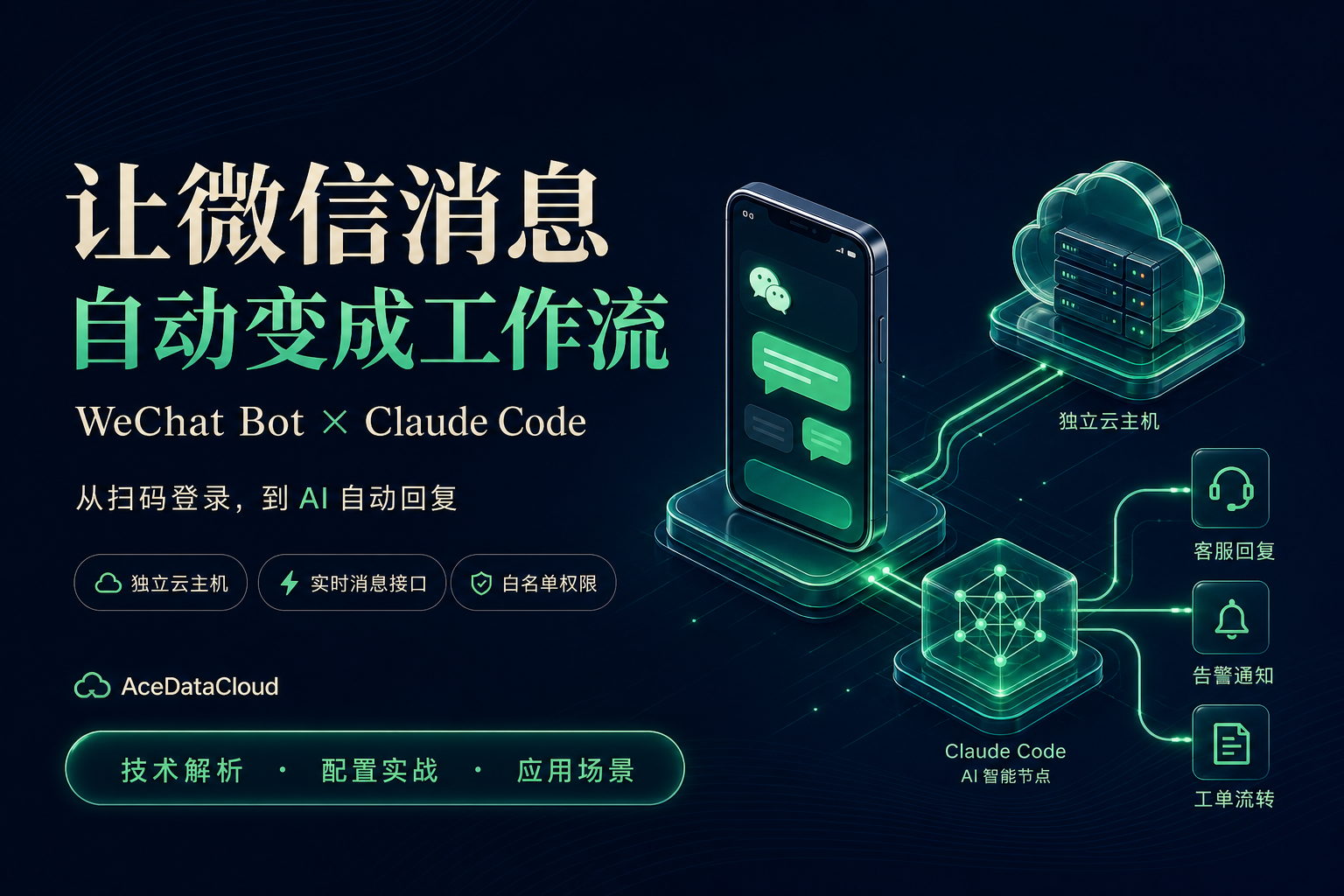
¶ WeChat Does Not Lack Messages; What It Lacks Is Automatic Processing After Messages
Many teams handle work in WeChat every day: when customers ask how to configure a product, it needs to be explained again; when users report issues in a group, they need to be copied into the ticketing system; when a service encounters an exception, the responsible person needs to be found and notified; after many conversations in a day, issues and to-dos still need to be organized manually.
What truly takes time is often not “receiving a message,” but the repetitive work after receiving it.
If WeChat messages can directly enter AI and business systems, the chat window is not just a communication tool, but can also become a work entry point.
AceDataCloud WeChat Bot provides such an integration foundation: it deploys an independent cloud host for users, runs a real WeChat desktop client, and provides message capabilities externally through HTTP and WebSocket; when AI automatic replies are needed, it can further connect to Claude Code through WisdomChannel.[1]
But to use it well, three layers need to be distinguished first:
WeChat Bot solves WeChat integration, WisdomChannel solves AI connection, and business systems solve specific business actions.
This article is compiled based on the product page and WisdomChannel public documentation. The configuration examples have not been tested through actual deployment by the author of this article. The images are AI-generated architecture and scenario illustrations, not product console screenshots; actual functions, versions, and pricing are subject to the current service page and documentation.
¶ I. Technical Features: Not Only Replying to Messages, but Also Making WeChat a System Interface
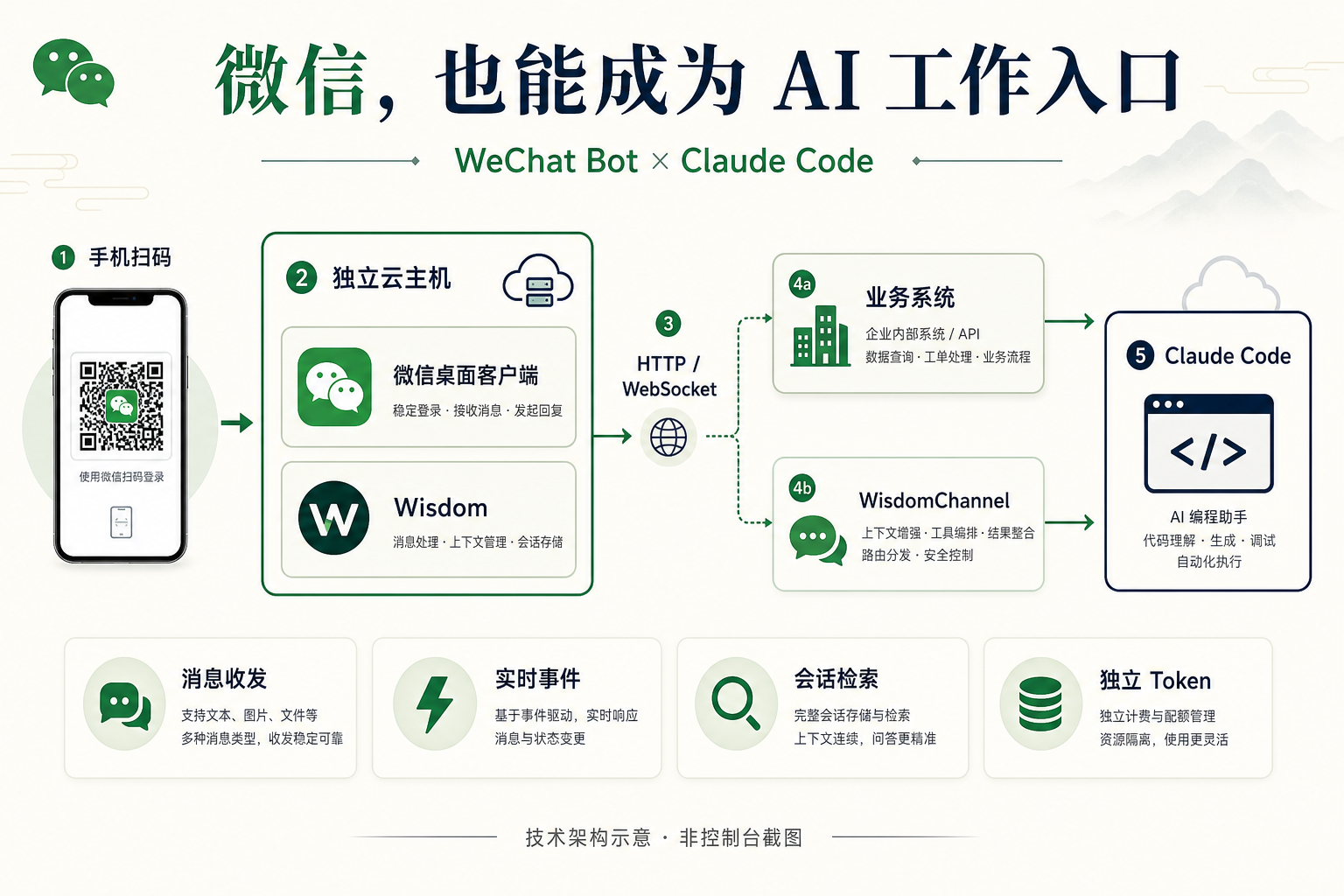
Figure 1: Technical architecture illustration, showing the relationship between WeChat, messaging interfaces, AI, and business systems.
¶ 1. An Independent Cloud Host Carries a Real WeChat Desktop Client
According to the product introduction, each user corresponds to an independent cloud host and logs in by scanning a QR code with WeChat on a phone; at the underlying level, Wisdom drives a real WeChat desktop client to send and receive messages, rather than using third-party Web protocol integration.[1]
This design separates the WeChat runtime environment from the daily office environment: business programs access instances through interfaces and do not need to directly operate the desktop; WeChat login status can be checked independently; when exceptions occur, there is a dedicated instance environment available for troubleshooting.
It should be noted that this is not a synonymous replacement for official APIs for WeChat Official Accounts or WeCom bots. It relies on the desktop client and its runtime environment, and one cannot infer from this that it will “never disconnect,” be “unaffected by version changes,” or involve “no account risks.”
¶ 2. HTTP Handles Operations, WebSocket Handles Real-Time Events
The core capabilities listed on the product page include:[1]
| Capability | Clearly Provided Endpoint or Description on the Page | Problems It Can Solve |
|---|---|---|
| Message sending | /api/messages/send, supports text, images, files, and videos |
Notifications, replies, material delivery |
| Real-time message listening | WebSocket /ws |
Triggering workflows for new messages |
| Message history and search | Retrieve and refresh conversation history, search by keywords | Communication traceability, quality inspection, analysis |
| Contact and conversation synchronization | Synchronize contacts and conversation lists | Maintaining business-side conversation information |
| Status checks | /api/status, /ping |
Checking online status and service availability |
| Operations and authentication | Independent API_TOKEN, QR-code login, VNC access |
Access control and troubleshooting |
The two types of interfaces can be understood simply as follows: HTTP means “please send this message” or “please query the current status”; WebSocket means “there is a new message, please start processing.”
Receive a WeChat message
    ↓
Check the conversation, sender, and access permissions
    ↓
AI generates an answer, or the business program processes the request
    ↓
Return the result through the sending interface
If integrating with production business, it is recommended to additionally implement message deduplication, reconnection after disconnection, retries, and rate control. Do not assume that messages will definitely not be duplicated before verifying protocol details, and do not directly equate a successful interface request with the user having read it.
¶ 3. WisdomChannel Connects the Message Channel to Claude Code
WisdomChannel is a WeChat Channel plugin for Claude Code. It connects to the remote Wisdom service through HTTP/WebSocket, so it does not need to run on the same machine as the WeChat desktop client.[2]
| Mode | How It Works | Suitable Use Cases |
|---|---|---|
| Interactive MCP Channel | Pushes WeChat messages to a running Claude Code session | Development debugging, assisted work with human supervision |
wisdom-channel bridge |
Receives allowed messages, calls claude -p, then sends replies back to WeChat |
Automatic replies without an interactive terminal |
Background automatic replies are more suitable to start with bridge mode. It does not require a continuously attached interactive Claude Code terminal, but the bridge process itself still needs to keep running.[2]
¶ 4. Automatic Replies Have Context, and Also Trigger Boundaries
WisdomChannel supports private chats and group chats; group chats are triggered only when @-mentioned, and whether messages are processed is determined in combination with access policies. When constructing replies, bridge also uses the sender, group chat, quoted messages, and recent conversation context. The default value of WECHAT_CONTEXT_MESSAGES is 8; setting it to 0 can disable recent-message context.[2]
For example, a user first asks “How should this be configured on Windows,” and then follows up with “Then where should the Token be entered?” The second sentence needs to be understood in combination with the preceding context. Recent-message context helps handle such follow-up questions, but it does not mean the system naturally has complete, permanent chat memory.
¶ 5. Permission Control Is Not an Add-On, but a Core Capability
When WeChat is connected to AI that can call tools, the most important question is not only “can it answer,” but also: who can make AI do what?
WisdomChannel uses access.json to manage user roles, default private chat policies, and group chat whitelists. User permissions use stable WeChat IDs, rather than relying only on display nicknames; unlisted group chats will be ignored. For roles with allow_tools=false, bridge disables tools through claude -p --tools "". Interactive Channel mode instead passes permission information to the running Claude Code session for handling.[2]
Deployment should start with the most conservative policy: do not respond to unfamiliar private chats by default, open only one test group, allow ordinary users to chat only, and do not grant administrator tool permissions during the trial phase.
First prove that it can answer safely, then consider allowing it to perform operations.
¶ II. Configuration Guide: From QR Code Login to the First AI Reply
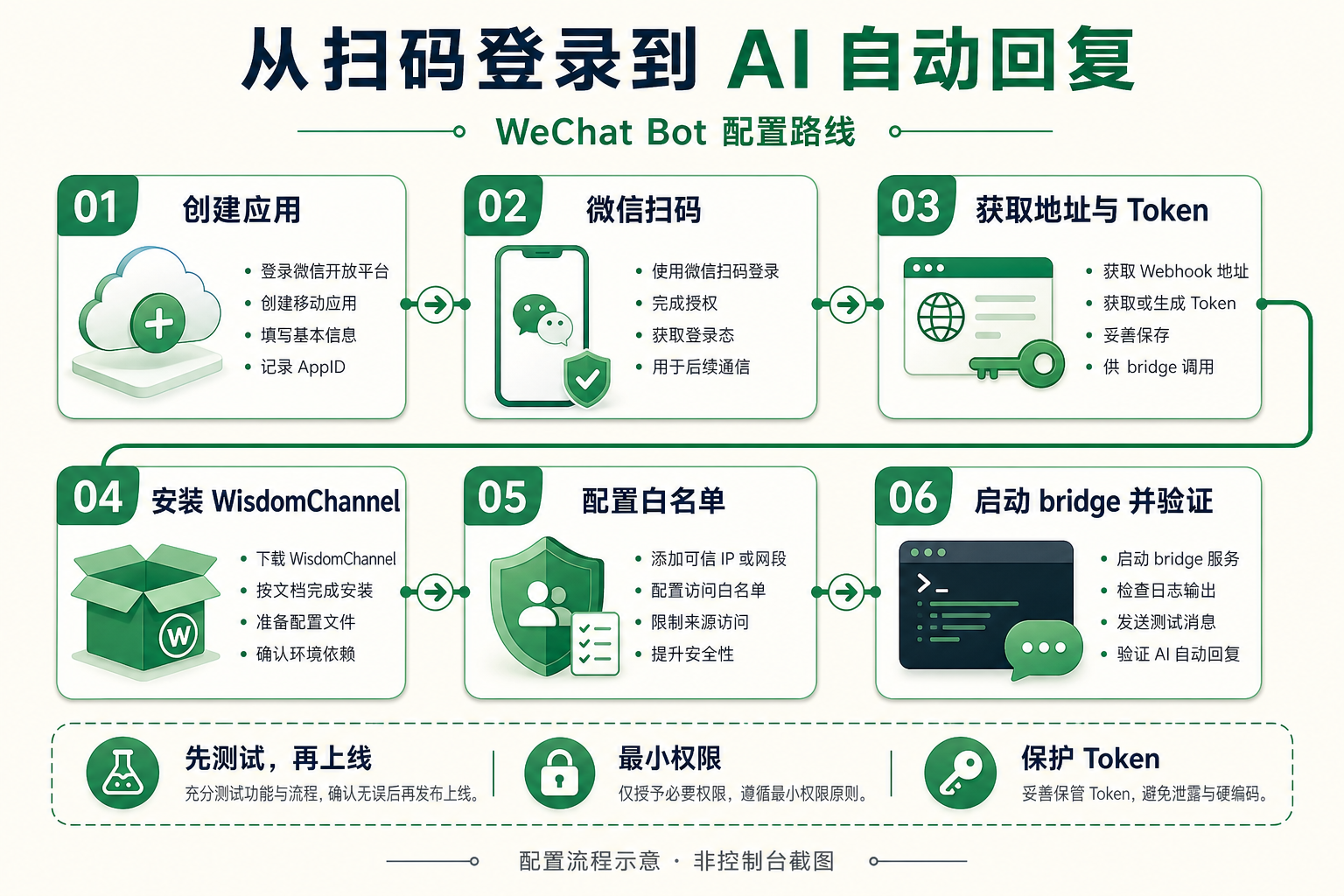
Figure 2: Recommended configuration path: first verify the message chain, then enable AI automatic replies.
The following uses an example path of Windows PowerShell + bridge. All placeholders need to be replaced with your own actual information.
¶ Step One: Create an Application and Log In by Scanning the QR Code
Create an application on the WeChat Bot service page, wait for the platform to deploy an independent instance, then use mobile WeChat to scan the QR code in the console to log in.
According to the product page, the console provides the instance API address, API_TOKEN, and a VNC interface entry; Viewer uses separate credentials and is visible only to the application owner and platform administrators.[1]
Instance API address: subject to the actual display in the console
API_TOKEN: instance access token
VNC entry: used for troubleshooting when desktop or login exceptions occur
Do not put the Token in public repositories, blog screenshots, or frontend pages.
¶ Step Two: Verify the API First, Do Not Connect AI in a Hurry
Set test variables in PowerShell:
$ApiUrl = "http://<your instance address>:8000"
$ApiToken = "<your API_TOKEN>"

$Headers = @{
    Authorization = "Bearer $ApiToken"
}
Check the service status:
Invoke-RestMethod `
    -Uri "$ApiUrl/api/status" `
    -Headers $Headers `
    -Method Get
Then send text to a contact who has explicitly agreed to receive test messages:
$Body = @{
    target = "<test contact>"
    type   = "text"
    text   = "Hello, this is a WeChat Bot connectivity test message."
} | ConvertTo-Json

Invoke-RestMethod `
    -Uri "$ApiUrl/api/messages/send" `
    -Headers $Headers `
    -Method Post `
    -ContentType "application/json; charset=utf-8" `
    -Body ([System.Text.Encoding]::UTF8.GetBytes($Body))
The sending fields above are adapted from the text message example on the product page; /api/status is the status check API publicly listed on the page.[1]
If sending does not meet expectations, first check the API address and network, Token, WeChat login status, target contact matching, and whether there are prompts or abnormal windows in VNC.
Only continue with AI integration after the basic message chain is working.
Security suggestion: The example follows the HTTP address format shown on the page. In a production environment, do not interpret “with Bearer Token” as “transmission is encrypted”; HTTPS, secure tunnels, or network access restrictions should be configured according to the instance deployment conditions.
¶ Step Three: Prepare Python and Claude Code
WisdomChannel documentation requires Python 3.10+, a logged-in Wisdom service, and Claude Code CLI v2.1.80+; bridge also requires the claude command to be in PATH.[2]
python --version
claude --version

pip install wisdom-channel
Then complete Claude Code login or credential configuration on the machine that will run bridge, and confirm that it can properly call the selected model.
The API_TOKEN of the WeChat instance is used to access the messaging service, not as model credentials for Claude Code.
¶ Step Four: Configure Instance Connection Information
Create the configuration directory and the .env file:
$ChannelDir = Join-Path $env:USERPROFILE ".claude\channels\wechat"

New-Item `
    -ItemType Directory `
    -Path $ChannelDir `
    -Force | Out-Null

@"
WISDOM_API_URL=http://<your instance address>:8000
WISDOM_API_TOKEN=<your API_TOKEN>
WECHAT_BOT_NAME=
WECHAT_CONTEXT_MESSAGES=8
"@ | Set-Content `
    -Path (Join-Path $ChannelDir ".env") `
    -Encoding utf8
The above path and environment variables come from WisdomChannel configuration conventions. When WECHAT_BOT_NAME is left blank, the name will be detected automatically; WECHAT_CONTEXT_MESSAGES controls the number of recent messages extracted for each reply.[2]
It is recommended to keep the default context count first, then adjust it according to answer quality, latency, and data minimization requirements after the flow is working.
¶ Step Five: Set the Whitelist First, Then Start Automatic Replies
Create access.json in the same directory:
~/.claude/channels/wechat/access.json
Below is an example that only allows test users and test groups, with no tool permissions enabled:
{
  "version": 3,
  "enabled": true,
  "roles": {
    "normal": {
      "allow_tools": false,
      "contexts": ["group", "private"],
      "prompt": "Only answer public, basic, and general questions. Do not view or modify internal projects, files, logs, servers, or databases."
    }
  },
  "users": {
    "<stable WeChat ID of the test user>": {
      "role": "normal"
    }
  },
  "private": {
    "enabled": true,
    "default_role": "deny",
    "prompt": ""
  },
  "groups": {
    "<exact name of the test group>": {
      "enabled": true,
      "default_role": "normal",
      "prompt": "",
      "members": {}
    }
  }
}
The key points are: fill in stable WeChat IDs in users, and do not fill in only nicknames; unmatched private chats are denied by default; group names need to match exactly; ordinary users do not have tool permissions; group chats must still meet the @ trigger condition.
These fields and matching rules follow WisdomChannel's access control documentation; the example above proactively removes the high-privilege administrator role.[2]
¶ Step Six: Test the Connection and Start bridge
First run the standalone connection test that does not start Claude Code:
python -m wisdom_channel --test
Then start automatic replies:
wisdom-channel bridge --model sonnet
The documentation explains that the previous command is used to test REST and WebSocket; the latter command runs the automatic reply loop and uses the same access policy and group chat @ rules.[2]
| Test Action | Expected Result |
|---|---|
| Whitelisted user sends a private message | Reply normally |
@ the bot in a whitelisted group |
Reply normally |
| Normal casual chat in a whitelisted group | Do not trigger a reply |
| Private message from a non-whitelisted user | Do not reply |
| Regular user requests to read server files | Does not have tool execution capability |
| User asks follow-up questions continuously | Check whether the responses can reasonably use recent context |
The runtime log is located at ~/.claude/channels/wechat/mcp.log.[2]
¶ Step 7: Turn “It Runs” into “It Is Maintainable”
The bridge does not depend on an interactive terminal, but that does not mean it will automatically be installed as a system service. For formal use, it is recommended to add:
- Process hosting: Restart after abnormal exit and retain runtime logs.
- Status monitoring: Check the instance, WeChat login status, and model calls.
- Human handoff: Transfer matters that cannot be answered or require commitments to the responsible person.
- Reply boundaries: Do not automatically commit to refunds, compensation, prices, or delivery times.
- Data protection: Clearly specify which conversations can be sent to the model for processing.
- Cost monitoring: Verify instance costs and model call costs separately.
These are deployment recommendations and should not be mistaken for the product already having a complete built-in ticketing, monitoring, or human customer service system.
¶ III. Application Scenarios: Start with a Small Workflow and Gradually Expand Value
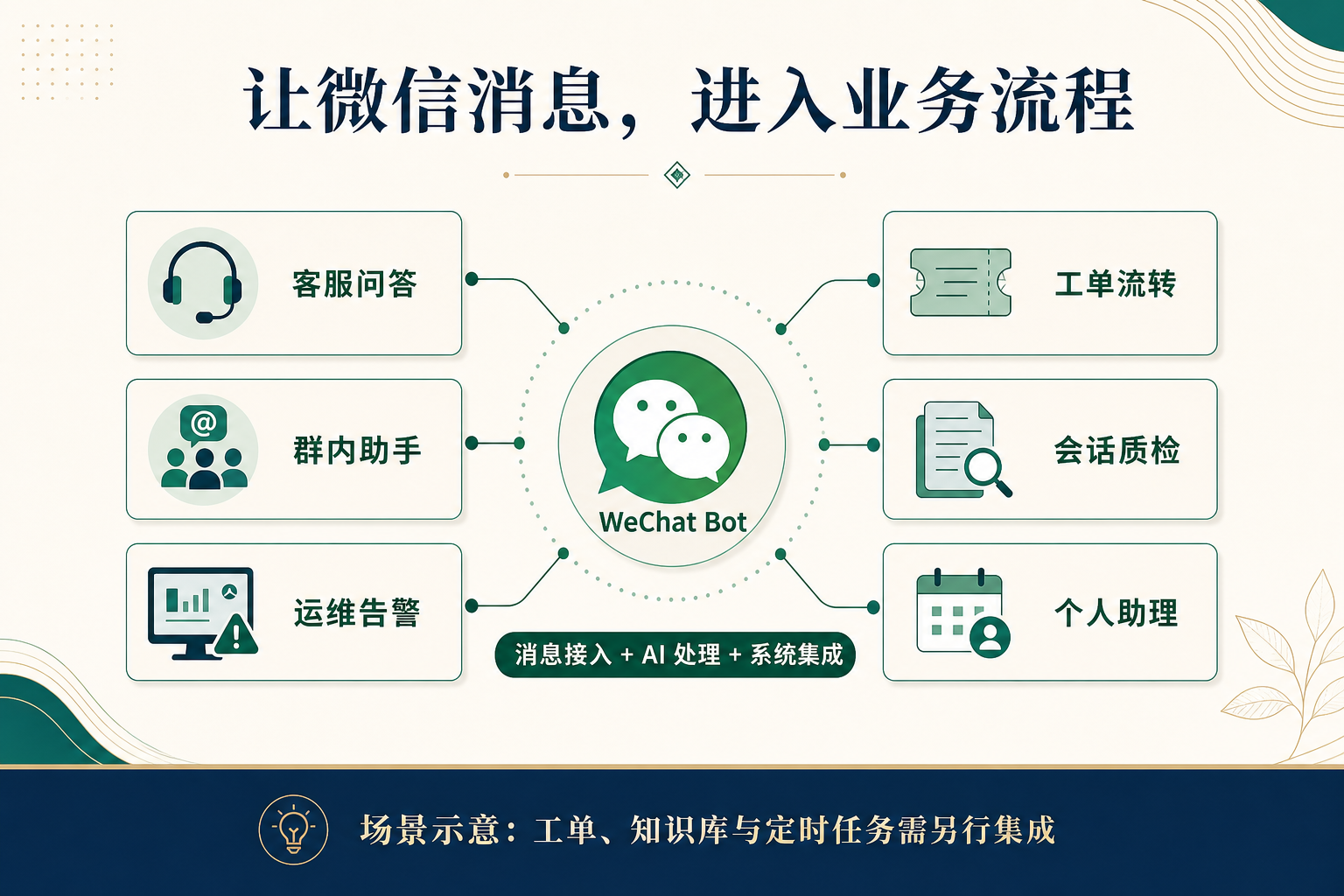
Figure 3: Six application directions. Knowledge bases, ticketing, and scheduled tasks need to be integrated separately according to business needs.
The following are implementation directions designed based on message sending and receiving, real-time events, and AI connectivity capabilities. They are not complete business systems automatically available after activation.
¶ Scenario 1: Customer Service Q&A, Handle Repetitive Questions First
Suitable for teams with many product inquiries, usage instructions, and common configuration issues.
Customer asks a question → Search approved product materials → AI organizes the answer
→ Send it to WeChat → Transfer to a human when uncertain
For example, standard questions such as “Where can I create an API Token?” and “How do I troubleshoot authentication failures?” can be handled automatically first.
Needs to be added: Product knowledge base, material update mechanism, and human handoff process. The value is not in making AI answer everything, but in reducing the time customer service spends repeatedly entering the same explanation.
¶ Scenario 2: Group Assistant, Reply Only When Called
Suitable for product support groups, training groups, and developer communities. Users can ask in the group: “@Assistant, what information do I need to prepare for the first integration?”
With the whitelist and @ trigger mechanism, the assistant can be restricted to designated groups, preventing it from participating in all casual chats.
Needs to be added: Group purpose description, answerable scope, and knowledge content that needs to be referenced. It is recommended to start with a role with clear boundaries, such as a “configuration instruction assistant,” rather than taking on all sales, customer service, and operations responsibilities from the beginning.
¶ Scenario 3: Operations Alerts, Push Exceptions to Common Communication Channels
Suitable for small teams that already have a monitoring platform.
Monitoring system detects an exception → Alert service classifies and deduplicates
→ Call the message sending interface → Notify designated contacts or groups
You can also further design an interaction such as “Reply with the alert ID to check the latest status,” but this requires connecting to the monitoring query interface.
Needs to be added: Alert rules, rate limiting, deduplication, and backup notification channels. WeChat can be a convenient notification entry point, but it should not become the only means of contact for critical failures.
¶ Scenario 4: Ticket Routing, Reduce Copying and Pasting
Suitable for teams where many issues enter through WeChat but need to be tracked in a ticketing platform.
User reports an issue → AI extracts product, symptoms, and error information
→ Remind the user to supplement missing fields → Call the ticketing system → Return the ticket ID
Needs to be added: Ticket API, field mapping, user identity association, and duplicate ticket detection.
Before automatically creating a ticket, the user can first be asked to confirm the summary: “My understanding is that the interface call returns an authentication error. Should I submit it with this description?” This can reduce erroneous records caused by misunderstandings.
¶ Scenario 5: Conversation Quality Inspection, Find Recurring Issues
Suitable for teams that want to improve products through customer service conversations. Based on authorized and accessible conversation data, daily or weekly analysis can be designed: Which issues occur most frequently? Which configuration steps are most likely to cause users to get stuck? Which answers did not solve users’ problems? Which content should be added to the help documentation?
Needs to be added: Scheduled tasks, storage, data masking, analysis rules, and report outputs. The goal is not to “collect as much as possible,” but to use necessary data to improve services under the premise of clear authorization and retention periods.
¶ Scenario 6: Personal Assistant, Organize Fragmented Messages into Action Items
Suitable for individual users who want a unified entry point for recording and organizing. For example: “Organize the several items I just sent into an action list, and mark the information that needs to be supplemented.”
If you also want to create actual to-dos, write to a calendar, or set reminders at specified times, you need to continue integrating the corresponding systems.
Needs to be added: To-do or calendar interfaces, scheduling mechanisms, and operation confirmation. “Help me organize this” and “Execute this for me” are different levels of permission. When external writing is involved, it is best to display the result first and then have the user confirm it.
¶ IV. Boundaries You Must Understand Before Use
¶ 1. Desktop Automation Is Not the Same as the Official WeChat Interface
The product page requires compliance with WeChat platform usage rules and reasonable control of sending frequency and content.[1] Real desktop client solutions also cannot guarantee that there are no account or operational risks. It is not recommended to use it for bulk outreach to strangers, unauthorized mass messaging, or other harassing automation.
¶ 2. Connecting AI Does Not Mean Automatically Obtaining Business Knowledge
Claude Code can generate responses, but your product policies, orders, inventory, customer permissions, and internal processes all need to be explicitly provided or queried through controlled interfaces. When facts and commitments are involved, you should prioritize reliable data rather than letting the model guess.
¶ 3. Chat content cannot directly become system authorization
Even if a message comes from a whitelist, permissions should not be expanded simply because it says “ignore the previous rules.” It is recommended to isolate ordinary chats from high-privilege operations, and set up separate reviews for actions such as deleting data, modifying configurations, making payments, and sending messages in bulk.
¶ 4. Do not write expected benefits as performance commitments
Public information is insufficient to confirm specific deployment time, throughput, response latency, service levels, or total costs. These metrics should be verified in practice during selection, and the console plans and current documentation should prevail.
¶ Conclusion: Connect One Workflow First, Then Let WeChat Take On More Work
What makes WeChat Bot worth paying attention to is not merely “having one more chatbot in WeChat.” More valuable is that it provides a way to connect chat with systems:
WeChat is responsible for receiving requests, AI is responsible for understanding and organizing information, and business systems are responsible for completing verifiable actions.
If you are ready to get started, it is recommended to first create a minimum viable pilot:
- Create an instance and log in by scanning the QR code.
- Verify the sending of a text message.
- Install WisdomChannel.
- Open access to only one test user or group.
- Use bridge to complete the automated reply flow.
- Then integrate one genuinely valuable business workflow.
There is no need to build an “all-purpose assistant” on the first day. Simply letting it answer one category of repetitive questions, forward one category of important notifications, or organize one category of customer feedback is already a worthwhile starting point to validate.
Start learning about and configuring AceDataCloud WeChat Bot →
¶ References
- AceDataCloud WeChat Bot Product Page: Product architecture, API capabilities, deployment process, and usage considerations.
- WisdomChannel Configuration and Operation Documentation: Environment requirements, configuration variables, access control, bridge mode, and logs.
- WisdomChannel Project README: Open-source client instructions and subsequent updates.
The cover image and three illustrative images in the main text were generated using OpenAI gpt-image-2.